Apple Intelligence Unveiled at WWDC 2024: Everything You Need to Know

Table of Contents
Table of Contents #
- What Is Apple Intelligence and Why Does It Matter Today?
- How Does Apple Intelligence's Three-Tier Architecture Work?
- What Are the New Apple Intelligence Features in iOS 18?
- How Has Siri Been Rebuilt with AI Capabilities?
- What Is Private Cloud Compute and Why Is It Different?
- How Does Apple Intelligence Compare to ChatGPT?
- What Hardware Is Required for Apple Intelligence?
- What Are the Developer Implications of Apple Intelligence?
- When Will Apple Intelligence Be Available?
- FAQ: Apple Intelligence at WWDC 2024
- The Bottom Line: What Apple Intelligence Means for Builders
What Is Apple Intelligence and Why Does It Matter Today? #
Apple Intelligence is Apple's umbrella brand for generative AI capabilities that just launched across iOS 18, iPadOS 18, and macOS Sequoia—marking Apple's official entry into the AI race with a privacy-first, deeply integrated approach that processes most requests on-device rather than in the cloud.
Today at WWDC 2024, Apple CEO Tim Cook unveiled what the company calls "personal intelligence for your iPhone, iPad, and Mac." Unlike the cloud-dependent AI solutions from OpenAI, Google, or Microsoft, Apple Intelligence processes the vast majority of queries locally on your device using optimized on-device foundation models. Only when a request exceeds local capabilities does the system escalate to Apple's new Private Cloud Compute infrastructure—or, for specialized tasks, to ChatGPT.
This represents a fundamental architectural bet: Apple believes the future of AI is personal, private, and on-device. The approach differs dramatically from competitors who route virtually every interaction through massive cloud data centers. Apple Intelligence runs on Apple silicon with dedicated Neural Engine optimization, using fine-tuned models and adapter techniques that balance capability with efficiency.
| Capability | Apple Intelligence Approach | Competitor Approach |
|---|---|---|
| Primary Processing | On-device with Neural Engine | Cloud-based inference |
| Data Storage | Minimal; processed and discarded locally | Often stored for model improvement |
| Cloud Fallback | Private Cloud Compute with cryptographic verification | Standard cloud servers |
| External AI | ChatGPT as optional, permission-based integration | Typically the primary interface |
| Privacy Model | Data never stored or shared with Apple | Varies by provider |
Why this matters today: The AI landscape has been dominated by cloud-first solutions that trade privacy for capability. Apple's announcement signals that on-device AI has reached a tipping point— Apple's own foundation models are now capable enough to handle most everyday tasks without leaving the device. This shift could reshape how we think about AI privacy, performance, and accessibility. For the estimated 1.5 billion active iPhone users worldwide, this is the moment AI becomes ambient and invisible rather than an explicit app you open. For builders and businesses, it represents a new platform layer with entirely different constraints and opportunities than cloud AI APIs.
How Does Apple Intelligence's Three-Tier Architecture Work? #
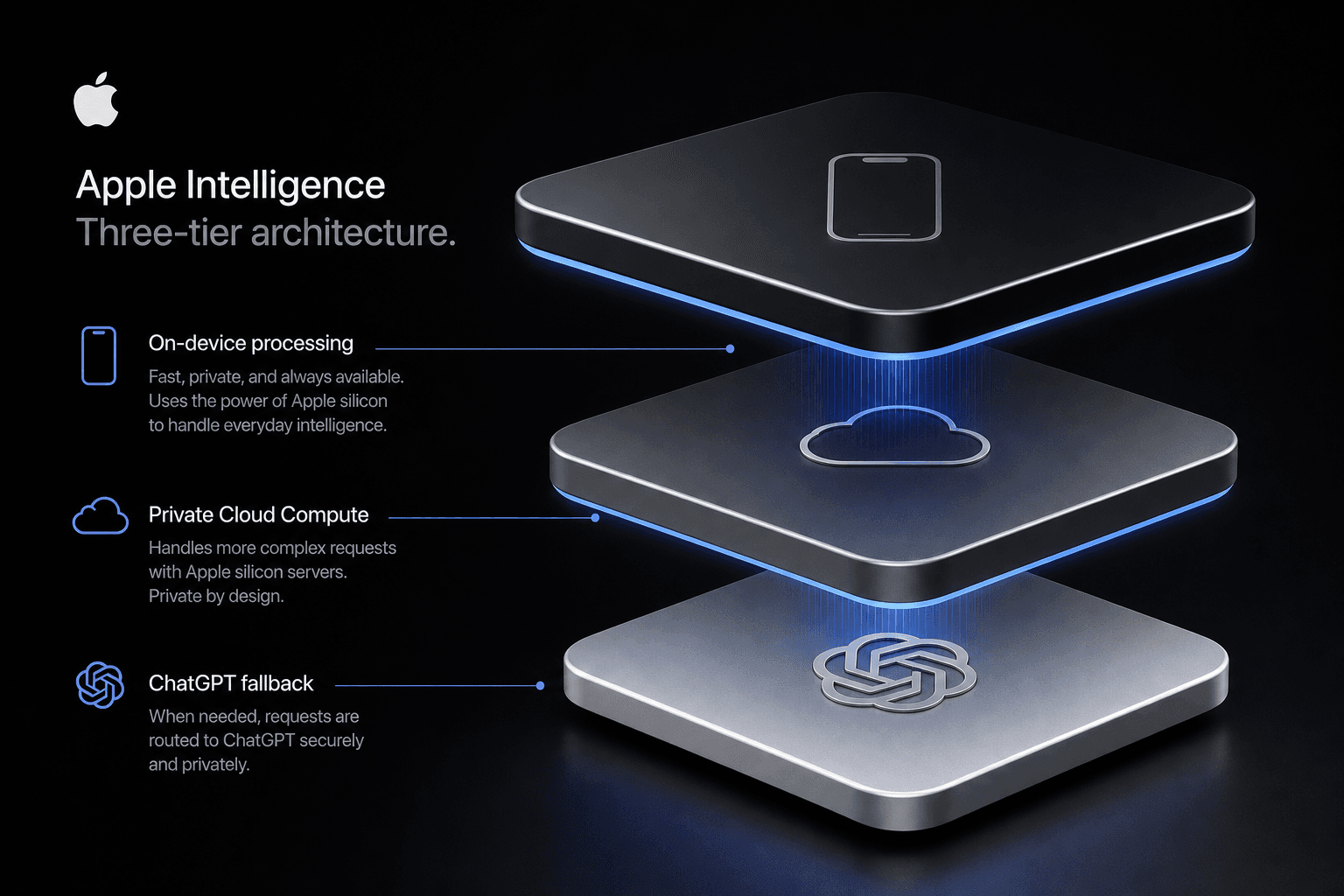
Apple Intelligence operates on a three-tier architecture: on-device foundation models handle everyday requests instantly and privately; Private Cloud Compute processes more complex tasks on Apple silicon servers with cryptographic privacy guarantees; and ChatGPT serves as an optional external fallback for specialized knowledge queries requiring GPT-4o's capabilities.
This architectural design represents Apple's calculated response to the AI capability-privacy tradeoff that has defined the industry. Rather than forcing users to choose between powerful cloud AI and limited on-device processing, Apple Intelligence attempts to deliver both through intelligent routing.
Tier 1: On-Device Foundation Models #
The foundation of Apple Intelligence is a family of locally-running models optimized for Apple silicon. These models handle:
- Text rewriting, proofreading, and summarization (Writing Tools)
- Quick image analysis and generation (Genmoji, basic Image Playground)
- Siri command processing and context understanding
- Notification summarization and Smart Reply suggestions
The on-device models are fine-tuned specifically for helpfulness, harmlessness, and alignment with how people actually use their devices. Apple trained these models using adapter techniques—smaller, task-specific layers that sit atop a base model—allowing efficient specialization without massive resource requirements.
Tier 2: Private Cloud Compute #
When a request exceeds on-device capabilities, Apple Intelligence escalates to Private Cloud Compute. This is Apple's answer to the question: "What happens when I need more power but don't want to sacrifice privacy?"
Private Cloud Compute runs on servers built entirely with Apple silicon, using the same secure boot and hardware-level security features found in iPhones and Macs. The key innovation: cryptographic verification that your data is processed only on these specifically configured servers and never stored. Apple's server code is designed to be transparently inspectable, and the system cryptographically ensures that your device only communicates with authorized Private Cloud Compute nodes.
┌─────────────────────────────────────────────────────────────┐
│                    Apple Intelligence                        │
│                     Request Routing Layer                    │
├─────────────────────────────────────────────────────────────┤
│                                                              │
│   ┌─────────────────┐    ┌─────────────────┐    ┌──────────┐│
│   │   ON-DEVICE     │───→│  PRIVATE CLOUD  │───→│ ChatGPT  ││
│   │  FOUNDATION     │    │    COMPUTE      │    │ (GPT-4o) ││
│   │    MODELS       │    │                 │    │          ││
│   │                 │    │  Apple Silicon  │    │ External ││
│   │ • Writing Tools │    │    Servers      │    │ Fallback ││
│   │ • Genmoji       │    │                 │    │          ││
│   │ • Siri (basic)  │    │ • Complex       │    │ • Deep   ││
│   │ • Smart Reply   │    │   reasoning     │    │   domain ││
│   │ • Notifications │    │ • Large context │    │   expertise│
│   │                 │    │ • Heavy image   │    │ • Creative│
│   │  [Neural Engine]│    │   processing    │    │   writing │
│   └─────────────────┘    └─────────────────┘    └──────────┘│
│           ↑                      ↑                     ↑     │
│     ~99% of requests      ~1% of requests      User-initiated│
│      (instant,            (encrypted,         (permission- │
│       private)            verifiable)         based)       │
└─────────────────────────────────────────────────────────────┘
Tier 3: ChatGPT Integration #
For tasks requiring deep domain expertise, creative writing, or broad knowledge queries, Apple Intelligence offers an optional handoff to ChatGPT powered by GPT-4o. This integration is distinct from the first two tiers:
- User-controlled: You must explicitly grant permission before any data goes to ChatGPT
- Account-optional: Free access without a ChatGPT account; subscribers can connect for premium features
- Privacy-protected: OpenAI doesn't store requests from Apple Intelligence users, and IP addresses are obscured
- Context-rich: Can include photos, documents, and other context from your device
The Architectural Philosophy #
Apple's three-tier approach reflects a core belief: AI should be invisible infrastructure, not a destination. The system routes requests automatically—users don't manually choose which tier handles their query. The device attempts local processing first, escalates to Private Cloud Compute only when necessary, and offers ChatGPT for specialized cases.
| Request Type | Typical Tier | Latency | Privacy Level |
|---|---|---|---|
| Text rewrite | On-device | <100ms | Maximum |
| Notification summary | On-device | <100ms | Maximum |
| Genmoji creation | On-device | 1-2s | Maximum |
| Complex Siri query | Private Cloud | 2-4s | Cryptographically verified |
| Document analysis | Private Cloud | 2-5s | Cryptographically verified |
| Recipe/creative writing | ChatGPT (opt-in) | 3-6s | OpenAI privacy terms |
| Multi-turn deep research | ChatGPT (opt-in) | 5-10s | OpenAI privacy terms |
What Are the New Apple Intelligence Features in iOS 18? #
iOS 18 introduces five core Apple Intelligence features available systemwide: Genmoji for custom emoji generation from text descriptions, Image Playground for creating stylized images across apps, Writing Tools for AI-powered text refinement in any text field, Smart Reply for intelligent message responses, and notification summaries that distill long threads into actionable briefs.
These capabilities aren't siloed in a dedicated AI app—they're woven into the fabric of iOS itself, available wherever you encounter text, images, or communication. Apple designed these features to feel less like "using AI" and more like natural extensions of familiar interactions.
Genmoji: Custom Emoji Creation #
Genmoji lets you create entirely new emoji by simply describing what you want. Type "t-rex in a tutu on a surfboard" in Messages, and iOS 18 generates a custom emoji matching that description. These Genmoji work as:
- Inline images in Messages conversations
- Tapback reactions to existing messages
- Stickers you can peel and place anywhere
- Custom emoji based on people from your Photos library (with appropriate accessories)
The generation happens on-device, meaning your prompts stay private and results appear instantly. Genmoji joins the standard emoji keyboard, making discovery automatic rather than requiring users to hunt for a separate feature.
Image Playground: Cross-App Image Generation #
Image Playground is Apple's dedicated image generation interface, available in three entry points: within Messages and Freeform, as a standalone app, and through a new API that third-party developers can integrate.
Users create images by selecting:
- Themes: Adventure, Origami, Sketch, and more
- Costumes and accessories: Add hats, glasses, backgrounds
- Concepts: Type any object, animal, or scene to include
- Starting photos: Use people from your Photos library as base references
Output styles include Animation (illustrated), Illustration (sketch-like), and Sketch (line art). The system generates multiple variations instantly, letting users swipe through options before committing.
Writing Tools: Systemwide Text Refinement #
Writing Tools represents the most ambitious Apple Intelligence integration—it's available in any standard text control across iOS 18. Select any text and you can:
| Tool | Function | Use Case |
|---|---|---|
| Rewrite | Recompose selected text in Friendly, Professional, or Concise tones | Adjusting email tone to match recipient |
| Proofread | Check grammar, word choice, and sentence structure | Polishing important documents before sending |
| Summarize | Distill long passages into key points | Converting lengthy articles to briefs |
| Key Points | Extract bulleted highlights from paragraphs | Meeting notes condensation |
| Table | Convert text into structured table format | Organizing list data visually |
| List | Transform prose into numbered or bulleted lists | Making instructions scannable |
Developers get this functionality automatically for standard text controls, but can also customize Writing Tools behavior for their specific apps.
Smart Reply and Notification Summaries #
Smart Reply in Mail and Messages suggests contextually relevant response options based on message content. Unlike previous canned replies, these are generated specifically for each conversation thread.
Notification Summaries address the modern plague of notification overload. Rather than showing a stack of 15 Messages notifications from a group chat, iOS 18 now shows a single intelligent summary: "Mom asked about dinner plans, Dad sent three funny memes, and Sarah confirmed she's running late." The system identifies senders, extracts key information, and presents it as actionable context.
Priority Notifications take this further—when time-sensitive information appears (flight updates, delivery notifications, urgent work mentions), iOS 18 surfaces these intelligently even in Focus modes.
Photos App Intelligence #
The Photos app receives several AI enhancements:
- Clean Up: Remove distracting objects or people from backgrounds with a tap
- Natural Language Search: Search photos using descriptions like "Maya skateboarding in a blue shirt" instead of just tags or dates
- Memory Movie Creation: Type a description like "Our summer vacation" and Photos automatically selects relevant clips and photos, arranges them with transitions, and suggests appropriate music from Apple Music
| Feature | Availability | Processing Location | Developer API |
|---|---|---|---|
| Genmoji | Systemwide emoji keyboard | On-device | No (end-user only) |
| Image Playground | Messages, Freeform, standalone app | On-device | Yes (new API) |
| Writing Tools | Any standard text control | On-device | Yes (customizable) |
| Smart Reply | Mail, Messages | On-device | Limited |
| Notification Summaries | Systemwide | On-device | No |
| Photos Clean Up | Photos app | On-device | No |
| Photos Natural Language | Photos app | On-device + Private Cloud | No |
How Has Siri Been Rebuilt with AI Capabilities? #
Siri has been fundamentally rebuilt around Apple Intelligence, gaining conversational context awareness that persists across multiple requests, on-screen awareness to understand what's currently displayed, improved natural language processing that handles stumbled speech, and the ability to execute hundreds of new in-app actions through the App Intents framework—all while sporting a redesigned glowing border interface.
This is the Siri upgrade users have waited thirteen years for. Where the previous Siri architecture relied heavily on predefined command patterns and struggled with context carryover, the Apple Intelligence-powered Siri operates more like a true conversational assistant that remembers what you just asked and understands what you're looking at.
Conversational Context Awareness #
The most significant Siri improvement is context retention across multiple turns. Previously, asking "What's the weather in San Francisco?" followed by "What about tomorrow?" would confuse Siri—the second query lacked explicit location context. The new Siri maintains conversational memory:
Example multi-turn conversation:
- User: "When is my mom's birthday?"
- Siri: "Your mom's birthday is March 15th."
- User: "Text her happy birthday"
- Siri: (Creates message to user's mom, knowing who "her" refers to)
- User: "Add it to my calendar"
- Siri: (Creates calendar event on March 15th labeled "Mom's birthday")
This context awareness extends beyond simple pronoun resolution. Siri now maintains state across complex workflows—finding information, acting on it, then following up with related requests without requiring users to restate subjects, locations, or people.
On-Screen Awareness #
Siri's new on-screen awareness capability means it can see and understand what's currently displayed on your device. This enables powerful new workflows:
- A friend texts you their new address → Ask Siri "Add this to their contact card" without manually copying and pasting
- Viewing a photo of your driver's license → Ask Siri to extract and fill out a form using that information
- Looking at a webpage with a recipe → Ask Siri to add ingredients to your shopping list
- Reviewing a long email → Ask Siri to summarize the key action items
On-screen awareness works across apps, letting Siri bridge information between contexts that previously required manual user intervention.
Natural Language and Speech Improvements #
Apple Intelligence brings significantly improved speech recognition to Siri. The system now:
- Handles natural language queries without requiring rigid command structures
- Processes stumbled speech, mid-sentence corrections, and conversational filler words
- Understands more varied phrasings for the same intent
- Supports text input via double-tapping the bottom of the screen for situations where speaking isn't appropriate
| Capability | Old Siri (iOS 17) | New Siri (iOS 18) |
|---|---|---|
| Context Retention | None—each query independent | Multi-turn conversation memory |
| Screen Understanding | Limited to basic app identification | Full on-screen content awareness |
| Speech Recognition | Rigid command patterns | Natural language with error tolerance |
| In-App Actions | ~100 predefined shortcuts | 100+ App Intents extensible actions |
| Text Input | Not available | Double-tap bottom edge to type |
| ChatGPT Access | None | Direct integration with permission |
| Device Knowledge | None | Answers "how do I..." questions |
| Visual Design | Orb at screen bottom | Glowing multi-colored border |
| Multi-Step Requests | Rarely supported | Core architecture feature |
App Intents and In-App Actions #
The new App Intents framework allows Siri to perform actions within apps at a granular level. Apple demonstrated capabilities including:
- Editing photos (adjusting brightness, applying filters, cropping)
- Finding and retrieving specific photos based on content descriptions
- Managing files across multiple apps and locations
- Controlling device settings with natural language
- Executing multi-step workflows that touch several apps
Visual Redesign #
Siri's interface receives a complete overhaul. Rather than the familiar glowing orb at the bottom of the screen, iOS 18 Siri presents as a full-screen glowing border effect with subtle multi-colored animations that wrap around the display edges. The visual language suggests Siri now encompasses the entire device experience rather than living in a single interface element.
Device Knowledge #
Siri can now answer questions about how to use your iPhone, iPad, or Mac. Ask "How do I turn on Dark Mode?" or "Show me how to use Stage Manager" and Siri provides direct guidance rather than just web search results. This positions Siri as a help system, not merely a command executor.
ChatGPT Integration Within Siri #
When Siri encounters a request that would benefit from ChatGPT's broad knowledge—recipe suggestions, creative writing assistance, detailed explanations—it can offer to route the query to ChatGPT. This happens transparently with explicit user permission, and responses come back through the Siri interface with the source clearly attributed.
What Is Private Cloud Compute and Why Is It Different? #
Private Cloud Compute is Apple's new server-side AI infrastructure that processes complex Apple Intelligence requests on dedicated Apple silicon servers while providing cryptographic guarantees that user data is never stored, retained, or accessible to anyone—including Apple. It's the missing link that enables powerful cloud AI without the privacy compromises that have defined the industry.
When an Apple Intelligence request exceeds on-device capabilities, the system doesn't route to standard cloud AI providers like OpenAI, Anthropic, or Google. Instead, it escalates to Private Cloud Compute—a purpose-built infrastructure that reimagines what cloud AI privacy can mean.
The Privacy Problem with Cloud AI #
Traditional cloud AI services present unavoidable privacy tradeoffs. When you send data to GPT-4, Claude, or Gemini, that information typically:
- Travels over the internet to third-party data centers
- Gets processed on servers you don't control
- May be logged, stored, or used for model training (depending on provider terms)
- Is accessible to the provider's employees and systems
- Often routed through jurisdictions with varying data protection laws
Even providers with strong privacy commitments can't offer the same guarantees as on-device processing because, fundamentally, they're handling your data on systems they control.
How Private Cloud Compute Works #
Apple's approach is architecturally different. Private Cloud Compute servers are:
1. Built on Apple Silicon
The servers run the same chips found in iPhones, iPads, and Macs (M-series processors), executing the same optimized foundation models that run on-device. This hardware uniformity enables consistent security properties across the entire Apple Intelligence stack.
2. Cryptographically Verified
Your device cryptographically verifies that it's communicating only with authorized Private Cloud Compute servers running specifically attested software. The system uses secure boot chains and hardware-rooted trust to ensure servers haven't been tampered with or reconfigured.
3. Stateless Processing
Private Cloud Compute processes requests without storing or retaining data. Information is used solely for the immediate computation and discarded immediately afterward. Apple explicitly states this data is not accessible to anyone—Apple employees included—and is never used for training Apple's models.
4. Transparent and Inspectable
Apple committed to making Private Cloud Compute server images publicly available for security researchers to inspect. This transparency allows independent verification that the privacy guarantees match Apple's claims.
The Technical Guarantee #
┌─────────────────────────────────────────────────────────────┐
│                  Private Cloud Compute                        │
│                   Privacy Architecture                        │
├─────────────────────────────────────────────────────────────┤
│                                                              │
│  User Device                    Apple Silicon Server         │
│  ┌──────────────┐               ┌──────────────────────┐     │
│  │ Secure Enclave│◄─────────────►│ Secure Boot Verified │     │
│  │ generates     │  encrypted     │ by Device Certificate│     │
│  │ attestation   │  connection    │                      │     │
│  └──────────────┘               └──────────────────────┘     │
│          │                              │                    │
│          │   request data               │                    │
│          │   ─────────────────────────►│                    │
│          │   (ephemeral, encrypted)     │                    │
│          │                              │                    │
│          │   processed result           │                    │
│          │   ◄──────────────────────────│                    │
│          │   (immediate deletion)       │                    │
│          │                              │                    │
│          ▼                              ▼                    │
│  ┌──────────────┐               ┌──────────────────────┐     │
│  │ Data never   │               │ Data never stored    │     │
│  │ leaves device│               │ or logged on server │     │
│  └──────────────┘               └──────────────────────┘     │
│                                                              │
│  VERIFICATION: Server code inspectable by security researchers│
│  GUARANTEE: Cryptographic attestation of server identity       │
└─────────────────────────────────────────────────────────────┘
Comparison to Standard Cloud AI #
| Aspect | Traditional Cloud AI | Private Cloud Compute |
|---|---|---|
| Hardware | Generic server GPUs/TPUs | Apple silicon (M-series) |
| Data Storage | Often retained; varies by provider | Never stored; ephemeral processing only |
| Training Use | May be used for model improvement | Explicitly prohibited |
| Access Scope | Provider employees may have access | Cryptographically inaccessible to all |
| Transparency | Closed-source infrastructure | Publicly inspectable server images |
| Jurisdiction | Multi-region data centers | Controlled infrastructure |
| Verification | Trust-based (privacy policies) | Cryptographic attestation |
Why This Matters for Builders #
Private Cloud Compute represents a new category in AI infrastructure: cloud-scale compute with device-grade privacy. For developers building sensitive applications—healthcare, legal, finance, personal journaling—this architecture offers something previously unavailable: capable AI without data exposure.
The system also means Apple Intelligence can handle more complex queries than on-device models alone could manage while maintaining privacy guarantees that satisfy enterprise security requirements. This opens AI integration possibilities for apps that previously couldn't risk cloud processing.
For the broader industry, Private Cloud Compute raises the privacy bar. It demonstrates that cloud AI doesn't inherently require data retention or provider access—that with sufficient engineering investment, users can have both capability and privacy. Whether competitors will match this standard remains to be seen, but Apple's announcement today establishes a new privacy benchmark that customers will increasingly expect.
How Does Apple Intelligence Compare to ChatGPT? #
Apple Intelligence and ChatGPT serve fundamentally different but complementary roles: Apple Intelligence handles personal, contextual, device-native AI tasks privately on your iPhone or through Private Cloud Compute, while ChatGPT provides broad world knowledge, creative expertise, and deep reasoning as an optional, permission-based external integration powered by GPT-4o. Apple Intelligence is the default; ChatGPT is the specialist fallback.
Today's announcement of Apple Intelligence at WWDC 2024 includes a significant partnership with OpenAI, but it's critical to understand the architectural relationship. ChatGPT is not the foundation of Apple Intelligence—it's one component in a broader system designed to handle requests appropriately based on type, privacy requirements, and capability needs.
The Division of Labor #
Apple Intelligence and ChatGPT divide AI workloads based on task characteristics:
| Task Category | Primary Handler | When ChatGPT Gets Invoked |
|---|---|---|
| Personal context (contacts, calendars, photos) | Apple Intelligence | Never—private data stays on-device |
| Text rewriting, proofreading | Apple Intelligence | For specialized creative writing only |
| Siri commands and queries | Apple Intelligence | For complex knowledge questions |
| Image generation (Genmoji, Playground) | Apple Intelligence | Not applicable—Apple handles natively |
| Notification summaries | Apple Intelligence | Never |
| Recipe suggestions | ChatGPT (with permission) | When user asks Siri for recipes |
| Creative writing assistance | ChatGPT (with permission) | When user requests creative help |
| Deep domain expertise | ChatGPT (with permission) | When query requires broad knowledge |
| Complex reasoning tasks | ChatGPT (with permission) | Multi-step analysis beyond local capabilities |
The Integration Mechanics #
When Apple Intelligence determines that ChatGPT's capabilities would serve a user request better than local or Private Cloud Compute processing, the system follows a strict permission protocol:
Step 1: User Permission Prompt
Before any data leaves the device for OpenAI processing, users see an explicit permission dialog explaining that ChatGPT will handle the request. This is opt-in per query, not blanket authorization.
Step 2: Context Sharing
If permitted, the system can share relevant context—photos, documents, selected text—along with the query. This enables rich, multimodal interactions impossible with text-only interfaces.
Step 3: Anonymous Processing
Requests sent to ChatGPT from Apple Intelligence have IP addresses obscured and are explicitly not stored by OpenAI or used for model training, according to the partnership terms announced today.
Step 4: Response Integration
ChatGPT responses appear through the native Siri or Writing Tools interface, attributed clearly as coming from ChatGPT, with the option to continue the conversation or return to Apple Intelligence.
Access Models #
ChatGPT integration within Apple Intelligence supports two access tiers:
Free Tier
- No OpenAI account required
- Access to GPT-4o's core capabilities
- Subject to standard rate limits
- Full privacy protections (no storage, IP obscured)
Subscriber Tier
- Connect existing ChatGPT Plus account
- Access to premium features and higher rate limits
- Persistent conversation history within ChatGPT app
- Same privacy protections as free tier
Why This Architecture Matters #
Apple's positioning of ChatGPT as an optional external component rather than the core AI engine represents a strategic bet on differentiation. While competitors (Samsung, Google) have deepened their reliance on cloud AI providers, Apple maintains that most daily AI tasks should happen privately on-device.
The ChatGPT partnership gives Apple Intelligence credible capability for edge cases—creative tasks, broad knowledge, complex reasoning—without requiring Apple to build those competencies internally or compromise its privacy-first architecture for mainstream features.
For users, this means:
- Default privacy: Most AI interactions never leave your device
- No lock-in: You're not forced into OpenAI's ecosystem
- Flexibility: Access GPT-4o when appropriate without installing separate apps
- Clarity: Clear attribution of which system handles each request
Competitive Context #
The Apple-OpenAI partnership announced today differs from other AI integrations in the mobile space. Samsung's Galaxy AI relies heavily on Google Cloud services. Google's Pixel features use Gemini as the primary engine. Apple's approach keeps most processing in-house or on-device, treating external AI as a supplement rather than the main course.
This distinction matters for developers choosing platforms and users prioritizing privacy. Apple Intelligence offers a different value proposition: powerful AI with privacy defaults that other ecosystems haven't matched.
What Hardware Is Required for Apple Intelligence? #
Apple Intelligence requires specific hardware capabilities that limit support to iPhone 15 Pro and iPhone 15 Pro Max (featuring the A17 Pro chip), iPad models with M1 or newer processors, and Mac computers with M1 or newer Apple silicon. Older devices, including standard iPhone 15 and iPhone 15 Plus models, lack the Neural Engine performance and memory bandwidth necessary to run on-device foundation models at usable speeds.
The hardware restrictions announced today at WWDC 2024 are aggressive—more selective than typical iOS feature rollouts. This reflects the substantial computational demands of running large language models locally rather than in the cloud.
iPhone Compatibility #
Apple Intelligence on iPhone is limited to just two models:
| Device | Chip | Neural Engine | Apple Intelligence |
|---|---|---|---|
| iPhone 15 Pro | A17 Pro | 16-core (35 TOPS) | ✅ Supported |
| iPhone 15 Pro Max | A17 Pro | 16-core (35 TOPS) | ✅ Supported |
| iPhone 15 | A16 Bionic | 16-core (17 TOPS) | ❌ Not supported |
| iPhone 15 Plus | A16 Bionic | 16-core (17 TOPS) | ❌ Not supported |
| iPhone 14 Pro / Max | A16 Bionic | 16-core (17 TOPS) | ❌ Not supported |
| iPhone 14 / Plus | A15 Bionic | 16-core (15.8 TOPS) | ❌ Not supported |
| iPhone 13 series | A15 Bionic | 16-core (15.8 TOPS) | ❌ Not supported |
| iPhone SE (3rd gen) | A15 Bionic | 16-core (15.8 TOPS) | ❌ Not supported |
| All earlier iPhones | Various | Various | ❌ Not supported |
The A17 Pro's Neural Engine delivers approximately 35 trillion operations per second—roughly double the A16 Bionic's performance. Apple AI chief John Giannandrea explained that while older chips could theoretically run Apple Intelligence models, "it would be so slow it would not be useful."
iPad Compatibility #
Apple Intelligence requires iPad models with M-series processors:
Supported iPads:
- iPad Pro 12.9-inch (M1, M2, M4)
- iPad Pro 11-inch (M1, M2, M4)
- iPad Air (M1, M2)
- iPad mini: Not supported (A-series chips only)
- Standard iPad (10th generation and earlier): Not supported
The M1's unified memory architecture and dedicated Neural Engine provide the bandwidth and performance necessary for foundation model inference that A-series iPad chips cannot match.
Mac Compatibility #
All Apple silicon Macs support Apple Intelligence:
Supported Macs:
- MacBook Air (M1, M2, M3)
- MacBook Pro (M1, M2, M3, M3 Pro, M3 Max)
- Mac mini (M1, M2, M2 Pro)
- iMac (M1, M3)
- Mac Studio (M1 Max, M1 Ultra, M2 Ultra)
- Mac Pro (M2 Ultra)
Intel-based Macs do not support Apple Intelligence, regardless of discrete GPU configuration. The Neural Engine in Apple silicon is essential for the on-device AI processing that defines the Apple Intelligence experience.
Why the Hardware Requirements Are So Strict #
Running large language models locally demands three resources in abundance:
1. Neural Engine TOPS (Tera Operations Per Second)
Foundation model inference requires massive matrix multiplication throughput. The A17 Pro and M-series chips provide 35+ TOPS, while older chips top out around 15-17 TOPS. The difference isn't incremental—it's the gap between "instant response" and "several seconds of waiting."
2. Memory Bandwidth
Foundation models require rapid data movement between memory and processing units. Apple silicon's unified memory architecture provides dramatically higher bandwidth than traditional separated CPU/GPU memory pools.
3. RAM Capacity
All Apple Intelligence-compatible devices have at least 8GB of RAM. Loading even compressed foundation models requires substantial memory headroom above and beyond what the operating system and running apps consume.
Implications for Users and Developers #
For Users:
- Upgrading to Apple Intelligence requires hardware investment—an iPhone 15 Pro or newer, or an M-series iPad/Mac
- The iPhone installed base that can access Apple Intelligence on day one is a fraction of total active devices
- Older devices will continue functioning normally but won't see the AI features announced today
For Developers:
- App features built on Apple Intelligence APIs will only work on supported hardware
- Apps must gracefully degrade on older devices (Apple Intelligence APIs report availability)
- The addressable market for Apple Intelligence-dependent apps starts smaller than the total iOS user base
The hardware requirements represent Apple's unwillingness to compromise on performance and user experience. Rather than offering slow, frustrating AI features on older devices, Apple restricted Apple Intelligence to hardware that can deliver the responsive, instant experience the system is designed for. This approach trades market reach for quality—a characteristic Apple strategy, but one that means most current iPhone users won't experience Apple Intelligence until their next hardware upgrade.
What Are the Developer Implications of Apple Intelligence? #
Developers today gain access to multiple new frameworks for integrating Apple Intelligence capabilities: the App Intents framework enables Siri to perform granular in-app actions, the Image Playground API allows custom image generation within apps, Writing Tools can be customized for specific text workflows, and new Swift APIs expose systemwide AI capabilities that were previously impossible to implement at the app level. These tools represent both opportunity and constraint—Apple Intelligence integration is powerful but operates within strict privacy and hardware boundaries.
WWDC 2024's Platforms State of the Union detailed how developers can ride the Apple Intelligence wave rather than being disrupted by it. The message is clear: integrate with the system intelligence rather than building redundant AI features from scratch.
App Intents Framework: Deep Siri Integration #
The expanded App Intents framework lets developers expose specific actions within their apps to Siri and the Apple Intelligence system. This goes far beyond the limited shortcut actions previously available:
import AppIntents

struct EditPhotoIntent: AppIntent {
    static var title: LocalizedStringResource = "Edit Photo"

    @Parameter(title: "Photo")
    var photo: PhotoEntity

    @Parameter(title: "Adjustment")
    var adjustment: PhotoAdjustment

    func perform() async throws -> some IntentResult {
        // Execute the photo edit within your app
        let result = await PhotoEditor.apply(adjustment, to: photo)
        return .result(value: result)
    }
}
Apps can now expose hundreds of granular actions—editing specific content types, retrieving items by natural language descriptions, executing multi-step workflows—that Siri can invoke through conversational requests. The system handles intent resolution, parameter extraction from natural language, and execution coordination.
Image Playground API #
Developers can integrate Image Playground directly within their apps, providing users with on-device image generation without building custom ML pipelines:
| API Component | Purpose | Integration Level |
|---|---|---|
| ImagePlaygroundView | SwiftUI view for Image Playground interface | Drop-in component |
| ImagePlaygroundController | UIKit controller for custom presentations | Full programmatic control |
| GenerationRequest | Programmatic image generation requests | Backend integration |
| Style Options | Animation, Illustration, Sketch presets | Customizable |
The API allows developers to specify starting concepts, suggest themes, and provide reference photos while letting Apple's models handle the actual generation. Images are produced on-device, meaning no network calls or API keys for generation features.
Writing Tools Customization #
For apps with specialized text editing needs, Writing Tools can be customized beyond the default system behaviors:
- Custom Rewrite Tones: Apps can define domain-specific tones (Legal, Medical, Technical, etc.)
- Proofread Configuration: Specify style guides and terminology preferences
- Transformation Options: Expose app-specific text transformations beyond the standard Summarize/Table/List options
Writing Tools integration is automatic for standard text controls, but developers can adopt the new UITextView and NSTextView APIs for deeper customization and to trigger Writing Tools programmatically.
Genmoji and SF Symbols #
While direct Genmoji generation APIs aren't publicly exposed, developers can work with the generated content through existing image handling APIs. Genmoji appear as standard image content that can be embedded, shared, and manipulated like any other image asset.
Swift APIs for System Intelligence #
New Swift frameworks expose systemwide Apple Intelligence capabilities:
import AppleIntelligence

// Check if Apple Intelligence is available on this device
if AppleIntelligence.isAvailable {
    // Request notification summaries
    let summary = try await NotificationIntelligence.summarize(notifications: pending)

    // Access Smart Reply suggestions
    let replies = try await MessageIntelligence.smartReplies(for: conversation)
}
Implications for AI Automation + Growth Track #
For builders creating AI-powered automation and growth systems:
Opportunities:
- On-device processing: Build apps that use local AI without cloud API costs or latency
- Privacy-first positioning: Market to enterprise clients who require on-device processing for compliance
- App Intents ecosystem: Create rich Siri integrations that expose your automation workflows to voice control
Constraints:
- Limited to Apple hardware: Android and web versions of your product won't have equivalent capabilities
- No custom model training: You're working with Apple's pre-trained models, not your own
- Hardware fragmentation: Must design for users with and without Apple Intelligence capabilities
Implications for Web Design + Digital Experiences Track #
For web-focused builders and immersive experience creators:
Opportunities:
- Web-to-native handoff: Use App Intents to bridge web experiences with native AI capabilities
- Image generation at the edge: Consider hybrid architectures where native apps handle image generation
- Privacy as a feature: Position on-device AI as a differentiator for client projects with data sensitivity requirements
Constraints:
- Web apps excluded: Apple Intelligence APIs are native-only; web apps cannot access these capabilities directly
- PWA limitations: Even installed PWAs won't integrate with Apple Intelligence the way native apps can
- Cross-platform complexity: Web-first products must maintain separate native implementations to use these features
The Strategic Position #
Apple's developer message is consistent with its historical approach: extend the platform's capabilities while maintaining strict control over the implementation. Developers gain powerful new tools but must operate within Apple's privacy framework and hardware limitations.
For agencies and developers serving premium clients, this creates a new category of "Apple Intelligence-enhanced" apps that justify higher investment through genuinely differentiated capabilities. The builders who master App Intents, Image Playground integration, and Writing Tools customization today will have a significant advantage as the Apple Intelligence user base grows through hardware upgrades over the next 24 months.
When Will Apple Intelligence Be Available? #
Apple Intelligence features begin rolling out with developer betas of iOS 18, iPadOS 18, and macOS Sequoia this summer, with a staggered public release starting in fall 2024. However, Apple confirmed that not all features will launch simultaneously—Siri's full AI capabilities will arrive in phases extending into 2025, and ChatGPT integration is slated for "later this year" without a specific date committed at WWDC 2024.
Today's announcement establishes the timeline for experiencing Apple Intelligence, but the rollout is more complex than a single release date. Understanding the phased availability helps set realistic expectations for both users and developers planning around these capabilities.
Developer Beta Availability (Summer 2024) #
Developers with compatible hardware can access initial Apple Intelligence features in the first beta releases of:
- iOS 18 Developer Beta
- iPadOS 18 Developer Beta
- macOS Sequoia Developer Beta
Initial beta features include:
- Writing Tools (Rewrite, Proofread, Summarize)
- Basic Genmoji generation
- Image Playground (standalone app)
- Notification summaries
- Smart Reply in Mail and Messages
- Priority Notifications
Beta Limitations:
- Features may be region-locked to US English at launch
- Siri enhancements arrive in later beta seeds
- Private Cloud Compute requires server-side enablement
- Performance and availability subject to change during beta
Public Release Schedule (Fall 2024) #
Apple's traditional release cadence suggests:
| Platform | Target Release | Apple Intelligence Status |
|---|---|---|
| iOS 18 | September 2024 | Core features available |
| iPadOS 18 | September 2024 | Core features available |
| macOS Sequoia | October 2024 | Core features available |
"Core features" at public launch includes:
- Writing Tools across all apps
- Genmoji and basic Image Playground
- Notification summaries and Smart Reply
- Siri's visual redesign and basic context awareness
Phased Feature Rollout (Late 2024–2025) #
Not all Apple Intelligence capabilities arrive simultaneously. Apple's staged rollout plan:
Late 2024:
- Full Image Playground API for third-party developers
- Complete Siri context awareness and on-screen understanding
- Enhanced natural language processing improvements
2025:
- Complete Siri App Intents integration across more app categories
- Advanced multi-turn conversation capabilities
- Expanded regional language support beyond US English
ChatGPT Integration Timeline #
The OpenAI partnership integration has the most vague availability. Apple stated ChatGPT capabilities will arrive "later this year" with no specific commitment to the iOS 18.0 launch. Factors affecting timing:
- Integration testing between Apple's systems and OpenAI's APIs
- Finalizing privacy and data handling agreements
- Scaling infrastructure for potentially hundreds of millions of users
- Regulatory considerations in different markets
Regional and Language Availability #
At launch, Apple Intelligence will support US English only. Apple's announced expansion roadmap:
| Phase | Languages | Timeline |
|---|---|---|
| Launch | US English | Fall 2024 |
| Wave 1 | UK English, Canadian English, Australian English | 2024 |
| Wave 2 | German, Italian, French, Spanish, Japanese, Korean, Chinese | 2025 |
| Wave 3 | Additional languages | 2025+ |
Regional availability for iOS 18 itself is broader, but Apple Intelligence features will be disabled in unsupported languages until localization is complete.
What Builders Should Plan For #
Immediate Actions (Summer 2024):
- Download betas and test App Intents implementations
- Evaluate Writing Tools customization for your app's text workflows
- Audit your app's Siri integration opportunities
Fall 2024 Launch Preparation:
- Implement graceful degradation for non-Apple Intelligence devices
- Prepare marketing materials highlighting on-device AI privacy advantages
- Consider promotional timing around the iOS 18 public launch
2025 and Beyond:
- Plan for expanding language support and regional markets
- Monitor Siri's evolving capabilities for additional integration points
- Evaluate whether hybrid approaches (Apple Intelligence + cloud AI) serve your use case
The Bottom Line on Timing #
If you're reading this today at WWDC 2024, Apple Intelligence is months away from daily use—developer betas this summer, public release this fall, and complete feature parity sometime in 2025. For builders, that timeline offers a runway to prepare integrations and position products. For users, it means the iPhone 15 Pro or M-series device you might buy this year will become significantly more capable over the next 18 months as the Apple Intelligence feature set fills out.
FAQ: Apple Intelligence at WWDC 2024 #
What is Apple Intelligence? #
Apple Intelligence is Apple's personal intelligence system that integrates generative AI capabilities across iOS 18, iPadOS 18, and macOS Sequoia. Unlike standalone AI apps, Apple Intelligence is woven into the operating system itself, processing most requests on-device using optimized foundation models while maintaining strict privacy standards. It includes features like Writing Tools, Genmoji, Image Playground, and a rebuilt Siri powered by AI.
How does Apple Intelligence differ from ChatGPT? #
Apple Intelligence is a privacy-first, on-device system for personal AI tasks, while ChatGPT serves as an optional external fallback for specialized knowledge queries. Most Apple Intelligence features run locally on your iPhone or through Apple's Private Cloud Compute, keeping your data private. ChatGPT integration, powered by GPT-4o, only activates when you explicitly grant permission for requests requiring deep domain expertise, creative writing, or broad knowledge that local models can't handle.
Is Apple Intelligence free to use? #
Yes, Apple Intelligence is free for all users with compatible devices. There is no subscription fee to access Writing Tools, Genmoji, Image Playground, or the rebuilt Siri. The ChatGPT integration is also free—users don't need an OpenAI account to access GPT-4o capabilities within Apple Intelligence. ChatGPT Plus subscribers can connect their accounts for premium features, but this is optional.
Which devices support Apple Intelligence? #
Apple Intelligence requires iPhone 15 Pro or iPhone 15 Pro Max, or iPad and Mac models with M1 chips or newer. The A17 Pro chip in iPhone 15 Pro models delivers the Neural Engine performance (35 trillion operations per second) and memory bandwidth necessary for on-device foundation model inference. Older iPhones, including standard iPhone 15 and 15 Plus, lack the processing power to run Apple Intelligence at usable speeds. All Intel-based Macs are excluded.
Does Apple Intelligence work offline? #
Most Apple Intelligence features work entirely offline because they process on-device using local foundation models. Writing Tools, Genmoji, basic Image Playground, notification summaries, and Smart Reply all function without an internet connection. Features requiring Private Cloud Compute (complex Siri queries, large document analysis) need connectivity, but data is still protected. ChatGPT integration obviously requires internet access since it routes to OpenAI's servers.
What is Private Cloud Compute? #
Private Cloud Compute is Apple's server-side AI infrastructure that processes complex requests on Apple silicon servers with cryptographic privacy guarantees. Unlike standard cloud AI where providers may store and review your data, Private Cloud Compute uses cryptographically verified servers that process data ephemerally—it's never stored, logged, or accessible to anyone including Apple. The server code is publicly inspectable for security research.
Can developers integrate with Apple Intelligence? #
Yes, developers can integrate with Apple Intelligence through several new frameworks announced at WWDC 2024 today. The App Intents framework lets apps expose actions to Siri, the Image Playground API enables on-device image generation within apps, and Writing Tools can be customized for specific text workflows. These integrations require iOS 18, iPadOS 18, or macOS Sequoia and only function on Apple Intelligence-compatible hardware.
When can I use Apple Intelligence? #
Apple Intelligence begins rolling out in developer betas this summer 2024, with public release starting fall 2024. Core features (Writing Tools, Genmoji, Image Playground, notification summaries) arrive with the iOS 18.0 public launch. However, some capabilities—particularly full Siri enhancements and ChatGPT integration—are staggered, with complete feature availability extending into 2025. Initial availability is limited to US English, with additional languages coming in 2025.
Does Apple Intelligence replace Siri? #
Apple Intelligence fundamentally rebuilds and enhances Siri rather than replacing it. Siri remains the voice interface, but gains AI-powered context awareness, on-screen understanding, improved natural language processing, and conversational memory. The Siri you know becomes significantly more capable—maintaining conversation context across multiple requests, understanding what's displayed on your screen, and handling complex multi-step tasks through the App Intents framework.
Is my data private with Apple Intelligence? #
Yes, Apple Intelligence is designed with privacy as a foundational principle rather than an afterthought. Most processing happens on-device using your iPhone's Neural Engine, meaning your data never leaves the device. When cloud processing is necessary, Private Cloud Compute ensures data is never stored and can't be accessed by Apple or anyone else. ChatGPT integration requires explicit permission per request, with OpenAI not storing requests or using them for training.
What apps get Apple Intelligence features? #
Apple Intelligence features work systemwide across iOS 18, iPadOS 18, and macOS Sequoia. Writing Tools automatically appear in any standard text control. Genmoji integrates with the emoji keyboard in Messages. Image Playground is available in Messages, Freeform, and as a standalone app. Smart Reply works in Mail and Messages. Notification summaries apply to all apps. Developers can integrate deeper using the new APIs announced today at WWDC 2024.
How does the ChatGPT integration work? #
ChatGPT integration functions as an optional, permission-based external fallback within Apple Intelligence. When Siri or Writing Tools encounter a request that would benefit from GPT-4o's capabilities, the system asks for your explicit permission before sending any data to OpenAI. You can share photos, documents, or context along with your query. The integration is free and doesn't require an OpenAI account, though subscribers can connect accounts for premium features. Responses appear through native Apple interfaces with clear ChatGPT attribution.
The Bottom Line: What Apple Intelligence Means for Builders #
Apple Intelligence represents a fundamental shift in how AI capabilities reach mainstream users—through deep OS integration, privacy-first architecture, and a bet that most daily AI tasks should happen on-device rather than in the cloud. Today's WWDC 2024 announcement doesn't just add features to iOS 18; it repositions Apple as a serious AI platform player with a differentiated approach that competitors will struggle to replicate.
For builders and businesses, the implications are immediate and long-term. The on-device processing model creates opportunities for privacy-sensitive applications previously impossible with cloud AI. The App Intents framework opens new interaction patterns where voice and AI blend naturally into app workflows. The phased rollout gives you months to prepare integrations before the full user base has access.
The strategic considerations for your projects:
If you're building AI-powered automations or growth systems, Apple Intelligence offers a credible alternative to cloud API dependency for iOS-native workflows. The privacy story is stronger, the latency lower, and the user experience more fluid—but you're limited to Apple's models and hardware constraints.
If you're creating custom web experiences or immersive digital builds, Apple Intelligence creates pressure to maintain native app complements. Web apps can't access these capabilities directly, meaning premium experiences may increasingly require native components to stay competitive.
The hardware requirements are aggressive—iPhone 15 Pro and M-series devices only—meaning the addressable market starts smaller than the total iOS ecosystem. But those users represent the highest-value segment, and the installed base will expand with each hardware upgrade cycle.
What I'm watching: Whether developers embrace App Intents for deep Siri integration, how quickly competitors respond to Private Cloud Compute's privacy model, and whether the ChatGPT partnership evolves into deeper integration or remains at arm's length.
Apple Intelligence isn't just new features—it's a new platform philosophy. The builders who internalize that philosophy and start shipping integrations this fall will have a significant advantage as the Apple Intelligence user base scales through 2025.
Related Reading #
- The Complete AI Coding Assistant Showdown: Cursor vs. Claude Code vs. Antigravity vs. Codex — How Apple's AI approach compares to developer tooling
- The MCP Architecture Guide: How Model Context Protocol Actually Works — Understanding the infrastructure layer beneath modern AI systems
- Choosing the Right LLM in 2024: Claude vs. GPT vs. Gemini for Coding — Comparing the models that power today's AI capabilities
Ready to build AI-powered systems or immersive digital experiences?
Whether you're integrating Apple Intelligence into your iOS apps, building privacy-first AI automations, or creating the kind of premium web experiences that justify serious investment—let's talk.
For AI automation and growth engineering: Book a 15-minute AI strategy call to discuss how on-device AI, custom agents, and n8n workflows can transform your operations.
For custom web design and immersive digital experiences: Start a project inquiry and let's build something that stands apart from template-driven mediocrity.
— William Spurlock, June 10, 2024
Related Posts
Google I/O 2026 Action List: How I Prompted Gemini 3.5 Flash and Antigravity Workflows
Google I/O 2026 just reset the AI tooling landscape. Here's the 9-action checklist for builders who want to ship this week, not just watch the keynote.
Anthropic vs. OpenAI vs. Google: The State of the Frontier in May 2026
A head-to-head breakdown of the three AI giants in May 2026: Claude Opus 4.6, GPT-5.3 and 5.4, Gemini 3.1 Pro. Real specs, real pricing, and what actually matters for builders.
Kimi K2 Open Weights: How I Prompted Moonshot's Frontier Model for Agentic Tool Use
How I direct Kimi K2 by Moonshot AI for agentic workflows, long-context tool calling, and workflow automation. A 1 trillion parameter MoE model with competitive benchmarks at 5-17x lower cost than GPT-5 and Claude.




