OpenAI Assistants v2 + File Search GA: What the API Upgrade Actually Changed

Table of Contents
OpenAI Assistants v2 + File Search GA: What the API Upgrade Actually Changed #
Table of Contents #
- Introduction: The April 11, 2024 Shift
- What’s New in Assistants v2: A High-Level Overview
- The Death of "Retrieval" and the Birth of "File Search"
- Vector Stores: Simplifying the RAG Pipeline
- Streaming Support: Finally, Real-Time Agentic UX
- Tool Choice and Fine-Grained Execution Control
- Custom RAG Stacks vs. Managed Assistants API: When to Switch
- Practical Use Cases for Developers in 2024
- Pricing Reality Check: Vector Store Costs
- Conclusion: The Future of Agentic Workflows
- FAQ
Introduction: The April 11, 2024 Shift #
On April 11, 2024, OpenAI fundamentally restructured how developers build agentic applications by launching Assistants API v2 and File Search GA. This wasn't just a version bump; it was a complete overhaul of the RAG (Retrieval-Augmented Generation) pipeline within the OpenAI ecosystem. As someone who spent the better part of early 2024 wrestling with the limitations of the original Assistants beta, this update felt like the platform finally growing up.
The release addressed the three biggest pain points developers faced: the lack of streaming support, the opaque nature of the "Retrieval" tool, and the difficulty of managing large-scale document sets. By introducing Vector Stores and a dedicated File Search tool, OpenAI moved from a "black box" approach to a more transparent, manageable, and scalable architecture. If you're building production-grade AI agents, this is the moment the Assistants API became a viable alternative to custom-built RAG stacks.
What’s New in Assistants v2: A High-Level Overview #
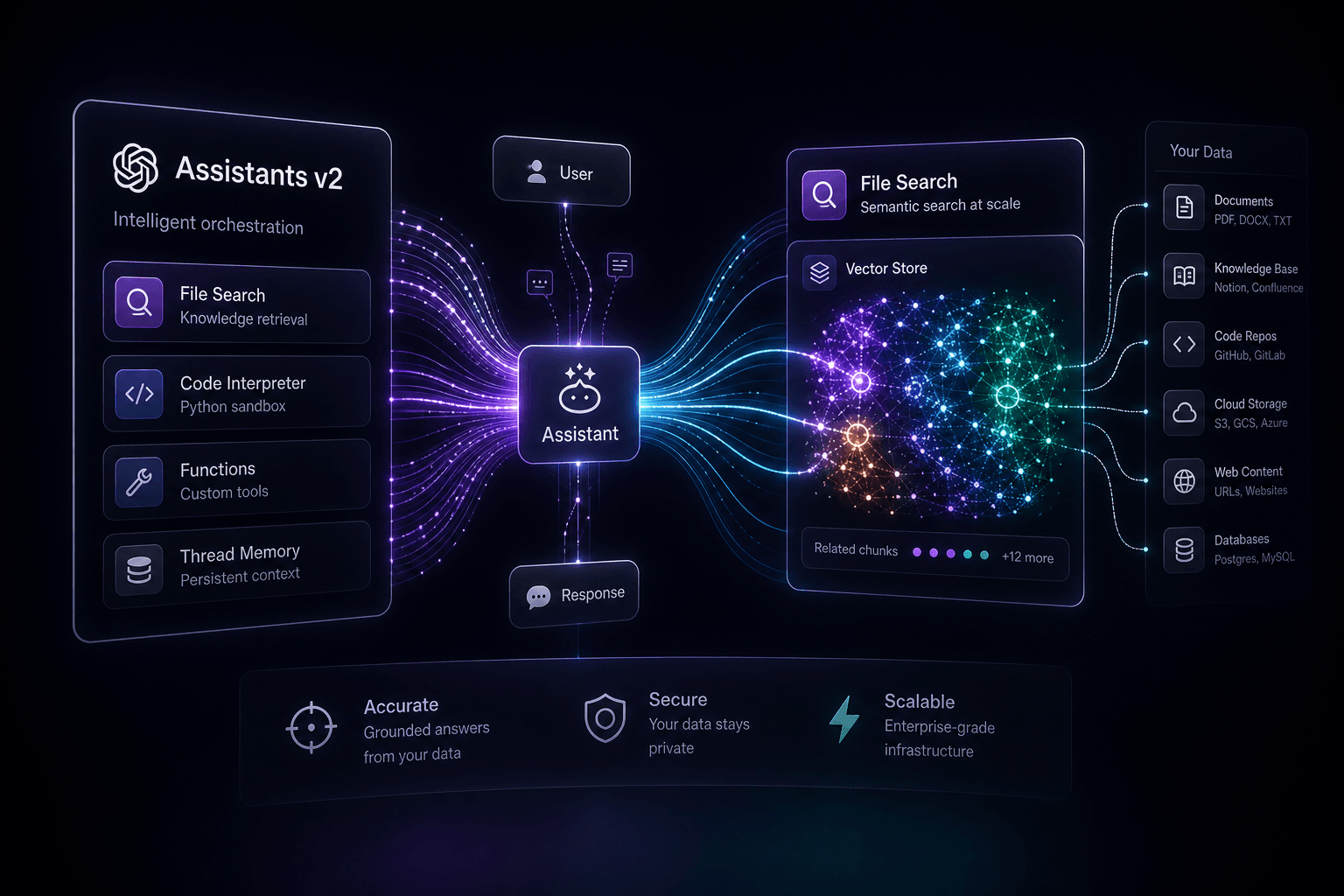
Assistants v2 introduces native streaming support, a new File Search tool that supports up to 10,000 files per assistant, and a dedicated Vector Store API for managing document embeddings. This version shift represents a move toward more granular control over how agents interact with tools and data.
The core upgrades can be categorized into four main pillars:
- File Search GA: Replaces the legacy "Retrieval" tool with a more robust, scalable search mechanism that uses both vector and keyword search.
- Vector Store API: A new standalone object for managing groups of files, making it easier to share document sets across multiple assistants or threads.
- Streaming & Tool Choice: Native support for streaming responses (finally!) and the ability to force an assistant to use a specific tool (or none at all) using the
tool_choiceparameter. - Increased Limits: You can now attach up to 10,000 files per vector store—a 500x increase over the previous 20-file limit.
| Feature | Assistants v1 (Beta) | Assistants v2 (GA) |
|---|---|---|
| File Limit | 20 files per assistant | 10,000 files per vector store |
| Retrieval Tool | Legacy "Retrieval" | New "File Search" |
| Data Management | Files attached to Assistant/Thread | Dedicated Vector Store objects |
| Streaming | Not natively supported | Full streaming support |
| Tool Control | Automatic | Fine-grained via tool_choice |
| Pricing | Free (during beta) | $0.10/GB per day per vector store |
The Death of "Retrieval" and the Birth of "File Search" #
The legacy "Retrieval" tool has been sunset in favor of "File Search," a more sophisticated RAG implementation that combines vector search with keyword-based retrieval. In the v1 beta, retrieval was often criticized for being a "black box"—you uploaded files and hoped for the best. File Search changes the game by giving developers more transparency and significantly higher scale.
The new file_search tool is designed to handle massive document sets. While the old retrieval tool capped you at 20 files, File Search allows for up to 10,000 files per vector store. This is a massive leap for developers building knowledge-base agents for large enterprises or complex technical documentation.
How File Search Works Under the Hood #
When you enable file_search, OpenAI handles the heavy lifting of the RAG pipeline:
- Parsing & Chunking: Documents are automatically broken down into manageable chunks.
- Embedding: Chunks are converted into high-dimensional vectors.
- Hybrid Search: The tool uses both vector search (semantic similarity) and keyword search (BM25) to find the most relevant context.
- Re-ranking: The retrieved results are re-ranked to ensure the model receives the highest-quality information.
This managed approach means you don't have to maintain a separate Pinecone or Weaviate instance for basic RAG tasks. You simply upload your files, and OpenAI's infrastructure handles the rest.
Vector Stores: Simplifying the RAG Pipeline #
The introduction of the Vector Store API is perhaps the most significant architectural change in Assistants v2, decoupling document storage from individual assistants or threads. In v1, files were attached directly to an assistant. If you wanted multiple assistants to share the same knowledge base, you had to re-upload or re-attach files manually.
With Vector Stores, you create a standalone container for your documents. This container can then be attached to one or more assistants, or even specific threads. This makes managing knowledge bases at scale much more efficient.
The Vector Store Lifecycle #
Managing a vector store involves a few simple steps:
- Create: Initialize a new vector store via the API.
- Upload: Add files to the store. OpenAI provides a helper
upload_and_pollin their SDKs to handle the upload and embedding status in one go. - Attach: Link the vector store to an assistant's
tool_resources.
# Example: Creating a Vector Store in Python
from openai import OpenAI
client = OpenAI()

# 1. Create the vector store
vector_store = client.beta.vector_stores.create(name="Company Knowledge Base")

# 2. Upload files and poll for completion
file_paths = ["docs/handbook.pdf", "docs/policies.pdf"]
file_streams = [open(path, "rb") for path in file_paths]

file_batch = client.beta.vector_stores.file_batches.upload_and_poll(
  vector_store_id=vector_store.id, files=file_streams
)

# 3. Attach to an Assistant
assistant = client.beta.assistants.update(
  assistant_id="asst_abc123",
  tool_resources={"file_search": {"vector_store_ids": [vector_store.id]}},
)
This modularity allows for much cleaner codebases. You can now build a "master" knowledge base and spin up specialized assistants that all point to the same source of truth.
Streaming Support: Finally, Real-Time Agentic UX #
Native streaming support in Assistants v2 is the single biggest improvement for user experience, eliminating the awkward "waiting for run completion" state that plagued v1 apps. Previously, you had to poll the Run status repeatedly to check if the assistant was finished before you could display the message. This led to high latency and a disjointed feel.
With streaming, you can pipe the assistant's response to the frontend as it's being generated. This makes AI agents feel responsive and "live," much like the ChatGPT interface.
Implementing Streaming in Node.js #
OpenAI's SDK now includes event handlers that make streaming straightforward. You can listen for specific events like thread.message.delta to catch incoming text chunks.
// Example: Streaming an Assistant Run in Node.js
const run = openai.beta.threads.runs.stream(thread.id, {
  assistant_id: assistant.id
})
  .on('textDelta', (textDelta, snapshot) => process.stdout.write(textDelta.value))
  .on('toolCallDone', (toolCall) => console.log(`\nTool call finished: ${toolCall.type}`))
  .on('end', () => console.log('\nRun completed.'));
Beyond just text, streaming also provides visibility into tool calls. You can see when the assistant decides to search a file or run code, allowing you to show "thinking" indicators or progress bars to the user. This transparency is crucial for building trust in agentic workflows.
Tool Choice and Fine-Grained Execution Control #
The new tool_choice parameter gives developers the ability to force an assistant to use a specific tool, ensuring predictable behavior in multi-step workflows. In v1, the assistant's decision to use a tool was entirely autonomous. While usually smart, this could lead to inconsistencies where the model would skip a necessary file search or hallucinate a code execution.
With tool_choice, you can now specify:
none: The assistant will not use any tools.auto: The default behavior (assistant decides).required: The assistant must use at least one tool.{ "type": "file_search" }: Forces the assistant to use the File Search tool.
Why This Matters for Agentic Loops #
In complex agentic systems, you often need to chain specific actions. For example, if you're building a legal research agent, you might want to:
- Force a
file_searchto gather facts. - Follow up with a
code_interpreterrun to calculate damages. - Finish with a
nonerun to draft the final summary.
This level of control allows you to treat the Assistants API more like a set of programmable primitives rather than a single, unpredictable entity. It bridges the gap between fully autonomous agents and structured workflow automation.
Custom RAG Stacks vs. Managed Assistants API: When to Switch #
The launch of Assistants v2 raises a critical question for developers: should you keep building custom RAG stacks with Pinecone and LangChain, or migrate to OpenAI's managed infrastructure? The answer depends on your requirements for control, latency, and cost.
For many projects, the managed Assistants API is now the "good enough" solution that saves weeks of engineering time. However, custom stacks still hold the edge in specific scenarios.
| Factor | Managed Assistants API (v2) | Custom RAG Stack (Pinecone/Weaviate) |
|---|---|---|
| Setup Time | Minutes (managed by OpenAI) | Days/Weeks (infrastructure + logic) |
| Complexity | Low (single API) | High (multiple services) |
| Search Control | Limited (OpenAI's algorithm) | Full (custom chunking, embedding, retrieval) |
| Scalability | High (up to 10,000 files) | Infinite (limited only by your DB) |
| Cost | Predictable ($0.10/GB/day) | Variable (DB costs + embedding API costs) |
| Data Privacy | OpenAI-hosted | Self-hosted or VPC-hosted |
When to use the Assistants API: #
- You want to ship a knowledge-aware agent quickly.
- You don't want to manage vector database infrastructure.
- Your document set is under 10,000 files and fits within OpenAI's supported formats.
- You need tight integration with other OpenAI tools like Code Interpreter.
When to stick with a Custom Stack: #
- You need custom embedding models or specific chunking strategies.
- You require ultra-low latency (custom databases can often be tuned faster).
- You have strict data residency requirements that forbid hosting data on OpenAI's vector stores.
- You are building a multi-cloud or model-agnostic application.
Practical Use Cases for Developers in 2024 #
The upgrades in Assistants v2 open the door for more complex, production-ready applications that were previously too difficult or slow to build. Here are three high-impact use cases where v2 shines:
1. Enterprise Knowledge Bots #
With the 10,000-file limit and Vector Store API, you can now build a single assistant that serves as a "source of truth" for an entire company's documentation. By attaching the same vector store to different assistants (e.g., an HR bot, a Technical Support bot, and a Sales bot), you ensure consistency across all departments while maintaining specialized instructions for each.
2. Real-Time Customer Support Agents #
Streaming support changes the experience here. You can build a support agent that feels as fast as a human, providing instant answers from your product manuals while showing the user exactly which documents it's searching. This transparency reduces user frustration during long retrieval tasks.
3. Automated Data Analysts #
By combining File Search with the Code Interpreter, you can create agents that find relevant data in a massive set of CSVs or PDFs, extract the numbers, and then run Python code to generate visualizations or summaries. The improved tool_choice ensures the assistant doesn't skip the search step before trying to analyze the data.
Pricing Reality Check: Vector Store Costs #
OpenAI has shifted the pricing model for File Search from a per-assistant fee to a storage-based model, charging $0.10 per GB per day for vector store storage. This is a critical change for developers to understand, as it makes the cost of RAG more predictable but also requires more active management of your data.
In the v1 beta, retrieval was free. In v2, you pay for the data you keep "live" in your vector stores. While $0.10/GB/day might seem small, it adds up if you're storing terabytes of data across multiple stores.
Cost Optimization Strategies: #
- Clean Up Old Stores: Delete vector stores that are no longer in use.
- Be Selective with Uploads: Don't upload every document you have; only upload what's necessary for the assistant's task.
- Monitor Usage: Keep an eye on your OpenAI dashboard to see how your storage costs are trending.
File Search tool calls themselves do not incur an additional fee beyond the standard token costs for the model. You pay for the storage, and then you pay for the input/output tokens used by the assistant when it performs a search.
Conclusion: The Future of Agentic Workflows #
The release of Assistants v2 and File Search GA marks the moment the OpenAI platform moved from experimental to enterprise-ready. By solving the streaming problem and providing a scalable, managed RAG solution through Vector Stores, OpenAI has significantly lowered the barrier to entry for building sophisticated AI agents.
As we move further into 2024, I expect the focus to shift from "how do I build RAG?" to "how do I optimize my agent's performance?" The tools are now in place; the differentiator will be how developers use them to create truly useful, responsive, and reliable digital experiences.
If you're still on v1, now is the time to start your migration. The benefits of streaming and the scalability of File Search are too significant to ignore. The era of the "black box" assistant is over—the era of the programmable agent has begun.
FAQ #
Q: What is the main difference between Assistants v1 and v2? #
A: Assistants v2 introduces native streaming support, a dedicated Vector Store API, and the new File Search tool. It also increases the file limit from 20 to 10,000 files per vector store, providing a much more scalable solution for enterprise RAG.
Q: How does File Search differ from the old Retrieval tool? #
A: File Search combines vector search with keyword-based search (BM25) and includes a re-ranking step. This hybrid approach is more robust than the legacy retrieval tool and supports significantly larger document sets.
Q: What are Vector Stores in the Assistants API? #
A: Vector Stores are standalone objects that store your documents and their embeddings. They decouple data from assistants, allowing you to share a single knowledge base across multiple assistants or threads.
Q: Does the Assistants API v2 support streaming? #
A: Yes, native streaming is now supported via the SDKs. You can listen for events like textDelta to display assistant responses in real-time, significantly improving the user experience.
Q: How many files can I upload to a Vector Store? #
A: You can upload up to 10,000 files per vector store. This is a 500x increase over the 20-file limit in the v1 beta.
Q: What is the cost of using File Search? #
A: File Search is priced at $0.10 per GB per day for storage in your vector stores. There are no additional fees for the search tool calls themselves, though standard model token costs still apply.
Q: Can I use File Search with GPT-3.5 Turbo? #
A: Yes, File Search is supported on both GPT-4 and GPT-3.5 Turbo models. However, for complex RAG tasks, GPT-4 typically provides more accurate synthesis of the retrieved information.
Q: How do I migrate from Assistants v1 to v2? #
A: You need to update your API version to assistants=v2 in your headers and migrate your file management to the new Vector Store API. OpenAI provides a detailed migration guide in their documentation.
Q: What is the tool_choice parameter? #
A: The tool_choice parameter allows you to force the assistant to use a specific tool, use no tools, or decide automatically. This provides fine-grained control over the assistant's execution flow.
Q: Can I attach files directly to a thread in v2? #
A: Yes, you can attach files to messages in a thread. OpenAI will automatically manage a temporary vector store for that thread to enable File Search on those specific documents.
Ready to Build Your Next AI Agent? #
If you're looking to integrate these new Assistants API capabilities into your production workflows, I can help. I specialize in building custom AI agents and automation pipelines that scale.
Related Posts

How to Get ChatGPT and Perplexity to Recommend Your Business
A practical owner playbook for getting ChatGPT and Perplexity to name your business — third-party proof, schema, a 30/60/90 plan, and monthly prompt tests.

How to Build the Author Authority AI Looks For
AI cites people it can verify. Here's how LinkedIn, author markup, and consistent profiles turn your name into a machine-readable authority signal.

AI Agents for Operations: Replacing the Repetitive Tasks That Drain Your Team
Yes — an AI agent can analyze your ops data and recommend next moves, but only if you give it the right access, read-only first, and a human approval layer.

