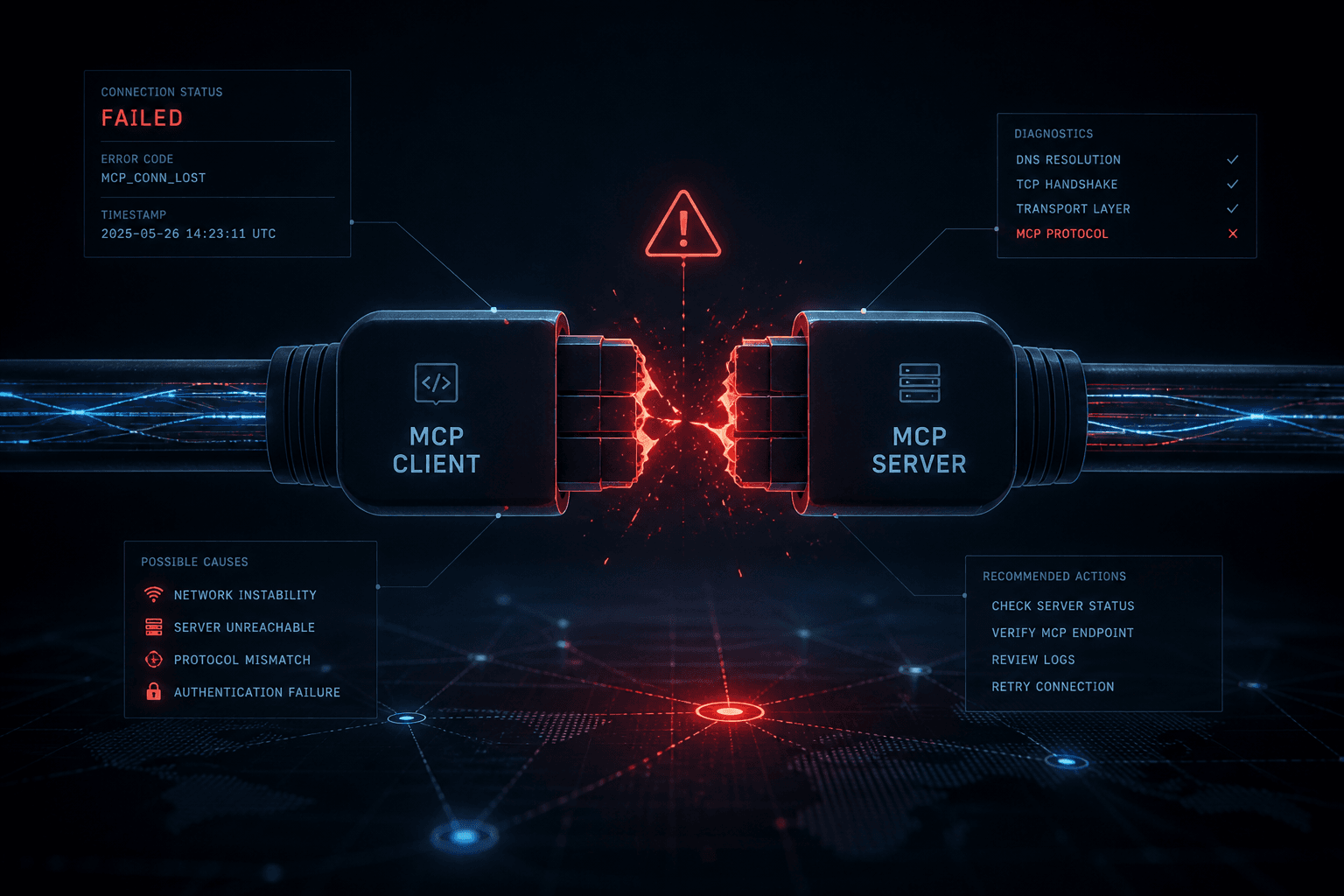
When MCP Integrations Break: How a Business Owner Spots What's Wrong

Table of Contents
A business owner spots a broken MCP integration by the symptom, not by reading a protocol spec: expired auth, a tool timeout, a schema mismatch, a silent empty result, or a host — Claude Desktop, Cursor, or n8n — that cannot see the server. Name the symptom first. The failure class follows. The fix is usually a reconnect, a restart, or a scoped ticket — not a rebuild.
I'm William Spurlock. I architect agent stacks for operators. Across 500+ automations and 20,000+ hours on agentic systems, the call I get after a first MCP win is almost never "explain the protocol again." It is "it worked last week and Claude is guessing now." This post is that diagnosis. I write it in the present tense of 29 August 2026, after the MCP 2026-07-28 spec shipped and hosts are still catching up.
The connect-and-scope job — first server, read-only, Claude Desktop JSON, hosted URL, n8n as a tool host — already lives in your first MCP server without a developer. I will not rebuild that path here. The protocol map — what MCP is, why agents standardize on it — is in MCP explained. I will not retell it. You own one question on this page: what failed, and how do you tell from the chair you already sit in?
How can a business owner tell when an MCP integration has broken and what failed? #
You tell by running a trap question you already know the answer to, then matching the reply to one of five failure classes — auth, timeout, schema, empty result, or "the host cannot see the server." If the model answers from memory, the integration is not in the loop. If it calls a tool and the tool lies, stalls, or vanishes, you now have a class.
I do not start with JSON-RPC. I start with a record I can see in Airtable, Notion, or the CRM without opening a terminal: invoice INV-1042, the deal named after last Tuesday's close, the help article that has a weird title. Then I ask Claude Sonnet 5, GPT-5.5, or Gemini 3.1 Pro — whichever host I am standing in — to fetch that exact object.
| What you see | Failure class | What actually failed |
|---|---|---|
| "I don't have a tool for that" / empty tool list | Host cannot see the server | Config, process, transport, or a host that never loaded the server |
| Login / reconnect / 401 language, or a sudden "I can't access that workspace" | Auth expiry | Access token, refresh token, or a revoked API key |
Long pause, then a generic "I hit a limit" or a -32001-style timeout |
Tool timeout | The call ran longer than the host wait, or the server never returned |
"Missing required argument" / "unexpected property" / isError: true on a tool that used to work |
Schema mismatch | Tool input shape changed, or the model is sending last month's arguments |
Confident answer, zero tool call, or a tool call that returns [] and the model still narrates a pipeline |
Silent empty result | Auth scoped to nothing, wrong base, filter that matches zero rows, or the model filled the gap |
Anthropic introduced MCP on 25 November 2024. A year and a half later the owner job is not "what is a server." The owner job is separating a model that is being helpful from a tool that is broken. Those two look the same in a chat transcript if you only read the last paragraph.
The trap question I actually use #
I pin this prompt on every client host. It is not clever. It is specific.
Fetch the live record for invoice INV-1042 from the connected MCP tools.
Quote the invoice number, status, and last-modified date from the tool result.
If you cannot call a tool, say "NO_TOOL" and list the MCP tools you can see.
If the tool returns zero rows, say "EMPTY" and paste the raw tool result.
Do not invent a status. Do not use memory from this chat.
Four honest endings. NO_TOOL is a visibility problem. EMPTY is a data or auth-scope problem. A quoted status that matches the source of record is a pass. A quoted status that does not match is a silent lie — treat it like EMPTY plus a model that filled the blank.
I do not ask "what's in the pipeline this week" as the first test. That question invites a summary. Summaries hide empty tool results.
What I will not diagnose from a screenshot of the last sentence #
A founder sends me the last bubble: "Looks like the deal is still in Proposal." That sentence is useless. I need three things next to it:
- Did a tool call appear in the host UI?
- What did the tool return — error object, empty list, or rows?
- Does that return match the record you can see with your own login?
If you cannot answer (1), you are not debugging MCP yet. You are reading a language model. Claude Opus 4.8 will write a calm status update either way.
What does a healthy MCP connection look like from the owner's chair? #
A healthy MCP connection is boring: the host lists the server, the model can name the tools in plain English, a trap question returns a live field you can check, and a write you did not authorize is refused. If any of those four is missing, you do not have a connection. You have a chat app with a logo.
I score "healthy" the same way on Claude Desktop, Cursor, and n8n. The screens differ. The checklist does not.
| Owner check | Pass | Fail |
|---|---|---|
| Server appears in the host | Named, connected, no red badge | Missing, "needs authentication," or a process that dies on start |
| Tool list is visible | You can read three tool names without opening a repo | Zero tools, or names that look like internal function IDs you never approved |
| Trap question hits a tool | The UI shows a tool call before the answer | The model answers in one breath with no tool row |
| Live field matches source of record | Status / date / ID match what you see logged in | Polite prose that does not match the record |
| Unauthorized write is refused | "I don't have a write tool" or the tool is absent | It updates production on the first try |
Claude Desktop loads servers from claude_desktop_config.json into the Desktop chat surface — Anthropic documents that path in the Desktop application notes. Cursor loads project or user mcp.json and shows failures in Output → MCP Logs, per Cursor's MCP docs. n8n fetches the tool list from the endpoint you give the MCP Client or MCP Client Tool node. Three hosts. Same four checks.
What "the model can see the tools" sounds like #
Ask: "List the MCP tools you can see. Name only. No sales pitch."
A pass looks like a short menu: search_records, get_invoice, list_open_deals. A fail looks like "I can help with whatever you need" or a list of built-in host skills that are not your server. Claude Sonnet 5 will happily describe Airtable if you mentioned Airtable in the project instructions. That is not a tool call.
The official second opinion when the host is lying #
When I do not trust the host UI, I do not open the server source. I run the official MCP Inspector — the reference debugger Anthropic's protocol site ships as @modelcontextprotocol/inspector. Web, CLI, or TUI. Same connection rules.
npx @modelcontextprotocol/inspector --cli \
  --server-url https://YOUR-HOSTED-SERVER/mcp \
  --transport http \
  --method tools/list \
  --format json
The Inspector CLI exits with a class, not a vibe: 3 needs auth, 4 cannot reach the server, 5 means tools/call came back isError: true or the tool name is wrong. That is the owner translation I want on a Slack thread. "It's broken" is not a ticket. "Inspector exit 3" is.
If you connected last month and never opened Inspector, you are still allowed to use it. You are not becoming a developer. You are asking the same question the host should have answered: is the server up, authed, and advertising tools?
Why did it work yesterday and fail this morning? #
Most "it worked yesterday" MCP breaks are auth: an access token expired, a refresh did not run, an API key was rotated, or the OAuth grant was revoked on the vendor side. The model still talks. The server still exists. The host no longer has a credential the vendor will honor.
Remote MCP servers usually require authorization. The official Inspector treats a 401 plus a WWW-Authenticate header as the start of an OAuth flow — that is documented in the Inspector authorization guide, not as folklore. Your host is doing a worse or better version of the same handshake.
| Symptom you feel | Likely cause | Owner check |
|---|---|---|
| Claude Desktop shows the server, then "needs authentication" | Access token expired; refresh failed or was never stored | Settings → Developer (or Connectors) → reconnect that server; complete the vendor login |
| Cursor lists the server red in Customize / MCP Logs mention 401 | Same token story, or a header that used to carry a Bearer key | Output → MCP Logs; then toggle the server off/on and re-auth if the host prompts |
| n8n MCP Client Tool fails on every execution after a quiet week | Saved credential expired; OAuth2 refresh not completing | Open the credential, re-test, re-consent if the vendor asks |
Trap question returns NO_TOOL after a laptop sleep |
Local stdio process died; less often, the env key was edited |
Restart the host; confirm the env block still has a key, not a placeholder |
| Works on your Mac, fails for the teammate | Their grant never existed, or theirs expired first | Do not share your token. They reconnect on their host |
I do not treat this as a mysterious "AI outage." I treat it like a Google login that aged out. You would not rebuild Gmail because the session died.
What expiry looks like in the chat (and what it does not) #
Auth failure is loud when the host is honest: a reconnect button, a 401 in the log, Inspector exit 3. It is quiet when the host swallows the error and the model says it "couldn't find that workspace." Same class. Different manners.
What it is not:
- A new MCP spec by itself. The 2026-07-28 revision can cause a host/server era mismatch (Inspector even negotiates legacy vs modern on one connection). That is a version problem. It does not look like "please sign in again."
- A schema mismatch. Schema errors mention arguments. Auth errors mention permission, unauthorized, or reconnect.
- An empty CRM. Empty CRM with a 200 and
[]is the next section's cousin — silent empty — unless the vendor mapped "no scope" to an empty list on purpose.
The owner reconnect I actually walk people through #
On Claude Desktop: reconnect the named server, finish the vendor page, restart Desktop, run the trap question. Anthropic loads that file-backed server into the chat surface; if the file still has yesterday's command and today's token is dead, the file is not the bug.
On Cursor: open Customize, find the server, watch MCP Logs. Cursor's own FAQ says a failed or timed-out server shows an error in chat and leaves other servers running. If the log says 401, stop editing mcp.json for sport. Re-auth.
On n8n: the MCP Client supports Bearer, generic header, multiple headers, and OAuth2. Pick the method the server actually speaks. I have watched people paste a personal access token into an OAuth Client ID field. That is not expiry. That is a credential type mismatch that looks like expiry after the first hour.
{
  "mcpServers": {
    "crm-readonly": {
      "command": "npx",
      "args": ["-y", "mcp-remote", "https://mcp.example.com/mcp"],
      "env": {
        "NOTE": "Put the vendor token in env or complete OAuth in the host. Never paste it into chat."
      }
    }
  }
}
Treat that block as shape. If your host uses a URL plus OAuth instead of mcp-remote, use the host's remote entry. The owner rule is the same: secrets stay in env, headers, or the OAuth session — not in the prompt.
What does a tool timeout look like versus a hang? #
A timeout is a tool call that started and did not finish inside the host's wait window. A hang is a host that never returns control — no error, no result, the cursor just sits there. Timeouts have a class. Hangs have a process problem. Do not merge them in the ticket.
The protocol does not promise you a single global number. Hosts pick a wait. n8n makes that wait an explicit Timeout option in milliseconds on the MCP Client and the MCP Client Tool node. Cursor's docs say a server that crashes or times out shows an error in chat, marks the tool failed, and leaves other servers alone. The official Inspector treats a connection that never answers as exit 4 (unreachable: DNS, refused, timeout, fetch failed).
| Symptom | Likely cause | Owner check |
|---|---|---|
Tool row appears, then "timed out" / -32001 / "request timed out" |
The call ran longer than the host wait, or a proxy cut the stream | Run the same lookup in the source app. If the app is instant, the MCP path is the wait. If the app is also slow, fix the query, not the host. |
| n8n execution sits on the MCP Client Tool until the node Timeout | Same wait, now you can see the millisecond budget | Open the node Options → Timeout. Note the number. Re-run a smaller lookup. |
| Cursor chat shows a failed tool; MCP Logs show a kill or a stall | Server process wedged, or a remote URL that never returned | Output → MCP Logs. Toggle that server only. Do not restart every server you own. |
| No tool row, chat frozen, host UI unresponsive | Hang: local stdio process blocked, or the host is waiting on a callback nobody will finish | Force-quit the host. Reopen. If it freezes again on connect, disable that server and test the rest. |
Inspector CLI hangs then exit 4 |
Network, DNS, wrong URL, or a server that never binds | Confirm the URL in a browser or curl without asking the model anything. |
I have a bias: if the native app returns the record in two seconds and MCP times out, the tool is doing too much work in one call — unbounded search, a full-base dump, a report that was never meant to be a tool. That is not a reason to "upgrade the model." Claude Opus 4.8 cannot out-wait a tool that never returns.
Timeout vs auth vs empty (do not swap the labels) #
- Auth says no. Timeout says later, then dies.
- Empty says done, here is
[]. - A hang says nothing.
If your teammate reports "it just thinks forever," ask whether a tool row appeared. Tool row plus a later error is a timeout. No tool row plus a frozen window is a hang. No tool row plus a fluent paragraph is either visibility or a silent empty — not a timeout.
What I change before I touch code #
- Ask for one record, not "everything in Q3."
- On n8n, read the Timeout value. If someone set it to 5 seconds on a report that takes 20, that is an owner setting, not a vendor outage.
- On Cursor, isolate the server. Cursor documents that one failed server should not take the others down. If everything dies, you have a host problem or a shared credential, not one slow tool.
- On Claude Desktop, restart once. If the same tool times out after a clean restart, stop restarting. You are teaching the team that ritual is a fix.
I do not publish a "raise every timeout to ten minutes" rule. A longer wait hides a tool that should have been two tools. Split the work: search IDs, then fetch one record. That is diagnosis that turns into a better menu. The custom-server version of that split is a build — and that build is the architecture guide, not this page.
When the tool name is the same but the arguments no longer match #
A schema mismatch is when the tool is still listed, the host can call it, and the call fails because the arguments no longer match the input shape the server advertises. The name stayed. The contract moved. The model keeps sending last month's JSON.
This is the failure I see after a vendor "improves" a hosted server, after someone republishes an n8n MCP Server Trigger with new fields, or after a July-era host talks to an older server (or the reverse) following the 2026-07-28 spec. I am not walking the spec internals. I am telling you what it feels like in the chair: the tool exists, and the tool rejects you.
| Symptom | Likely cause | Owner check |
|---|---|---|
isError: true with "required property" / "additional properties not allowed" |
Input schema changed; the model used a cached or guessed argument list | Ask the host to list required arguments for that tool, then compare to a call that worked in an old transcript |
Tool used to take record_id, now wants recordId or a wrapper object |
Rename or nesting change on the server | Run Inspector tools/list and read the advertised properties. Do not trust the chat's memory of the shape. |
| n8n MCP Client "Input Mode: JSON" executions fail after a canvas edit | You changed the workflow inputs and did not update the Agent's tool mapping | Open the MCP Client / MCP Client Tool, refresh the tool list, re-save the JSON params |
| Cursor still offers a tool you removed yesterday | Host cached the tool list | Full quit of Cursor, not only Reload Window — then check Customize |
Inspector exit 5 on tools/call |
Tool error or the name you typed is not on the server | --method tools/list first. If the name is missing, this is visibility, not schema. |
The Inspector CLI is explicit: a tools/call that returns isError: true still prints the payload and exits 5, so a script does not treat a failed call as success. That is the same distinction I want from a human. A red tool result is data. A confident paragraph is not.
How I prove it without opening TypeScript #
I keep an old successful call if the host shows arguments. Then I ask:
Show the input schema for the tool named search_records.
List required properties and a one-line description each.
Then call it with only those required properties for invoice INV-1042.
If the call fails, paste the tool error verbatim. Do not rewrite it.
If the schema list and the error disagree, the host is stale. Restart the host. If they agree and the error names a field you never heard of, the server changed. That is a vendor or builder ticket, not a "prompt harder" ticket.
n8n's MCP Client has an Input Mode split — Manual fields vs JSON — documented on the MCP Client node page. After someone edits the exposed workflow, I watch operators keep last week's JSON blob. The node will fetch a new tool list. The blob will not update itself. Refresh the list. Rewrite the JSON. Run one item.
Opinion: do not "fix" schema with a longer system prompt #
I have been sent 800-word project instructions that restate the old argument names so the model "remembers." That teaches the model to fight the live schema. Delete the essay. Restart the host. Call the tool with the advertised fields. If the advertised fields are wrong for the business, that is a server change — scoped, reviewed, and versioned — the same way I treat a production agent deploy in how to deploy an AI agent without breaking everything.
Why silent empty results are worse than a red error #
A silent empty result is a successful tool call that returns no rows — or a skipped tool call — while the model still writes a confident operational answer. The host did not fail. The transcript looks fine. You make a decision on fiction.
This is the failure I trust least, because it does not trip Inspector exit 3 or 4. A tools/call that returns { "records": [] } can exit 0. The business still lost.
| Symptom | Likely cause | Owner check |
|---|---|---|
| Fluent pipeline recap, no tool row | Model answered from chat memory or training | Demand NO_TOOL vs a pasted tool result. If there is no paste, do not believe the recap. |
Tool row exists, payload is [] or "no records," and the model still names a status |
Filter, base, or table is wrong; token can see the API and not your rows | Open the source of record yourself. If the row is there, the tool pointed at the wrong place or the wrong view. |
| Works for you, empty for a teammate | Their token is scoped to a different workspace / base | Compare which Airtable base or Notion workspace the credential can see — not whether they "have Airtable." |
| Empty after a vendor permission change | Read scope narrowed; API now returns empty instead of 403 | Re-open the vendor admin. Confirm the integration still has the base. Re-run Inspector tools/call and read the raw payload. |
| Empty only on one phrase ("overdue invoices") | The tool's filter fields do not match how you talk | Use the invoice ID, not the nickname. If the ID works and the nickname does not, that is query shape, not a down server. |
I would rather see a 401 than a polished empty. A 401 stops the meeting. An empty plus Claude Sonnet 5 starts a meeting on the wrong number.
The owner rule: no raw result, no decision #
I tell operators to treat MCP answers like a bank transfer. No confirmation, no money moved. Here the confirmation is the raw tool payload, not the model's paragraph.
Call the search tool for INV-1042.
Reply with two blocks only:
1) RAW: the tool result, unmodified
2) VERDICT: MATCH, EMPTY, or ERROR
If VERDICT is not MATCH, stop. Do not describe the pipeline.
If they cannot produce RAW, we are not in diagnosis. We are in storytelling.
Why this is not "the model is dumb" #
GPT-5.5 and Claude Opus 4.8 are good at sounding like ops. That is the product. When the tool returns nothing, the helpful move from the model's point of view is to keep you moving. Your job is to make emptiness a first-class outcome. I do that in the prompt and in the habit: EMPTY is a status, not a mood.
If EMPTY keeps happening on a record you can see, the usual stack is: wrong base ID, a view filter the token cannot bypass, or a read token minted on a personal workspace while the live data sits in the company workspace. None of those need a new server. They need you to look at the credential's scope the way you would look at a shared Drive link.
When Claude, Cursor, or n8n cannot see the server at all #
If the host cannot see the server, you do not have an MCP problem inside the tool. You have a load problem: the process never started, the URL never connected, the config file is in the wrong place, or you are looking at a different host than the one you configured. Fix visibility before you debate schema.
This is the class I get when someone configured Claude Desktop and then asked ChatGPT why the tools are missing, or configured ~/.cursor/mcp.json and opened a different project that only reads .cursor/mcp.json.
| Host | Where the server has to live | Owner check when it is invisible |
|---|---|---|
| Claude Desktop | claude_desktop_config.json (Settings → Developer → Edit Config) |
Restart Desktop after every save. Ask it to list tools. If the entry is missing from the file, you edited the wrong file. |
| Cursor | Project .cursor/mcp.json or user ~/.cursor/mcp.json |
Confirm which file you edited. Open Customize. Read Output → MCP Logs. Toggle the server. |
| n8n (as client) | MCP Client / MCP Client Tool node: endpoint URL + credential | Click the Tool dropdown. If the list will not load, the node cannot see the server. Test the URL and auth independently of the Agent. |
| n8n (as server) | MCP Server Trigger (or instance MCP URL) | The other host must point at that URL. Claude will not invent an n8n trigger you never exposed. Wiring notes live in the n8n MCP guide. |
| Claude Code CLI | ~/.claude.json / .mcp.json — it does not read the Desktop file unless you import |
Anthropic documents that the standalone CLI skips claude_desktop_config.json until you run the Desktop import. Different host, different file. |
Cursor's transport table is the one I keep in my head: stdio is a local command the app starts; SSE and Streamable HTTP are URLs, usually with OAuth. If you paste a URL into a command field, or a launch command into a url field, the server will not appear. That is not subtle. The log will look like a crash or a refused connection.
Claude Desktop: configured, still invisible #
I see three owner mistakes, in order:
- Saved the JSON, did not restart Claude Desktop.
- JSON is invalid (trailing comma). The host loads nothing and does not always shout.
- The
commandisnpxand the laptop cannot see Node, so the process dies before it advertises tools.
Check (3) without a developer: if Inspector can list tools with the same command, Desktop's PATH is the suspect. If Inspector also fails with exit 4, the server never started. Stop blaming Claude Opus 4.8.
Cursor: green yesterday, empty today #
Cursor's own debug path is the Output panel, MCP Logs — initialization, tool calls, errors. Their FAQ also says you can toggle a server off without deleting it. I use that as a binary search: disable all but one, see which name brings the tools back.
If the server is connected and the tool you shipped yesterday is missing, assume a cached list before you assume the server lost its mind. I have had to fully quit Cursor — not Reload Window — before a new tool name appeared. That is a host cache. It is still a visibility failure from the owner's seat.
n8n: the Agent is not the same as the node #
People test the Agent chat and never open the MCP Client Tool. The Agent can "not see" a server because the tool node is disconnected, the credential is empty, the include-list filters every tool out, or the Timeout fires during tools/list. Open the node. Refresh tools. The MCP Client docs say the tool list is fetched from the external server. If that fetch fails, the Agent has no menu. The n8n canvas is the truth. The Agent chat is the story.
One server, three hosts — I expect two of them to be blind #
Reuse is the point of MCP. It is also why visibility bugs look like "the integration is down" when only one host is wrong. I never debug all three at once. I pick the host the operator actually lives in, get a trap-question pass there, then copy the working URL or command to the next host. If Desktop works and n8n does not, you do not have a dead vendor. You have a credential or transport mismatch in n8n.
The 15-minute owner diagnosis table #
Fifteen minutes is enough to name the failure class. It is not enough to rebuild a server, and you should not try. Work the table top to bottom. Stop when a row matches. Write the class in Slack before anyone opens Cursor Composer.
| Minute | You do | You are testing | If it fails |
|---|---|---|---|
| 0–2 | Log into the source of record. Confirm INV-1042 (or your trap ID) exists. |
The data, not MCP | If the row is gone, this is not an integration break. |
| 2–4 | Ask the host: list MCP tools by name. | Visibility | NO_TOOL → host/config/process. Do not pass Go. |
| 4–7 | Run the trap prompt. Demand RAW + VERDICT. |
Call path | No tool row → visibility or the model skipped the tool. Tool row + 401 language → auth. |
| 7–10 | If the call errors, read the error. Do not let the model translate it. | Schema vs timeout vs auth | Argument names → schema. Timed out → wait/work. Unauthorized → auth. |
| 10–12 | If VERDICT is EMPTY, open the same filter in the native app. |
Scope / wrong base | Native has the row → wrong workspace or view. Native is empty → the business data is empty. |
| 12–15 | Optional: Inspector tools/list or one tools/call. |
Independent of the chatty host | Exit 3 auth, 4 unreachable, 5 tool error. Put that number in the ticket. |
I time this on a phone call. If we are still "just one more restart" at minute sixteen, we are avoiding the class.
The Slack sentence I want back #
Copy this:
Host: [Claude Desktop / Cursor / n8n]
Symptom: [NO_TOOL / AUTH / TIMEOUT / SCHEMA / EMPTY / HANG]
Trap ID: INV-1042
Tool row visible: [yes/no]
Raw result: [paste or "none"]
Inspector exit (if used): [3/4/5/skip]
What I will not do: rebuild the server today
That message is more useful than a 20-minute loom of the chat scrolling.
What I keep next to the laptop #
- The trap ID that always exists (a real invoice, not "a typical deal").
- Which host this operator actually uses on Monday morning.
- Where the config lives for that host — one path, written down.
- A read-only credential I am allowed to reconnect without paging legal.
If you do not have those four, you do not have an MCP integration you can operate. You have a demo that worked on a call. The first-server post is how you get to a boring connect. This table is how you keep it boring.
What not to do while the integration is broken #
Do not add write tools, do not paste secrets into the chat, do not rebuild the server, and do not switch models to "see if GPT-5.5 is smarter than Claude Sonnet 5" until you have a failure class. Diagnosis is a subtractive job. Extra surface area makes the next symptom harder to read.
| Temptation | Why it feels right | What it actually does |
|---|---|---|
Enable update_record so you can "test a real write" |
Proof in production | You now have two bugs: the original break, and a write you may not be able to undo |
| Paste the API key into Claude "just this once" | Faster than finding env |
The key is now in logs, memory, and whoever you shared the thread with |
| Switch from Claude Desktop to Cursor mid-debug | Fresh start | You changed the host and the config file. You no longer have a controlled test. |
| Ask the model to "fix the MCP server" | It writes confident TypeScript | You did not establish which class failed. You started a build in a diagnosis window. |
| Turn on every MCP server you have installed | More tools, more chances | Visibility bugs get worse when the host is drowning in menus |
| Blame the July 2026 spec first | It is a real revision | Era mismatch is one class. It is not the default. Check auth and visibility first. |
I will not diagnose a write-capable server that was never supposed to write. If the original design was read-only — and it should have been — keep it that way while it is sick. The permissions conversation belongs in a calm hour, not in a break.
Do not turn a timeout into a permission grab #
When a tool times out, someone always suggests a "full access" token so the server can "see everything faster." That is not how latency works. That is how you widen blast radius during an incident. Narrow the query. Leave the token thin.
Do not file this as an "AI quality" issue #
Quality is what you measure after the tool returns the right row. If the tool did not run, you do not have a quality sample. I have sat in reviews where a team wanted a new model because last week's MCP answers "felt off." The log showed empty payloads. We did not need Gemini 3.1 Pro. We needed the Notion grant pointed at the company workspace.
When to restart versus when to call someone #
Restart the host after a config save, a finished OAuth, or a wedged stdio process. Call someone when the same class repeats after one clean restart, when Inspector and the host disagree, or when the fix is a server or permission change you do not own. Restart is a step. It is not a personality.
| Situation | Restart? | Call? | Who |
|---|---|---|---|
You edited JSON or mcp.json |
Yes, once | No | You |
| You completed a vendor reconnect | Yes, once | No | You |
| Local server vanished after sleep | Yes | No, unless it dies again immediately | You, then whoever owns Node / the laptop image |
Inspector exit 3, host also says 401 |
No amount of restarts | Only if reconnect fails | Vendor admin or the person who minted the token |
Inspector exit 4, URL is yours |
No | Yes | Whoever hosts the remote MCP |
Inspector exit 0 / tools list is healthy, host still NO_TOOL |
One full quit | Yes if still blind | Host-specific (Desktop vs Cursor vs n8n), not "an MCP developer" yet |
| Schema error names a field you never approved | No | Yes | The person who ships the server or the n8n workflow behind the trigger |
| EMPTY on a record you can see, scope looks right | No | Yes | Integration owner — wrong base IDs hide in "it should work" |
| You need a new tool or a write path | No | Yes | Custom agent / MCP wiring. That is a build. |
I restart more than I like to admit, because hosts cache tool lists and OAuth state. I also stop at one. A second restart without new information is superstition.
What "call someone" means when you are the owner #
You are not calling a protocol lawyer. You are calling the person who can change one of: the credential, the hosted server, the n8n trigger, or the host policy (Cursor allowlists, Claude managed servers). Bring the Slack sentence from the fifteen-minute table. If they ask for a repo tour first, they are starting a build. Make them name the class before they open a folder.
If the class is "we need a server that does not exist," that is the custom-agent conversation — the architecture guide is the prompt-first build, and I will sell that as a scoped wiring job, not as a diagnosis retainer.
If the class is "the agent should not have been this wide in production," read the deploy post and come back with a thinner menu. Diagnosis without a permission freeze is how quiet writes happen during an incident.
Opinion: I will not take a "make MCP reliable" brief that has no trap ID #
Reliability is a loop: trap question, class, fix, trap question again. If you cannot name INV-1042 (or your equivalent), you cannot tell me the integration recovered. I will not accept "it feels better" as a close.
Frequently Asked Questions #
What is the first thing I should check when an MCP tool stops working? #
Confirm the source-of-record row still exists, then ask the host to list MCP tools by name. If the invoice is gone, you do not have an integration incident. If the tool list is empty, you have a visibility problem — config, process, or host — and you should not debate schema yet. Anthropic's Desktop docs and Cursor's MCP page both treat "is the server loaded" as a separate step from "did the tool run."
Can an expired OAuth token look like a confident empty answer? #
Yes. Some hosts surface a reconnect. Others swallow a 401 and let the model keep talking. Remote MCP usually requires authorization; the official Inspector starts OAuth on 401 plus WWW-Authenticate (authorization guide). If you did not see a tool error, demand RAW + VERDICT. A fluent paragraph is not proof the token still works.
How do I tell an auth failure from a timeout? #
Auth refuses. A timeout starts the call and dies when the host wait expires. Inspector maps auth to exit 3 and unreachable/timeout-on-connect to exit 4; a tool that ran and failed is exit 5 (CLI exit codes). n8n exposes the wait as a millisecond Timeout on the MCP Client. If you never saw a tool row, it is not a timeout.
Why does Claude Desktop show the server but list no tools? #
The process started enough to get a name, then died, advertised zero tools, or the host cached an empty list. Restart Desktop once after a config save. If the command is npx and Node is not on the app's PATH, the process exits before tools/list. Confirm with Inspector tools/list using the same command. If Inspector lists tools and Desktop does not, you are in a host-visibility bug, not a missing server.
Why does Cursor see the server while n8n does not? #
They are different hosts with different config and different credentials. Cursor reads .cursor/mcp.json or ~/.cursor/mcp.json. n8n reads the MCP Client node's URL and credential — Bearer, header, or OAuth2 — and fetches tools from that endpoint. A working Desktop or Cursor session does not mint an n8n credential for you. Point n8n at the same URL, use the auth method the server actually speaks, and refresh the Tool dropdown.
Do I need to rebuild the MCP server when a tool starts failing? #
No for auth, timeout, visibility, and most EMPTY cases. Only rebuild when the advertised contract is wrong for the business or the server does not exist for the system you need. Reconnect, restart, narrow the query, fix the base ID. A rebuild is a build. The first-server path is connect without a developer. A custom server is the architecture guide. Do not start either until you can name the class.
Is a JSON error in the tool result a schema mismatch? #
It is a schema mismatch when the error names arguments, required properties, or unexpected fields on a tool that is still listed. It is not schema when the payload is [], when the status is 401, or when the host never called the tool. Read the tool error verbatim. If Inspector tools/call exits 5 with isError: true, keep that payload. Do not let the model rewrite it into a softer sentence.
How often should I re-test MCP tools after they work? #
Run the trap question on a schedule you will actually keep — I use Monday and after any vendor, n8n, or host change. You do not need a full eval harness to catch expiry. You need one ID and a VERDICT. After the 2026-07-28 spec I also re-test when a host or server ships a client update, because era mismatch shows up as "it used to list tools."
Can a model invent a tool result if MCP is down? #
Yes. Claude Opus 4.8, Claude Sonnet 5, GPT-5.5, and Gemini 3.1 Pro will all write a plausible ops paragraph when no tool ran. That is why the trap prompt forbids memory and requires NO_TOOL or RAW. If your team makes decisions from the last bubble only, you will not notice an integration break until a customer does.
Should I leave write tools on while I diagnose a break? #
No. Diagnose on read-only tools. Turn writes off until VERDICT is MATCH on the trap ID. A broken read wastes a turn. A broken write creates a record you now unwind. If the server only exposes writes, you do not have a safe diagnosis environment — that is a wiring problem, not a prompt problem.
What to do next #
Name the class. Reconnect or restart once. Run the trap question again. If the class repeats, you do not need another article about what MCP is. You need the credential, the host config, or the server menu fixed.
If you want that wiring done as a scoped job — which hosts, which read-only tools, where logs live, and who is on-call when Inspector would exit 3 — book an AI automation strategy call. I will diagnose the break, then tell you whether this is a reconnect, an n8n credential, or a custom agent / MCP wiring build. I will not sell you a new server because yesterday's token expired.
The connect path stays in your first MCP server. The n8n-specific client/server seats stay in the n8n MCP guide. This post ends when you can tell auth from empty without guessing.
Related Posts
Agent Zero Music Site Maintenance Is a Monday Report
I run Agent Zero music site maintenance as a Monday report inside one artist project. One skill stays pinned. The live page changes only after I read the file.

Abacus Hermes and OpenClaw Setup: Two Pre-Baked Agents, One Job Each
Abacus Hermes and OpenClaw setup is two pre-baked agents on SuperComputer. Claw takes the chat channels. Hermes keeps the skills. Pro is required first.

Keeping Tour Dates and Streaming Links True Without a Full-Time Manager
Keep tour dates, presaves, and streaming links true from one source of truth. An agent checks copies; a human still publishes. No full-time manager required.