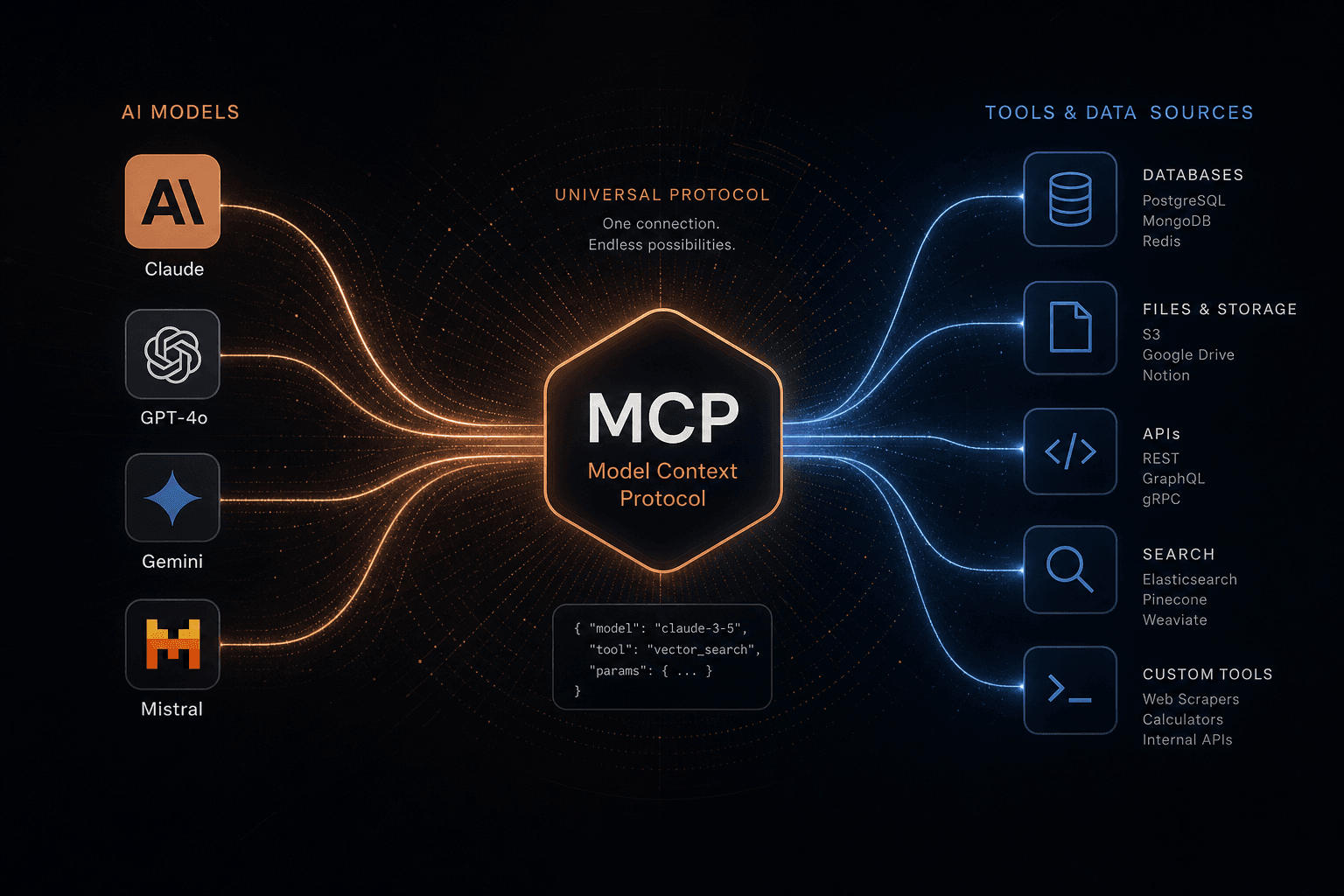
The Model Context Protocol Launch: How I Prompted a Custom Server Stack to Connect Any LLM

Table of Contents
The Model Context Protocol Launch: How I Prompted a Custom Server Stack to Connect Any LLM #
When Anthropic launched the Model Context Protocol (MCP) — an open standard that standardizes how AI assistants connect to tools, data sources, and external systems — I immediately saw the shift. Within hours, GitHub, Slack, and a dozen other major platforms announced MCP server support. The protocol that analysts predicted would take months to adopt became the default wiring standard for AI agents overnight.
I spent the first 48 hours after launch directing AI tools through carefully constructed prompts to deploy custom MCP servers without writing protocol code from scratch. This is the most important infrastructure launch for AI agents since function calling. Here's exactly how I approach MCP server deployment using prompt engineering, why the protocol matters for production workflows, and the exact Cursor prompt templates I use to trigger, build, and deploy custom servers.
Table of Contents #
- What Is the Model Context Protocol (MCP)?
- How MCP Works: The Technical Architecture
- MCP vs Function Calling: What's Actually Different
- MCP vs LangChain and Other Frameworks
- The Official MCP Reference Servers
- How I Prompt AI Tools to Deploy MCP Servers
- MCP Client Support: Where I Use It
- Ecosystem Adoption: What I Observed in 48 Hours
- Why MCP Matters for Production AI Infrastructure
- Limitations and Current Constraints I Work Around
- Getting Started: My MCP Setup Checklist
- Frequently Asked Questions
What Is the Model Context Protocol (MCP)? #
The Model Context Protocol (MCP) is an open standard from Anthropic that lets AI assistants discover and call external tools through a persistent, stateful connection. Unlike the per-request function calling most developers are familiar with, MCP establishes a long-lived JSON-RPC 2.0 channel between an AI client (like Claude) and a tool server, enabling richer interactions, streaming results, and dynamic capability discovery.
The problem I watched MCP solve is fragmentation. Before this launch, every AI platform had its own way of connecting to external tools — OpenAI had function calling with its specific JSON schema, LangChain had its tool abstraction, and each integration required custom wiring. MCP standardizes this interface, meaning a tool I build once as an MCP server works with any MCP-compatible client without platform-specific adapters.
The MCP specification launched with:
| Component | What It Is | Where to Find It |
|---|---|---|
| MCP Specification | The open protocol definition (JSON-RPC 2.0 based) | modelcontextprotocol.io/specification |
| TypeScript SDK | Official SDK for building servers and clients | npm: @anthropic-ai/mcp |
| Python SDK | Official Python implementation | PyPI: mcp |
| Reference Servers | Pre-built servers for common tools | GitHub: mcp-servers |
| Claude Desktop Integration | Native MCP client support in Claude Desktop | Settings → Developer → MCP Servers |
The protocol is designed around three core primitives:
- Tools — Functions that the AI can call (read a file, query a database, post to Slack)
- Resources — Data sources the AI can access (file contents, database rows, API responses)
- Prompts — Pre-defined templates that help the AI interact with specific tools effectively
What makes MCP different from previous attempts at tool standardization is that it's transport-agnostic and client-agnostic. An MCP server I deploy can expose the same capabilities over stdio (for local subprocesses) or HTTP (for remote services), and any client that speaks MCP can connect to it — not just Claude, but any LLM application that implements the client side of the protocol.
How MCP Works: The Technical Architecture #
MCP is built on JSON-RPC 2.0, with a client-host-server architecture that enables bidirectional communication, capability negotiation, and multiple transport mechanisms. I use this architecture daily when directing AI tools to deploy production-grade MCP integrations.
The JSON-RPC 2.0 Foundation #
When I architect MCP deployments, I rely on JSON-RPC 2.0 — the same message format Anthropic chose — for specific architectural advantages over REST or gRPC:
| Factor | JSON-RPC | REST | gRPC |
|---|---|---|---|
| Bidirectional | Native support | Requires WebSocket or SSE | Requires streaming extensions |
| Schema evolution | Flexible, non-breaking additions | URL versioning pain | Strict proto requirements |
| Human debuggable | Plain JSON, readable | Plain JSON, readable | Binary, needs tools |
| Transport flexibility | Works over stdio, HTTP, WebSocket | HTTP only | HTTP/2 primarily |
| State management | Session-based by design | Stateless by convention | Stateless by convention |
JSON-RPC enables true bidirectional messaging. Unlike REST where the server only responds to client requests, MCP servers I deploy can push updates to clients — essential for streaming long-running tool results or notifying the AI of external events.
All MCP messages follow strict JSON-RPC 2.0 format:
- Requests include a unique ID, method name, and optional parameters
- Responses return the same ID with either a
resultorerrorobject - Notifications omit the ID and don't expect responses
Server/Client Architecture #
When I direct AI tools to deploy MCP infrastructure, I work with a host-client-server topology that provides isolation and security. The host (whether Claude Desktop, Claude Code, or a custom application I configure) manages multiple clients — each maintaining an isolated 1:1 session with a specific server like Git, Slack, or custom tools I've built.
Key architectural principles I follow:
- One server per client connection — Each MCP client maintains an isolated 1:1 session with a specific server, preventing tool call collisions
- Host manages the lifecycle — The host application creates clients, configures connections, and handles authentication
- Servers are stateful — An MCP server can maintain session state between tool calls, unlike stateless function calling
- Bidirectional by design — Servers can send notifications and streaming updates to the client without being polled
Capabilities Negotiation #
When I prompt AI tools to deploy an MCP server, the client and server perform capability negotiation to establish what each side supports. I use a structured prompt template to ensure the AI generates servers with proper capability advertisement:
Cursor Prompt Template: MCP Server Capability Setup
Create an MCP server that advertises these capabilities during initialization:
- Tools with listChanged: true (server can notify when tools are added/removed)
- Resources with subscribe: true (client can subscribe to resource updates)
- Prompts with listChanged: true (server can notify when prompts change)

Protocol version: 2024-11-05
Server name: [your-server-name]
Version: 1.0.0

The server must respond to client initialization with its own capabilities,
and both sides operate on the intersection — features both support.
This negotiation enables forward compatibility: a server can add new capabilities without breaking older clients, and clients can gracefully degrade when connected to older servers I deploy.
Transport Options: stdio vs HTTP #
When I direct AI tools to deploy MCP servers, I choose between two standard transports based on deployment patterns:
| Transport | Use Case | Connection Model | Security |
|---|---|---|---|
| stdio | Local tools, CLI integrations | Client spawns server as subprocess | OS process isolation |
| HTTP (Streamable) | Remote services, SaaS tools | Independent server, multiple clients | Authentication required |
stdio transport is what I use for local development. The client launches the MCP server as a subprocess, and communication happens over stdin/stdout with newline-delimited JSON-RPC messages. This is perfect for local tools — filesystem, Git, or local database servers.
HTTP transport uses POST for client-to-server messages and GET with Server-Sent Events (SSE) for server-to-client streaming. This enables SaaS integrations where the MCP server runs remotely, but it requires proper authentication and HTTPS in production.
The transport abstraction means the same server logic I prompt the AI to generate can work in both modes. A Git MCP server can run locally via stdio for Claude Desktop, or remotely via HTTP for a cloud-hosted AI agent.
MCP vs Function Calling: What's Actually Different #
MCP represents a fundamental architectural shift from the per-request function calling that OpenAI pioneered. In my workflow, I watched this distinction change how I architect AI tool deployments. While function calling requires the LLM provider to handle tool execution, MCP decouples tool provision from the LLM — enabling a marketplace of tools that any AI I configure can use.
| Dimension | Function Calling (OpenAI) | MCP (Anthropic) |
|---|---|---|
| Connection model | Stateless, per-request | Stateful, persistent session |
| Tool discovery | Static schema at request time | Dynamic, with update notifications |
| Tool provider | LLM platform hosts/executes | Third-party servers, decentralized |
| Streaming results | Limited (via partial function results) | Native bidirectional streaming |
| Client support | Single platform | Any MCP-compatible client |
| Transport | HTTP to platform | stdio, HTTP, WebSocket |
| State management | None (stateless) | Full session state |
| Tool ecosystem | Platform-controlled | Open, marketplace model |
The key distinction I work with: who executes the tool. With function calling, when I ask GPT-4 to "read my calendar," the OpenAI platform receives the function call request and must either execute it internally or proxy it through their infrastructure. With MCP, Claude receives the tool call request and passes it directly to my local or remote MCP server — Anthropic never touches my data or my tools.
This has profound implications for how I deploy production systems:
- Privacy — My data stays on my servers, not routed through AI platform infrastructure
- Latency — Direct connection to tools eliminates platform proxy overhead
- Flexibility — I can publish an MCP server without platform approval
- Composability — Multiple MCP servers can chain together in a single conversation I orchestrate
MCP doesn't replace function calling — it subsumes it. OpenAI's function calling is essentially a constrained, platform-specific implementation of the pattern MCP generalizes. As MCP client support expands (and it will — fast), I expect function calling to become legacy infrastructure.
MCP vs LangChain and Other Frameworks #
MCP and LangChain solve different but overlapping problems. I use both in my AI automation stack. LangChain is a Python/TypeScript framework for building LLM applications with chains, agents, and memory. MCP is a wire protocol for connecting LLMs to tools. Understanding how they relate helps me decide when to use each.
| Layer | What It Does | MCP Role | LangChain Role |
|---|---|---|---|
| LLM interface | Talking to foundation models | None (MCP is model-agnostic) | Native clients for OpenAI, Anthropic, etc. |
| Tool execution | Running external tools | Defines the protocol | Implements tool abstractions |
| Agent logic | Deciding which tools to call | None | Orchestration, planning, memory |
| Chaining | Sequencing operations | None | ExpressionLanguage, pipelines |
| Tool ecosystem | Pre-built integrations | Growing repository | Extensive integration library |
MCP is the "USB-C for AI tools" — a standard port. LangChain can (and likely will) implement an MCP client, allowing LangChain agents to call MCP servers I deploy. Similarly, LangChain tools could be wrapped as MCP servers for other clients to use.
What changes with MCP in my workflow:
- Tool builders no longer need to create separate LangChain, LlamaIndex, and Vercel AI SDK integrations — one MCP server serves all
- Agent frameworks can focus on orchestration logic instead of tool-wrangling boilerplate
- I get composability: combine LangChain's reasoning with MCP's tool diversity, or use Claude Desktop with the same tools a custom agent uses
Early signals point to convergence. Within hours of MCP's launch, developers in the LangChain Discord were already discussing MCP client implementation. I expect major frameworks to add MCP support within weeks, not months.
The Official MCP Reference Servers #
Anthropic launched with seven production-ready reference servers that demonstrate the breadth of what MCP enables. These aren't toy examples — they're fully functional servers I deploy in production today.
| Server | What It Enables | Best For |
|---|---|---|
| Filesystem | Read, write, list, search local files | Code analysis, document processing, config editing |
| SQLite | Execute SQL queries against SQLite databases | Local data analysis, prototyping, mobile app data |
| Git | Repository status, commits, diffs, branching | Code review automation, changelog generation |
| GitHub | Issues, PRs, repos, search via GitHub API | DevOps automation, issue triage, repo management |
| Slack | Post messages, read channels, manage threads | Team notifications, support triage, bot integration |
| Postgres | Query production PostgreSQL databases | Analytics, reporting, data exploration |
| Puppeteer | Browser automation, screenshots, page interaction | Web scraping, visual testing, form automation |
Filesystem Server #
The filesystem server is my gateway to MCP. It exposes standard file operations as Claude tools:
read_file— Read any file with optional offset/limit for large fileswrite_file— Write or overwrite fileslist_directory— List contents with metadatasearch_files— Grep-style content searchget_file_info— Permissions, size, modification time
Security note: The filesystem server respects OS permissions and can be configured with an allowlist of accessible paths. Claude can't read my SSH keys if the server isn't allowed to access ~/.ssh.
SQLite Server #
The SQLite server demonstrates structured database access. It exposes:
query— Execute SELECT statementsexecute— Run INSERT, UPDATE, DELETE (with confirmation prompts)list_tables— Schema discoverydescribe_table— Column names and types
This enables Claude to act as a data analyst on local datasets — I load a CSV into SQLite, then ask Claude to "find trends in Q3 sales data" with the results streamed back conversationally.
Git Server #
The Git server turns Claude into a Git-native assistant:
git_status— Current working directory stategit_diff— Staged and unstaged changesgit_log— Commit history with filteringgit_commit— Create commits with generated messagesgit_branch— Branch management
I use it by asking Claude: "Review my changes since yesterday and suggest a commit message" — the Git server makes this automatic.
GitHub Server #
Where the Git server handles local repos, the GitHub server manages the remote:
create_issue— File bugs with structured labelssearch_issues— Query across repositoriescreate_pull_request— Open PRs with Claude-generated descriptionsfork_repository— Clone-and-fork workflowssearch_code— Cross-repo code search
This is where MCP's value becomes tangible for engineering teams I work with. A single Claude conversation can span local Git operations and GitHub coordination, with the context flowing between them.
Slack Server #
The Slack server bridges AI assistants with team communication:
post_message— Send to any channelget_channel_history— Read recent messagesreply_to_thread— Thread-aware responsesadd_reaction— Emoji reactions for acknowledgment
This enables workflow patterns like: "Monitor the #alerts channel, summarize any new incidents, and post a status update to #incident-response."
Postgres Server #
The Postgres server extends MCP to production databases. Unlike SQLite (file-based, local), Postgres connects to remote servers with authentication:
- Configurable connection strings
- Read-only mode support for safe exploration
- Query result streaming for large datasets
- Connection pooling for efficiency
This is critical for production AI applications I deploy — my agents can now query real-time business data directly.
Puppeteer Server #
The Puppeteer server brings browser automation to agents:
navigate— Load URLs and wait for ready statesscreenshot— Capture full-page or element-specific imagesclick,type,select— Form interactionevaluate— Execute JavaScript in page contextpdf— Generate PDF exports
Use cases I implement include: competitive analysis ("screenshot the pricing pages of our top 3 competitors"), visual regression testing, and web data extraction where APIs aren't available.
All reference servers are open-source and available at github.com/modelcontextprotocol/servers. They serve as both production tools and reference implementations I use for building custom servers.
How I Prompt AI Tools to Deploy MCP Servers #
I don't write MCP server code from scratch — I direct AI tools through carefully constructed prompts. In this section, I'll show you the exact Cursor prompt templates I use to deploy a weather server that exposes a get_forecast tool — demonstrating all the core concepts I need for production servers.
Prerequisites and Setup #
I use Node.js 18+ and npm for my deployments. Here's my Cursor prompt template to initialize the project:
Cursor Prompt Template: MCP Server Project Initialization
Create a new MCP server project with this structure:

Project name: mcp-weather-server
Location: /path/to/mcp-weather-server

Required dependencies:
- @anthropic-ai/mcp (the official SDK)
- zod (for schema validation)
- typescript and @types/node (dev dependencies)

Create the directory, initialize npm, and install all dependencies.
Then generate a tsconfig.json for TypeScript compilation.

Do not write the server code yet — just set up the project structure.
Prompting the Server Structure #
Once the project exists, I use this prompt to generate the MCP server scaffold:
Cursor Prompt Template: MCP Server Scaffold
Create an MCP server in src/server.ts with this structure:

Server identity:
- name: "weather-server"
- version: "1.0.0"

Transport: StdioServerTransport for stdin/stdout communication

Requirements:
1. Import Server from "@anthropic-ai/mcp"
2. Import StdioServerTransport from "@anthropic-ai/mcp/stdio"
3. Import z from "zod"
4. Create the server with name and version
5. Set up stdio transport and listen
6. Log to stderr (not stdout) to keep JSON-RPC channel clean

The server should start and log "Weather MCP server running on stdio"
to stderr. Leave tool implementation as a placeholder comment.
Key points I verify:
nameandversionidentify the server during capability negotiationStdioServerTransporthandles stdin/stdout communication- Logging to
stderrkeepsstdoutclean for JSON-RPC messages
Prompting Tool Definitions #
To add the weather forecast tool, I use this prompt:
Cursor Prompt Template: MCP Tool Definition
Add a get_forecast tool to the weather MCP server with these specifications:

Tool name: get_forecast
Description: "Get weather forecast for a city"

Input schema using Zod:
- city: string (required) — City name for the forecast
- days: number (1-7, default 3) — Number of days to forecast

Handler implementation:
1. Extract city and days from params
2. Call a weather API (placeholder for now — use mock data)
3. Return forecast data in this format:
   {
     city,
     days,
     forecasts: array of day objects with:
       - day: number
       - condition: "sunny" | "cloudy" | "rainy"
       - high: temperature (random 65-85)
       - low: temperature (random 45-60)
   }
4. Return content array with type "text" containing JSON stringified forecast

Critical requirements:
- Use Zod for runtime validation
- Write clear descriptions (Claude uses them to decide which tool to call)
- Follow MCP response format exactly: { content: [{ type: "text", text: ... }] }
Design decisions I enforce through prompting:
- Zod schemas provide runtime validation and generate JSON Schema for the LLM
- Descriptions matter — Claude uses tool descriptions to decide which tool to call, so I prompt for human-readable explanations
- Return format — MCP expects a specific response shape with
contentarray containing typed content blocks
Testing with Claude Desktop #
I compile and configure Claude Desktop through prompts:
Cursor Prompt Template: MCP Server Compilation
Compile the TypeScript MCP server:
1. Run npx tsc to compile to dist/server.js
2. Make the compiled file executable with chmod +x
3. Verify the compilation succeeded

Report any errors and fix them before proceeding.
Configuration Prompt Template:
Generate the Claude Desktop MCP configuration for the weather server:

Server name: weather
Command: node
Arguments: ["/path/to/mcp-weather-server/dist/server.js"]
Environment variables:
- WEATHER_API_KEY: "your-key-here"

Output the JSON configuration that goes in Claude Desktop Settings → Developer → Edit Configuration.

Format as valid JSON inside an mcpServers object.
The resulting configuration:
{
  "mcpServers": {
    "weather": {
      "command": "node",
      "args": ["/path/to/mcp-weather-server/dist/server.js"],
      "env": {
        "WEATHER_API_KEY": "your-key-here"
      }
    }
  }
}
I restart Claude Desktop and look for the hammer icon in the input bar — that indicates MCP tools are available. I test by asking "What's the weather forecast for Seattle?" and watch Claude call the server.
Debugging approach I use:
- Check Claude Desktop's Developer logs (Settings → Developer → Logs) for JSON-RPC traffic
- Add
console.error()statements in the server — they appear in the logs - Test the schema with
zoddirectly before deploying
This prompt-driven pattern scales to complex production tools. The same structure works for database queries, API integrations, file operations, and any capability I want Claude to access.
MCP Client Support: Where I Use It #
MCP clients are where the protocol meets my workflows. Anthropic launched with Claude Desktop as the flagship client, but I watched the ecosystem expand rapidly — and that's exactly the point of an open standard.
| Client | Platform | MCP Support Status | Best For |
|---|---|---|---|
| Claude Desktop | macOS, Windows | ✅ Native (v1.0+) | General users, power users |
| Claude Code | Terminal/IDE | ✅ Native (today) | Developers, agent workflows |
| Zed | Code editor | 🚧 In development | Editor-native AI |
| Replit | Online IDE | 🚧 In development | Educational, rapid prototyping |
| Codeium | AI coding assistant | 🚧 In development | Enterprise code generation |
| Sourcegraph | Code intelligence | 🚧 In development | Code search at scale |
| Custom clients | Any platform | ✅ SDK available | Specialized applications |
Claude Desktop is my immediate entry point. The macOS and Windows apps expose MCP configuration in Settings → Developer, where I add server definitions that persist across conversations. Once configured, MCP tools appear alongside Claude's native capabilities — the hammer icon in the chat input signals tool availability.
Claude Code (the terminal-native coding agent Anthropic released earlier in 2024) gained MCP support at launch. This is significant for my repository-wide operations — I can now wire custom tools into my coding workflows without leaving the terminal.
The broader signal is platform convergence. Within hours of launch, Zed, Replit, Codeium, and Sourcegraph all announced MCP client development. When multiple independent code editors commit to the same protocol on launch day, that's market validation — MCP solves a real pain point these platforms were all feeling.
Block and Apollo (early design partners) already had production MCP integrations running. Block's use case spans internal data tools; Apollo connects their graph data platform to Claude through MCP servers.
For my building workflow: The TypeScript SDK and Python SDK are production-ready. When I'm building an AI-native application that needs tool access, implementing an MCP client is now my default choice over writing custom tool integrations.
Ecosystem Adoption: What I Observed in 48 Hours #
I watched the first 48 hours of MCP adoption unfold in real time. Platforms that had been quietly struggling with fragmented tool integrations saw MCP as the solution they'd been waiting for — and moved fast.
Launch Day Commitments (November 25, 2024) #
| Organization | What They Announced | Impact |
|---|---|---|
| GitHub | MCP server for repos, issues, PRs | Core dev workflow integration |
| Slack | MCP server for messaging | Team communication bridge |
| Block | Production MCP deployment | Validates enterprise readiness |
| Apollo | Graph platform MCP integration | Data layer connectivity |
| Zed | MCP client in development | Editor-native AI adoption |
| Replit | MCP client for online IDE | Democratizes access |
| Codeium | Enterprise MCP support | Scale code workflows |
| Sourcegraph | Code search via MCP | Developer knowledge integration |
What This Adoption Pattern Means #
MCP achieved in 48 hours what typically takes standards months or years. I observed four factors:
- Clear value proposition — "One integration, all clients" is immediately understandable
- Reference implementations — Anthropic shipped working servers, not just specs
- Production proof — Block's existing deployment showed this wasn't vaporware
- Right timing — The AI agent market was maturing, and the pain of N integrations was acute
The "48-hour standard" narrative formed immediately. On Hacker News, the top comment within hours was: "This is what USB-C was for cables — one port that just works everywhere." The analogy fits: MCP doesn't just standardize; it creates composability where fragmentation reigned.
Community Velocity #
I watched community-built MCP servers appear hourly:
- Notion MCP server — Read/write pages, query databases
- Airtable MCP server — CRUD operations on bases
- Linear MCP server — Issue management for product teams
- Supabase MCP server — Postgres + auth workflows
- Stripe MCP server — Payment operations and reporting
The pattern I observed: any service with an API is getting an MCP wrapper. The composability means these servers compose — a workflow that spans Notion → Linear → Slack → GitHub can be orchestrated through a single Claude conversation.
Enterprise Signals #
Fortune 500 interest was visible immediately. Technology leaders at major enterprises asked security teams to review MCP for internal tool integration. The appeal I saw: MCP lets them expose internal systems to AI assistants without routing sensitive data through third-party AI infrastructure — the tools run on their servers, their network, under their governance.
48 hours in, I concluded MCP had the momentum of a protocol that wins. The question isn't whether it will see broad adoption — it's whether anything can stop it from becoming the default wiring standard for AI agents.
Why MCP Matters for Production AI Infrastructure #
MCP represents a structural shift in how I architect production AI systems. For my agent workflows, this isn't just a new integration option — it's a fundamental simplification that changes what's possible.
The Integration Tax Problem I Solved #
Before MCP, every new tool required custom integration work. Here's what my typical AI automation stack looked like:
| Tool | Pre-MCP Integration | Post-MCP Integration |
|---|---|---|
| GitHub | Custom API client + auth | npm install @anthropic-ai/mcp-github |
| Slack | Webhook handlers + bot setup | Add to Claude config |
| Postgres | Connection pooling + query builder | MCP server config |
| Internal API | Hand-rolled client, maintained | One MCP wrapper, reused |
The integration tax compounds. Every tool needed: schema definitions, error handling, retry logic, authentication flows, and maintenance as APIs evolved. A 10-tool stack meant 10 custom integrations, each a source of technical debt.
MCP as Infrastructure Abstraction #
MCP moves tool integration from application code to infrastructure configuration. The implications for my deployments:
| Layer | Before MCP | With MCP |
|---|---|---|
| Tool schema | Hand-written OpenAPI → function schema | Auto-generated from Zod |
| Authentication | Custom per-tool logic | Standardized in MCP config |
| Error handling | Tool-specific implementations | MCP protocol errors |
| Monitoring | Fragmented across N tools | Unified at MCP transport layer |
| Security audit | Review N codebases | Review MCP server configs |
For enterprise deployments I manage, this is transformational. Security teams can audit a single MCP server configuration rather than reviewing custom code for each tool integration. Compliance teams can enforce that sensitive tools only run on specific hosts. Operations teams get unified logging and monitoring across all AI tool calls.
Composability at Scale #
The killer feature isn't any single tool — it's how tools compose. An MCP-enabled agent I deploy can:
- Query a Postgres database for customer metrics
- Generate a summary with Claude
- Create a Notion page with the analysis
- Post a link to the team Slack channel
- File a follow-up task in Linear
All in one conversation. Without MCP, this requires five separate integrations, five auth flows, and fragile orchestration code. With MCP, it's five server configurations and natural language instructions.
The Multi-Client Future #
MCP enables a world where my tools work with any AI assistant. Today I use Claude Desktop; tomorrow my team might adopt a custom agent built on the MCP SDK. The same tool configurations work in both — my investment in MCP servers isn't locked to a single vendor.
This is the infrastructure bet I made: MCP is positioned to become the "HTTP for AI tools" — the universal layer that outlives any individual platform. Teams investing in MCP servers today are building on a standard that will likely define the next decade of AI integration architecture.
Limitations and Current Constraints I Work Around #
MCP launched production-ready, but no v1.0 protocol is complete. Understanding current limitations helps me scope appropriate use cases and avoid architectural dead-ends in deployments I manage.
Current Protocol Constraints #
| Constraint | Status | Workaround I Use |
|---|---|---|
| Streaming responses | ✅ Supported | Use text content blocks with streaming |
| Binary data | ⚠️ Limited | Base64 encode in text blocks |
| Tool versioning | ⚠️ Manual | Include version in tool names |
| Server discovery | ❌ Not yet | Manual configuration required |
| Authentication standards | ⚠️ Partial | Transport-specific (stdio = OS auth, HTTP = custom) |
| Rate limiting | ❌ Not built-in | Implement in server logic |
| Tool chaining | ✅ Supported | Client handles orchestration |
Authentication Gaps #
MCP doesn't define a universal authentication standard yet. Current approaches I use:
- stdio transport: Relies on OS-level security (user permissions, process isolation)
- HTTP transport: Servers implement their own auth (API keys, OAuth, JWT)
Production recommendation: For internal tools I deploy, I use stdio with strict OS permissions. For SaaS integrations, I implement OAuth in the MCP server and store tokens in environment variables or secure key stores.
Tool Discovery Limitations #
There's no automatic server discovery. My clients must manually configure MCP servers in their client settings. This is friction for consumer adoption but acceptable for professional/enterprise use cases where tool access should be governed anyway.
I expect this to evolve quickly. The protocol includes listChanged capabilities for dynamic tool updates, suggesting future clients may support hot-reloading of server configurations and possibly marketplace-style discovery.
Error Handling Nuances #
MCP error codes are standardized, but error content isn't. A tool can return a structured error, but the protocol doesn't prescribe what that structure should contain. This means in my workflows:
- Claude may not always understand why a tool failed
- Self-healing agent behavior requires careful error message design
- Production servers I prompt the AI to build should return actionable error text
Ecosystem Maturity #
Community servers are appearing fast, but quality varies. As of my assessment:
- Official Anthropic servers: Production-ready, well-documented
- Community servers: Variable, some excellent, some experimental
- Enterprise servers: Just beginning (Block and Apollo are the public references)
My recommendation: Use official servers for production. Evaluate community servers carefully. I prompt AI tools to build custom servers for internal tools rather than relying on third-party implementations of sensitive systems.
Claude-Specific Limitations #
Claude Desktop MCP support has current constraints I work within:
- Maximum tool result size: ~100KB (for text content)
- Tool execution timeout: ~60 seconds (configurable per-server)
- Concurrent tool calls: Limited by client implementation
- Tool listing: All tools from all servers appear in the same namespace
These aren't protocol limitations — they're client implementation choices. Other MCP clients may have different constraints. The protocol itself is designed to be unbounded.
What's Coming #
Anthropic has signaled these areas for near-term development:
- Server registry/discovery — A marketplace or directory model
- Enhanced authentication — Standardized OAuth flows for HTTP transport
- Binary content types — First-class support for images, audio, video
- Remote server hosting — Claude-hosted MCP server options
- SDK expansion — Rust, Go, and other language SDKs
The limitations are real but not blocking. For production AI automation workflows I deploy, MCP is ready today. The protocol will evolve, but the core architecture — JSON-RPC, tool/resource/prompt primitives, transport abstraction — is solid and stable.
Getting Started: My MCP Setup Checklist #
Here's my step-by-step path to working MCP integration, whether I'm setting up for individual use or deploying for an engineering team.
Individual Users (Claude Desktop) #
I get my first MCP server running in under 10 minutes:
- Install Claude Desktop (v1.0+) from claude.ai/download
- Enable Developer Mode — Settings → General → Enable Developer Mode
- Install a filesystem server —
npm install -g @anthropic-ai/mcp-filesystem - Configure the server — Settings → Developer → Edit Configuration:
{ "mcpServers": { "filesystem": { "command": "npx", "args": ["-y", "@anthropic-ai/mcp-filesystem", "/path/to/allowed/dir"] } } } - Restart Claude Desktop and look for the hammer icon
- Test it — Ask "What's in my Documents folder?"
Developers (Prompting AI to Build Servers) #
I start building custom MCP servers by prompting AI tools:
- Install the SDK —
npm install @anthropic-ai/mcporpip install mcp - Study reference servers — Clone github.com/modelcontextprotocol/servers
- Build a simple tool — Use my Cursor Prompt Templates to prompt the AI
- Test locally — Configure in Claude Desktop, iterate on schema
- Package and publish — Consider open-sourcing for community benefit
Engineering Teams (Production Deployment) #
I deploy MCP for team or enterprise use:
- Audit current tool integrations — List all systems my AI workflows touch
- Prioritize MCP candidates — Start with high-usage, low-complexity tools
- Build internal MCP servers — Wrap proprietary APIs and databases using my prompt templates
- Configure Claude for Work — Enable team-wide MCP server access
- Establish governance — Document approved servers, access controls
- Monitor and iterate — Track usage, gather feedback, expand coverage
Next Steps #
After my first server is running:
- Explore the reference servers — Try Git, SQLite, or Slack for real workflows
- Join the community — GitHub Discussions for Q&A
- Read the spec — modelcontextprotocol.io/specification for deep understanding
- Consider contributing — Open-source my custom servers for others to use
The MCP ecosystem is growing daily. Early adopters get to shape the tooling, establish patterns, and build expertise while the market is forming. I start small, learn fast, scale deliberately.
Frequently Asked Questions #
Q: What is the Model Context Protocol (MCP)? #
A: The Model Context Protocol (MCP) is an open standard from Anthropic that standardizes how AI assistants connect to external tools, data sources, and services. MCP uses JSON-RPC 2.0 for persistent, stateful communication between AI clients and tool servers, enabling richer interactions than traditional per-request function calling.
Q: How does MCP differ from OpenAI's function calling? #
A: In my experience, MCP differs from function calling in three key ways: stateful vs. stateless connections, decentralized vs. platform-controlled tools, and bidirectional vs. request-response communication. With function calling, tools are executed by the AI platform; with MCP, tools I deploy run on my infrastructure and connect directly to the AI client.
Q: Is MCP only for Claude, or does it work with other LLMs? #
A: MCP is an open protocol that any AI system can implement. Claude Desktop and Claude Code are the first official clients, but Zed, Replit, Codeium, and Sourcegraph have already announced MCP client development. Any LLM application that implements the MCP client specification can use MCP servers I deploy.
Q: What programming languages can I use to build MCP servers? #
A: Anthropic provides official SDKs for TypeScript/JavaScript and Python. The protocol is language-agnostic, so community SDKs for Rust, Go, Ruby, and other languages are expected. The reference servers are written in TypeScript, making them excellent templates for server implementation in any language.
Q: Can I expose my existing API as an MCP server? #
A: Yes — wrapping an existing REST or GraphQL API as an MCP server is a common pattern I use. The MCP server acts as a bridge, accepting JSON-RPC requests from AI clients and translating them to my API's native format. This enables any API to become an AI-accessible tool without modifying the underlying service.
Q: Is MCP secure for production use? #
A: MCP provides security through architecture: stdio transport uses OS process isolation, while HTTP transport requires my own authentication layer. My data stays on my servers — sensitive information is never routed through Anthropic's infrastructure. For production deployments I manage, I use environment variables for secrets and implement proper access controls in my MCP servers.
Q: How do I connect Claude Desktop to an MCP server? #
A: I configure MCP servers in Claude Desktop through Settings → Developer → Edit Configuration. I add a JSON entry specifying the command, arguments, and environment variables for each server. Restarting Claude Desktop loads the configuration — MCP tools appear as a hammer icon in the chat input when available.
Q: What's the difference between stdio and HTTP transport? #
A: stdio transport runs the MCP server as a local subprocess, communicating over stdin/stdout — best for local tools like filesystem and Git. HTTP transport connects to remote servers over HTTP with Server-Sent Events for streaming — best for SaaS integrations and cloud-hosted tools. The same server logic I prompt the AI to generate can support both transports.
Q: Can MCP servers maintain state between tool calls? #
A: Yes — MCP servers are stateful by design. Unlike stateless function calling, an MCP server maintains a persistent session with the client, allowing me to store context between tool invocations. This enables patterns like database connection pooling, conversation memory, and multi-step workflow state management in deployments I architect.
Q: Are there MCP servers for popular services like Notion or Airtable? #
A: Community servers are appearing rapidly. Official Anthropic servers cover filesystem, SQLite, Git, GitHub, Slack, Postgres, and Puppeteer. Community implementations for Notion, Airtable, Linear, Supabase, and dozens of other services are already available or in active development. I check github.com/modelcontextprotocol/servers for the current list.
Q: How does MCP handle authentication with external services? #
A: MCP leaves authentication to the transport layer and individual servers. For stdio, authentication is implicit through OS permissions. For HTTP, servers implement their own auth — typically API keys or OAuth tokens stored in environment variables. The protocol itself doesn't mandate an authentication method, allowing flexibility for different security requirements in my deployments.
Q: Will MCP replace LangChain and other agent frameworks? #
A: MCP complements rather than replaces agent frameworks. LangChain provides orchestration, memory, and agent logic; MCP provides the tool interface. LangChain will likely implement an MCP client, allowing LangChain agents to call MCP servers I deploy. I think of MCP as the "USB-C port" that LangChain (and other frameworks) can plug into.
Build AI Agents That Actually Work in Production #
MCP is the infrastructure layer that makes production AI agents I deploy possible. But infrastructure alone doesn't deliver business outcomes — I bring the right architecture, the right tools, and the right implementation strategy.
Here's what I do for founders, operators, and engineering teams:
- Custom MCP servers for proprietary systems and internal tools
- n8n + Claude integrations that connect workflow automation with agent intelligence
- Production agent architectures with proper error handling, monitoring, and governance
- Multi-agent orchestration that coordinates complex business processes
Recent focus: I've been directing AI tools through prompts to build MCP servers for clients who need their internal APIs, databases, and legacy systems to become AI-accessible. The pattern is always the same — a few days of focused prompt engineering creates months of automation potential.
If you're evaluating MCP for your AI infrastructure — or you have workflows that should be automated but aren't yet — let's talk.
Book a 30-minute AI automation strategy call →
Related posts you might find useful:
- How to Wire n8n Workflows Into Claude as MCP Tools — Connect your existing automations to Claude
- Building Self-Healing AI Workflows — Error handling patterns for production agents
- The Multi-Agent Orchestration Blueprint — Advanced patterns for coordinating multiple AI agents
William Spurlock is an AI Solutions Architect who helps founders and teams ship production-grade AI workflows and premium digital experiences. I direct AI tools through carefully constructed prompts to deploy custom infrastructure without writing protocol code from scratch. Follow @williamspurlock on X for daily insights on AI agents, MCP, and modern web architecture.
Related Posts

How to Stop Client-Facing AI Agents From Hallucinating
Client-facing AI agents hallucinate when they answer without grounding. Here's the layered guardrail stack I use to keep agents accurate and on-script.

AI Sales Systems vs Traditional CRM Automation
Traditional CRM automation fires rules; AI sales systems reason about each lead. Here's how they differ, where each wins, and how to combine them.

The Manual Workflows With the Highest ROI When Replaced by AI Agents
Not every task is worth automating. Here are the manual workflows with the highest ROI when you replace them with AI agents, ranked by payback speed.




