Claude Code Subagents: How I Prompted a Multi-Agent File Orchestrator

Table of Contents
Claude Code Subagents: How I Prompted a Multi-Agent File Orchestrator #
What Are Claude Code Subagents and Why Do They Matter? #
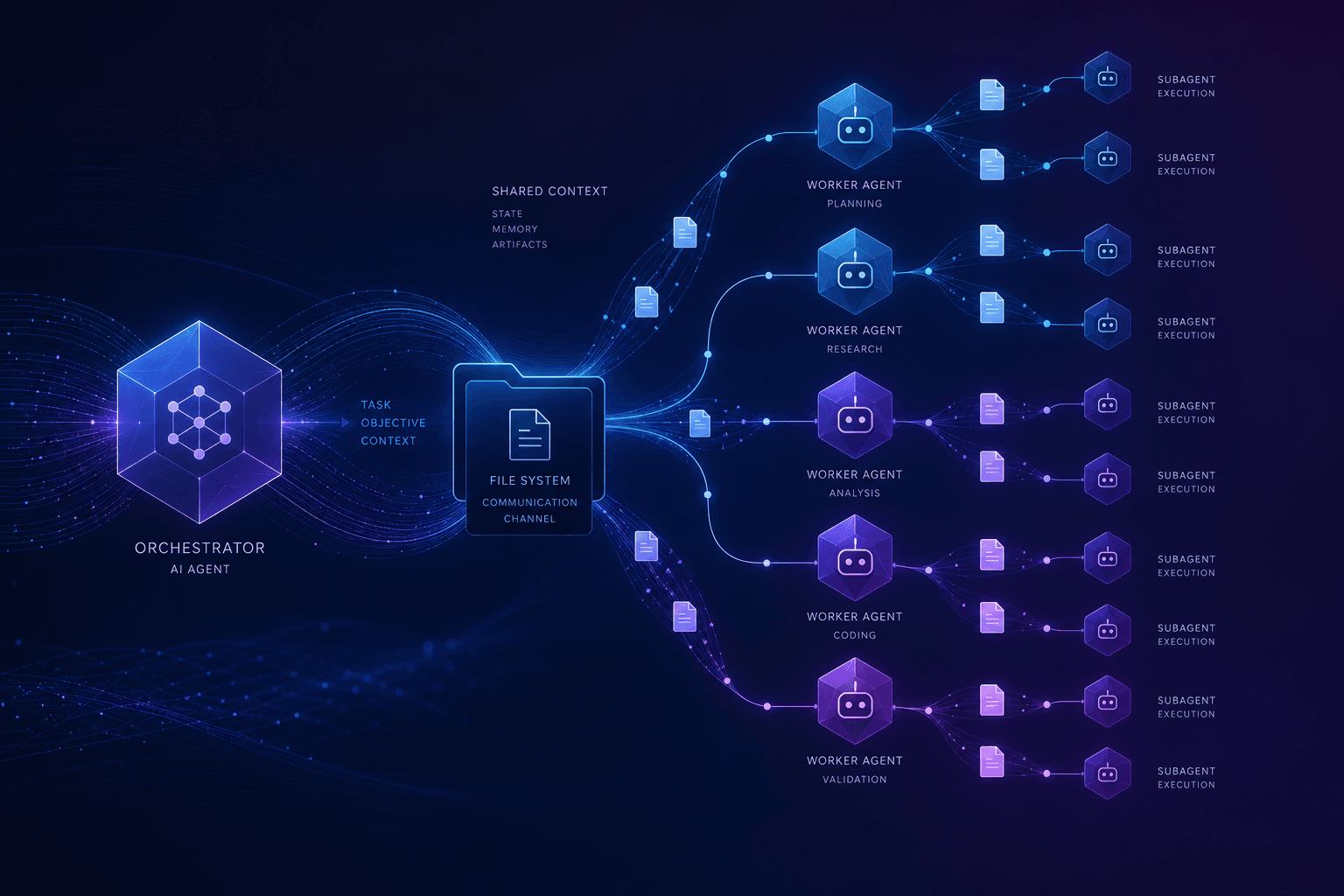
Claude Code subagents are specialized AI workers I spawn through the Task tool—each runs with isolated context and returns a single distilled result. They enable parallel execution of complex workflows—turning sequential bottlenecks into fan-out operations that complete in minutes instead of hours.
Anthropic designed subagents to solve a fundamental limitation in single-session AI coding: context pollution. When one Claude session tries to do everything—read 50 files, analyze architecture, generate tests, and write documentation—the context window fills with intermediate reasoning, tool outputs, and partial results. Performance degrades. I flip this model: I prompt the parent to spawn specialists, give them bounded tasks, receive clean outputs, and synthesize the results.
The Core Mechanism #
Every subagent spawned via the Task tool receives:
| Property | Description | Why It Matters |
|---|---|---|
| Isolated context | Fresh conversation history, no parent pollution | Each worker stays focused on its specific task |
| Custom system prompt | Role-specific instructions (architect, tester, reviewer) | Specialists outperform generalists |
| Bounded scope | Files, directories, or explicit task lists | Prevents scope creep and hallucination |
| Single return value | One string result back to parent | Clean aggregation without noise |
| Parallel execution | Multiple subagents run concurrently | 4-6x speedup on fan-out workloads |
The shift is architectural. Instead of one Claude instance doing linear work, I orchestrate a team—each member focused, each returning structured output, the parent synthesizing the final result. This is how I scale AI coding agents beyond toy demos into production workflows.
Why File-Based Orchestration Wins #
Claude Code's subagent system is file-based by design—and I have Anthropic's official documentation to thank for this architecture. Skills live in .claude/skills/*/SKILL.md files. Hooks trigger on session events. Subagent configurations are YAML frontmatter, not UI toggles. This matters because:
- Version control: My orchestration patterns live in Git, reviewable and revertible
- Team sharing: New team members inherit working subagent templates
- Reproducibility: The same prompt + context produces the same subagent behavior
- Composability: Skills can spawn subagents, which can invoke skills, which can spawn more subagents
If I'm building anything more complex than single-file edits, subagents aren't optional—they're the difference between AI assistance that scales and AI assistance that breaks down under real codebase complexity.
Understanding the Task Tool: The Subagent Spawning Mechanism #
The Task tool is Claude Code's native mechanism for spawning subagents—I don't call it directly; I instruct the parent agent to "use the Task tool" or "spawn subagents," and the orchestration happens automatically. It's the bridge between my strategic intent and parallel execution.
When I tell Claude Code to "use the Task tool to explore the authentication layer and the database layer in parallel," the parent agent:
- Plans the decomposition: Breaks my request into discrete sub-tasks
- Spawns isolated workers: Each subagent starts fresh, with only the context I specify
- Runs parallel execution: All subagents work simultaneously (subject to rate limits)
- Collects results: Receives a single string from each subagent
- Synthesizes output: Aggregates, deduplicates, and presents the unified result
What Subagents Can See (and Can't) #
This isolation is the critical design decision:
| Context Element | Parent Agent | Subagent | Notes |
|---|---|---|---|
| Parent conversation history | Full access | No access | Prevents context pollution |
| System prompt / role | Default | Custom per subagent | Specialist configuration |
| Specified files/paths | All repo | Only what parent sends | Explicit context injection |
| Tool access | Full toolkit | Configurable subset | Security and focus |
| MCP servers | Connected | Inherited | Same tool availability |
The subagent sees only what I explicitly provide: the prompt, any attached files, and the allowed tools. This is intentional. A subagent exploring my auth/ directory doesn't need to know about the UI refactoring discussion happening in the parent session. That separation keeps both contexts clean.
The Single Return Value Constraint #
Each subagent returns one string to the parent—not a stream, not intermediate tool calls, not a conversation transcript. This constraint shapes how I design subagent workflows.
Weak vs. Strong Prompt Patterns:
| Approach | Prompt Structure | Result |
|---|---|---|
| ❌ Weak | "Explore the codebase and tell me what you find" | Unstructured prose, hard to synthesize |
| ✅ Strong | "Analyze /src/auth/** and return a markdown table: | File | Purpose | Dependencies | Risk Level | with one row per file, max 150 words per cell" | Structured data, easy to aggregate |
Strong prompts define the output contract explicitly. The parent can then parse, aggregate, or feed these structured outputs into the next phase of work.
Forked Subagents: The Context-Inheritance Variant #
As of Claude Code's recent builds, there's an experimental variant: forked subagents (enabled via CLAUDE_CODE_FORK_SUBAGENT=1). These subagents inherit the parent's full conversation context while still running in parallel.
I use forked subagents when:
- The subagent needs awareness of ongoing discussion
- I'm iterating on a design and want parallel exploration of alternatives
- Context isolation would require repeating too much background
I use standard isolated subagents when:
- The task is self-contained (code review, test generation)
- I want guaranteed clean context (security audits, dependency analysis)
- I'm fanning out to 4+ workers and need predictable behavior
When to Spawn Subagents vs. Doing Work Inline #
I use subagents when I can decompose work into parallel, bounded tasks with independent outputs; I work inline when tasks are sequential, interdependent, or trivial enough that spawning overhead exceeds benefit. The decision hinges on granularity, dependency chains, and context management needs.
The Subagent Sweet Spot #
Subagents excel at read-heavy, fan-out workloads where the same analysis or transformation applies to multiple targets:
| Scenario | Pattern | Subagent Count | Speedup |
|---|---|---|---|
| Codebase exploration | One agent per module (auth, API, DB, tests) | 4 | 3-4x |
| Test generation | One agent per target file | 5-10 | 5-8x |
| Documentation audit | One agent per directory | 3-6 | 3-5x |
| Migration discovery | One agent per legacy dependency | 3-5 | 3-4x |
| PR review | One agent per changed module | 2-4 | 2-3x |
| Security scanning | One agent per concern (auth, input, deps) | 3 | 2-3x |
These share common traits: bounded scope, identical process, independent execution, and aggregatable output. The parent doesn't need subagent A's result to start subagent B—so they run in parallel.
When Inline Work Wins #
Some tasks are better handled in the parent session:
- Sequential dependencies: "Refactor the API, then update all call sites" requires the API changes before call site analysis can begin
- Trivial scope: A single 50-line function doesn't justify spawning overhead
- Tight feedback loops: Rapid iteration on CSS or copy benefits from immediate, single-context refinement
- Complex state management: When subagents would need constant coordination and handoff
The overhead of spawning isn't zero. Each subagent starts a fresh context, loads specified files, and runs through its own tool loop. For tasks under ~5 minutes of work, the spawn time (30-60 seconds) can represent 10-20% overhead—not worth it for one-off edits.
The Decision Matrix #
My decision flow for subagent deployment:
- Can the work split into 2+ independent parts?
- NO → Work inline
- YES → Subagent candidate
- Is each part > 5 minutes of work?
- NO → Consider inline (overhead ratio)
- YES → Continue evaluating
- Do parts need each other's outputs?
- YES → Sequential inline or chained subagents
- NO → Parallel subagents (optimal case)
- Is each part > 5 minutes of work?
Real example from my workflow: I was adding TypeScript types to a 40-file API surface. Inline would have taken ~2 hours of sequential analysis. Instead:
- Discovery subagent: Mapped all untyped exports (1 minute)
- 4 type-generation subagents: Each handled 10 files in parallel (8 minutes each, concurrent)
- Synthesis: Merged outputs, resolved conflicts (5 minutes)
Total time: 14 minutes vs. 2 hours. The key was recognizing that each file's type generation was independent—no file's types depended on another's output.
The 4-6 Subagent Ceiling #
Practical experience shows 4-6 concurrent subagents is the effective ceiling for most workflows. Beyond this:
- Rate limits: Anthropic's API throttling kicks in
- Synthesis overhead: Aggregating 10+ outputs becomes cognitively expensive
- Diminishing returns: Context switching between too many parallel tracks reduces clarity
If you think you need 15 subagents, reconsider the granularity. Better to batch into 5 groups of 3 files each than spawn 15 single-file agents.
Structuring Prompts for Subagent Success #
Subagent prompts must be self-contained specification documents—unlike parent sessions where context accumulates, subagents start fresh and need complete task definition in a single prompt. Every critical constraint, output format, and success criterion belongs in the initial instruction.
The Three-Part Subagent Prompt Template #
After dozens of production workflows, I've settled on this structure:
Prompt Template Framework:
| Section | Content | Purpose |
|---|---|---|
| ROLE | Architect / Tester / Reviewer / Implementer | Sets specialist mindset |
| SCOPE | Explicit file paths or patterns | Bounds the context window |
| OUTPUT FORMAT | Structured template (table, JSON, code) | Ensures parseable returns |
| CONSTRAINTS | Non-negotiable rules | Prevents unwanted behavior |
| TASK DESCRIPTION | What to do and how | The actual work instruction |
| RETURN SPECIFICATION | Exact deliverable format | Eliminates conversational wrapping |
Real Test-Generation Prompt I Use:
ROLE: Test Generator
SCOPE: src/utils/validation.ts only
OUTPUT FORMAT: Jest test file, TypeScript
CONSTRAINTS:
- Test behavior, not implementation
- Cover happy path + 3 edge cases per function
- No mocks unless external HTTP calls
Analyze the exported functions in src/utils/validation.ts.
For each public function, generate comprehensive Jest tests.Expected output structure: Complete Jest describe/it blocks with assertions.
Return ONLY the complete test file content. No explanations.
The subagent receives the file content as context attachment, knows exactly what to produce, and returns only the test code—no conversational wrapping.
Context Injection Strategies #
Since subagents don't inherit parent context, I must inject what they need:
| Method | Use Case | Syntax |
|---|---|---|
| File attachment | Target code to analyze | Include in prompt: "Analyze src/auth/login.ts" |
| Shell output | Dynamic context (git status, file lists) | shell: git diff --name-only in skill frontmatter |
| Pattern matching | Batch targets | "All files in src/components/**/*.tsx" |
| Reference docs | Style guides, API specs | Paste relevant sections inline |
| Parent synthesis | Previous subagent results | Include aggregated output in follow-up prompts |
For a codebase migration, my discovery subagent might receive:
- The target file list from directory listing commands
- The migration guide (pasted from official documentation)
- The specific pattern to search for (e.g., "all uses of legacy AJAX patterns")
Output Format Contracts #
I define exactly what the subagent returns. Ambiguity causes synthesis failures:
| Approach | Prompt Pattern | Result Quality |
|---|---|---|
| ❌ Weak | "Review this code and tell me issues" | Unstructured prose, hard to parse |
| ✅ Strong | "Return a JSON array where each object has: file (string, relative path), line (number), severity ('high'/'medium'/'low'), issue (max 100 chars), suggestion (specific fix)" | Structured data, machine-parseable |
Strong contracts let the parent parse programmatically (even if the "program" is Claude aggregating natural language). When 4 subagents return identically-structured outputs, the parent can merge tables, deduplicate findings, and present coherent results.
The Context Budget #
Subagents get their own context window (200K tokens for Sonnet 4.6, Opus 4.6 per Anthropic's model documentation). But effective subagent work stays far below that limit. I design prompts that:
- Target <50K tokens of context per subagent (fast startup, quick iteration)
- Include only necessary files (don't attach the entire repo)
- Use file patterns selectively (src/auth/** not src/**)
- Reference, don't repeat ("Follow the patterns in src/styles/tokens.css" not pasting the whole file)
A subagent drowning in context is a slow subagent. The parent should do the coarse filtering; subagents handle the focused work.
Parallel vs. Sequential Orchestration Patterns #
Multi-agent orchestration in Claude Code follows three fundamental patterns: parallel fan-out for independent tasks, map-reduce for batch processing, and dependency chains for sequential workflows. Each pattern matches different problem structures.
Pattern 1: Parallel Fan-Out (The Bread-and-Butter) #
The simplest and most common pattern—spawn N subagents simultaneously to work on N independent targets:
Pattern 1: Parallel Fan-Out Structure
| Phase | Action | Subagents |
|---|---|---|
| Spawn | Parent launches parallel workers | Subagent A (Auth), B (API), C (DB), D (Tests) |
| Execute | All subagents work concurrently | Each analyzes its assigned domain |
| Synthesize | Parent aggregates results | Unified report across all domains |
This is my default for codebase exploration. Each subagent returns a structured summary of its domain, and the parent builds the architectural overview from their collective outputs.
Pattern 2: Map-Reduce (Batch Processing) #
For processing many similar items (test generation, documentation updates), use the map-reduce pattern:
Pattern 2: Map-Reduce Structure
Map Phase (Parallel):
- Subagent 1 processes target 1
- Subagent 2 processes target 2
- ... through Subagent N
Reduce Phase (Sequential):
- Parent deduplicates findings across all outputs
- Parent merges code changes
- Parent generates unified summary report
The key is identical subagent prompts with different target contexts. Each "mapper" applies the same analysis to its assigned slice; the parent "reducer" handles integration.
Pattern 3: Dependency Chain (Sequential Pipeline) #
When step N requires output from step N-1, chain subagents sequentially:
Pattern 3: Dependency Chain Structure
| Step | Subagent | Input | Output |
|---|---|---|---|
| 1 | Discovery | Raw codebase | API endpoint list |
| 2 | Design | Endpoint list | TypeScript interfaces |
| 3 | Implementation | Interface definitions | Changed files |
| 4 | Verification | Changed files | Pass/fail report |
Each step feeds the next. This is slower than parallel execution but necessary when work productively depends on previous outputs. I use this for migrations where the architecture must be understood before any refactoring happens.
Pattern 4: Hybrid Tree (Real-World Complexity) #
Production workflows often combine patterns:
Pattern 4: Hybrid Tree Structure
| Phase | Pattern | Subagents | Dependencies |
|---|---|---|---|
| 1: Discovery | Parallel | A (Auth layer), B (Data layer) | None |
| Synthesis | Architecture overview | A + B outputs | |
| 2: Design | Parallel | C (Auth migration), D (Data migration) | Phase 1 synthesis |
| Synthesis | Migration plan | C + D outputs | |
| 3: Implementation | Chained | E (Migrate auth), F (Migrate data) | Phase 2 outputs |
The parent acts as the orchestrator, deciding when to fan out, when to sequence, and when to synthesize intermediate results.
Aggregation Strategies #
How the parent handles subagent outputs:
| Output Type | Aggregation Approach |
|---|---|
| Structured data (JSON, tables) | Parse and merge programmatically |
| Code | Concatenate, resolve conflicts, deduplicate imports |
| Findings/Issues | Deduplicate by file+line, severity sort |
| Analysis text | Thematic grouping, remove redundancy |
| Binary pass/fail | Boolean AND (all must pass) |
The parent prompt should specify: "After receiving all subagent outputs, merge them into a single markdown report with sections for Architecture, Risks, and Recommendations." This ensures consistent final output regardless of how many subagents contributed.
Real Workflow Example 1: Parallel Codebase Exploration #
Parallel codebase exploration uses 4-6 subagents to simultaneously map different architectural layers, producing a comprehensive system overview in minutes instead of hours. This is my starting point for any unfamiliar codebase.
The Scenario #
I recently joined a mid-sized SaaS project with 80K lines of TypeScript. The task: add OAuth2 provider support. First, I needed to understand the existing auth system, API patterns, and data models—work that would take hours of manual exploration.
The Subagent Configuration #
I instructed Claude Code: "Use the Task tool to spawn 4 subagents in parallel. Each should explore a different layer of the codebase and return structured findings."
| Subagent | Role | Scope | Deliverable |
|---|---|---|---|
| Auth Explorer | Security Analyst | src/auth/, src/middleware/auth* |
Auth patterns, session strategy, middleware chain |
| API Explorer | Backend Engineer | src/routes/, src/controllers/ |
Route structure, handler patterns, validation approach |
| Data Explorer | Database Architect | src/models/, src/db/, migration files |
Schema design, ORM usage, relationship patterns |
| Test Explorer | QA Engineer | src/tests/, *.test.ts, *.spec.ts |
Testing strategy, coverage patterns, mock approach |
The Parent Prompt #
Spawn 4 subagents to explore this codebase simultaneously:

1. Auth Explorer: Analyze src/auth/ and authentication middleware.
   Return: Table of | File | Purpose | Key Functions | Dependencies |

2. API Explorer: Analyze src/routes/ and request handlers.
   Return: Table of | Route File | Endpoints | Middleware Stack | Validation |

3. Data Explorer: Analyze src/models/ and database layer.
   Return: Table of | Model | Fields | Relations | Key Queries |

4. Test Explorer: Analyze the test suite structure.
   Return: Table of | Test File | What's Tested | Framework | Coverage |

After all return, synthesize:
- Architecture summary (3 paragraphs)
- Key integration points for OAuth2
- Risk areas for external auth changes
- Recommended implementation approach
Subagent Execution #
Each subagent ran for approximately 3-4 minutes, reading its assigned directories and producing structured output. Because they ran in parallel, the total wall-clock time was ~4 minutes (the slowest subagent), not 12-16 minutes sequential.
Sample output from the Auth Explorer:
| File | Purpose | Key Functions | Dependencies |
|------|---------|---------------|--------------|
| src/auth/jwt.ts | JWT token generation/validation | signToken, verifyToken, refreshToken | jsonwebtoken, bcrypt |
| src/auth/session.ts | Session management | createSession, destroySession, getSession | redis, uuid |
| src/middleware/auth.ts | Auth middleware | requireAuth, optionalAuth, extractToken | jwt.ts, session.ts |
| src/auth/oauth.ts | OAuth1.0 provider | oauth1Handshake, oauth1Callback | passport-oauth1 |
Parent Synthesis #
Claude Code received 4 structured tables, then synthesized the architectural overview:
Architecture Summary: The application uses a JWT + Redis session hybrid. JWT handles short-lived API tokens; Redis manages session state for browser flows. OAuth1.0 is already implemented but legacy—only used for Twitter integration. The middleware chain (
requireAuth→extractToken→verifyToken) is well-structured for adding OAuth2 alongside.Key Integration Points:
- Extend
src/auth/oauth.tswith OAuth2 strategy- Add provider configuration to existing auth middleware
- Database: user table needs
oauth_provider,oauth_idcolumnsRisk Areas: The Redis session layer isn't abstracted—direct Redis calls in
session.ts. OAuth2 refresh token storage will need careful handling here.
Time Comparison #
| Approach | Time | Quality |
|---|---|---|
| Manual exploration | 2-3 hours | Incomplete, fatigue-affected |
| Single Claude session | 30-45 minutes | Sequential, context pollution |
| 4 parallel subagents | 4 minutes | Comprehensive, structured |
This is why subagents matter. Not incremental improvement—order of magnitude change in how quickly you can understand and work with complex systems.
Real Workflow Example 2: Test Generation at Scale #
Test generation at scale uses specialized subagent roles—generator, runner, and quality reviewer—to produce comprehensive test coverage faster than manual writing, with built-in validation. This pattern turns the tedious work of backfilling tests into a structured pipeline.
The Scenario #
A client project had 40 utility functions in src/utils/ with minimal test coverage. The task: add comprehensive Jest tests for all public functions. Manual approach: 6-8 hours of writing tests. Subagent approach: 20 minutes of orchestration.
The Pipeline Architecture #
Parent Agent (Orchestrator - Opus 4.6)
├─ Phase 1: Discovery (inline)
│  └─ Identify all public functions needing tests
│
├─ Phase 2: Parallel Generation
│  ├─ TestGen Agent 1: src/utils/validation.ts
│  ├─ TestGen Agent 2: src/utils/formatting.ts
│  ├─ TestGen Agent 3: src/utils/api-helpers.ts
│  ├─ TestGen Agent 4: src/utils/date-utils.ts
│  └─ TestGen Agent 5: src/utils/arrays.ts
│
├─ Phase 3: Verification
│  └─ TestRunner Agent: Execute all new tests
│
└─ Phase 4: Quality Review
   └─ QualityReviewer Agent: Evaluate test quality
Phase 1: Discovery (Inline) #
Before spawning generators, I need the target list. A quick inline prompt to Claude Code:
List all files in src/utils/ that export functions and don't have corresponding .test.ts files.
Return: Array of file paths that need test coverage.
Result: 5 files identified. Each will get its own test-generation subagent.
Phase 2: Test Generation Subagents #
Each generator subagent receives an identical prompt structure with a different target file:
Test Generation Prompt Template:
ROLE: Test Generator
MODEL: Sonnet 4.6 (fast, cost-effective for generation) #Generate Jest tests for [TARGET_FILE].
Context:
- Framework: Jest with ts-jest
- Style: Behavior-focused, minimal mocking
- Coverage: Happy path + 3 edge cases per function
Process:
- Read the target file and identify all exported functions
- For each function, write comprehensive tests covering normal input, boundary conditions, error cases, and empty/null/undefined handling
- Follow existing test patterns in src/utils/string.test.ts
Return ONLY the complete test file content. No explanatory text.
All 5 subagents run simultaneously. Each completes in 2-3 minutes, analyzing its assigned file and producing test code.
Phase 3: Test Runner Subagent #
After receiving 5 test files, the parent aggregates them and spawns a verification subagent:
Test Runner Prompt Template:
ROLE: Test Runner #
The following test files have been created: [LIST_OF_FILES]
Execute these tests and return a structured report:
Test File Tests Run Passed Failed Failure Details For any failures, include: test name, error message, and suggested fix.
The runner subagent uses the shell tool to execute tests and parses the output.
Phase 4: Quality Reviewer Subagent #
Finally, a quality reviewer evaluates the generated tests against best practices:
Quality Reviewer Prompt Template:
ROLE: Test Quality Reviewer #
Review the generated tests for:
- Behavior focus (not implementation details)
- Edge case coverage (not just happy path)
- Assertion quality (specific, not generic)
- Avoidance of unnecessary mocks
Return a prioritized list of improvements with columns: Priority (high/medium/low), File, Issue, Suggested Change.
Pipeline Results #
| Metric | Value |
|---|---|
| Total time | 18 minutes |
| Test files generated | 5 |
| Total test cases | 127 |
| Pass rate (initial) | 94% (120/127) |
| Issues flagged by reviewer | 8 |
| Final pass rate | 100% |
Cost Analysis #
Using Sonnet 4.6 ($3/M input, $15/M output) for generators and Opus 4.6 ($5/M input, $25/M output) for orchestration:
| Phase | Model | Approximate Tokens | Cost |
|---|---|---|---|
| Generation (×5) | Sonnet 4.6 | ~150K input, 50K output | ~$1.20 |
| Runner | Sonnet 4.6 | ~50K input, 10K output | ~$0.30 |
| Reviewer | Sonnet 4.6 | ~100K input, 20K output | ~$0.60 |
| Orchestration | Opus 4.6 | ~80K context | ~$0.50 |
| Total | ~$2.60 |
Compare to manual developer time at $150/hour: ~$2.60 vs. $900+. Even accounting for review and refinement, the economics are decisive.
When This Pattern Breaks #
This pipeline assumes:
- Testable, pure functions (not complex side effects)
- Existing test patterns to follow
- Clear function boundaries
For tightly-coupled legacy code with heavy mocking requirements, the generators may struggle. In those cases, I use the discovery → design → implement chain instead of pure parallel generation.
Real Workflow Example 3: Codebase Migration with Phased Rollout #
Complex codebase migrations use a phased pipeline—Discovery, Architecture, Implementation, and Verification—each phase staffed by specialized subagents with explicit handoffs. This pattern de-risks high-stakes refactoring by separating analysis from action.
The Scenario #
Migrating a React codebase from JavaScript to TypeScript across 60+ components. High risk: runtime errors from incorrect type assumptions. High reward: IDE autocomplete, catch bugs at build time. This is exactly the kind of work where blind automation fails and careful orchestration succeeds.
The Four-Phase Pipeline #
| Phase | Pattern | Subagents | Output |
|---|---|---|---|
| 1. Discovery | Parallel | A: Component mapper, B: API contract mapper, C: Utility mapper, D: Coverage assessor | Migration inventory |
| 2. Architecture | Sequential | E: Type strategy designer | Type definitions + migration plan |
| 3. Implementation | Parallel batches | Batch 1: Utilities (5 agents), Batch 2: Components (8 agents), Batch 3: Containers (4 agents) | Typed file batches |
| 4. Verification | Parallel | F: Type checker, G: Test validator, H: Smoke tester | Pass/fail report with fixes |
Phase 1: Discovery Subagents #
Four parallel discovery agents map the codebase:
Discovery Agent A (Component Mapper) Prompt:
Analyze src/components/**/*.jsx. For each component extract: file path, props received with usage patterns, state shape, children rendered, and API calls made. Return a structured list of component definitions.
Discovery Agent B (API Contract Mapper) Prompt:
Identify all API endpoints called from the frontend. For each endpoint extract: URL pattern, request method, request body shape from call sites, and response usage patterns. Return a table of API contracts with inferred TypeScript interfaces.
Discovery Agent C (Utility Mapper) Prompt:
Catalog all utility functions in src/utils/ and src/helpers/. For each function extract: signature (params, return), usage patterns across codebase, and side effects if any. Return a table of functions needing type definitions.
Discovery Agent D (Coverage Assessor) Prompt:
Evaluate current test coverage for components, utilities, and integration tests. Identify which files have insufficient tests for safe refactoring. Return a risk-ranked list of files needing test backfill before migration.
All four run simultaneously. Total Phase 1 time: ~6 minutes.
Phase 2: Architecture Subagent #
The architect receives the synthesis of all discovery outputs:
Architecture Subagent Prompt:
ROLE: TypeScript Migration Architect
MODEL: Opus 4.6 (high reasoning requirement) #Based on discovery data from Phase 1 (component inventory, API contracts, utility functions, high-risk files), design a TypeScript migration strategy covering: core type definitions with shared interfaces, migration order from low-risk to high-risk files, any-type strategy where strict types break, and test requirements per phase.
Return: core type definitions file content, migration phases table with dependencies, and risk mitigation notes.
This is sequential because the architecture depends on complete discovery. The architect produces the migration plan that implementation subagents will follow.
Phase 3: Implementation Subagents #
Implementation happens in parallel batches, each subagent handling a small file set:
Implementation Agent (Batch 1 - Utilities) Prompt:
ROLE: TypeScript Implementer
MODEL: Sonnet 4.6 #Migrate the assigned utility files from JavaScript to TypeScript.
Requirements:
- Strict types (no implicit any)
- Handle null/undefined explicitly
- Export type definitions where used by components
- Add JSDoc for complex functions
Return: Complete file contents for all assigned files.
17 implementation subagents run in 3 batches (respecting the 4-6 concurrent ceiling). Each batch completes in ~5 minutes.
Phase 4: Verification Subagents #
After implementation, three verification agents validate the work:
Type Checker Prompt:
ROLE: Type Checker #
Run the TypeScript compiler with no-emit flag on the migrated codebase. Report: total type errors, errors by file, categorized by severity (blocking vs. warning). For each blocking error, suggest a specific fix.
Test Validator Prompt:
ROLE: Test Validator #
Run the full test suite. Report: tests passing/failing, any tests broken by type changes, and specific failures with diagnostic information.
Smoke Tester Prompt:
ROLE: Smoke Tester #
Check for common JavaScript-to-TypeScript migration issues: missing null checks that were implicit in JS, incorrect any types masking real issues, broken import statements, and missing type exports. Return a pre-deployment checklist status.
Pipeline Results #
| Phase | Subagents | Time | Output |
|---|---|---|---|
| 1. Discovery | 4 parallel | 6 min | Complete codebase inventory |
| 2. Architecture | 1 sequential | 4 min | Type strategy + migration plan |
| 3. Implementation | 17 in 3 batches | 18 min | 60+ files migrated |
| 4. Verification | 3 parallel | 5 min | Pass/fail with fix list |
| Total | 25 | 33 min | Production-ready TypeScript |
Manual estimate for this scope: 2-3 days. Subagent pipeline: 33 minutes.
Risk Mitigation Built In #
This pipeline specifically addresses migration risks:
- Unknown scope: Discovery phase maps everything before any changes
- Breaking changes: Architecture phase designs backward-compatible types
- Silent failures: Type checker + test validator catch issues immediately
- Knowledge loss: All decisions documented in structured subagent outputs
The phased approach means I can pause, review, and adjust between phases. If the architecture subagent proposes a risky strategy, I iterate on the plan before implementation subagents execute.
Skills and Hooks: Templating Subagent Behavior #
Skills are reusable prompt templates I store as SKILL.md files that standardize subagent spawning patterns—turning complex orchestration instructions into simple slash commands like /test-gen or /migrate. They encode best practices so I don't rewrite prompts.
Skill File Structure #
Skills live in three scopes:
| Scope | Path | Use Case |
|---|---|---|
| Personal | ~/.claude/skills/<name>/SKILL.md |
My cross-project workflows |
| Project | .claude/skills/<name>/SKILL.md |
Team-shared patterns |
| Plugin | <plugin>/skills/<name>/SKILL.md |
Distributed capabilities |
A Minimal Skill File Template:
name: test-gen
description: "Generate comprehensive tests for target files using parallel subagents"
user-invocable: true
allowed-tools: [edit, shell, Task]
context:
- shell: dynamic file list command #I am a test generation orchestrator. When invoked with
/test-gen, I follow this process:
- Identify target files needing tests (use shell context)
- Spawn one TestGenerator subagent per target file (max 5 concurrent)
- After all return, spawn TestRunner to verify
- Spawn QualityReviewer to assess coverage
- Present final report with test files and recommendations
Subagent prompt template (TestGenerator): I prompt the subagent with ROLE: Test Generator, target file specification, and expected output format.
The YAML frontmatter defines the skill metadata; the body defines the orchestration logic.
Key Frontmatter Fields #
| Field | Purpose | Example |
|---|---|---|
name |
Slash command trigger | test-gen → /test-gen |
description |
Help text shown in CLI | "Generate tests..." |
user-invocable |
Appears as slash command? | true or false |
allowed-tools |
Restricts tool access | [edit, shell, Task] |
context |
Pre-loads context | File paths, shell commands |
agent |
Subagent configuration | Model selection, timeouts |
Context Injection in Skills #
The context block automatically injects dynamic data. A review skill can automatically receive the files changed in the last commit, the project style guide, and the current test suite status—all before I type a single character.
Context Injection Methods:
| Method | What It Does | Use Case |
|---|---|---|
| repo: path | Loads file contents from path | Pre-loading source directories |
| shell: command | Runs command, captures output | Dynamic file lists from git status |
| file: path | Loads specific file | Style guides, configuration files |
A Production Skill: /batch #
The built-in /batch skill demonstrates sophisticated subagent orchestration. I use it for large-scale mechanical changes—migrating imports, renaming conventions, updating API calls—by spawning isolated subagents in git worktrees.
/batch Skill Template:
name: batch
description: "Apply a pattern-based change across many files using parallel agents"
user-invocable: true
allowed-tools: [edit, shell, Task]
context:
- fork: true #Apply the user's described pattern across multiple targets.
Process: identify matching files, create work units, spawn subagents in separate git worktrees, aggregate results, offer to apply changes or open PRs.
Use worktrees to isolate changes and enable parallel testing.
Each subagent works independently; failures don't contaminate other units.
Custom Subagent Skill Template #
Here's a skill I use for architecture reviews:
/arch-review Skill Template:
name: arch-review
description: "Multi-agent architecture review with specialized reviewers"
user-invocable: true
allowed-tools: [read, Task]
context:
- repo: ./src #Perform a comprehensive architecture review using parallel specialist subagents.
Spawn 4 reviewers simultaneously: PatternReviewer (design patterns, consistency), SecurityReviewer (auth, input validation, secrets), PerformanceReviewer (N+1 queries, renders, bundle size), MaintainabilityReviewer (test coverage, documentation, complexity).
Each reviewer returns structured findings. After all return, synthesize into executive summary, prioritized fix list, and positive findings.
Usage: /arch-review ./src/features/checkout — and four specialists analyze simultaneously.
Hooks: Session-Level Automation #
While skills are user-invoked, hooks respond to session events. The Context Mode and ClaudeMem plugins demonstrate this:
| Hook Type | Trigger | Action |
|---|---|---|
| Session start | claude launches |
Load relevant memories, recent context |
| File edit | After any edit |
Log change to memory, update documentation |
| Command complete | Shell command finishes | Capture output for future context |
| Session end | User exits | Summarize session, write to knowledge base |
These are implemented as plugins, but the same YAML configuration approach applies. My .claude/hooks/ directory can define automated behaviors that run without explicit invocation.
Skill + Subagent Synergy #
The real power comes from skills that spawn subagents which themselves use skills:
Skill Nesting Example: /migrate-to-ts
| Level | Action | Skill Used |
|---|---|---|
| 1 | Discovery subagents spawned | /discover internally |
| 2 | Findings synthesized | Parent orchestration |
| 3 | Architect subagent spawned | Direct prompting |
| 4 | Implementation subagents spawned | /ts-convert internally |
| 5 | Verification subagents spawned | Direct prompting |
This composability means complex workflows become repeatable, shareable, and maintainable. The once-off prompt engineering effort becomes a reusable organizational capability.
Model Selection: Opus 4.6 vs. Sonnet 4.6 for Orchestration #
Strategic model selection—Opus 4.6 for orchestration and synthesis, Sonnet 4.6 for subagent workers—delivers 40% cost savings while maintaining output quality. The pricing differential makes this tiering economically essential at scale.
Current Pricing (May 2026) #
| Model | Input (per 1M tokens) | Output (per 1M tokens) | Context Window |
|---|---|---|---|
| Opus 4.6 | $5 | $25 | 1M tokens |
| Sonnet 4.6 | $3 | $15 | 1M tokens |
| Haiku 4.5 | $1 | $5 | 512K tokens |
Sonnet 4.6 is 40% cheaper on both input and output. For a typical subagent workload (2M input + 0.5M output monthly):
- All Opus 4.6: $22.50
- All Sonnet 4.6: $13.50
- Hybrid (Opus parent, Sonnet workers): ~$15.00
The hybrid approach saves ~33% versus all-Opus while preserving quality at critical decision points.
Role-Based Model Assignment #
| Role | Recommended Model | Reasoning |
|---|---|---|
| Orchestrator / Parent | Opus 4.6 | Complex planning, synthesis, error recovery |
| Discovery / Analysis | Sonnet 4.6 | Pattern matching, structured output generation |
| Implementation | Sonnet 4.6 | Code generation, mechanical transformations |
| Verification | Sonnet 4.6 | Test execution, linting, type checking |
| Bulk scanning | Haiku 4.5 | File listing, simple extraction, large-scale search |
| Quality Review | Opus 4.6 | Nuanced judgment, edge case identification |
When Opus 4.6 Is Worth the Premium #
I use Opus 4.6 when the cost of failure exceeds the cost of the model:
- Architecture decisions: Designing type systems, API contracts, database schemas
- Complex synthesis: Merging conflicting subagent outputs, resolving ambiguous requirements
- Edge case analysis: Security reviews, compliance checks, safety-critical code
- Error recovery: When subagents fail and the parent must diagnose and replan
- Refinement loops: Multi-step iterations where quality compounds
When Sonnet 4.6 Is Sufficient #
Sonnet 4.6 handles the majority of subagent work:
- Code exploration: Reading files, summarizing patterns, identifying symbols
- Mechanical transformations: TypeScript conversion, import updates, formatting
- Test generation: Writing test cases, assertions, mock setups
- Documentation: Generating comments, README updates, changelogs
- Verification: Running tests, checking types, linting
Real-world benchmarks show Sonnet 4.6 within 1-5% of Opus 4.6 on coding tasks—at 60% of the cost.
The Haiku 4.5 Tier: Bulk Operations #
For truly large-scale, low-complexity work, Haiku 4.5 offers 80% cost reduction:
Haiku 4.5 Prompt Example:
ROLE: File Cataloger
MODEL: Haiku 4.5 #List all JavaScript files in src/ that import from 'lodash' and don't have corresponding TypeScript files. Return: simple list of file paths, one per line.
This runs at $1/M input tokens—practical for scanning 500K+ token codebases.
Practical Tiering Example #
A 25-subagent migration workflow:
| Phase | Subagents | Model | Tokens | Cost |
|---|---|---|---|---|
| 1. Discovery | 4 | Sonnet 4.6 | 80K in, 20K out | $0.54 |
| 2. Architecture | 1 | Opus 4.6 | 50K in, 15K out | $0.62 |
| 3. Implementation | 17 | Sonnet 4.6 | 400K in, 150K out | $3.45 |
| 4. Quality Review | 1 | Opus 4.6 | 100K in, 30K out | $1.25 |
| 5. Verification | 2 | Sonnet 4.6 | 60K in, 10K out | $0.33 |
| Parent orchestration | 1 | Opus 4.6 | 200K context | ~$1.00 |
| Total | 26 | Mixed | ~$7.19 |
Same workflow with all Opus 4.6: ~$12.00. Same with all Sonnet 4.6: ~$5.50 (but lower quality at critical architecture phase). The mixed approach hits the sweet spot.
Claude Code Subscription vs. API #
For interactive Claude Code usage:
| Plan | Monthly | Best For |
|---|---|---|
| Pro ($20) | ~44K tokens/5hr | Light daily use |
| Max 5x ($100) | ~88K tokens/5hr | Regular professional use |
| Max 20x ($200) | ~220K tokens/5hr | Heavy all-day coding |
Heavy subagent workflows may exceed subscription limits. For batch operations (test generation across 100 files, large migrations), the Anthropic API with direct model selection often proves more economical and predictable.
Recommendation #
I start with Sonnet 4.6 for everything. When I hit quality issues—architecture decisions going wrong, synthesis producing garbage, edge cases missed—I upgrade specific roles to Opus 4.6. I measure the difference. Most workflows run fine on Sonnet; the heavy reasoning moments justify the Opus premium.
Best Practices and Anti-Patterns #
Effective subagent orchestration follows proven patterns—4-6 concurrent ceiling, explicit output contracts, and parent synthesis—while avoiding common traps like context bloat, unclear handoffs, and excessive nesting. I learned these from production failures.
The 4-6 Subagent Ceiling #
Never spawn more than 4-6 subagents concurrently. Beyond this threshold:
- Rate limiting: Anthropic's API throttles aggressive parallel usage
- Synthesis burden: Aggregating 10+ diverse outputs becomes cognitively expensive for the parent
- Context loss: The parent loses track of which subagent handled which scope
- Diminishing returns: Wall-clock time stops improving; overhead increases
If my task needs 15 subagents, I batch them:
Batching Pattern for 15 Subagents:
| Round | Subagents | Action |
|---|---|---|
| 1 | 1-5 | Run parallel → Synthesize |
| 2 | 6-10 | Run parallel → Synthesize |
| 3 | 11-15 | Run parallel → Final synthesis |
Three rounds of 5 subagents each beats 15 simultaneous workers.
Explicit Output Contracts (Mandated) #
Every subagent prompt must define output format explicitly. Ambiguous contracts cause synthesis failures:
| Quality | Prompt Pattern | Outcome |
|---|---|---|
| ❌ BAD | "Review the code and tell me what you think" | Unstructured, unparseable |
| ✅ GOOD | "Return markdown table: File, Line, Severity (critical/warning/note), Issue, Fix. Max 100 chars per cell." | Machine-parseable, structured |
The parent can parse the good output programmatically. The bad output requires another round of prompting to extract usable information.
The Parent Synthesizes, Subagents Execute #
The most common anti-pattern: pushing synthesis work to subagents.
| Pattern | Parent Prompt | Subagent Returns | Result |
|---|---|---|---|
| ❌ ANTI-PATTERN | "Spawn subagents to explore and agree on architecture" | A: "Use pattern X", B: "Use pattern Y" | Conflicting opinions, confused parent |
| ✅ CORRECT | "Spawn subagents to analyze modules. Return findings, not opinions." | A: "12 uses of X, 3 of Y", B: "8 uses of X, 7 of Y" | Parent synthesizes: "20 uses of X vs 10 of Y, recommend X" |
Data flows up; decisions happen at the parent level.
Context Budget Management #
I keep subagent context under 50K tokens per agent:
| Approach | Prompt | Result |
|---|---|---|
| ❌ BLOATED | "Here's the entire repo, find the auth patterns" | Context overload, slow execution |
| ✅ FOCUSED | "Analyze /src/auth/ (15 files, ~8K tokens) for login/logout patterns" | Fast, targeted results |
The parent should do coarse-grained filtering ("these 5 files"), subagents do fine-grained analysis.
Tool Permission Hygiene #
I restrict subagent tools to what's needed:
Tool Permission Patterns by Role:
| Role | Tools Allowed | Tools Excluded | Why |
|---|---|---|---|
| Discovery | read | edit, shell | Read-only analysis prevents accidents |
| Implementation | read, edit | shell | Can modify files but not run commands |
| Verification | read, shell | edit | Can run tests but not modify code |
Default to minimal permissions. I expand when the subagent role clearly requires it.
Common Anti-Patterns #
| Anti-Pattern | Why It Fails | The Fix |
|---|---|---|
| Nesting subagents (subagent spawns subagent) | Depth limits, exponential cost, debugging hell | Parent orchestrates all; no nested spawning |
| Overly broad scope | Context bloat, vague output, timeout risk | Bound to specific files or directories |
| Sequential dependencies in parallel | Race conditions, incomplete data, silent failures | Explicit phases: discovery → design → implement |
| No error handling | One failed subagent breaks the synthesis | Always check return status, have fallback prompts |
| Ignoring subagent output | Wasted tokens, incomplete workflows | Parent must actively use and synthesize results |
| Chatty subagents | Subagents return essays instead of data | Mandate structured formats, ban prose |
Error Handling Pattern #
When subagents fail, the parent must recover gracefully:
My Error Handling Workflow:
- Spawn N subagents
- Wait for results
- Check each result for error indicators:
- Empty return
- "Failed to" / "Error:" / "Could not"
- Timeout signals
- Handle failed subagents by:
- Retry with simpler scope?
- Escalate to user with diagnostic info?
- Continue with partial data (degraded mode)?
- Synthesize only successful outputs
- Report failures clearly in final output
I don't assume all subagents succeed. Production workflows handle the failure case.
Idempotency and Reproducibility #
I design subagents to be safely re-runnable:
- Read-only analysis: Always safe to repeat
- File modifications: Use git, create branches, enable rollback
- External calls: Mock or record for reproducibility
If a subagent times out or fails, I can respawn it without side effects.
Integrating Subagents with MCP and External Tools #
Subagents inherit MCP tool access from the parent session, enabling complex workflows where subagents query databases, call APIs, and use external services while the parent orchestrates. The combination amplifies both patterns.
MCP Tool Inheritance #
When I configure MCP servers in Claude Code per the official MCP integration docs:
{
  "mcpServers": {
    "postgres": {
      "command": "npx",
      "args": ["-y", "@modelcontextprotocol/server-postgres"]
    },
    "slack": {
      "command": "npx",
      "args": ["-y", "@modelcontextprotocol/server-slack"]
    }
  }
}
All subagents spawned by that parent session inherit these tool connections. This means:
- Discovery subagent can query your PostgreSQL schema directly
- Notification subagent can post results to Slack
- Deployment subagent can trigger Vercel builds via MCP
Pattern: Database-Backed Analysis #
A subagent that queries my actual database during discovery:
Database Schema Analyst Prompt:
ROLE: Database Schema Analyst
TOOLS: postgres MCP, read #Analyze the database schema and its relationship to the codebase.
- Use the postgres MCP tool to query: all tables and columns, foreign key relationships, and index definitions
- Compare against the ORM/models in src/models/
- Return a report with columns: Table, ORM Model, Discrepancies
The subagent has live database access but isolated reasoning context. The parent receives structured findings without database connection noise in its own context.
Pattern: Notification and Logging #
Post high-level results while subagents do detailed work:
Notification Workflow:
- Spawn 5 parallel analysis subagents
- Wait for results
- Spawn "Notifier" subagent with prompt: "Post a Slack summary of these findings to #dev-updates"
- Continue with implementation
The notification happens in parallel with ongoing work, not blocking the main flow.
Pattern: Multi-System Workflows #
Complex orchestration across multiple external systems:
Multi-System Workflow Example: Data Migration
| Subagent | Role | MCP Tool |
|---|---|---|
| A | Query legacy database | legacy-postgres |
| B | Map data to new schema | new-postgres |
| C | Validate transformed data | data-validator |
| D | Log to monitoring | datadog |
Each subagent has focused tool access. The parent coordinates the pipeline.
Error Propagation from Tools #
When MCP tools fail inside a subagent, I handle it explicitly:
Error Handling Prompt Template:
When using MCP tools:
- Always check for error responses
- If a query fails:
- Retry once with simplified query
- If still failing, return ERROR: [specific message]
- DO NOT silently continue
The parent will receive structured error messages like "ERROR: Connection timeout to postgres" and can decide: retry, skip, or escalate.
Structured error returns let the parent implement recovery logic.
Tool Permission Scoping #
I control which subagents get which tools:
Tool Permission Patterns:
| Subagent Type | read | edit | shell | MCP Access |
|---|---|---|---|---|
| Read-only | Yes | No | No | postgres (SELECT only) |
| Write-capable | Yes | Yes | No | postgres (full), slack |
| Deployment | Yes | Yes | Yes | vercel deploy |
This mirrors security best practices: principle of least privilege per role.
Integration with n8n Workflows #
Combine Claude Code subagents with n8n for long-running, event-driven automation:
n8n Monitoring Workflow:
Parent prompts: "Monitor this n8n workflow and analyze failures"
- Subagent A: Query n8n execution logs via MCP
- Subagent B: Analyze error patterns in recent runs
- Subagent C: Generate remediation recommendations
The n8n MCP server exposes workflow execution data; subagents analyze it in parallel. See my n8n Production Playbook for the full MCP wiring guide.
Cross-Reference: MCP Architecture #
For a complete technical breakdown of how MCP servers expose tools to agents—including JSON-RPC transport, capability negotiation, and server implementation—see The MCP Architecture Guide. Subagents leverage the same protocol; understanding MCP deepens your subagent orchestration capabilities.
FAQ #
How do Claude Code subagents differ from regular agent sessions? #
Claude Code subagents are spawned via the Task tool with completely isolated context—they start fresh with no access to the parent's conversation history, only the files and prompts explicitly provided. This isolation prevents context pollution: a subagent analyzing your auth/ directory doesn't accumulate the UI refactoring discussion from the parent session. Subagents return a single string result (not a conversation transcript), which the parent synthesizes with other subagent outputs. Regular agent sessions continue linearly in the same context window, accumulating all tool calls and reasoning—a model that breaks down for complex, multi-file work.
What is the Task tool in Claude Code? #
The Task tool is the native mechanism Claude Code uses to spawn subagents—developers don't call it directly; instead, they instruct the parent agent in natural language to "use the Task tool to analyze these modules in parallel." When issuing this instruction, Claude Code automatically plans the decomposition, spawns isolated subagents, runs them concurrently (subject to rate limits), and synthesizes their outputs. The Task tool handles the complexity of parallel execution, context management, and result aggregation—developers simply describe what they want done, and the orchestration happens behind the scenes.
How many subagents can run in parallel? #
Practical experience and Anthropic's rate limits suggest a 4-6 concurrent subagent ceiling for most workflows. Beyond 4-6 parallel agents, developers hit diminishing returns: API throttling kicks in, synthesizing too many diverse outputs becomes cognitively expensive for the parent, and the coordination overhead outweighs the parallel speedup. If a task truly needs 15+ subagents, batch them in rounds—run 5, synthesize, run the next 5—rather than spawning all at once. This keeps the workflow under rate limits while still achieving significant speedup over sequential work.
Can subagents see the parent agent's conversation history? #
Standard subagents cannot see the parent's conversation history—they receive only the prompt, explicitly specified files, and allowed tools. This isolation is the default and intentional design. However, as of recent Claude Code builds, there is an experimental "forked subagent" option (enabled via CLAUDE_CODE_FORK_SUBAGENT=1) that inherits the parent's full conversation context while still running in parallel. Developers should use forked subagents when the subagent needs awareness of ongoing discussion; use isolated subagents for bounded, focused tasks where clean context prevents confusion.
When should I use subagents instead of working inline? #
Use subagents when decomposing work into parallel, independent tasks—especially read-heavy exploration, test generation across multiple files, or analysis of distinct architectural layers. The decision hinges on three factors: (1) Can the work split into independent parts? (2) Is each part substantial enough (>5 minutes) to justify spawning overhead? (3) Do the parts need each other's outputs? If yes, yes, no—subagents will deliver 3-5x speedup. Work inline for sequential dependencies (step N needs N-1's output), trivial scope (<5 minutes), or tight feedback loops requiring rapid iteration within a single context.
How do I pass context to a subagent? #
Pass context to subagents through explicit prompt instructions, file path references, shell command output injection, or YAML context blocks in skills. Since subagents don't inherit parent context, developers must be deliberate: include target file paths in the prompt ("Analyze src/auth/login.ts"), attach relevant documentation inline, use the context: block in SKILL.md files to pre-load files or shell output, or reference patterns ("All files in src/components/**/*.tsx"). The golden rule: a subagent's prompt must be self-contained—it should specify exactly what files to read and what output to produce without requiring knowledge of the parent session.
What model should I use for subagents vs. the orchestrator? #
Developers should use Opus 4.6 for the orchestrator parent agent that plans, synthesizes, and handles edge cases; use Sonnet 4.6 for subagent workers that execute bounded tasks like exploration, generation, and verification. Opus 4.6 ($5/M input, $25/M output) delivers superior reasoning for complex synthesis and architecture decisions—worth the 40% premium for critical judgment calls. Sonnet 4.6 ($3/M input, $15/M output) performs within 1-5% of Opus on most coding tasks at significantly lower cost, making it ideal for subagent workers. For bulk scanning (file listing, simple extraction), Haiku 4.5 ($1/M input, $5/M output) offers 80% cost savings with acceptable quality.
Can subagents use MCP tools and skills? #
Yes—subagents inherit MCP tool access from the parent session and can invoke skills defined in the project. When configuring MCP servers (PostgreSQL, Slack, Vercel, etc.) in Claude Code, all subagents spawned from that session can access those tools. They can query databases, post notifications, and trigger deployments just like the parent. Subagents can also invoke skills: a subagent spawned by a parent can itself use /batch or /review if configured. The limitation is skill scope: subagents inherit tool permissions but may have restricted skill access based on the parent's allowed-tools configuration.
How do I structure subagent output for easy synthesis? #
Define an explicit output format contract in every subagent prompt—use markdown tables, JSON objects, or structured sections with clear headers. Ambiguous prompts produce ambiguous outputs that resist aggregation. Instead of "Review this code and tell me issues," developers should specify: "Return a JSON array where each object has 'file' (string), 'line' (number), 'severity' ('high'|'medium'|'low'), 'issue' (max 100 chars), and 'fix' (specific code suggestion)." When 4 subagents return identically-structured outputs, the parent can merge tables, deduplicate findings, and present coherent results without parsing prose paragraphs.
What are Claude Code skills and how do they relate to subagents? #
Claude Code skills are reusable prompt templates stored as SKILL.md files that standardize complex workflows—including subagent orchestration patterns. A skill defines a complete process: context injection, subagent spawning instructions, aggregation logic, and output formatting. Skills live in .claude/skills/<name>/SKILL.md (project-scoped) or ~/.claude/skills/ (personal). When running /test-gen or /batch, developers are invoking a skill that likely spawns subagents internally. Skills turn complex orchestration into repeatable, version-controlled, shareable capabilities—subagent playbooks encoded in files rather than one-off prompts.
Is there a cost difference between subagents and inline work? #
Subagents cost the same per token as inline work—there's no Anthropic surcharge for spawning—but the overhead of fresh context loading and parallel execution means subagents are most cost-effective for substantial, parallelizable tasks. A subagent that runs for 2 minutes analyzing one file costs the same tokens as 2 minutes of inline analysis of that same file. However, spawning a subagent for a 30-second task wastes the 30-60 second context setup overhead. Developers should use subagents when the parallel speedup (3-5x) justifies any overhead; for trivial single-file edits, inline work is more economical.
Can I chain subagents sequentially for complex workflows? #
Yes—feed the output of one subagent as context to the next, creating dependency chains where step N requires step N-1's results. This is essential for workflows like "Discovery → Architecture → Implementation → Verification." The parent spawns the discovery subagent, waits for its return, then includes that output in the prompt for the architecture subagent: "Based on this discovery data [pasted output], design a migration strategy." The chain continues: architecture output feeds implementation subagents, whose outputs feed verification. This sequential pipeline is slower than pure parallel execution but necessary when work productively depends on previous analysis.
What's the difference between subagents and agent teams? #
Subagents (spawned via Task tool) are lightweight, isolated workers for parallel tasks within a single parent session; agent teams are complex, persistent multi-agent systems with dedicated orchestrators and cross-agent messaging. Subagents are the sweet spot for most dev workflows: they provide parallelism and specialization without heavy orchestration overhead. Agent teams are heavier—designed for complex multi-step, multi-component changes where agents need to message each other and share partial results. For 80% of production coding workflows, subagents are the right abstraction. Reserve agent teams for truly complex coordination (e.g., simultaneous API, frontend, and database refactors with tight coupling).
How do I debug when a subagent fails? #
Handle subagent failures through explicit error indicators in their output, parent-side retry logic, and graceful degradation—never assume all subagents succeed. Design subagents to return structured errors: "ERROR: Connection timeout" or "ERROR: File not found" rather than silent failures. The parent checks each subagent return for error signals and implements recovery: retry with simpler scope, escalate with diagnostic info, or continue with partial data in degraded mode. Always include a synthesis step that reports which subagents succeeded, which failed, and why—transparency beats silent data loss.
Can subagents spawn their own subagents? #
Technically yes, but practically no—nesting subagents (a subagent spawning its own subagents) creates exponential complexity, debugging nightmares, and depth limits that make it an anti-pattern. The recommended architecture: the parent agent orchestrates all subagents directly. If a task seems to need nested spawning, reconsider the decomposition—the parent should handle the top-level coordination, not delegate it to a mid-level subagent. This keeps error handling, retry logic, and synthesis centralized where I can reason about it. Deep nesting also multiplies costs and makes failures exponentially harder to trace.
Conclusion and Next Steps #
Claude Code's subagent system—built on Anthropic's Task tool architecture—transforms AI coding from linear, context-limited sessions into parallel, orchestrated workflows that handle real production complexity. The patterns in this guide—file-based orchestration through skills, strategic model tiering, explicit output contracts, and phased pipeline execution—are how I scale AI automation beyond toy demos into production-grade systems.
The shift is architectural. Single-session AI coding hits context limits at ~50 files; subagent workflows scale to 500+ files through fan-out and synthesis. The economics are decisive: a $2.60 subagent pipeline replaces $900+ of manual developer time for test generation. The quality is higher: specialists with isolated context outperform generalists drowning in accumulated noise.
Key Takeaways #
| Pattern | When to Use | Expected Speedup |
|---|---|---|
| Parallel fan-out (4-6 subagents) | Codebase exploration, test generation | 3-5x |
| Map-reduce batches | Many similar items, bulk operations | 4-8x |
| Dependency chains | Sequential analysis → design → implement | Quality gain (no speedup) |
| Hybrid tree | Real-world complexity | Both speed and quality |
| Model tiering (Opus parent, Sonnet workers) | All substantial workflows | 33% cost savings |
Related Reading #
For a complete picture of AI coding assistants and how Claude Code fits into the broader ecosystem:
- The MCP Architecture Guide — The foundational protocol that lets Claude Code (and subagents) connect to external tools, databases, and APIs via standardized JSON-RPC servers
- How I Use Cursor and Claude Code Together — My actual daily handoff patterns between Cursor for in-editor work and Claude Code for long-horizon agent tasks
- The Complete AI Coding Assistant Showdown — Head-to-head comparison of Cursor, Claude Code, Antigravity, and Codex with specific recommendations for different workflow types
Build Your Subagent Practice #
I recommend starting small:
- Week 1: Use parallel exploration (4 subagents) on the next unfamiliar codebase
- Week 2: Create a
/test-genskill that spawns generators per file - Week 3: Build a migration pipeline with discovery → architect → implement → verify
- Month 2: Share skills with the team via
.claude/skills/in the repo
Each skill I encode is a reusable acceleration. Each subagent workflow I design is a template for future work. The compound effect over months is transformative.
Let's Build an AI Automation Stack #
If you're looking to implement subagent-based workflows for your engineering team—or build comprehensive AI automation across your operations—book a strategy call. I help engineering teams design and deploy Claude Code subagent systems, n8n + MCP orchestration, and end-to-end AI automation that replaces manual processes with reliable, scalable machine execution.
From codebase migration pipelines to self-healing operational workflows, the patterns exist. Let's implement them.
Related Posts

Model Context Protocol (MCP) Explained: Why Every AI Agent Will Run on This
MCP is the open standard that lets AI agents talk to your tools and data once, then reuse that connection everywhere. Plain-English what, why, and how it beats one-off APIs.

How to Stop Client-Facing AI Agents From Hallucinating
Client-facing AI agents hallucinate when they answer without grounding. Here's the layered guardrail stack I use to keep agents accurate and on-script.

AI Sales Systems vs Traditional CRM Automation
Traditional CRM automation fires rules; AI sales systems reason about each lead. Here's how they differ, where each wins, and how to combine them.