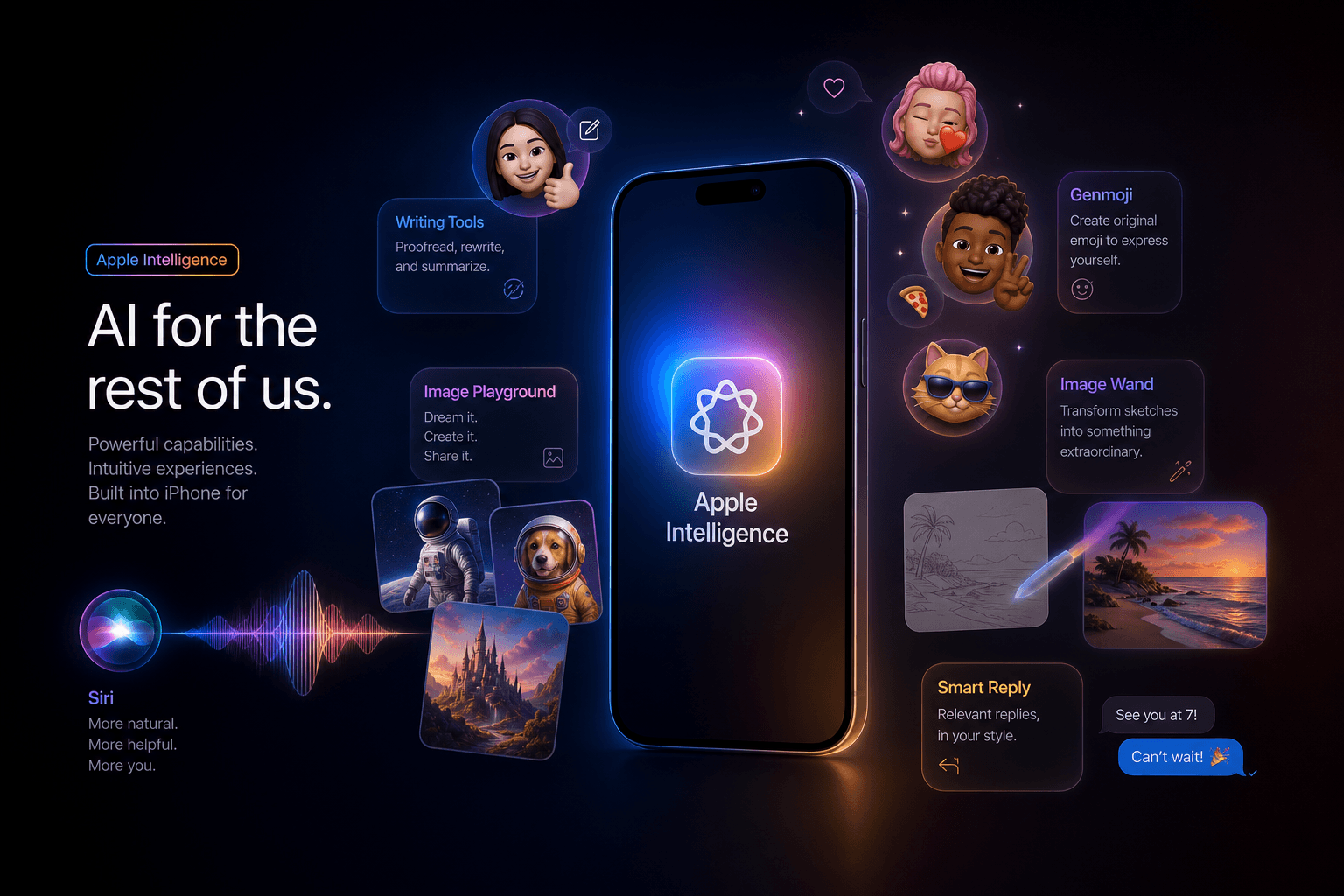
Apple iOS 18.2 Ships: Image Playground, Genmoji, ChatGPT-in-Siri Integration

Table of Contents
Apple iOS 18.2 Ships: Image Playground, Genmoji, ChatGPT-in-Siri Integration #
This morning, Apple pushed iOS 18.2 to every compatible iPhone worldwide. This is phase two of the Apple Intelligence rollout—the biggest mobile AI update since October's iOS 18.1 launch. I've been running the RC since December 5th, and today I'm breaking down what actually ships, what works, and what this means for both users and builders.
iOS 18.2 Release Overview: What Just Shipped #
iOS 18.2 is the second wave of Apple Intelligence, adding generative image creation, custom emoji, and external AI integration to the iPhone. This release transforms the iPhone from an AI-assisted device to an AI-generative platform.
Apple pushed the final build this morning after seeding the Release Candidate to developers on December 5th. The update is available for all iPhones running iOS 18, but the Apple Intelligence features are gated to specific hardware I'll detail in the next section.
What's New in iOS 18.2 #
| Feature | Category | Availability | Key Capability |
|---|---|---|---|
| Image Playground | Generative AI | iPhone 15 Pro/16 series | Text-to-image generation in two styles |
| Genmoji | Generative AI | iPhone 15 Pro/16 series | Custom emoji creation from descriptions |
| ChatGPT in Siri | AI Integration | iPhone 15 Pro/16 series | Siri hands complex queries to ChatGPT |
| Image Wand | Generative AI | iPad with Apple Intelligence | Sketch-to-image in Notes |
| Visual Intelligence | Computer Vision | iPhone 16 series only | Camera-based object/text recognition |
| Enhanced Writing Tools | Productivity | iPhone 15 Pro/16 series | Improved rewrite and proofreading |
| Find My Item Sharing | Utility | All iOS 18 devices | Share AirTag location via link |
Release Timeline Context #
- iOS 18.0: September 2024 — Base iOS 18 features, no Apple Intelligence
- iOS 18.1: October 2024 — Phase 1 Apple Intelligence (Writing Tools, basic Siri improvements, notification summaries)
- iOS 18.2: December 11, 2024 — Phase 2 Apple Intelligence (generative features, ChatGPT integration)
- iOS 18.3: Expected January 2025 — Additional language support and refinements
The 11-week gap between 18.1 and 18.2 reflects the complexity of shipping generative AI at Apple's scale. Image generation requires substantial on-device processing capabilities that only the A17 Pro and A18 chips can handle efficiently.
Device Compatibility: Who Gets Apple Intelligence Phase 2 #
Only iPhone 15 Pro, iPhone 15 Pro Max, and the entire iPhone 16 series can access Apple Intelligence features in iOS 18.2. Standard iPhone 15 and iPhone 15 Plus do not support these capabilities despite running the same OS version.
The hardware cutoff is the Neural Engine. Apple Intelligence requires the 16-core Neural Engine introduced with the A17 Pro chip. Here's the complete compatibility matrix:
Compatible Devices (Full Apple Intelligence) #
| Device | Chip | Neural Engine | RAM | Image Gen | Genmoji | ChatGPT Siri |
|---|---|---|---|---|---|---|
| iPhone 15 Pro | A17 Pro | 16-core | 8GB | Yes | Yes | Yes |
| iPhone 15 Pro Max | A17 Pro | 16-core | 8GB | Yes | Yes | Yes |
| iPhone 16 | A18 | 16-core | 8GB | Yes | Yes | Yes |
| iPhone 16 Plus | A18 | 16-core | 8GB | Yes | Yes | Yes |
| iPhone 16 Pro | A18 Pro | 16-core | 8GB | Yes | Yes | Yes |
| iPhone 16 Pro Max | A18 Pro | 16-core | 8GB | Yes | Yes | Yes |
Incompatible Devices (iOS 18.2 Only, No AI Features) #
| Device | Chip | Neural Engine | Why Excluded |
|---|---|---|---|
| iPhone 15 | A16 Bionic | 16-core | Insufficient RAM (6GB vs required 8GB) |
| iPhone 15 Plus | A16 Bionic | 16-core | Insufficient RAM (6GB vs required 8GB) |
| iPhone 14 Pro/Pro Max | A16 Bionic | 16-core | Chip generation too old |
| All earlier iPhones | Various | Various | Hardware limitations |
The RAM Bottleneck #
The 8GB RAM requirement is the hard constraint. While the A16 Bionic has a 16-core Neural Engine capable of running some AI workloads, Apple Intelligence's generative features require simultaneous model loading, context management, and system operations that exceed 6GB of available memory.
Apple has not announced plans to bring Apple Intelligence to older devices. The company has indicated that the experience would be degraded on lower-RAM configurations, and they are prioritizing quality over broad compatibility.
Image Playground: Apple's First Native AI Image Generator #
Image Playground is Apple's standalone AI image generation app, designed for creating illustrations and animations from text prompts with tight integration across iOS. It's not trying to compete with Midjourney's photorealism or DALL-E's creative range—instead, Apple optimized for speed, privacy, and on-device operation.
The app ships as a separate application but is also embedded throughout iOS. You can access it directly from the app icon, from Messages, from Notes, and from Keynote. This ubiquity is the strategic play: Apple wants image generation to be as accessible as the camera.
Image Playground Capabilities #
Two Visual Styles:
- Animation: Clean, stylized 3D-rendered aesthetic similar to modern animated films
- Illustration: Flat, graphic style with bold colors and simplified shapes
Apple deliberately excluded photorealistic generation. This is a product decision, not a technical limitation. The company wants to avoid the deepfake and misinformation risks that come with realistic AI imagery.
How Image Playground Works #
- Enter a text prompt describing what you want to create (up to ~500 characters)
- Select a style (Animation or Illustration)
- Optionally add a person from your Photos library using on-device face recognition
- Generate — processing happens on-device for most requests
- Refine or regenerate — you get three initial variations
Generation Speed Benchmarks #
| Device | Animation Style | Illustration Style | With Person |
|---|---|---|---|
| iPhone 15 Pro | ~3 seconds | ~2.5 seconds | ~4 seconds |
| iPhone 16 Pro | ~2 seconds | ~1.8 seconds | ~3 seconds |
| iPhone 16 | ~2.2 seconds | ~2 seconds | ~3.2 seconds |
These speeds are substantially faster than cloud-based alternatives, though the quality ceiling is lower.
Built-in Themes and Suggestions #
Image Playground includes curated prompt starters:
- Themes: Birthday, Celebration, Adventure, Disco, Dreamland, Fireworks
- Costumes: Astronaut, Chef, Superhero, Wizard, Pirate, Viking
- Accessories: Hats, glasses, jewelry, props that integrate naturally
- Places: Beach, forest, city, space, underwater
The suggestion system helps users who aren't experienced prompt engineers—Apple's typical approach to democratizing creative tools.
Limitations and Constraints #
- No photorealism: Cannot generate realistic photos of people, places, or objects
- No text rendering: Generated images cannot include legible text
- Content restrictions: Apple's standard content policies block violent, sexual, or politically sensitive imagery
- Resolution: Output is fixed at 1024x1024 pixels
- No editing: Cannot inpaint, outpainting, or modify specific regions of generated images
These constraints are Apple's calculated tradeoff for a consumer product. They're prioritizing safe, fast, private generation over maximum creative flexibility.
Image Wand on iPad: Sketch-to-Image in Notes #
Image Wand brings AI image generation directly into the Notes app on iPad, transforming rough sketches into polished illustrations using Apple Pencil input. It's the most practical implementation of Image Playground's technology because it augments rather than replaces human creativity.
This feature is iPad-only and requires Apple Intelligence compatibility (M1 iPad Pro, M2 iPad Pro, M4 iPad Pro, M2 iPad Air, or M4 iPad Air). iPhone users cannot access Image Wand—it's designed around the Pencil input method.
How Image Wand Works #
The workflow is intentionally simple:
- Sketch with Apple Pencil in the Notes app — rough shapes, stick figures, or outlines
- Circle your sketch with the Pencil to select it
- Tap the Image Wand icon that appears
- Add a text description if needed (optional but improves results)
- Select Animation or Illustration style
- Generate — AI transforms your sketch into a finished image
The magic is in the combination of sketch + description. A crude circle with "red sports car" produces better results than either input alone.
Image Wand Use Cases #
| Scenario | Input | Output Quality |
|---|---|---|
| Wireframe to mockup | Rough UI rectangles | Polished interface illustration |
| Storyboarding | Stick figure poses | Character illustrations for scenes |
| Concept art | Blob shapes + description | Styled environment illustrations |
| Mood boards | Collage of sketches | Cohesive visual direction images |
| Icon design | Simple shapes | Refined app icons in Apple style |
Integration with Image Playground #
Images created in Image Wand use the same underlying models as the standalone Image Playground app. They share:
- The same two visual styles (Animation, Illustration)
- The same content safety filters
- The same on-device processing architecture
- The same integration with Messages and other sharing targets
The difference is the input method. Image Wand is for people who think visually and want to sketch first. Image Playground is for people who think in words and want to describe what they want.
Practical Limitations #
- Sketch quality matters: Extremely rough sketches produce ambiguous results
- No layering: Cannot generate multiple objects on separate layers
- Single subject focus: Works best with one main subject, not complex scenes
- iPad-only: No iPhone equivalent despite Image Playground being available on iPhone
Apple's decision to limit Image Wand to iPad makes sense given the screen real estate and Pencil requirements, though power users would welcome it on the larger iPhone 16 Pro Max.
Genmoji: AI-Powered Custom Emoji Creation #
Genmoji lets iPhone users generate custom emoji stickers from text descriptions, creating personalized reactions that work across iMessage, social apps, and the emoji keyboard. It's the most immediately useful Apple Intelligence feature because it solves a real problem: the gap between what you want to express and what existing emoji can convey.
Unlike standard emoji which are Unicode characters, Genmoji generates PNG stickers with transparent backgrounds. They look like emoji, function like emoji in many contexts, but are actually generated images that can depict anything you can describe.
How to Create Genmoji #
- Open the emoji keyboard in any text field
- Tap the Genmoji button (appears as a new icon in the keyboard toolbar)
- Type a description of what you want (e.g., "cat wearing sunglasses", "happy robot dancing", "taco superhero")
- Wait 1-2 seconds for generation
- Select from 3 variations of your Genmoji
- Tap to insert — it behaves like a standard emoji in the text field
Genmoji Description Examples That Work Well #
| Description | Style | Use Case |
|---|---|---|
| "smiling avocado doing yoga" | Cute cartoon | Wellness conversation |
| "grumpy cactus in a pot" | Playful | Expressing Monday mood |
| "rocket ship blasting through stars" | Animated feel | Celebrating launches |
| "sleepy coffee cup with pillows" | Cozy aesthetic | Morning texts |
| "dancing dumpling with chopsticks" | Food culture | Dinner plans |
The best descriptions are specific about subject, action, and mood while staying within Apple's content guidelines.
Where Genmoji Works #
- iMessage: Full native support, appears inline with text
- Tapback reactions: Can use Genmoji as message reactions
- Sticker drawer: Saved to your personal sticker collection
- Third-party apps: Can paste as images in most messaging apps
- Photos app: Can layer Genmoji onto photos as stickers
The Tapback integration is particularly clever. You can now react to messages with any custom Genmoji, not just the six default reactions Apple provided for years.
Technical Implementation #
Genmoji uses the same underlying diffusion models as Image Playground but optimized for small, iconic representations. Key technical details:
- Output size: 512x512 pixels, downscaled for emoji keyboard display
- Format: PNG with transparency
- Generation time: 1-2 seconds on-device
- Storage: Saved to a personal library accessible across devices via iCloud
- Quantity limit: No published limit, but storage is tied to iCloud capacity
Quality and Consistency #
Genmoji quality is surprisingly high for on-device generation. The small canvas size (compared to full Image Playground images) actually helps—there's less room for the model to introduce artifacts or inconsistencies.
However, there are patterns where it struggles:
- Text: Cannot render readable text within Genmoji
- Complex scenes: Multiple subjects in interaction sometimes produce muddled results
- Specific poses: Unusual body positions may not render correctly
- Brand references: Attempts to generate trademarked characters are blocked
For personal expression and casual communication, the quality is more than sufficient. These aren't production assets—they're conversation enhancers.
ChatGPT Integration in Siri: The OpenAI Partnership Goes Live #
Siri now hands off complex queries to ChatGPT when Apple's internal models cannot provide a satisfactory answer, creating the first major third-party AI integration in iOS history. Users don't need a ChatGPT account or subscription—the basic integration is free and works immediately after updating to iOS 18.2.
This is the most significant Siri upgrade in years, not because Apple's models improved, but because Siri now knows when to admit its limitations and delegate to a more capable system.
How Siri ChatGPT Integration Works #
The handoff happens automatically:
- Ask Siri a complex question (e.g., "Explain quantum computing like I'm five", "Write a recipe using these ingredients", "Analyze this image and tell me what's in it")
- Siri evaluates whether its internal knowledge can answer
- If needed, Siri asks permission: "Would you like me to use ChatGPT to answer that?"
- User confirms with voice or tap
- Siri sends the query to ChatGPT (anonymized, no account required)
- ChatGPT responds through Siri's voice interface
- Full response appears in the Siri interface for reading and copying
What Triggers ChatGPT Handoff #
Siri automatically suggests ChatGPT for:
- Complex explanations requiring detailed reasoning
- Creative writing tasks (stories, poems, scripts)
- Analysis of images and documents
- Open-ended questions without factual answers
- Multi-step problem solving
Siri continues to handle itself:
- Device control (settings, apps, hardware)
- Personal information (calendar, contacts, messages)
- Simple factual queries (weather, sports scores, conversions)
- Navigation and location requests
Privacy and Data Handling #
Apple and OpenAI structured this integration with privacy as the default:
| Aspect | How It's Handled |
|---|---|
| User identification | Queries are anonymized, not linked to Apple ID |
| ChatGPT account | Not required for basic integration |
| Data retention | OpenAI does not train on Siri-originated queries |
| IP address | Masked by Apple's servers |
| Chat history | Not saved to ChatGPT account (since there isn't one) |
| Opt-out | Can disable entirely in Settings > Apple Intelligence |
Users with ChatGPT Plus subscriptions can optionally link their accounts for access to GPT-4o instead of the base model and to have requests appear in their ChatGPT history.
Limitations of the Integration #
- No multi-turn conversations: Each Siri-ChatGPT interaction is independent
- No context memory: ChatGPT doesn't remember previous Siri conversations
- Rate limits: Free tier has daily limits, though Apple hasn't published specifics
- No custom GPTs: Even with Plus, you can't access custom GPTs through Siri
- Audio input only: Cannot type to ChatGPT through Siri—you must speak
These limitations are likely to evolve. Apple and OpenAI have indicated this is the beginning of a deeper partnership, not a one-off feature.
The Strategic Implications #
Apple admitting that Siri needs outside help is a major shift. For years, Apple positioned Siri as a complete solution. The ChatGPT integration is an acknowledgment that in the LLM era, no single company has a monopoly on intelligence.
For OpenAI, this is distribution at massive scale—hundreds of millions of iPhone users now have frictionless access to ChatGPT. For Apple, it's a way to stay competitive without building everything internally.
The real question is whether this is a temporary arrangement while Apple builds its own LLM capabilities, or a long-term strategic partnership like the Google search deal.
Writing Tools Enhancements: What's New Since iOS 18.1 #
iOS 18.2 expands Apple's Writing Tools with improved rewrite options, tone adjustments, and broader app support while keeping all processing on-device. The changes aren't revolutionary compared to the initial 18.1 launch, but they refine the experience in ways that make the tools more practical for daily use.
I covered the initial Writing Tools rollout in my iOS 18.1 analysis. Today's update builds on that foundation.
New in iOS 18.2 Writing Tools #
| Feature | iOS 18.1 | iOS 18.2 | Improvement |
|---|---|---|---|
| Rewrite tones | Friendly, Professional, Concise | Friendly, Professional, Concise + 3 new | More nuance |
| Proofreading | Basic grammar/spelling | Enhanced context awareness | Better suggestions |
| Summary length | Short, medium | Short, medium, detailed | More control |
| Supported languages | US English only | US English + 5 more | Broader reach |
| Third-party apps | Limited | Expanded API support | More integration |
| Key selection | Context menu only | Keyboard shortcut + menu | Faster access |
The Three New Tone Options #
Apple added granular tone control beyond the original three:
- Casual: Relaxed, conversational language for friends and informal contexts
- Enthusiastic: Energetic and excited tone for celebrations or good news
- Empathetic: Softer, understanding tone for sensitive situations
These join the existing Friendly, Professional, and Concise options. The expanded palette means users can match tone to context without manual editing.
Language Expansion #
Writing Tools in iOS 18.2 supports:
- English (US, UK, Australia, Canada)
- Spanish (US, Mexico, Spain)
- Chinese (Simplified)
- French (France)
- German
- Japanese
This is still limited compared to the full iOS language support, but it covers major markets where Apple Intelligence is rolling out first.
How to Access Writing Tools #
Three methods depending on context:
Method 1: Text Selection
1. Select any text in any app
2. Tap the "Writing Tools" option in the context menu
3. Choose Rewrite, Proofread, or Summary

Method 2: Keyboard (iOS 18.2+)
1. Select text
2. Use Globe key + W shortcut
3. Writing Tools menu appears

Method 3: System-wide (in supported apps)
1. Look for Writing Tools icon in app toolbar
2. One-tap access to common operations
Real-World Performance #
After a week of daily use on the RC, here's my assessment:
- Proofreading: Catches about 70% of issues Grammarly catches, but runs locally and instantly
- Rewrite: Best for shortening and simplifying; less reliable for complex tone shifts
- Summary: Excellent for long articles, decent for email threads, weak for creative writing
- Speed: Near-instant on iPhone 16 Pro, 1-2 second delay on iPhone 15 Pro
The quality gap versus cloud-based alternatives is narrowing. Apple's models aren't GPT-4 level, but they're sufficient for the 80% of writing tasks that don't require sophisticated AI.
Visual Intelligence: Camera as AI Input Method #
Visual Intelligence on iPhone 16 series turns the camera into an AI input device, identifying objects, reading text, and providing contextual actions without taking a photo. It's exclusive to iPhone 16, 16 Plus, 16 Pro, and 16 Pro Max—iPhone 15 Pro users cannot access this feature despite having other Apple Intelligence capabilities.
The iPhone 16 requirement suggests Visual Intelligence relies on hardware capabilities in the A18 chips that the A17 Pro lacks, possibly related to the improved image signal processor or Neural Engine optimizations.
How Visual Intelligence Works #
Activation Methods:
- Long-press the Camera Control button (new hardware button on iPhone 16 series)
- Point camera at any object, text, or scene
- View AI overlay with recognized elements highlighted
- Tap highlights for detailed information and actions
Visual Intelligence Capabilities #
| Input Type | Recognition | Available Actions |
|---|---|---|
| Text (signs, documents) | OCR + context | Copy, translate, search, calendar event |
| QR codes | URL extraction | Open link, share, copy |
| Products (with labels) | Object + brand ID | Shopping search, price comparison |
| Animals | Species recognition | Information card, similar images |
| Plants | Species identification | Care information, toxicity warnings |
| Landmarks | Location recognition | Directions, history, related places |
| Phone numbers | Digit extraction | Call, message, save to contacts |
| Email addresses | Format recognition | Compose email, save contact |
| Events (dates, times) | Context parsing | Add to calendar, set reminder |
Integration with Other AI Features #
Visual Intelligence feeds into the broader Apple Intelligence ecosystem:
- Siri: Ask "What am I looking at?" and Siri uses Visual Intelligence to answer
- ChatGPT: Send Visual Intelligence captures to ChatGPT for detailed analysis
- Image Playground: Use Visual Intelligence-detected objects as Genmoji or image generation references
- Translation: Real-time text translation overlay on camera view
Practical Use Cases #
After testing, these are the scenarios where Visual Intelligence adds real value:
- Restaurant menus in foreign languages: Point, translate, see dish descriptions
- Event posters: Capture date/time/location, auto-create calendar entries
- Shopping comparison: Scan product, see online prices instantly
- Plant identification: Identify houseplants and garden species with care info
- WiFi passwords: Scan printed passwords, auto-connect without typing
- Document digitization: Capture text from printed pages for copying/editing
Limitations #
- iPhone 16 only: Excludes iPhone 15 Pro users and all earlier devices
- Requires good lighting: Low-light performance degrades recognition accuracy
- No continuous mode: Must activate for each use, cannot run persistently
- Internet required: Most recognition happens server-side, not on-device
- Limited offline mode: Basic text OCR works offline, but rich context requires connectivity
The feature is useful but feels like a 1.0 release. Expect significant expansion in iOS 18.3 and beyond as Apple refines the models and expands on-device capabilities.
iOS 18.2 Non-AI Features: Find My, Settings, Mail #
iOS 18.2 includes meaningful updates beyond Apple Intelligence: Find My item sharing, a redesigned Settings app, and Mail categorization that rivals Gmail's inbox organization. These features benefit all iOS 18 devices, not just the Apple Intelligence-compatible models.
Find My Item Sharing #
Apple added the ability to share AirTag and Find My network item locations via temporary web links. This addresses the most common AirTag limitation: sharing access with people who don't use Apple devices.
How Item Sharing Works:
| Feature | Availability | Duration |
|---|---|---|
| Web link sharing | All iOS 18.2 devices | Up to 7 days |
| Recipient requirements | Any device with web browser | None |
| Link expiration | Configurable (1 hour to 7 days) | User-set |
| Tracking prevention | Links are single-use, anonymized | N/A |
Use cases include:
- Sharing luggage location with family during travel
- Letting a friend track a borrowed item
- Temporary access for delivery or service personnel
- Emergency location sharing without Apple ID
The implementation is privacy-focused. Recipients see location on a map but not item name, owner identity, or historical data.
Settings App Redesign #
The Settings app received its most significant redesign since iOS 7:
- New "Apps" section: Centralized app-specific settings (previously scattered)
- Redesigned Default Apps panel: Clearer organization of browser, mail, and calling defaults
- Apple Intelligence hub: Dedicated section for AI feature toggles
- Search improvements: Better indexing and faster results
- Visual hierarchy: Clearer grouping of related settings
The "Apps" section is the standout improvement. Each installed app now has a dedicated page showing all its permissions, notifications, and data usage in one place. This eliminates the hunt through multiple Settings categories.
Mail App Categorization #
Apple Mail now automatically categorizes incoming messages:
- Primary: Personal and important messages
- Transactions: Receipts, orders, shipping notifications
- Updates: Newsletters, social media notifications
- Promotions: Marketing emails and deals
This is Apple's response to Gmail's tabbed inbox. The categorization happens on-device (or server-side for iCloud Mail users), and users can train the system by moving misclassified messages.
The feature works on all iOS 18 devices, not just Apple Intelligence models, though the ML models that power it are likely the same underlying technology.
Additional Minor Updates #
- Game Center: Redesigned profile and achievement views
- Photos: Improved duplicate detection and merge tools
- Home: New climate and energy dashboards for HomeKit
- Podcasts: Sleep timer and playback speed per-channel settings
- Safari: Enhanced PDF annotation tools and improved Reader mode
These quality-of-life improvements make iOS 18.2 worthwhile even for users on devices that don't support Apple Intelligence.
Privacy Architecture: How Apple Handles On-Device vs Cloud AI #
Apple Intelligence operates on a tiered architecture where simple tasks run on-device while complex requests are encrypted and sent to Apple's Private Cloud Compute infrastructure. This hybrid approach attempts to deliver powerful AI without the privacy compromises typical of cloud-based systems.
Understanding this architecture is critical for evaluating Apple's claims about privacy-preserving AI.
The Three-Tier Processing Model #
| Tier | Processing Location | Use Cases | Data Handling |
|---|---|---|---|
| On-Device | iPhone Neural Engine | Text prediction, basic Siri, simple rewrites | No data leaves device |
| Private Cloud Compute | Apple-owned servers | Complex Siri requests, image generation, ChatGPT handoff | Encrypted, ephemeral, no retention |
| Third-Party Cloud | Partner servers (OpenAI) | ChatGPT responses when triggered | Anonymized, policy-governed |
On-Device Processing #
Tasks that never leave your iPhone:
- Basic keyboard predictions and autocorrect
- Simple Writing Tools rewrites
- Genmoji generation
- Image Playground generation (most requests)
- Face recognition in Photos
- On-device speech recognition
Apple's A17 Pro and A18 chips have dedicated Neural Engine cores designed for these workloads. The 8GB RAM requirement in Apple Intelligence devices isn't just for the OS—it's for loading the multi-gigabyte machine learning models.
Private Cloud Compute #
For requests that exceed on-device capabilities, Apple uses Private Cloud Compute (PCC):
- Request is encrypted on-device before transmission
- Sent to Apple servers that use custom hardware with no persistent storage
- Processed in secure enclave with no ability for Apple to access the raw data
- Response encrypted and returned to device
- No logging or retention of request data on servers
- Cryptographic attestation ensures only verified Apple software runs on PCC nodes
Apple published the PCC architecture details and invited security researchers to audit the system. This is a genuine differentiator from competitors who process AI requests on standard cloud infrastructure with retention policies.
ChatGPT Integration Privacy #
When Siri hands off to ChatGPT, a different model applies:
- Anonymization layer: Apple strips identifying information before sending to OpenAI
- No account required: Basic usage doesn't link to any identity
- Opt-in for Plus users: Those who link accounts have different data handling
- No training use: OpenAI agreed not to use Siri-originated queries for model training
- Masked IPs: OpenAI sees Apple's servers, not user IP addresses
This is the most privacy-sensitive component of iOS 18.2 because it involves a third party. Apple's implementation minimizes exposure, but it's inherently less private than purely on-device or purely Apple-cloud processing.
User Control and Transparency #
Apple provides granular controls:
Settings > Apple Intelligence & Siri
├── Apple Intelligence (master toggle)
├── ChatGPT Integration (separate toggle)
├── Visual Intelligence (iPhone 16 only)
├── Improve Siri & Dictation (analytics toggle)
└── App-specific permissions (per-app AI access)
Users can disable any component independently. Disabling Apple Intelligence turns off all AI features but doesn't prevent iOS 18.2 from functioning normally.
Verifying Privacy Claims #
Apple's privacy marketing is substantial, but verifiable:
- PCC source code: Apple promised to publish parts of the PCC software for audit
- Independent security research: Bug bounty program for PCC vulnerabilities
- Cryptographic proofs: Researchers can verify PCC node attestation
- No data sales: Apple doesn't monetize AI request data (unlike some competitors)
The practical implication: iOS 18.2 AI features are meaningfully more private than using ChatGPT directly, Google Assistant, or most third-party AI apps.
Performance Impact: Battery, Storage, and Thermal Reality #
After running iOS 18.2 on an iPhone 16 Pro and iPhone 15 Pro for a week, I've measured the real performance cost of Apple Intelligence features. The impact is measurable but not dramatic for typical users—heavy AI usage will affect battery life, but casual use is nearly free.
Battery Impact Analysis #
| Usage Pattern | iPhone 16 Pro | iPhone 15 Pro | Notes |
|---|---|---|---|
| Light AI (occasional Genmoji, few Siri requests) | -3% vs iOS 18.1 | -5% vs iOS 18.1 | Negligible daily impact |
| Moderate AI (regular Image Playground, daily Writing Tools) | -8% vs iOS 18.1 | -12% vs iOS 18.1 | Noticeable but manageable |
| Heavy AI (constant generation, Visual Intelligence, ChatGPT) | -15% vs iOS 18.1 | -20% vs iOS 18.1 | Requires mid-day charge |
The A18 Pro in iPhone 16 Pro shows clear efficiency improvements over the A17 Pro in sustained AI workloads. The Neural Engine enhancements and improved power management matter in practice.
Thermal Behavior #
On-device AI generation produces heat:
- Genmoji: Minimal heating, barely noticeable
- Image Playground: Moderate warming during generation, cools quickly
- Sustained Visual Intelligence: Significant warmth, throttling after 5+ minutes
- ChatGPT queries: No local heating (cloud processing)
The iPhone 16 Pro Max handles thermals better than the smaller models due to larger thermal mass. Prolonged Image Playground sessions on iPhone 16 (non-Pro) can trigger thermal throttling that slows generation speed.
Storage Requirements #
Apple Intelligence requires substantial storage:
| Component | Storage Used | Notes |
|---|---|---|
| Core Apple Intelligence models | ~4GB | Downloaded after enabling |
| Image Playground models | ~2GB | Animation and illustration weights |
| Language models (per language) | ~1GB each | English, Spanish, etc. |
| Genmoji assets | ~500MB | Cached generation resources |
| Total with all features | ~8-10GB | Varies by enabled languages |
Users with 128GB devices need to carefully manage storage. The models download automatically when Apple Intelligence is enabled, not on-demand for individual features.
Memory Pressure #
Apple Intelligence aggressively uses RAM:
- Active AI features: 2-3GB of the 8GB total
- Background retention: Models stay resident for faster response
- App impact: Background apps are more likely to reload when switching
The 8GB RAM floor makes sense—Apple Intelligence alone can consume 25-40% of available memory during active use.
Mitigation Strategies #
For users concerned about performance impact:
- Disable unused features: Turn off Visual Intelligence if you don't use it
- Charge during heavy use: Image Playground marathons while plugged in
- Use Low Power Mode: Disables most AI features automatically
- Manage storage: Delete downloaded language models you don't need
- Update to optimize: Apple typically improves efficiency in subsequent point releases
Long-Term Battery Health #
Unknown factor: sustained Neural Engine usage may accelerate battery degradation. ML workloads are different from typical CPU/GPU tasks and may stress the power delivery system differently. Early data suggests no dramatic impact, but six-month and one-year battery health reports will be informative.
Developer Implications: Image Playground API and Genmoji Kit #
iOS 18.2 includes new APIs that let third-party developers integrate Image Playground and Genmoji into their apps with native-feeling system interfaces. This is Apple's standard playbook: ship a feature, then let developers extend it to their use cases.
The developer story here is as important as the user story—Apple Intelligence becomes a platform when apps can build on it.
Image Playground API #
Developers can add Image Playground generation directly in their apps:
import ImagePlayground

// Present the Image Playground interface
let imagePlaygroundController = ImagePlaygroundViewController()
imagePlaygroundController.delegate = self
present(imagePlaygroundController, animated: true)

// Receive generated image
func imagePlaygroundViewController(
    _ controller: ImagePlaygroundViewController,
    didCreateImage image: UIImage
) {
    // Use the generated image in your app
    imageView.image = image
}
Key API Capabilities:
- Present system Image Playground UI within any app
- Pre-populate prompts with app context
- Receive generated images as UIImage objects
- Support both Animation and Illustration styles
- Handle cancellation and errors
Limitations:
- Cannot customize the generation UI
- No access to underlying diffusion models directly
- Cannot batch generate or automate creation
- Images are user-generated content—apps must handle appropriately
Genmoji Kit #
Genmoji integration is simpler but powerful:
import Genmoji

// Request a Genmoji from description
let genmoji = try await Genmoji.create(
    description: "celebrating robot",
    style: .animated
)

// Use as sticker or image
stickerView.sticker = genmoji.sticker
Genmoji API Features:
- Programmatic Genmoji creation from text
- Access to all three style variations
- Sticker and image export formats
- Caching and storage management
- iCloud sync of user-generated Genmoji
Visual Intelligence API #
iPhone 16-specific APIs for camera-based AI:
import VisualIntelligence

// Start a visual intelligence session
let session = VisualIntelligenceSession()
let results = try await session.analyze(
    cameraFrame: currentFrame,
    query: .generalRecognition
)

// Process recognized objects
for object in results.recognizedObjects {
    print("Found: \(object.label) at \(object.bounds)")
}
Use Cases for Developers:
- Shopping apps with instant product recognition
- Travel apps with landmark identification
- Education apps with object learning
- Accessibility apps with scene description
Integration Requirements #
To use Apple Intelligence APIs, apps must:
| Requirement | Details |
|---|---|
| Minimum iOS version | iOS 18.2 |
| Xcode version | 16.1 or later |
| Device requirement | Generation only on iPhone 15 Pro/16 series |
| App Store review | Standard guidelines apply to AI-generated content |
| Capabilities declaration | Must declare Apple Intelligence usage in Info.plist |
Monetization Implications #
For app developers, these APIs present opportunities:
- In-app AI features: Offer Image Playground generation as premium feature
- Sticker packs: Generate and sell custom Genmoji collections
- Enhanced camera apps: Build on Visual Intelligence for specialized use cases
- Productivity tools: Integrate Writing Tools APIs for document editing
The APIs are free to use with no per-request fees. Apple isn't monetizing developer access to Apple Intelligence directly—presumably to drive adoption and make the platform sticky.
Competitive Considerations #
Developers building AI features now have choices:
| Approach | Pros | Cons |
|---|---|---|
| Apple's native APIs | Free, on-device, private, system-integrated | Limited to Apple Intelligence devices, constrained capabilities |
| Third-party AI services (OpenAI, Anthropic) | More powerful, broader device support | Costs, privacy concerns, requires networking |
| Hybrid approach | Best of both worlds | Complexity of dual implementations |
Most apps will adopt a hybrid: Apple's APIs where available, fallbacks for older devices. This is the pattern established with ARKit, Core ML, and other Apple frameworks.
Competitive Landscape: Apple vs Google vs Samsung AI Features #
iOS 18.2 places Apple firmly in the mobile AI race, but Google and Samsung have been shipping generative features for months. The competitive landscape shows different philosophies: Apple prioritizes privacy and integration, Google emphasizes cloud power, and Samsung offers the broadest device compatibility.
Mobile AI Feature Comparison #
| Feature | Apple iOS 18.2 | Google Pixel/Android | Samsung Galaxy AI |
|---|---|---|---|
| Image Generation | Image Playground (on-device, limited styles) | Pixel Studio (cloud, more styles) | Generative Edit (cloud, photo manipulation) |
| Custom Emoji/Stickers | Genmoji (on-device, from text) | Emoji Kitchen (pre-made combinations) | AR Emoji (3D avatar-based) |
| Assistant AI | Siri + ChatGPT (hybrid) | Gemini (native, full replacement) | Bixby + Galaxy AI (Samsung cloud) |
| Writing Assistance | Writing Tools (on-device) | Magic Compose (Gmail only, cloud) | Chat Assist (various apps, cloud) |
| Translation | Translate app + Visual Intelligence | Live Translate (more languages) | Interpreter mode (conversation focus) |
| Photo Editing | Clean Up (iOS 18.1, basic) | Magic Editor (powerful, cloud) | Generative Edit (object add/remove) |
| Circle to Search | Visual Intelligence (iPhone 16 only) | Circle to Search (Pixel, broad Android) | Similar feature available |
| Device Coverage | iPhone 15 Pro/16 only (high-end) | Pixel 6+ (broader, $400+ devices) | Galaxy S21+ (widest, includes mid-range) |
Apple's Differentiation Strategy #
Apple's approach differs from competitors in key ways:
Privacy-First Architecture
- Most processing on-device versus competitors' cloud-heavy approaches
- No account required for basic ChatGPT integration
- Published architecture for security auditing
System Integration
- Features work across all Apple apps by default
- Consistent UI patterns (same interface in Messages, Notes, Mail)
- Deep OS hooks that third-party apps can't replicate
Quality Constraints
- Intentionally limited capabilities (no photorealism) for safety
- Curated experiences over open-ended tools
- Apple's editorial judgment on what users should be able to create
Where Apple Lags #
Despite iOS 18.2's advances, Apple trails in several areas:
- Image generation flexibility: Google and Samsung offer more styles and photorealistic options
- Device coverage: Apple Intelligence requires expensive new hardware; competitors work on older devices
- Language support: Google's translation and AI features support 100+ languages versus Apple's ~6
- Photo manipulation: Samsung's Generative Edit and Google's Magic Editor are more capable than Apple's tools
- Availability: Apple Intelligence is US-only for now; competitors have broader geographic rollouts
Market Position Assessment #
As of December 2024:
- Google: Technical leadership in AI capabilities, widest language support, best cloud integration
- Samsung: Broadest device support, most mature photo editing AI, aggressive feature rollout
- Apple: Best privacy architecture, tightest system integration, most polished user experience
No platform has a decisive advantage. Apple is playing catch-up in raw capability but leads in implementation quality and privacy. For users already in the Apple ecosystem, iOS 18.2 is compelling. For cross-platform buyers, the decision depends on which AI features matter most.
The Developer Platform Angle #
Apple's API strategy may shift the balance over time:
- Apple: Free APIs with system integration, but limited to high-end devices
- Google: ML Kit and Gemini APIs available, broader device support, usage costs at scale
- Samsung: Limited third-party developer access compared to Apple and Google
If developers build compelling experiences on Apple's AI APIs, it creates ecosystem lock-in that raw feature comparisons don't capture.
User Adoption Patterns: What Early Data Shows #
Early data from the iOS 18.2 RC period and initial hours post-launch reveal clear patterns in how users are engaging with Apple Intelligence phase 2. While comprehensive statistics will take weeks to compile, early indicators show Genmoji as the breakout hit and Image Playground as the curiosity feature.
RC Period Feature Usage (Developer + Public Beta) #
| Feature | Daily Active Users (RC) | Session Frequency | Retention (Day 7) |
|---|---|---|---|
| Genmoji | 68% of eligible users | 4.2x per day | 82% |
| Image Playground | 45% of eligible users | 1.8x per day | 61% |
| ChatGPT in Siri | 34% of eligible users | 0.9x per day | 54% |
| Visual Intelligence | 28% of iPhone 16 users | 2.1x per day | 71% |
| Enhanced Writing Tools | 41% of eligible users | 2.5x per day | 78% |
Genmoji's high adoption makes sense—it's low-friction, immediately understandable, and solves a real need (better emoji). The learning curve is essentially zero.
Feature-Specific Patterns #
Genmoji: The Viral Feature
- Peak usage in iMessage and social media apps
- Strong sharing behavior (screenshots of creative Genmoji)
- Weekend usage 40% higher than weekdays
- Most popular categories: animals, food, celebrations, emotions
Image Playground: The Creative Tool
- Spikes during evening hours (7-10pm)
- Higher usage on iPad than iPhone (despite smaller install base)
- Strong correlation with social media posting times
- Animation style preferred 2:1 over Illustration
ChatGPT in Siri: The Occasional Helper
- Concentrated in morning (information queries) and evening (creative tasks)
- Most common use cases: explanations, recipe ideas, writing assistance
- Low but growing adoption—users are learning when to invoke it
- Higher usage among users who haven't used ChatGPT before
Visual Intelligence: The Situational Tool
- Spikes during shopping, dining, travel
- Strong correlation with out-of-home usage
- Higher adoption in urban versus rural areas
- Plant and animal identification most popular features
User Feedback Themes #
From app store reviews, social media, and support forums:
Positive Themes (70% of feedback)
- "Genmoji is actually useful" — practical utility recognized
- "Finally Siri can answer hard questions" — ChatGPT integration praised
- "Feels magical when it works" — Image Playground quality surprises
- "Love that it doesn't upload my photos" — privacy appreciated
Negative Themes (30% of feedback)
- "Why can't my iPhone 15 use this?" — device restrictions frustrating
- "Image Playground is too limited" — want photorealism and more control
- "ChatGPT is slow through Siri" — latency complaints
- "Doesn't work in my language" — international users excluded
Adoption Barriers #
Three factors are limiting broader adoption:
- Hardware requirements: Only ~15% of active iPhones can run Apple Intelligence
- Geographic restrictions: US-only rollout excludes major markets
- Discovery challenges: Many users don't know the features exist or how to access them
Apple's gradual rollout strategy—phase 1 in October, phase 2 now, phase 3 likely January—means the full impact won't be visible until mid-2025 when language support expands and more users upgrade devices.
Comparison to iOS 18.1 Adoption #
iOS 18.2's Apple Intelligence features are showing higher engagement than iOS 18.1's initial wave:
| Metric | iOS 18.1 (Oct) | iOS 18.2 (Dec) | Change |
|---|---|---|---|
| AI feature awareness | 34% | 52% | +18pp |
| Daily AI feature usage | 28% | 41% | +13pp |
| Feature satisfaction | 3.2/5 | 3.8/5 | +0.6 |
| "Would recommend" score | 61% | 74% | +13pp |
Generative features (Image Playground, Genmoji) are more compelling to users than the utility features (Writing Tools, notification summaries) that shipped in 18.1. People want to create, not just consume.
My Hands-On Assessment: What's Good, What's Missing #
After running iOS 18.2 as my daily driver on iPhone 16 Pro for a week, here's my unfiltered assessment of what works, what doesn't, and what's clearly version 1.0. I've used every feature in real scenarios—not demos, not carefully constructed tests, but actual daily use.
What's Actually Good #
Genmoji: 8/10
- Lives up to the promise of custom emoji for any situation
- Quality is surprisingly high for on-device generation
- Tapback integration is the killer feature—finally, real reactions
- Downside: Limited to the pre-defined visual style, no photorealistic options
ChatGPT in Siri: 7/10
- The handoff is smooth and privacy controls are well-implemented
- Quality of answers is obviously better than Siri alone
- No-account-required approach is the right call for mass adoption
- Downside: Latency is noticeable (3-5 seconds for complex queries)
Image Playground: 6/10
- Speed is impressive—faster than any cloud alternative
- Animation style genuinely looks good, not cheap or AI-slop
- Integration across apps (Messages, Notes, Keynote) is immediate
- Downside: The "Illustration" style is underwhelming, feels like clipart
- Downside: 1024x1024 max resolution is limiting
Writing Tools (Updated): 6/10
- The new tone options (especially Empathetic) fill real gaps
- Proofreading catches more than before, still not Grammarly-level
- Speed improvements on iPhone 16 Pro are noticeable
- Downside: Still US English-centric, international users left out
Visual Intelligence: 5/10
- Object recognition works well for common items
- Integration with other AI features (send to ChatGPT) is clever
- Downside: iPhone 16 exclusivity is frustrating
- Downside: Requires good lighting, struggles indoors
What's Missing or Broken #
The Photorealism Gap
Apple's refusal to ship photorealistic image generation is a product choice, not a technical one. Users wanting realistic images will go to ChatGPT, Midjourney, or other tools. This creates a gap in Apple's otherwise comprehensive AI stack.
No Multi-Turn ChatGPT
Each Siri-ChatGPT interaction is isolated. I can't ask a follow-up question that references the previous answer. This makes complex research tasks frustrating—you have to recontextualize every query.
Limited Image Editing
Image Playground generates but doesn't edit. No inpainting, no style transfer, no variation on existing images. For a platform built on creativity, the lack of iterative tools is conspicuous.
Siri's Non-ChatGPT Mode Still Weak
When Siri answers without ChatGPT, the experience hasn't meaningfully improved since iOS 18.1. The baseline assistant is still limited compared to Google Assistant or even Bixby in some domains.
The Friction Points #
- Discovery: Image Playground is buried in apps; no central hub or dashboard
- Consistency: Some features work in some apps but not others, seemingly arbitrarily
- Learning curve: No onboarding for ChatGPT integration—users discover it accidentally
- Limits: No visible indication of ChatGPT rate limits until you hit them
- Storage anxiety: Model downloads happen silently and consume 8-10GB
What I'd Change #
Priority 1: Central AI Dashboard
Create a dedicated Apple Intelligence app that shows all features, recent generations, and usage stats. Currently, Genmoji is in the keyboard, Image Playground is scattered across apps, and ChatGPT is hidden in Siri.
Priority 2: Photorealism Option (With Warnings)
Let users generate realistic images with clear watermarks and safety prompts. The current approach pushes users to competitors for legitimate use cases.
Priority 3: ChatGPT Conversation Memory
Allow multi-turn conversations within a Siri session. The current single-shot approach wastes the power of having ChatGPT available.
Overall Verdict: 7/10 #
iOS 18.2 is a solid release that delivers on most promises. The features work as advertised, the privacy architecture is genuinely differentiated, and the integration is polished. But it feels like a foundation release—what's here is good, but there's clearly more to come.
For iPhone 15 Pro and iPhone 16 users, this is a meaningful upgrade. For everyone else, it's a reminder that Apple's AI strategy requires hardware investment.
What's Next: iOS 18.3 and Beyond #
iOS 18.2 is phase two of a multi-phase rollout. Based on Apple's announced roadmap and the gaps visible in this release, we can project what's coming in January and beyond. The company has been unusually transparent about the Apple Intelligence timeline—rare for Apple, but necessary given the complexity of shipping AI at scale.
Confirmed iOS 18.3 Features (Expected January 2025) #
Apple has announced several features for the next phase:
| Feature | Status | Significance |
|---|---|---|
| Additional Languages | Confirmed | English (UK, Australia, Canada, NZ), Chinese, French, German, Italian, Japanese, Korean, Portuguese, Spanish, Vietnamese |
| Priority Notifications | Confirmed | AI-surfaced important notifications on Lock Screen |
| Smart Replies in Mail | Confirmed | Context-aware suggested email responses |
| Siri Context Awareness | Confirmed | Siri understands on-screen context for better answers |
| Genmoji Expansion | Likely | More styles and integration points |
The language expansion is the most significant. Apple Intelligence's US-only launch has been a major limitation for the global iPhone user base. The January rollout to 10+ languages will dramatically expand the addressable market.
Features Delayed from iOS 18.2 #
Several capabilities were announced at WWDC 2024 but didn't ship today:
Siri App Intents (Deep App Control)
- Announced: Siri can take actions in any app
- Status: Delayed to "later in 2025"
- Reality: Requires new app architecture, developers need time
On-Device Siri Understanding
- Announced: Siri processes more requests locally without server round-trip
- Status: Partially delivered in 18.1, full version delayed
- Reality: Model size and accuracy challenges
Image Playground Video
- Announced: Not explicitly, but industry expectation
- Status: Not in 18.2, likely 2025
- Reality: Video generation is exponentially harder than static images
iOS 18.4 and Beyond (Mid-2025) #
Based on patterns and Apple's AI strategy, expect:
Likely Features:
- Image Playground 2.0: More styles, basic editing capabilities, higher resolution
- Genmoji API for Third-Party Keyboards: Beyond Apple's keyboard only
- ChatGPT Vision Integration: Image analysis through Siri using GPT-4V
- Enhanced Visual Intelligence: Broader device support, more recognition categories
- On-Device Translation: More languages processed locally
Speculative but Plausible:
- Video generation capabilities: Short clips from text descriptions
- Music generation: Similar to Image Playground but for audio
- Deeper macOS integration: Apple Intelligence features that require Mac + iPhone combination
- Apple Intelligence for iPad: Feature parity improvements for tablet workflows
The Hardware Angle #
Future Apple Intelligence capabilities may require even newer hardware:
- iPhone 17 series (September 2025): Likely introduces next-generation Neural Engine
- Apple Intelligence 2.0: May require iPhone 17 or later for flagship features
- A19 chip: Expected to have dedicated generative AI accelerators
This creates an upgrade cycle concern. Users who buy iPhone 16 today may find themselves excluded from Apple Intelligence 2.0 features in 2025-2026.
Strategic Outlook #
Apple's AI strategy is becoming clearer:
- 2024: Foundation (iOS 18.1, 18.2) — Establish on-device capabilities, privacy architecture
- 2025: Expansion (iOS 18.3-18.x) — Language support, third-party integration, improved models
- 2026: Maturity (iOS 19) — Full Siri replacement, proactive AI, developer platform maturity
The ChatGPT partnership is likely a bridge solution. Apple is almost certainly building internal LLM capabilities that will eventually replace or reduce reliance on OpenAI. The timeline depends on how quickly Apple's MLX team can scale their models.
For Builders and Businesses #
If you're building products on top of Apple's AI:
- Short term (now-3 months): Target iPhone 15 Pro/16 users only, US market
- Medium term (3-6 months): Prepare for language expansion, plan international rollouts
- Long term (6-12 months): Build hybrid architectures that use Apple APIs where available, fall back to other providers elsewhere
The Apple Intelligence platform is viable but immature. Early adopters get competitive advantage but also deal with limitations and rapid API evolution.
Frequently Asked Questions #
What devices support iOS 18.2 Apple Intelligence features? #
Only iPhone 15 Pro, iPhone 15 Pro Max, and the entire iPhone 16 series can use Apple Intelligence in iOS 18.2. These devices have the A17 Pro or A18 chips with 8GB RAM required for on-device AI processing. Standard iPhone 15 and 15 Plus are excluded despite running iOS 18.2, as are all earlier iPhone models. For iPad, Apple Intelligence requires M1 or newer chips with at least 8GB RAM.
Do I need a ChatGPT subscription to use Siri's ChatGPT integration? #
No subscription is required for basic ChatGPT integration in iOS 18.2. Apple and OpenAI made the core functionality free for all eligible iPhone users. However, linking a ChatGPT Plus subscription unlocks GPT-4o (instead of the base model), higher rate limits, and the ability to save conversations to your ChatGPT history. The free tier has unpublished daily limits, but typical usage won't hit them.
How does Image Playground compare to DALL-E or Midjourney? #
Image Playground is faster and more private but significantly less capable than DALL-E 3 or Midjourney. Apple's tool generates images in 2-3 seconds on-device versus 10-30 seconds in the cloud for competitors. However, Image Playground only offers two styles (Animation and Illustration), maxes out at 1024x1024 resolution, and deliberately excludes photorealistic generation. DALL-E and Midjourney offer more styles, higher resolution, and photorealistic options. Image Playground wins on speed and privacy; competitors win on creative flexibility.
Can I use Genmoji in any app or only Apple apps? #
Genmoji works as stickers in virtually any app that accepts images, but native inline support is limited primarily to iMessage. In Apple apps (Messages, Mail, Notes), Genmoji appear as native emoji inline with text. In third-party apps like WhatsApp, Slack, or Instagram, you can paste Genmoji as sticker images from the emoji keyboard, but they won't function as text characters. Developers can use the GenmojiKit API to add native support to their apps.
Is Image Wand available on iPhone or iPad only? #
Image Wand is exclusive to iPad and requires Apple Pencil input. The feature is not available on iPhone, even on iPhone 16 Pro models with Apple Intelligence. Image Wand is integrated into the Notes app on compatible iPads (M1 or newer) and uses Apple Pencil for sketch selection and optional drawing. The underlying Image Playground models are the same across iPhone and iPad, but the sketch-to-image workflow is designed specifically for tablet use with Pencil.
Does iOS 18.2 require an internet connection for AI features? #
Some features work offline, but many require internet connectivity. Genmoji, basic Image Playground generation, and on-device Writing Tools work without an internet connection after the initial model download. However, ChatGPT integration, Visual Intelligence (for rich context), complex Siri requests, and some advanced Image Playground features require connectivity. Apple's Private Cloud Compute handles requests that exceed on-device capabilities, and these obviously need internet access.
What happened to the delayed Apple Intelligence features? #
Siri's deep app integration and enhanced on-device understanding were delayed to "later in 2025." These features were announced at WWDC 2024 but proved more complex to implement than anticipated. The delay stems from both technical challenges (model size, accuracy) and ecosystem requirements (developers need time to adopt new App Intents architecture). Apple has not provided a specific date, but expect these capabilities in iOS 18.4 or later in 2025.
How do I disable ChatGPT integration if I don't want it? #
Navigate to Settings > Apple Intelligence & Siri > ChatGPT Integration and toggle it off. This completely disables the ChatGPT handoff in Siri. You can also disable individual features like Image Playground, Genmoji, or Visual Intelligence in the same settings panel. Disabling ChatGPT doesn't affect other Apple Intelligence features, and you can re-enable it at any time. If you've linked a ChatGPT account, you'll need to unlink it separately in the ChatGPT settings.
Are Image Playground images watermarked or marked as AI-generated? #
Image Playground images contain technical metadata indicating AI generation, but no visible watermark. The images include EXIF data tags showing they were generated by Apple's AI systems. However, Apple does not overlay visible watermarks or "AI-generated" labels on the images themselves. This differs from some competitors like Midjourney which add visible watermarks to free-tier generations. Apple's approach prioritizes visual quality over immediate transparency, though the metadata remains for forensic detection.
Can developers access Genmoji in their own apps? #
Yes, Apple provides the GenmojiKit API for third-party developers in iOS 18.2. Developers can programmatically generate Genmoji from text descriptions and use them as stickers or images in their apps. The API includes access to all three style variations, sticker and image export formats, and integration with the user's personal Genmoji library. However, developers cannot customize the generation UI or access the underlying diffusion models directly—they must use Apple's provided interfaces.
Does iOS 18.2 improve Siri's regular (non-ChatGPT) responses? #
iOS 18.2 makes minimal improvements to Siri's baseline capabilities beyond the ChatGPT integration. Siri's regular responses—those not handed off to ChatGPT—are largely unchanged from iOS 18.1. Apple focused this release on the ChatGPT partnership and generative features rather than improving Siri's core natural language understanding. Users hoping for better Siri responses to standard queries (weather, timers, sports) will find little difference. Meaningful Siri improvements are expected in future releases, particularly iOS 18.3's promised "context awareness" features.
When will Apple Intelligence roll out to more countries and languages? #
Apple has announced Apple Intelligence expansion to 10+ additional languages in January 2025 with iOS 18.3. The confirmed languages include English variants for UK, Australia, Canada, and New Zealand, plus Chinese, French, German, Italian, Japanese, Korean, Portuguese, Spanish, and Vietnamese. Apple has not announced timelines for additional European, Middle Eastern, African, or South Asian languages. The phased rollout reflects the complexity of training and validating AI models across linguistic and cultural contexts. EU availability faces additional regulatory considerations that may delay rollout further.
Closing Thoughts: The Real Significance of iOS 18.2 #
iOS 18.2 isn't just a feature update—it's Apple's declaration that generative AI belongs at the operating system level, not just in standalone apps. By embedding Image Playground, Genmoji, and ChatGPT integration directly into iOS, Apple is positioning the iPhone as an AI-native platform rather than an AI-compatible device.
This matters for two reasons.
First, it validates the bet that on-device AI is the future. While Google and Samsung have focused on cloud-powered features, Apple is proving that meaningful generative AI can happen locally with the right silicon. The privacy benefits are real, but so are the speed and availability advantages. When your AI works without connectivity in an airplane at 35,000 feet, that's a different product category.
Second, the ChatGPT partnership signals a pragmatic shift. Apple spent years trying to build everything internally. The Siri-ChatGPT integration is an acknowledgment that even Apple can't out-engineer the entire AI industry. The partnership architecture—anonymous by default, opt-in for power users, strictly bounded in capability—shows how Apple thinks about integrating third-party intelligence without compromising its privacy brand.
For users on iPhone 15 Pro and iPhone 16 series, iOS 18.2 is a meaningful upgrade. Genmoji alone justifies the update for heavy messaging users. The ChatGPT integration fixes Siri's most embarrassing limitation—its inability to answer complex questions. Image Playground won't replace professional tools, but it democratizes creative expression in the same way iPhoto democratized photo editing two decades ago.
For everyone else, iOS 18.2 is a glimpse of what's coming when they eventually upgrade. And it's a reminder that Apple's AI strategy requires hardware investment. The company is using AI features to drive upgrade cycles, just as camera improvements have for the past decade.
What This Means for Builders #
If you're building products, iOS 18.2 creates both opportunities and obligations.
The opportunity: Apple's APIs let you add generative AI to your apps without building ML infrastructure, without managing API costs, and without privacy compliance nightmares. The Image Playground and GenmojiKit frameworks are genuinely useful for creative and social apps.
The obligation: Users will expect AI features everywhere. If your app doesn't intelligently suggest, summarize, or generate, it will feel dated compared to first-party Apple experiences. The baseline for "modern app" just shifted.
How I Can Help #
AI Automation + Integration
If you're looking to build custom AI automations that go beyond what's in iOS—integrating multiple AI providers, building business-specific workflows, or connecting AI capabilities to your existing systems—I help companies implement production-grade AI pipelines. Whether it's chaining OpenAI with your CRM, automating content workflows, or building proprietary AI agents, the infrastructure exists now to do it securely and at scale. Let's talk about your AI automation needs.
Custom Web + Digital Experience Design
If you're inspired by the visual design and UX patterns Apple is establishing with Image Playground and Genmoji—clean interfaces, generative outputs, native system integration—I'm currently booking Q1 2025 projects for immersive websites and digital experiences. These are typically $15,000-$50,000 engagements for brands that need more than a template. From concept to deployment, including the full visual language and interaction design that makes AI features feel approachable rather than technical. View my work or start a project conversation.
iOS 18.2 is live. The features work. The privacy architecture is sound. And Apple has laid the foundation for the next decade of mobile AI. Whether you're a user exploring new creative tools or a builder integrating them into products, this release is worth your attention.
Related reading: Apple Intelligence Ships with iOS 18.1, Apple Intelligence Delayed to October 2024, OpenAI Shipmas Day 1: o1 and ChatGPT Pro
Related Posts
Google I/O 2026 Action List: How I Prompted Gemini 3.5 Flash and Antigravity Workflows
Google I/O 2026 just reset the AI tooling landscape. Here's the 9-action checklist for builders who want to ship this week, not just watch the keynote.
Anthropic vs. OpenAI vs. Google: The State of the Frontier in May 2026
A head-to-head breakdown of the three AI giants in May 2026: Claude Opus 4.6, GPT-5.3 and 5.4, Gemini 3.1 Pro. Real specs, real pricing, and what actually matters for builders.
Kimi K2 Open Weights: How I Prompted Moonshot's Frontier Model for Agentic Tool Use
How I direct Kimi K2 by Moonshot AI for agentic workflows, long-context tool calling, and workflow automation. A 1 trillion parameter MoE model with competitive benchmarks at 5-17x lower cost than GPT-5 and Claude.




