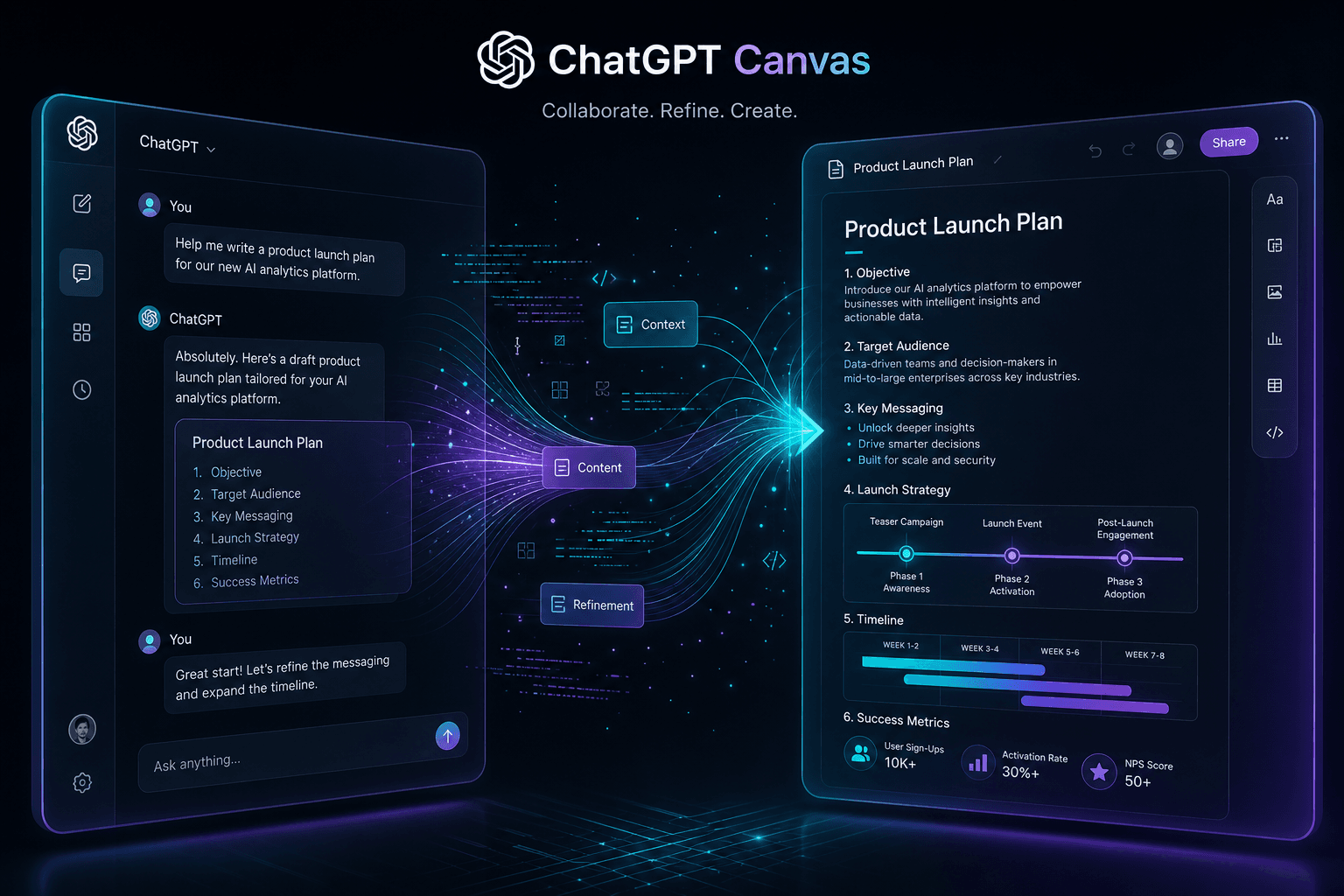
ChatGPT Canvas Launch: OpenAI's Answer to Claude Artifacts

Table of Contents
ChatGPT Canvas Launch: OpenAI's Answer to Claude Artifacts #
OpenAI launches Canvas today, a new side-by-side workspace interface for ChatGPT that enables collaborative editing and coding projects. Built on GPT-4o, Canvas opens in a separate window next to the chat, letting users write and iterate on content without losing conversation context. This is OpenAI's direct response to Anthropic's Artifacts feature, which launched with Claude 3.5 Sonnet in June and has become a defining feature of the Claude experience.
Table of Contents #
- What Just Launched: Understanding ChatGPT Canvas
- Canvas Writing Features: From Drafts to Polished Documents
- Canvas Coding Features: A New Way to Build with ChatGPT
- How Canvas Compares to Claude Artifacts
- The Model Training Behind Canvas Collaboration
- Availability and Rollout Timeline
- Real-World Use Cases and Workflows
- What This Means for the AI Assistant Wars
Frequently Asked Questions #
Q: What is ChatGPT Canvas and how does it work? #
ChatGPT Canvas is a new side-by-side workspace interface that opens next to the chat for collaborative writing and coding projects. When triggered, Canvas displays generated content in a persistent right panel where both you and ChatGPT can make edits across multiple conversation turns. You can directly edit text or code, highlight specific sections to focus ChatGPT's attention, and use shortcut menus for common transformations. The interface maintains version history and keeps conversational context attached to the evolving content.
Q: When did ChatGPT Canvas launch and who has access? #
Canvas launched in beta on October 3, 2024. The rollout prioritizes paid subscribers: ChatGPT Plus and Team users have immediate access, Enterprise and Edu users gain access the week of October 7, and free tier users will receive access when the beta concludes. OpenAI has not announced a specific timeline for free tier availability.
Q: How does Canvas compare to Claude Artifacts? #
Canvas and Artifacts share the persistent side-panel concept but differ in execution. Canvas offers dedicated shortcut menus for one-click transformations (length adjustment, reading level, code porting, debugging) that Artifacts lacks. Artifacts supports broader content types including SVG graphics, React components, and interactive HTML with live preview rendering — capabilities Canvas doesn't currently match. Underlying model performance also differs: Claude 3.5 Sonnet (powering Artifacts) beats GPT-4o on coding benchmarks, giving Artifacts an edge for development work.
Q: What writing features does Canvas include? #
Canvas includes five writing shortcuts: suggest edits, adjust length, change reading level, add final polish, and add emojis. The reading level adjustment (Kindergarten to Graduate School) is particularly distinctive, allowing content tailoring for different audiences. The suggest edits feature provides inline feedback like a copy editor. The final polish shortcut checks grammar, clarity, and consistency. Version history with a back button enables restoring previous iterations.
Q: What coding features does Canvas offer? #
Canvas provides five coding shortcuts: review code, add logs, add comments, fix bugs, and port to language. The code porting feature translates between JavaScript, TypeScript, Python, Java, C++, and PHP. The review function provides inline suggestions for improvement. The add logs shortcut instruments code with debugging print statements. All coding features support iterative refinement within the persistent workspace rather than generating new code blocks in chat.
Q: Is Canvas built on GPT-4o or a different model? #
Canvas is built on GPT-4o using specialized post-training for collaborative behaviors. OpenAI's research team used synthetic data generation techniques — distilling from o1-preview outputs — to train GPT-4o for workspace triggering, targeted editing, and inline feedback. This training improved targeted edit precision by 18% and comment quality by 16% over baseline GPT-4o. Canvas is model-specific and only available when GPT-4o is selected.
Q: Can I manually trigger Canvas or does it open automatically? #
Canvas opens automatically when ChatGPT detects a project suitable for the workspace interface, or you can force it open by including "use canvas" in your prompt. OpenAI tuned the model to trigger appropriately for writing and coding projects while avoiding unnecessary activation for general Q&A. For writing, the trigger accuracy is 83%; for coding, it's 94% with intentional conservative bias to avoid disrupting quick code snippets.
Q: How much does Canvas cost and is it available on free tier? #
Canvas is currently available to ChatGPT Plus ($20/month) and Team subscribers at no additional cost. Enterprise and Edu access follows next week. OpenAI plans to make Canvas available to free tier users when the beta concludes, but has not announced timing. There is no separate pricing for Canvas — it's included with existing subscriptions.
Q: Does Canvas support version history and rollbacks? #
Yes — Canvas includes a back button that restores previous versions of your work. The version history persists within the workspace session, allowing you to roll back to earlier iterations if edits go wrong or you want to branch from a previous state. This version control is workspace-specific and complements the conversation history maintained in the main chat panel.
Q: Which programming languages does Canvas support for code porting? #
Canvas supports code porting between six languages: JavaScript, TypeScript, Python, Java, C++, and PHP. The porting shortcut translates code while attempting to preserve logic and functionality. As with any automated translation, teams should validate the output through testing before production use. The feature is designed to accelerate multi-language SDK development and legacy code migration.
Q: Is Canvas available via API or only in the ChatGPT web interface? #
Canvas is currently available only in the ChatGPT web interface. API users do not get the Canvas workspace UI — the API returns standard message content as before. OpenAI has not announced plans for API access to Canvas features. This mirrors Anthropic's approach with Artifacts, which is also Claude.ai-only without API availability.
Q: Should I switch from Claude to ChatGPT for Canvas? #
The choice depends on your primary use case. Canvas's shortcut system and one-click transformations offer genuine workflow advantages for writing and rapid code iteration. However, Claude 3.5 Sonnet still leads on coding benchmarks, and Artifacts supports more content types with live preview rendering. Many developers will find value in using both: Claude for complex coding where model quality matters, ChatGPT for writing workflows and teams embedded in the OpenAI ecosystem.
What Just Launched: Understanding ChatGPT Canvas #
OpenAI's Canvas is a new side-by-side workspace that transforms ChatGPT from a conversational chatbot into a collaborative editor for writing and coding projects. Launched today in beta, Canvas opens as a separate window adjacent to the main chat interface, allowing users to create, edit, and iterate on content while maintaining the full conversational context.
The core innovation is context persistence. In standard ChatGPT interactions, generated content appears inline in the chat stream — if you want to refine it, you copy it out, edit it elsewhere, or paste it back into the conversation. Canvas eliminates this friction by giving generated content a persistent home where both you and ChatGPT can make edits across multiple conversation turns.
Canvas automatically opens when ChatGPT detects a scenario where the collaborative workspace would be helpful. You can also force it open by including "use canvas" in your prompt. Once triggered, the interface splits: your conversation history stays on the left, while the Canvas workspace occupies the right panel.
Unlike ChatGPT's previous Code Interpreter feature — which focused on executing code in a sandbox and returning results — Canvas is designed for the iterative process of creation and refinement. You can directly edit text or code in the Canvas window, highlight specific sections to direct ChatGPT's attention, and use shortcut menus to request specific transformations like length adjustments or code debugging.
This launch represents OpenAI's first major visual interface update since ChatGPT debuted two years ago. It's also a clear competitive response to Claude Artifacts, the side-panel feature Anthropic shipped in June 2024 that has become a defining advantage for Claude's developer and writer user base.
Canvas Writing Features: From Drafts to Polished Documents #
Canvas transforms document creation from one-shot generation into iterative refinement with dedicated shortcuts for common editing tasks. The writing capabilities are designed around the reality that first drafts rarely ship — documents need multiple passes for length, tone, clarity, and polish.
The five core writing shortcuts available in Canvas today:
| Shortcut | Function | Use Case |
|---|---|---|
| Suggest edits | Inline feedback and revision suggestions | Collaborative editing and improvement |
| Adjust length | Make document shorter or longer | Fitting content to space constraints |
| Change reading level | Adjust from Kindergarten to Graduate School | Audience-appropriate communication |
| Add final polish | Grammar, clarity, and consistency check | Pre-publication quality assurance |
| Add emojis | Insert relevant emojis for emphasis | Casual or social media content |
The reading level adjustment is particularly noteworthy. Most AI writing tools don't explicitly optimize for audience literacy levels — Canvas lets you dial the complexity from elementary school simplicity through graduate-level technical depth. This matters for teams creating content across diverse audiences: the same product announcement can be rendered in plain language for general customers or technical depth for developer documentation.
The suggest edits feature functions like a copy editor embedded in the interface. ChatGPT reviews the document in the Canvas window and provides inline suggestions — not by rewriting the whole thing, but by marking specific phrases or sections with proposed changes. You review each suggestion and accept or decline individually, maintaining control while benefiting from AI assistance.
Version history adds another layer of utility. Canvas includes a back button that lets you restore previous versions of your work. If an edit goes wrong or you want to branch from an earlier iteration, you're not stuck — the full revision history is accessible within the workspace.
For content teams and writers, this means Canvas can handle the full document lifecycle: initial drafting, collaborative refinement, tone adjustment for different channels, final proofing, and version management. The interface keeps everything in one place rather than fragmenting the workflow across ChatGPT, external editors, and version control systems.
Canvas Coding Features: A New Way to Build with ChatGPT #
Canvas brings the same iterative refinement model to software development, with dedicated shortcuts for code review, debugging, and cross-language porting. For developers who have been copying code blocks between ChatGPT and their editor, this changes the fundamental workflow from "generate and paste" to "collaborate and refine."
The five coding shortcuts in Canvas mirror the writing workflow but address developer-specific needs:
| Shortcut | Function | Output |
|---|---|---|
| Review code | Inline suggestions for improvement | Specific line-by-line recommendations |
| Add logs | Insert print statements for debugging | Code instrumented with logging calls |
| Add comments | Generate explanatory comments | Documented code with inline explanations |
| Fix bugs | Detect and resolve errors | Corrected code with problematic sections rewritten |
| Port to language | Translate to another programming language | Equivalent code in target language |
The language porting feature deserves particular attention. Canvas can translate code between JavaScript, TypeScript, Python, Java, C++, and PHP with a single shortcut click. For teams modernizing legacy codebases, maintaining multi-language SDKs, or migrating between technology stacks, this eliminates hours of manual translation work.
The code review shortcut functions like a pair programmer providing feedback. ChatGPT examines the code in the Canvas window and adds inline comments highlighting potential issues, suggesting optimizations, flagging security concerns, or recommending style improvements. Unlike static linting tools, this review incorporates conversational context — ChatGPT knows what you told it the code is supposed to do and can evaluate whether the implementation matches the intent.
Debugging workflows get specific support through the "add logs" shortcut. When code isn't behaving as expected, this feature automatically inserts strategic print statements or logging calls to help trace execution flow and identify where values diverge from expectations. Combined with the "fix bugs" shortcut, Canvas can take a broken function from problem identification through resolution without leaving the workspace.
The comment generation feature addresses one of the most tedious aspects of code maintenance: documentation. Canvas can add explanatory comments throughout codebases, making complex logic accessible to future maintainers. This is particularly valuable for teams onboarding new developers or working with inherited code where tribal knowledge has been lost.
What separates Canvas from previous ChatGPT coding experiences is the tight feedback loop. When ChatGPT suggests a fix or adds comments, you see it immediately in the Canvas window. You can respond with follow-up requests — "make that function more efficient," "add error handling for the edge case I mentioned" — and ChatGPT updates the code in place rather than generating entirely new blocks. This preserves the context of what you're building and reduces the cognitive overhead of tracking multiple versions across chat history.
How Canvas Compares to Claude Artifacts #
Canvas and Claude Artifacts share the same fundamental concept — a persistent side-panel workspace for collaborative content creation — but differ significantly in execution and feature depth. OpenAI's launch is a clear competitive response to Anthropic's June release, and the comparison reveals where each platform is investing.
| Feature | ChatGPT Canvas | Claude Artifacts |
|---|---|---|
| Launch date | October 3, 2024 | June 20, 2024 |
| Model | GPT-4o | Claude 3.5 Sonnet |
| Base model strength | GPT-4o class | Beats GPT-4o on coding benchmarks |
| Writing shortcuts | 5 dedicated shortcuts | No dedicated shortcuts |
| Coding shortcuts | 5 dedicated shortcuts | No dedicated shortcuts |
| Reading level adjustment | Yes (Kindergarten to Graduate) | No |
| Code language porting | Yes (6 languages) | No |
| Version history | Back button for rollbacks | Version history with branching |
| Content types | Text and code | Code, SVG, diagrams, documents, HTML, React |
| Rendering | Code editor and text editor | Live preview for HTML/React/SVG |
| Availability | Plus/Team beta now | Free tier included |
Canvas differentiates through its shortcut system. The dedicated one-click actions for adjusting document length, changing reading level, porting code between languages, and adding debugging logs are genuinely useful workflow accelerators that Artifacts currently lacks. These aren't just convenience features — they represent trained model behaviors that understand when to make targeted edits versus full rewrites.
Artifacts maintains advantages in content type diversity. Claude's implementation handles not just text and code but also SVG graphics, React components, interactive HTML, and formatted documents — with live preview rendering for visual content. Canvas is more limited in its current beta form, focusing specifically on writing and traditional programming languages without the visual/interactive component rendering that makes Artifacts powerful for web developers.
The model underlying each interface matters. Canvas runs on GPT-4o, a capable general-purpose model. Artifacts runs on Claude 3.5 Sonnet, which currently leads GPT-4o on coding-specific benchmarks like HumanEval (92.0% vs 90.2%) and SWE-bench Verified (56.0% — highest published score). For pure coding tasks, Claude's model advantage persists even as OpenAI catches up on interface innovation.
Availability patterns also differ. Anthropic shipped Artifacts to all Claude.ai users including the free tier immediately. OpenAI is rolling Canvas out starting with Plus and Team subscribers, with Enterprise and Edu access following next week and free tier access planned for full release. This staged approach is typical for OpenAI's feature rollouts but means the competitive feature gap will persist for free users in the near term.
The bottom line: Canvas leapfrogs Artifacts in shortcut-driven workflow efficiency, while Artifacts maintains advantages in model capability, content type diversity, and live preview rendering. For developers prioritizing code quality and visual component building, Artifacts remains the stronger choice. For writers and developers who value one-click transformations and iterative refinement workflows, Canvas brings genuine innovation.
The Model Training Behind Canvas Collaboration #
Canvas isn't just a UI layer on top of GPT-4o — OpenAI trained the model specifically for collaborative editing behaviors using synthetic data distilled from o1-preview. The research team published technical details today on how they taught GPT-4o to function as a creative partner rather than just a text generator.
The training focused on three core behaviors that define the Canvas experience:
1. Triggering the canvas at appropriate moments
OpenAI needed the model to recognize when a side-by-side workspace would be helpful versus when standard chat suffices. The target: open Canvas for project-oriented requests like "write a blog post about coffee history" but not for general Q&A like "help me cook dinner."
For writing tasks, they optimized for "correct triggers" even at the expense of occasionally opening Canvas when it wasn't strictly necessary — reaching 83% accuracy on appropriate trigger detection. For coding, they intentionally biased the model against triggering to avoid disrupting power users who might prefer standard chat for quick snippets — achieving 94% accuracy on coding trigger decisions.
2. Making targeted edits versus full rewrites
The model had to learn when to surgically modify a specific section versus rewriting an entire document. OpenAI trained GPT-4o to detect text selection in the interface — when users highlight specific content, the model makes targeted edits to that selection. Without explicit selection, the model defaults to broader rewrites.
This behavior improved 18% over baseline zero-shot GPT-4o performance, meaning Canvas makes measurably more precise edits than standard GPT-4o would when given the same instructions.
3. Providing high-quality inline feedback
For the code review and writing suggestion features, OpenAI needed the model to generate genuinely useful inline comments. This was the hardest behavior to evaluate automatically, so they used human assessments for quality control.
The result: Canvas-trained GPT-4o outperforms baseline GPT-4o by 30% in comment accuracy and 16% in comment quality on human evaluations. The synthetic training data — generated using techniques similar to OpenAI's API model distillation approach — produced better collaborative behavior than prompting alone could achieve.
The training methodology is notable. Rather than relying on human-generated examples of collaborative editing, OpenAI used synthetic data generation techniques with o1-preview outputs. This allowed rapid iteration without building massive human-curated datasets, and the quality improvements suggest synthetic training from stronger reasoning models can effectively transfer collaborative capabilities.
For users, this means Canvas behaviors will improve as the training refines. The beta launch represents a foundation that will evolve based on production usage patterns, with the trigger boundaries, editing precision, and feedback quality all tunable based on real-world feedback.
Availability and Rollout Timeline #
Canvas enters beta today with a tiered rollout that prioritizes paid subscribers before expanding to free users. OpenAI is following their established pattern of testing new features with their most engaged user base before broader release.
The rollout schedule announced today:
| Tier | Availability | Date |
|---|---|---|
| ChatGPT Plus | Global beta access | October 3, 2024 |
| ChatGPT Team | Global beta access | October 3, 2024 |
| Enterprise | Access enabled | Week of October 7, 2024 |
| Edu | Access enabled | Week of October 7, 2024 |
| Free tier | General availability | When beta concludes (date TBD) |
To access Canvas as a Plus or Team user, you don't need to enable anything in settings — the feature activates automatically. When ChatGPT detects a project that would benefit from the Canvas workspace, it opens automatically. You can also force Canvas open by including "use canvas" in your prompt, which is useful for opening existing projects in the workspace interface.
Canvas runs on GPT-4o specifically — you won't see Canvas options if you're using GPT-4, GPT-4o-mini, or other models in the ChatGPT model picker. The collaboration behaviors were trained into GPT-4o, so the feature is model-specific rather than a general interface enhancement.
API access remains unchanged. Developers using OpenAI's API don't get the Canvas UI — the API returns standard message content. Canvas is strictly a ChatGPT web interface feature for now. This mirrors Anthropic's approach with Artifacts, which is also Claude.ai-only without API availability.
The beta designation matters. OpenAI explicitly states they "plan to rapidly improve its capabilities" based on user feedback. This suggests the current feature set — writing shortcuts, coding shortcuts, version history — represents a foundation that will expand. The eventual free tier availability will democratize access, but timing depends on how the beta period progresses and what refinements emerge from production usage.
Real-World Use Cases and Workflows #
Canvas is designed for project work that spans multiple iterations — the kind of sustained creative and technical work that standard chat interfaces fragment across message history. Three workflow patterns emerge as immediate high-value applications.
Content Marketing and Documentation Workflows
Marketing teams creating documentation, blog posts, and technical guides can use Canvas as a collaborative editor:
- Draft generation — Start with a rough outline or full draft in Canvas
- Length optimization — Use the "adjust length" shortcut to create versions for different channels (long-form for blog, concise for social)
- Audience targeting — Change reading levels to create executive summaries versus technical deep-dives
- Final polish — Run the polish shortcut for grammar, clarity, and consistency checks
- Version management — Use the back button to compare iterations and select the best version for publication
This workflow eliminates the copy-paste cycle between ChatGPT and external editors while maintaining conversational context for follow-up refinements.
Multi-Language SDK Development
For teams maintaining SDKs or libraries across multiple programming languages, the code porting shortcut accelerates feature parity:
- Implement in primary language — Build and debug the feature in your preferred language
- Port to target languages — Use Canvas shortcuts to translate to JavaScript, TypeScript, Python, Java, C++, or PHP
- Review and refine — Use the code review shortcut to catch translation errors
- Add documentation — Generate comments explaining the ported implementations
- Export final versions — Copy each language implementation to your repository
The porting feature handles syntax translation, but teams should still run the output through standard testing — Canvas accelerates the mechanical translation work but doesn't replace validation.
Iterative Debugging Sessions
Developers troubleshooting complex issues can use Canvas as a persistent debugging workspace:
- Paste problematic code — Load the function or module into Canvas
- Add logging — Use the shortcut to instrument the code with strategic print statements
- Review with AI — Have ChatGPT review the code for logical errors or edge cases
- Apply fixes — Use the "fix bugs" shortcut to address identified issues
- Iterate — Continue the conversation, adding context from runtime behavior until resolution
The persistent workspace means you don't lose context between debugging iterations. ChatGPT remembers the code state and can reason about changes across the conversation rather than starting fresh with each message.
For teams already using n8n for workflow automation, Canvas provides a convenient environment for preparing code that will run in n8n's Function nodes, HTTP request configurations, and webhook handlers. The iterative refinement model matches how n8n workflows evolve — initial implementation, testing, debugging, and optimization.
What This Means for the AI Assistant Wars #
Canvas signals that OpenAI recognizes the chat interface is insufficient for serious creative and technical work — and they're willing to evolve their core product to compete. This is a strategic inflection point with implications beyond the feature itself.
The competitive dynamic is now clear: Anthropic forced OpenAI's hand with Artifacts. When Claude 3.5 Sonnet launched in June with the side-panel workspace, it established a new baseline for how AI assistants should handle project work. Four months later, OpenAI has matched the core concept while adding their own innovations in shortcut-driven workflows.
For users, this competition drives rapid innovation in the interfaces where millions do daily work. The features shipping today — persistent workspaces, version history, one-click transformations, inline feedback — would have taken years to arrive in a non-competitive market. Instead, we're seeing six-month innovation cycles as each platform responds to the other's moves.
The model war and the interface war are now running in parallel. Anthropic currently holds the model advantage — Claude 3.5 Sonnet beats GPT-4o on coding benchmarks — while OpenAI is catching up on interface innovation. This bifurcation creates genuine choice: developers prioritizing raw code quality may still prefer Claude, while those prioritizing workflow efficiency may prefer Canvas's shortcut system.
What to watch next:
- API access: Both Canvas and Artifacts are currently interface-only. Whichever platform exposes these collaboration features via API first will unlock enterprise integration use cases
- Multiplayer features: Today's implementations are single-user. The first platform to enable real-time collaborative editing — multiple humans and AI in the same workspace — creates a genuine new category
- Content type expansion: Canvas currently handles text and code. Expanding to visual content, interactive components, and rich media would close the gap with Artifacts' broader rendering capabilities
- Model convergence: GPT-4o's successor will likely target the benchmark lead Claude 3.5 Sonnet currently holds. When that happens, interface features become the primary differentiator
For builders choosing platforms today, the recommendation is to use both. Claude 3.5 Sonnet with Artifacts remains the choice for complex coding tasks where model quality matters most. ChatGPT with Canvas makes sense for writing workflows, rapid code iteration, and teams already embedded in the OpenAI ecosystem. The "right" choice depends on which platform's strengths align with your specific work patterns.
Building AI-Powered Workflows? Let's Talk #
Canvas and Artifacts represent the next evolution in how teams collaborate with AI — moving from one-shot generation to iterative refinement. If you're building n8n automations, exploring agent architectures, or figuring out how to integrate AI into your team's operations, I design and deploy custom AI automation systems for growing companies.
The interfaces launching today are just the surface. The real value comes from wiring these capabilities into your actual workflows: lead generation pipelines, content operations, developer tooling, customer support systems. That's where custom automation architecture matters.
Book an AI automation strategy call — we'll look at your current tooling, identify where AI can create leverage, and map out whether a custom automation build makes sense for your workflow.
Related posts:
Related Posts
Google I/O 2026 Action List: How I Prompted Gemini 3.5 Flash and Antigravity Workflows
Google I/O 2026 just reset the AI tooling landscape. Here's the 9-action checklist for builders who want to ship this week, not just watch the keynote.
Anthropic vs. OpenAI vs. Google: The State of the Frontier in May 2026
A head-to-head breakdown of the three AI giants in May 2026: Claude Opus 4.6, GPT-5.3 and 5.4, Gemini 3.1 Pro. Real specs, real pricing, and what actually matters for builders.
Kimi K2 Open Weights: How I Prompted Moonshot's Frontier Model for Agentic Tool Use
How I direct Kimi K2 by Moonshot AI for agentic workflows, long-context tool calling, and workflow automation. A 1 trillion parameter MoE model with competitive benchmarks at 5-17x lower cost than GPT-5 and Claude.




