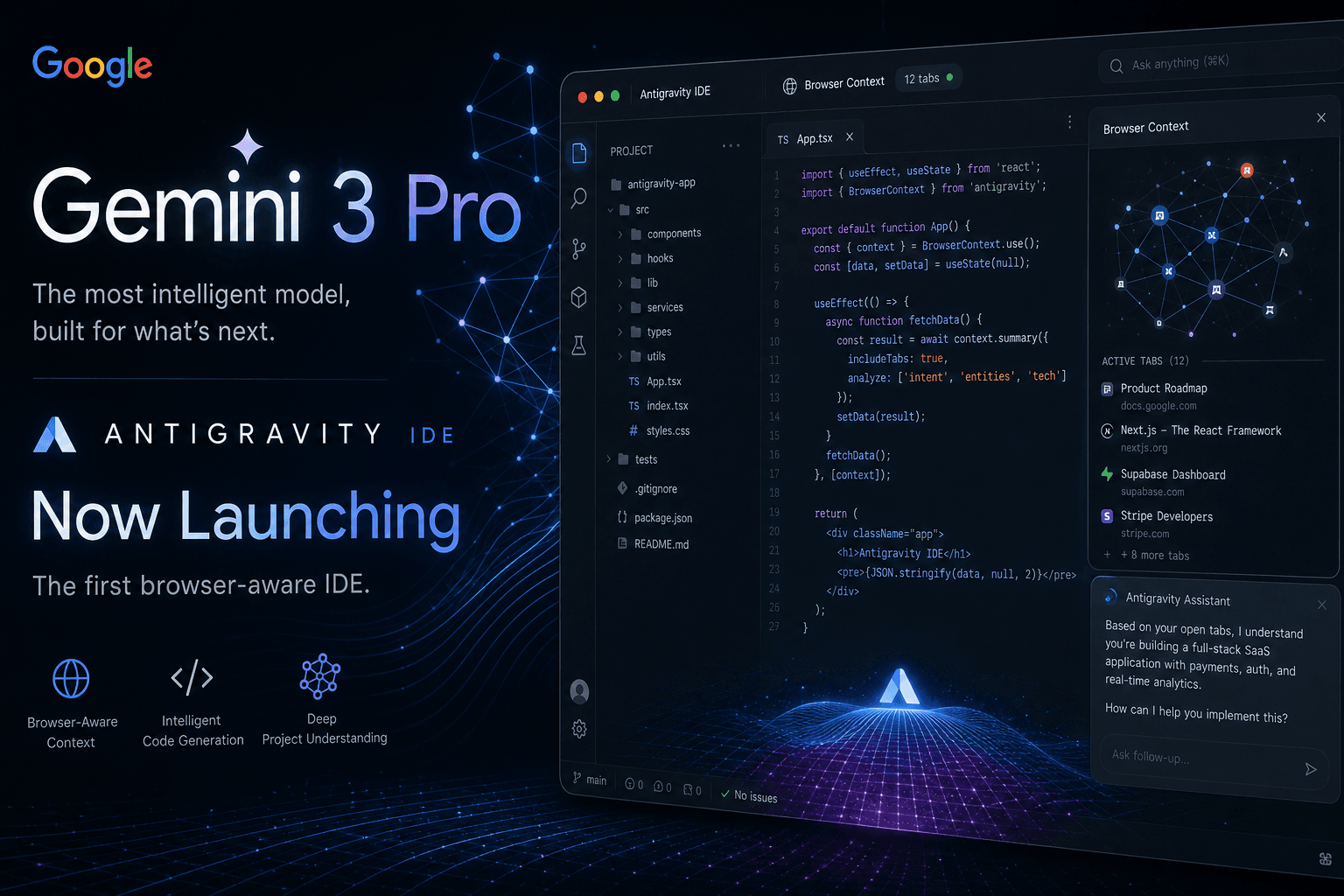
Gemini 3 Pro + Google Antigravity: The Browser-Aware IDE That Changes Everything

Table of Contents
Gemini 3 Pro + Google Antigravity: The Browser-Aware IDE That Changes Everything #
What Google Just Announced: Antigravity IDE and Gemini 3 Pro #
Google launched two major products today: Gemini 3 Pro and the Antigravity IDE. Both ship as a unified platform. Both are available in free public preview for macOS, Windows, and Linux.
Google is positioning Antigravity not as an editor upgrade, but as an "agent-first" development platform. The IDE integrates directly with Gemini 3 Pro, offering 1M token context windows, native browser automation, and a multi-agent architecture that can spawn asynchronous workers across different workspaces.
Key facts about today's launch:
| Feature | Specification |
|---|---|
| Model | Gemini 3 Pro with 1M token context |
| Output | 64K tokens per generation |
| Architecture | Sparse mixture-of-experts (MoE) |
| Availability | Free public preview |
| Platforms | macOS, Windows, Linux |
| Multi-agent | Native support with Manager Surface |
| Browser control | Embedded Chrome with agent access |
What distinguishes this from previous Google AI releases: browser-aware coding. Antigravity agents can launch Chrome, interact with UI elements, take screenshots, verify functionality, and return proof of completion. No Playwright scripts. No external integrations. The browser is a first-class citizen inside the IDE.
Gemini 3 Pro Technical Specifications #
Gemini 3 Pro represents the first member of the Gemini 3 family, shipping with significant architectural improvements over Gemini 2.5.
The model specifications confirm what early benchmarks suggested:
- 1 million token context window for inputs
- 64,000 token output per generation
- Sparse MoE transformer architecture with native multimodal support
- Deep Think mode for parallel reasoning on complex problems
Benchmark performance as of November 2025:
| Benchmark | Gemini 3 Pro Score |
|---|---|
| SimpleQA Verified (factuality) | 72.1% |
| SWE-bench Verified (code) | 76.2% |
| Humanity's Last Exam (no tools) | 48.4% |
| MMMU-Pro (multimodal) | Industry-leading |
| Video-MMMU | Top-tier performance |
The Deep Think capability deserves special attention. It employs parallel reasoning—evaluating multiple hypotheses simultaneously rather than sequential chain-of-thought processing. Early applications include identifying logical flaws in peer-reviewed mathematics papers and optimizing semiconductor fabrication methods.
Multimodal capabilities have expanded significantly:
media_resolutionparameter (low/medium/high) for vision processing control- Multimodal function responses including images and PDFs
- Streaming function calling
- Native audio, video, and code repository comprehension
For developers, the combination of 1M context and improved tool use means entire codebases fit in context. Agents can read, understand, and modify large projects without the chunking gymnastics required by shorter-context models.
The Browser-Aware Coding Revolution #
Antigravity's browser automation is not a plugin or external tool—it is embedded directly into the agent architecture.
Traditional AI coding assistants stop at the file boundary. They write code, but testing that code requires human intervention: launch the browser, navigate to the page, check if the button works, resize to mobile, verify the layout doesn't break. Antigravity eliminates this friction.
Here's how the browser-aware workflow operates:
- Agent receives task: "Ensure the jewelry category filter works on mobile view"
- Browser launches: Embedded Chrome opens within the IDE
- Autonomous navigation: Agent toggles DevTools, switches to mobile viewport
- Interaction testing: Clicks filters, verifies functionality
- Proof generation: Screenshots and video recordings captured
- Completion report: Agent returns with visual proof of success or failure
This changes the development cycle. Agents no longer write code and hope it works—they verify it works before reporting completion. The implications:
- Fewer manual QA cycles for UI changes
- Self-documenting verification via screenshots and recordings
- Mobile testing without device labs
- CI/CD integration potential for automated visual regression
The browser agent is powered by Gemini 2.5 Computer Use, specifically fine-tuned for DOM interaction and visual understanding. It understands CSS selectors, can interpret visual layouts, and handles JavaScript-rendered content.
Antigravity vs Cursor: A Feature Breakdown #
Cursor defined the AI IDE category. Antigravity aims to redefine it.
Direct comparison across critical dimensions:
| Feature | Antigravity | Cursor |
|---|---|---|
| Browser automation | Native embedded Chrome | Limited embedded browser |
| Multi-agent | Native Manager Surface | Single-agent focus |
| Model support | Gemini 3 Pro, Claude Sonnet 4.5, GPT-OSS | OpenAI, Anthropic, custom |
| Artifacts system | Built-in (task lists, plans, recordings) | Composers/Projects |
| Asynchronous work | Yes—agents work in background | Limited |
| Context window | 1M tokens (Gemini 3 Pro) | Depends on model |
| Pricing | Free public preview | $20/month Pro |
Browser automation represents the clearest differentiator. Cursor's agents can interact with embedded browsers, but the capability is limited compared to Antigravity's full Chrome control. Cursor lacks the autonomous verification loop—taking screenshots, recording videos, and self-validating work.
The multi-agent architecture is equally significant. Antigravity's Manager Surface allows spawning multiple agents that work asynchronously across different workspaces. One agent writes backend API changes while another tests frontend integration in the browser. Cursor's model is primarily single-agent, with project context shared through Composer threads.
Where Cursor maintains advantage:
- Mature ecosystem with extensive documentation and community
- Predictable pricing with established Pro tiers
- Customization depth via
.cursorrulesand MCP servers - Stability as a shipping product, not preview software
Antigravity's resource demands are notable. The embedded browser and multi-agent system consume significant RAM. Early testing shows performance impacts on MacBook Pro systems, particularly when running multiple agents simultaneously.
Antigravity vs Claude Code: Who Wins? #
Claude Code is a terminal-first tool. Antigravity is an IDE-first platform. The distinction matters.
Claude Code operates through command-line interaction, requiring terminal literacy. It integrates via MCP servers for browser automation, but this is external configuration, not native capability.
Comparison matrix:
| Dimension | Antigravity | Claude Code |
|---|---|---|
| Interface | Native IDE (GUI) | Terminal-first |
| Browser control | Native embedded Chrome | Via MCP servers |
| Setup complexity | Install and launch | Terminal + MCP configuration |
| Visual feedback | Screenshots, recordings in IDE | Text-only unless configured |
| Target user | IDE-centric developers | Terminal-centric developers |
| Model backing | Gemini 3 Pro primary | Claude Sonnet 4.5 |
Claude Code excels in scenarios requiring deep terminal integration, server management, and command-line workflows. Its integration with Claude Sonnet 4.5 provides exceptional reasoning for complex refactoring tasks.
Antigravity wins when:
- Frontend development with visual verification requirements
- Teams needing artifact-based collaboration (comments on screenshots, review of implementation plans)
- Projects requiring simultaneous browser testing and code editing
- Developers preferring GUI workflows over terminal commands
The choice is not binary. Many developers run both: Claude Code for backend infrastructure tasks, Antigravity for frontend feature development with visual requirements.
Deep Planning Mode: Google's Secret Weapon #
Gemini 3 Pro's Deep Think mode isn't a gimmick—it changes how agents approach complex tasks.
Traditional chain-of-thought reasoning processes problems sequentially. Deep Think uses parallel reasoning: evaluating multiple hypotheses simultaneously, weighting confidence scores, and selecting optimal paths. The mechanism resembles how expert human problem-solvers weigh alternatives before committing to an approach.
In Antigravity, Deep Think manifests in the Artifacts system. When an agent encounters a complex task, it generates:
- Implementation plans with step-by-step breakdowns
- Task lists with dependencies and estimated completion
- Walkthroughs explaining reasoning decisions
- Verification criteria defining "done" for the task
These artifacts appear as structured documents in the IDE, not raw text streams. Users review, comment, and approve plans before execution begins—similar to Google Docs collaboration patterns.
Deep Think performance on reasoning benchmarks:
- Humanity's Last Exam: 48.4% without tools (gold medal territory)
- ARC-AGI-2: Competitive with specialized reasoning models
- MathArena Apex: Strong performance on competition mathematics
- Logical flaw detection: Identifies errors in peer-reviewed papers
For developers, this means agents that actually plan before coding. Complex refactors get architectural consideration. Database migrations include dependency analysis. API changes anticipate breaking impacts.
Multi-Agent Architecture Inside Antigravity #
Antigravity treats agents as orchestratable resources, not chat participants.
The platform provides two primary interfaces:
Editor View: Traditional IDE with tab completions, inline commands, and AI assistance. Familiar to anyone using Cursor or Copilot.
Manager Surface: The differentiator. A dedicated interface for spawning, monitoring, and coordinating multiple agents. Each agent operates in its own workspace with defined scope and deliverables.
Multi-agent workflows available today:
| Workflow | Agent 1 | Agent 2 | Agent 3 |
|---|---|---|---|
| Full-stack feature | Backend API development | Frontend component building | Browser testing & verification |
| Code review | Security analysis | Performance optimization | Documentation update |
| Refactoring | Core logic migration | Test suite updates | Integration verification |
| Documentation | Code analysis | Example generation | Visual screenshot capture |
Agents communicate through Artifacts. Agent A completes a backend endpoint and publishes an Artifact. Agent B, working on frontend integration, subscribes to that Artifact and begins testing against the live endpoint. Agent C captures browser screenshots for verification.
This is asynchronous by design. Agents don't block waiting for each other. They publish, subscribe, and progress independently. Users monitor via the Manager Surface, intervening when human judgment is required.
Resource implications are real. Each agent consumes memory and compute. Google recommends 16GB+ RAM for comfortable multi-agent operation. The preview builds show connection stability issues when agents exceed available resources.
Why Google's AI Strategy Just Clicked #
Sundar Pichai called 2025 "a critical year" for Google AI. Today's launch explains why.
Google's strategy is no longer fragmented. The pieces now connect:
- Gemini 3 Pro as the foundation model with industry-leading context and multimodal capabilities
- Antigravity as the developer-facing IDE, showcasing agent-first workflows
- Vertex AI as the enterprise platform for production deployments
- Google AI Studio for prototyping and experimentation
- Android Studio integration bringing agents to mobile development
- A2A protocol for agent interoperability across platforms
The unified ecosystem approach addresses Google's historical weakness: shipping integrated products rather than isolated research demos. Antigravity isn't a research paper—it's a downloadable IDE with working browser automation and multi-agent coordination.
Strategic positioning against competitors:
| Competitor | Google's Counter |
|---|---|
| OpenAI / ChatGPT | Gemini 3 Pro with superior context window |
| Cursor | Antigravity with native browser + multi-agent |
| Claude Code | GUI-first alternative with visual verification |
| Microsoft Copilot | Deeper IDE integration with Android Studio |
The free public preview is strategic positioning. Google can capture developer mindshare before competitors match the browser-aware and multi-agent capabilities. The model quality (72.1% on SimpleQA for factuality) addresses trust concerns that previously pushed developers toward Claude.
What This Means for Developers Today #
Practical implications for development teams considering Antigravity:
Immediate opportunities:
- Frontend-heavy projects benefit most from browser-aware verification
- Full-stack teams can parallelize backend and frontend work across agents
- QA workflows gain automated visual regression without separate tools
- Documentation auto-generates with screenshots and walkthroughs
Current limitations:
- Preview stability issues require tolerance for occasional agent disconnections
- Resource consumption demands capable hardware
- Ecosystem maturity lags behind Cursor (fewer plugins, smaller community)
- MCP server compatibility is evolving
Migration considerations:
Teams using Cursor can run both in parallel. Antigravity excels at specific workflows (visual testing, multi-agent tasks) while Cursor handles daily editing. No immediate need to switch entirely—augment existing workflows where Antigravity provides clear advantage.
Enterprise implications:
- Free preview reduces evaluation barriers
- 1M token context enables monorepo-scale projects
- Multi-agent coordination supports team-scaled development
- Integration with Vertex AI provides production deployment path
The browser-aware paradigm is the key shift. Developers who previously accepted the "write code, manually test, iterate" cycle now have agents that verify their own work. This isn't incremental improvement—it's a workflow category change.
Frequently Asked Questions #
What exactly is Google Antigravity? #
Antigravity is Google's agent-first IDE, launched today in free public preview. It combines a traditional AI-powered code editor with a multi-agent orchestration system and native browser automation. Unlike standard IDEs where AI assists a single human developer, Antigravity treats agents as autonomous workers that can plan, code, test, and verify across multiple surfaces simultaneously.
How does Gemini 3 Pro compare to GPT-4o and Claude 3.5 Sonnet? #
Gemini 3 Pro leads on context window and multimodal integration. The 1M token context exceeds GPT-4o and Claude 3.5 Sonnet, enabling entire codebases in a single prompt. Benchmark scores show 76.2% on SWE-bench Verified (code generation) and 72.1% on SimpleQA (factuality). The Deep Think mode for parallel reasoning is unique to Gemini 3 Pro. However, Claude 3.5 Sonnet maintains advantages in code quality perception and certain reasoning tasks.
Can Antigravity replace my current IDE? #
For specific workflows, yes. For everything, not yet. Antigravity excels at browser-aware development, multi-agent coordination, and visual verification. It can replace Cursor or VS Code for frontend-heavy projects and team workflows requiring parallel agent work. However, ecosystem maturity (plugins, community resources, stability) still favors established IDEs. Many developers run Antigravity alongside their primary editor for specific tasks.
What makes browser-aware coding different? #
Browser-aware coding means agents can launch Chrome, interact with UI elements, and verify functionality autonomously. Traditional AI coding stops at file boundaries—agents write code but humans must test it. Antigravity agents toggle DevTools, resize viewports, click buttons, capture screenshots, and record videos as proof of completion. This closes the verification loop that previously required manual QA cycles.
Is Antigravity free to use? #
Yes, Antigravity is currently in free public preview. Google has not announced pricing tiers. The preview includes access to Gemini 3 Pro with generous rate limits, plus support for Claude Sonnet 4.5 and OpenAI's GPT-OSS. This free period provides evaluation opportunity before commercial pricing establishes.
Does Antigravity support all programming languages? #
Antigravity supports all major programming languages through Gemini 3 Pro's training. JavaScript, TypeScript, Python, Go, Rust, Java, C++, and web frameworks (React, Vue, Angular) work with full feature support. Niche languages may have reduced agent effectiveness. The browser automation features work regardless of backend language, as they interact with rendered output rather than source code.
How does the multi-agent system work? #
The Manager Surface interface spawns independent agents across separate workspaces. Each agent has defined scope and publishes Artifacts (task lists, plans, screenshots) that other agents can subscribe to. Agents work asynchronously—Agent A can build a backend API while Agent B tests frontend integration against it. Users monitor progress via the Manager Surface and intervene when human judgment is required.
When will Antigravity be available to everyone? #
Antigravity is available today in free public preview for macOS, Windows, and Linux. No waitlist or application required. Download from the official Antigravity site and launch. Google has not announced end dates for the preview period or future pricing. Current availability is immediate and unrestricted.
Ready to Build Smarter? Let's Talk #
Google's Antigravity launch signals where AI development is heading: agents that don't just write code, but verify it. Browser-aware workflows. Multi-agent coordination. Deep reasoning before execution.
This is exactly the architecture I implement for clients.
If you're evaluating how these tools fit your development pipeline, I can help. I specialize in AI automation systems and full-stack development that leverages these capabilities for real business outcomes—not demos, but production systems that ship.
Explore my AI Automation & Growth services or view my full-stack development work.
Related reading:
Related Posts
Google I/O 2026 Action List: How I Prompted Gemini 3.5 Flash and Antigravity Workflows
Google I/O 2026 just reset the AI tooling landscape. Here's the 9-action checklist for builders who want to ship this week, not just watch the keynote.
Anthropic vs. OpenAI vs. Google: The State of the Frontier in May 2026
A head-to-head breakdown of the three AI giants in May 2026: Claude Opus 4.6, GPT-5.3 and 5.4, Gemini 3.1 Pro. Real specs, real pricing, and what actually matters for builders.
Kimi K2 Open Weights: How I Prompted Moonshot's Frontier Model for Agentic Tool Use
How I direct Kimi K2 by Moonshot AI for agentic workflows, long-context tool calling, and workflow automation. A 1 trillion parameter MoE model with competitive benchmarks at 5-17x lower cost than GPT-5 and Claude.




