Anthropic Tool Use Goes GA: Function-Calling Becomes Table Stakes

Table of Contents
Anthropic Tool Use Goes GA: Function-Calling Becomes Table Stakes #
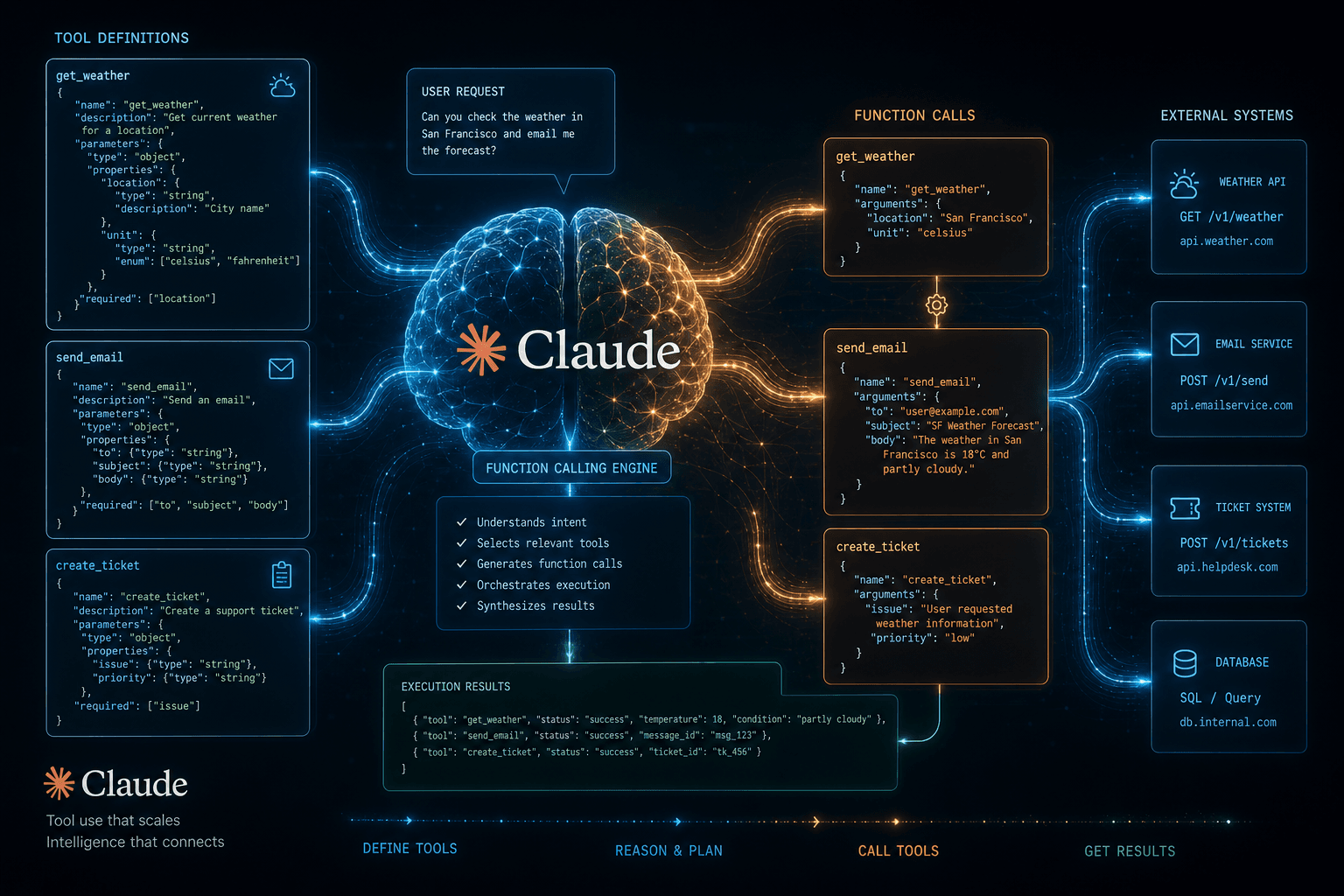
As of May 30, 2024, Anthropic's Tool Use feature is generally available across the Claude API, Amazon Bedrock, and Google Vertex AI. Tool Use is Anthropic's name for function calling — the capability that lets Claude intelligently invoke external functions, APIs, and services as part of completing a task. This is the primitive every serious agent is built on, and it just became production-grade.
Table of Contents #
What Is Anthropic Tool Use? (And Why "Function Calling" Is the Wrong Mental Model) #
Tool Use is the mechanism by which Claude outputs structured JSON describing what external function to call, with what arguments — and then your application executes that function and sends the result back. Claude never actually calls anything. It reasons about the problem, decides a tool is needed, emits a tool_use content block specifying the tool name and inputs, and waits for your code to run the function and return a tool_result. The model is the brain; your application is the hands.
The "function calling" label inherited from OpenAI is technically accurate but undersells what's happening. Tool Use isn't just about calling functions — it's the primitive that enables agents to interact with real-world systems: databases, APIs, file systems, browsers, communication platforms, internal business logic. When Claude can call tools, it can:
- Query live data rather than reasoning from stale training knowledge
- Write to external systems — create records, send messages, trigger workflows
- Chain multi-step operations — the output of one tool informs the next call
- Operate autonomously across long-horizon tasks without human intervention at each step
The full request/response cycle works like this:
- You send a message to the Claude API with a
toolsarray defining available functions - Claude reasons about the task and decides which tool (if any) to call
- Claude returns a response with
stop_reason: "tool_use"and one or moretool_usecontent blocks - Your application parses the
tool_useblock, extractsnameandinput, and executes the function - You send the result back as a
tool_resultcontent block in a new user turn - Claude synthesizes the tool output with its reasoning and either continues (more tool calls) or delivers a final answer
This loop is the foundation of every production Claude agent. Understanding this cycle — not just the API spec — is what separates builders who get reliable agents from those who fight unexplained failures.
What Changed at GA: From Beta to Production-Ready #
Anthropic's Tool Use moved from public beta to general availability on May 30, 2024 — roughly two and a half months after the beta launched in mid-March 2024. The GA release isn't just a status label change. There are concrete improvements that make production deployment viable where the beta was risky.
Beta vs. GA: What Actually Improved #
| Dimension | Beta (March 2024) | GA (May 30, 2024) |
|---|---|---|
| JSON adherence | Occasional schema violations | High fidelity to defined inputSchema |
| Reliability | Intermittent tool_use omissions | Consistent tool invocation on matched intents |
| Platform support | Anthropic API only | Anthropic API + Amazon Bedrock + Google Vertex AI |
| Parallel tool use | Limited/unstable | Fully supported and documented |
| Model support | Claude 3 Sonnet initially | Claude 3 Opus, Sonnet, and Haiku |
| Streaming with tools | Not supported | Supported in GA |
| Production SLA | None (beta) | Standard API SLA applies |
Platform Parity Is the Real Story #
The biggest unlock at GA isn't any single capability improvement — it's platform parity. Enterprise buyers don't deploy directly to Anthropic's API. They route through Amazon Bedrock (for existing AWS infrastructure, IAM, VPC, compliance controls) or Google Vertex AI (for GCP-native deployments). Having Tool Use in beta on those platforms meant theoretical access; having it GA means enterprise-grade production deployments can ship today.
For independent builders and agencies using the Anthropic API directly, the reliability improvements matter most. In beta, Tool Use had enough inconsistency that production agents needed expensive retry logic and fallback prompting. At GA, the baseline JSON schema adherence is high enough that you can build a production agentic loop without wrapping every tool call in defensive error handling.
Models at GA Launch #
All three Claude 3 tiers support Tool Use at GA:
- Claude 3 Opus — highest reasoning, best for complex multi-tool orchestration, highest cost
- Claude 3 Sonnet — balanced performance/cost, the production default for most agent workloads
- Claude 3 Haiku — fastest, cheapest, suitable for high-throughput tool-heavy workflows where speed matters more than reasoning depth
The model choice for Tool Use isn't about which one "supports" it — all three do. It's about matching reasoning depth to task complexity. Simple tool lookups (weather, DB queries) run great on Haiku. Multi-step research agents with conditional tool chains need Opus or Sonnet.
The Tool Use Schema: How to Define Tools Claude Can Call #
Every tool Claude can access is defined by a JSON object with three required fields: name, description, and input_schema. The input_schema follows JSON Schema draft 7 syntax — the same format used for OpenAPI specs and JSON Schema validators, just nested inside Anthropic's tool definition wrapper.
Full Schema Structure #
{
  "name": "search_database",
  "description": "Search the product database for items matching a query. Use this when the user asks about specific products, pricing, availability, or inventory. Returns an array of matching product objects with id, name, price, and stock_count.",
  "input_schema": {
    "type": "object",
    "properties": {
      "query": {
        "type": "string",
        "description": "The search term or product name to look up"
      },
      "category": {
        "type": "string",
        "enum": ["electronics", "clothing", "furniture", "food"],
        "description": "Optional product category filter"
      },
      "max_results": {
        "type": "integer",
        "description": "Maximum number of results to return. Defaults to 10.",
        "default": 10
      }
    },
    "required": ["query"]
  }
}
The Description Field Is the Most Important Part #
Claude uses the description to make two decisions: whether to call this tool at all, and what inputs to pass. A vague description produces unreliable tool invocation. A specific description produces highly predictable behavior.
| Description Quality | Example | Result |
|---|---|---|
| Too vague | "Searches for things" |
Claude calls it randomly or skips it |
| Slightly better | "Search the product database" |
Claude calls it, but misses edge cases |
| Production-grade | "Search the product database for items matching a query. Use this when the user asks about specific products, pricing, availability, or inventory." |
Consistent, predictable invocation |
Rules for production-grade tool descriptions:
- State the purpose explicitly — what does this tool do and why would Claude use it?
- Describe the trigger conditions — "Use this when the user asks about X"
- Describe the return shape — "Returns an array of product objects with id, name, price"
- Note limitations — "Only searches the current catalog, not historical orders"
- Parameter descriptions are also critical — each property's
descriptionguides input generation
The input_schema Supports the Full JSON Schema Spec
#
You get type, properties, required, enum, default, minimum, maximum, pattern, nested object types, and array types. Claude respects all of these — enum values especially constrain Claude to valid inputs:
{
  "name": "create_calendar_event",
  "description": "Create a new event on the user's Google Calendar. Use when the user wants to schedule a meeting, appointment, or reminder.",
  "input_schema": {
    "type": "object",
    "properties": {
      "title": { "type": "string", "description": "Event title" },
      "start_time": { "type": "string", "description": "ISO 8601 datetime, e.g. 2024-05-31T14:00:00Z" },
      "duration_minutes": { "type": "integer", "minimum": 15, "maximum": 480 },
      "attendees": {
        "type": "array",
        "items": { "type": "string", "format": "email" },
        "description": "List of attendee email addresses"
      },
      "recurrence": {
        "type": "string",
        "enum": ["none", "daily", "weekly", "monthly"],
        "default": "none"
      }
    },
    "required": ["title", "start_time", "duration_minutes"]
  }
}
The tighter your schema, the more deterministic Claude's tool call outputs. Think of input_schema as a contract — Claude will honor it if you write it precisely.
Implementing Tool Use in Python: A Complete Working Example #
A complete Claude Tool Use implementation in Python requires five steps: define tools, send the initial message, check stop_reason, execute the tool, and return the result. Here's a production-ready implementation using the anthropic Python SDK (version 0.25+, the version available at GA).
import anthropic
import json

client = anthropic.Anthropic()  # Uses ANTHROPIC_API_KEY from env

# Step 1: Define your tools
tools = [
    {
        "name": "get_weather",
        "description": "Get current weather conditions for a city. Use when the user asks about weather, temperature, or conditions in a specific location.",
        "input_schema": {
            "type": "object",
            "properties": {
                "city": {
                    "type": "string",
                    "description": "City name, e.g. 'San Francisco' or 'London'"
                },
                "units": {
                    "type": "string",
                    "enum": ["celsius", "fahrenheit"],
                    "description": "Temperature units. Default celsius.",
                    "default": "celsius"
                }
            },
            "required": ["city"]
        }
    },
    {
        "name": "search_web",
        "description": "Search the web for current information on any topic. Use when the user needs up-to-date information that may not be in your training data.",
        "input_schema": {
            "type": "object",
            "properties": {
                "query": {
                    "type": "string",
                    "description": "The search query"
                }
            },
            "required": ["query"]
        }
    }
]

# Step 2: Your tool execution functions
def get_weather(city: str, units: str = "celsius") -> dict:
    # In production, call a real weather API here
    return {"city": city, "temperature": 22, "units": units, "condition": "Sunny"}

def search_web(query: str) -> dict:
    # In production, call a search API (Tavily, Serper, etc.)
    return {"results": [{"title": f"Result for {query}", "snippet": "..."}]}

def execute_tool(tool_name: str, tool_input: dict):
    """Route tool calls to their implementations."""
    if tool_name == "get_weather":
        return get_weather(**tool_input)
    elif tool_name == "search_web":
        return search_web(**tool_input)
    else:
        raise ValueError(f"Unknown tool: {tool_name}")

# Step 3: The agentic loop
def run_agent(user_message: str) -> str:
    messages = [{"role": "user", "content": user_message}]

    while True:
        # Call Claude
        response = client.messages.create(
            model="claude-3-5-sonnet-20240620",
            max_tokens=4096,
            tools=tools,
            messages=messages
        )

        # Step 4: Check why Claude stopped
        if response.stop_reason == "end_turn":
            # Extract the final text response
            for block in response.content:
                if hasattr(block, "text"):
                    return block.text

        elif response.stop_reason == "tool_use":
            # Add Claude's response (including tool_use blocks) to messages
            messages.append({"role": "assistant", "content": response.content})

            # Collect all tool results
            tool_results = []
            for block in response.content:
                if block.type == "tool_use":
                    print(f"→ Calling tool: {block.name} with {block.input}")

                    # Step 5: Execute the tool
                    result = execute_tool(block.name, block.input)

                    tool_results.append({
                        "type": "tool_result",
                        "tool_use_id": block.id,
                        "content": json.dumps(result)
                    })

            # Send all tool results back to Claude
            messages.append({"role": "user", "content": tool_results})

        else:
            # stop_reason == "max_tokens" or unexpected
            raise RuntimeError(f"Unexpected stop_reason: {response.stop_reason}")

# Usage
result = run_agent("What's the weather in Tokyo, and search for the latest news about AI agents?")
print(result)
Key Implementation Details #
response.contentis a list — it can containtextblocks andtool_useblocks mixed together. Always iterate the full list; don't assume the first block is text.tool_use_idmust match — when sendingtool_resultback, thetool_use_idmust exactly match theidfrom thetool_useblock. Mismatches cause the API to reject the message.- Results as strings — while
contentintool_resultcan be a string or a list of content blocks, the simplest production approach isjson.dumps(result)for structured data. - The
while Trueloop — a real production agent should have a max iteration guard (if iterations > 10: raise) to prevent runaway loops on unexpected model behavior.
Implementing Tool Use in TypeScript: A Complete Working Example #
The TypeScript implementation using @anthropic-ai/sdk follows the same loop pattern, but gives you full type safety on response content blocks. The SDK exports ToolUseBlock and TextBlock types that eliminate the hasattr guessing present in Python. Install with npm install @anthropic-ai/sdk.
import Anthropic from "@anthropic-ai/sdk";

const client = new Anthropic(); // Uses ANTHROPIC_API_KEY from env

// Tool definitions (identical JSON schema format as Python)
const tools: Anthropic.Tool[] = [
  {
    name: "get_stock_price",
    description:
      "Get the current stock price for a ticker symbol. Use when the user asks about stock prices, market data, or company valuations.",
    input_schema: {
      type: "object" as const,
      properties: {
        ticker: {
          type: "string",
          description: "Stock ticker symbol, e.g. AAPL, MSFT, GOOGL",
        },
        exchange: {
          type: "string",
          enum: ["NYSE", "NASDAQ", "LSE"],
          description: "Stock exchange. Defaults to NASDAQ.",
        },
      },
      required: ["ticker"],
    },
  },
  {
    name: "send_slack_message",
    description:
      "Send a message to a Slack channel. Use when the user wants to notify a team, post an update, or send an alert.",
    input_schema: {
      type: "object" as const,
      properties: {
        channel: {
          type: "string",
          description: "Slack channel name without #, e.g. 'general' or 'alerts'",
        },
        message: {
          type: "string",
          description: "The message text to send",
        },
      },
      required: ["channel", "message"],
    },
  },
];

// Tool implementations
async function getStockPrice(
  ticker: string,
  exchange?: string
): Promise<{ ticker: string; price: number; currency: string }> {
  // In production: call a market data API (Polygon.io, Alpha Vantage, etc.)
  return { ticker, price: 182.52, currency: "USD" };
}

async function sendSlackMessage(
  channel: string,
  message: string
): Promise<{ success: boolean; timestamp: string }> {
  // In production: call Slack API with your bot token
  console.log(`[Slack] #${channel}: ${message}`);
  return { success: true, timestamp: new Date().toISOString() };
}

async function executeTool(
  name: string,
  input: Record<string, string>
): Promise<unknown> {
  switch (name) {
    case "get_stock_price":
      return getStockPrice(input.ticker, input.exchange);
    case "send_slack_message":
      return sendSlackMessage(input.channel, input.message);
    default:
      throw new Error(`Unknown tool: ${name}`);
  }
}

// The agentic loop
async function runAgent(userMessage: string): Promise<string> {
  const messages: Anthropic.MessageParam[] = [
    { role: "user", content: userMessage },
  ];

  let iterations = 0;
  const MAX_ITERATIONS = 10;

  while (iterations < MAX_ITERATIONS) {
    iterations++;

    const response = await client.messages.create({
      model: "claude-3-5-sonnet-20240620",
      max_tokens: 4096,
      tools,
      messages,
    });

    if (response.stop_reason === "end_turn") {
      // Extract final text response
      const textBlock = response.content.find(
        (block): block is Anthropic.TextBlock => block.type === "text"
      );
      return textBlock?.text ?? "No response generated";
    }

    if (response.stop_reason === "tool_use") {
      // Add assistant's full response to message history
      messages.push({ role: "assistant", content: response.content });

      // Execute all tool calls (may be multiple in parallel tool use)
      const toolResults: Anthropic.ToolResultBlockParam[] = await Promise.all(
        response.content
          .filter(
            (block): block is Anthropic.ToolUseBlock => block.type === "tool_use"
          )
          .map(async (toolUse) => {
            console.log(`→ Tool call: ${toolUse.name}`, toolUse.input);
            const result = await executeTool(
              toolUse.name,
              toolUse.input as Record<string, string>
            );
            return {
              type: "tool_result" as const,
              tool_use_id: toolUse.id,
              content: JSON.stringify(result),
            };
          })
      );

      // Return all tool results in a single user message
      messages.push({ role: "user", content: toolResults });
    }
  }

  throw new Error(`Agent exceeded max iterations (${MAX_ITERATIONS})`);
}

// Usage
runAgent(
  "Check AAPL stock price and if it's above $180, send a message to the alerts channel"
)
  .then(console.log)
  .catch(console.error);
TypeScript Advantages Over Python for Tool Use #
- Type guards with
.filter()+ type predicates cleanly separateTextBlockfromToolUseBlock— nohasattrchecks Promise.allon tool execution naturally handles parallel tool use correctly (all tools execute concurrently, all results sent back together)Anthropic.Tool[]type catches schema errors at compile time rather than runtime API rejectionsAnthropic.MessageParam[]enforces valid message structure in the history array
Parallel Tool Use: Running Multiple Functions Simultaneously #
Parallel tool use means Claude returns multiple tool_use blocks in a single response, and you execute all of them concurrently before sending back a batch of tool_result blocks. This cuts latency dramatically on tasks that require gathering multiple independent data points. A query like "compare the weather in New York, London, and Tokyo" can fire three simultaneous API calls instead of three sequential round trips to the model.
When Claude Chooses Parallel vs. Sequential #
Claude decides autonomously whether to call tools in parallel or sequence based on whether tool calls have data dependencies:
| Scenario | Claude's Strategy |
|---|---|
| "Get weather in NYC and London" | Parallel — both calls are independent |
| "Search for X, then summarize the top result" | Sequential — second call depends on first result |
| "Look up customer #123 and send them an email" | Sequential — must have customer data to craft email |
| "Check stock prices for AAPL, MSFT, GOOGL" | Parallel — all independent lookups |
| "Get order status and update it to shipped" | Sequential — must read before writing |
Python: Handling Parallel Tool Use Correctly #
The execution pattern for parallel tool use is identical to sequential — iterate response.content, collect all tool_use blocks, execute them (concurrently with asyncio.gather or sequentially in a loop), then send all tool_result blocks back in one message:
import asyncio
import anthropic
import json

client = anthropic.AsyncAnthropic()  # Use async client for concurrent execution

async def handle_tool_use_response(response, messages: list) -> list:
    """Process a tool_use stop, execute all tools, return updated messages."""

    # Collect all tool_use blocks from the response
    tool_use_blocks = [
        block for block in response.content
        if block.type == "tool_use"
    ]

    print(f"→ Claude wants to call {len(tool_use_blocks)} tool(s) in parallel")

    # Execute all tools concurrently
    async def run_single_tool(tool_use):
        print(f"  → {tool_use.name}({tool_use.input})")
        result = await execute_tool_async(tool_use.name, tool_use.input)
        return {
            "type": "tool_result",
            "tool_use_id": tool_use.id,
            "content": json.dumps(result)
        }

    tool_results = await asyncio.gather(*[
        run_single_tool(block) for block in tool_use_blocks
    ])

    # Add assistant response + all tool results to history
    messages.append({"role": "assistant", "content": response.content})
    messages.append({"role": "user", "content": list(tool_results)})

    return messages

async def execute_tool_async(name: str, inputs: dict):
    # Your async tool implementations here
    await asyncio.sleep(0.1)  # Simulate API call
    return {"tool": name, "result": f"Result for {inputs}"}
Critical rule: All tool_result blocks must go back in a single user message. Do NOT send one tool result, wait for a response, then send the next. The API expects a complete batch corresponding to all the tool calls Claude made in its last turn.
Claude Tool Use vs. OpenAI Function Calling: What's Actually Different #
The conceptual model is identical — the schema format and response shape are different enough that you can't port code directly. Both systems let you define functions as JSON schemas and have the model decide when to call them. But the specific field names, response structures, and some behavioral nuances diverge in ways that matter for production code.
Schema Comparison #
| Field | Anthropic Tool Use | OpenAI Function Calling |
|---|---|---|
| Tool wrapper | tools: [{ name, description, input_schema }] |
tools: [{ type: "function", function: { name, description, parameters } }] |
| Schema field name | input_schema |
parameters |
| Schema type annotation | Required at object level | Required at object level |
| Tool choice | tool_choice: { type: "auto" | "any" | "tool", name? } |
tool_choice: "auto" | "none" | "required" | { type: "function", function: { name } } |
Response Format Comparison #
Anthropic response: Tool calls are in response.content as ContentBlock objects with type: "tool_use":
{
  "stop_reason": "tool_use",
  "content": [
    { "type": "text", "text": "I'll check that for you." },
    {
      "type": "tool_use",
      "id": "toolu_01ABC",
      "name": "get_weather",
      "input": { "city": "Tokyo" }
    }
  ]
}
OpenAI response: Tool calls are in message.tool_calls as a separate array:
{
  "finish_reason": "tool_calls",
  "message": {
    "role": "assistant",
    "content": null,
    "tool_calls": [
      {
        "id": "call_ABC",
        "type": "function",
        "function": {
          "name": "get_weather",
          "arguments": "{\"city\": \"Tokyo\"}"
        }
      }
    ]
  }
}
Note the critical difference: OpenAI's arguments is a JSON string that requires JSON.parse(). Anthropic's input is already a parsed object — no deserialization needed.
Behavioral Differences #
| Behavior | Anthropic | OpenAI |
|---|---|---|
| Arguments format in response | Pre-parsed JSON object | JSON string (requires JSON.parse) |
| Text + tool_use in same response | Yes — content array can have both |
Content is null when tool_calls present |
| Forced tool use | tool_choice: { type: "tool", name: "tool_name" } |
tool_choice: { type: "function", function: { name } } |
| Parallel tool calls | Supported (multiple items in content) | Supported (multiple items in tool_calls) |
| Tool result message role | User message with tool_result blocks |
tool role message per result |
Which Is Better? #
For building agents with Claude specifically: Anthropic's format is cleaner for most tasks. Pre-parsed inputs eliminate a deserialization footgun, and allowing text alongside tool_use blocks means Claude can "think out loud" before calling a tool — visible in the response content — rather than silently returning null content. For teams already deep in the OpenAI ecosystem with existing LangChain or OpenAI SDK code, the migration friction is real but manageable; the patterns are conceptually identical.
Platform Availability: Claude on Bedrock and Vertex AI #
Tool Use is now generally available on all three major platforms simultaneously — the Anthropic API, Amazon Bedrock, and Google Vertex AI. For enterprise teams, this means you no longer have to choose between Claude's reasoning capability and your infrastructure compliance requirements.
Why Platform Choice Matters for Production #
Most enterprise AI deployments don't use the Anthropic API directly. The reasons are structural:
- AWS deployments require traffic to stay inside a VPC, use IAM roles for auth, and log to CloudWatch. Bedrock provides all of this natively.
- GCP deployments need Vertex AI for VPC Service Controls, Google's enterprise audit logging, and existing GCP billing/quota management.
- Data residency requirements — some regulated industries require data to stay in a specific region. Bedrock and Vertex AI both offer regional endpoints.
- Consolidated billing — most enterprises prefer one AI spend line item on their cloud bill.
Using Claude on Amazon Bedrock with Tool Use #
On Bedrock, Claude models are accessed through the boto3 SDK using the converse API, which abstracts tool use across all supported models on Bedrock:
import boto3
import json

bedrock = boto3.client("bedrock-runtime", region_name="us-east-1")

tools_config = {
    "tools": [
        {
            "toolSpec": {
                "name": "get_weather",
                "description": "Get weather for a city. Use when asked about weather or temperature.",
                "inputSchema": {
                    "json": {
                        "type": "object",
                        "properties": {
                            "city": {"type": "string"}
                        },
                        "required": ["city"]
                    }
                }
            }
        }
    ]
}

response = bedrock.converse(
    modelId="anthropic.claude-3-sonnet-20240229-v1:0",
    messages=[{"role": "user", "content": [{"text": "What's the weather in Seattle?"}]}],
    toolConfig=tools_config
)

# Parse stop reason
stop_reason = response["stopReason"]  # "tool_use" or "end_turn"
Note the Bedrock differences: toolSpec wrapper instead of flat tool object, inputSchema.json wrapping, modelId string format with version suffix, and converse API instead of messages.create.
Platform Parity at GA: What It Means for Builders #
The real significance of Tool Use going GA across all three platforms simultaneously is that you can now build production agents on Claude without locking yourself to any single infrastructure provider. Your tool schemas are portable — the same JSON definition works on all three platforms (with minor API wrapper differences). The agent logic, the tool descriptions, the agentic loop patterns: all transferable. Build once, deploy wherever your enterprise infrastructure lives.
Designing Tools Claude Will Actually Use Correctly #
Tool design is half engineering, half UX — you're writing for Claude's reasoning engine, not for a type checker. The JSON schema validates structure, but what determines whether Claude calls your tool correctly in practice is the quality of the natural language descriptions. Think of it as writing API documentation for a very literal but highly capable engineer.
The "One Tool Does One Thing" Principle #
Resist the urge to build Swiss Army knife tools. A manage_database tool with 10 parameters for reading, writing, updating, and deleting will confuse Claude about when to use it and what arguments to pass. Break it into query_database, insert_record, update_record, delete_record — each with a clear, narrow description.
| Anti-pattern | Better design |
|---|---|
do_action(action_type, ...args) |
Separate tools per action |
manage_crm(operation, entity, data) |
get_contact, create_contact, update_contact |
file_ops(mode, path, content) |
read_file, write_file, list_directory |
| Tool that reads and writes | Two tools — one for each direction |
Parameter Naming Conventions #
Claude reads parameter names as context cues. Names that are self-documenting produce better results:
{
  "BAD": {
    "p1": { "type": "string" },
    "val": { "type": "integer" }
  },
  "GOOD": {
    "customer_email": {
      "type": "string",
      "description": "Customer's email address, e.g. jane@example.com"
    },
    "order_limit": {
      "type": "integer",
      "description": "Maximum number of orders to return (1-100)",
      "minimum": 1,
      "maximum": 100
    }
  }
}
Returning Errors Claude Can Act On #
When a tool fails, return a structured error object — not an exception that crashes your agent loop, and not a vague string that gives Claude nothing to work with:
def get_customer(customer_id: str) -> dict:
    try:
        customer = db.find_customer(customer_id)
        if not customer:
            # Return a structured error Claude can reason about
            return {
                "error": True,
                "error_type": "not_found",
                "message": f"No customer found with ID {customer_id}",
                "suggestion": "Try searching by email using the search_customers tool"
            }
        return {"error": False, "customer": customer}
    except Exception as e:
        return {
            "error": True,
            "error_type": "system_error",
            "message": str(e)
        }
When Claude receives a structured error, it can decide to try an alternative tool, ask the user for clarification, or explain the failure — rather than hallucinating an answer or looping indefinitely.
Tool Design Checklist #
Before shipping any tool to production:
- Description states what the tool does, when to use it, and what it returns
- Each parameter has a
descriptionwith an example value -
requiredarray only includes genuinely required params -
enumconstrains any parameter with a finite valid set - Error returns are structured objects, not raw exception strings
- Tool does exactly one thing (not a
modeparameter anti-pattern) - Return shape is documented in the tool
description
Building a Production Agent Loop with Tool Use #
The production agentic loop is a while loop that runs until stop_reason == "end_turn" or a safety valve fires. Everything else — logging, error handling, token budgeting, iteration limits — wraps around that core pattern. Here's a production-hardened Python implementation you can adapt directly:
import anthropic
import json
import logging
from typing import Callable, Any
from dataclasses import dataclass

logger = logging.getLogger(__name__)

@dataclass
class AgentConfig:
    model: str = "claude-3-5-sonnet-20240620"
    max_tokens: int = 4096
    max_iterations: int = 15
    system_prompt: str = ""

def build_production_agent(
    tools: list[dict],
    tool_registry: dict[str, Callable],
    config: AgentConfig = AgentConfig()
) -> Callable[[str], str]:
    """
    Factory that returns a production-ready agent function.

    Args:
        tools: List of Anthropic tool schema dicts
        tool_registry: Dict mapping tool name -> callable
        config: Agent configuration

    Returns:
        agent(user_message) -> str
    """
    client = anthropic.Anthropic()

    def agent(user_message: str) -> str:
        messages = [{"role": "user", "content": user_message}]
        total_input_tokens = 0
        total_output_tokens = 0
        iteration = 0

        while iteration < config.max_iterations:
            iteration += 1
            logger.info(f"Agent iteration {iteration}/{config.max_iterations}")

            # Build API call kwargs
            kwargs = {
                "model": config.model,
                "max_tokens": config.max_tokens,
                "tools": tools,
                "messages": messages,
            }
            if config.system_prompt:
                kwargs["system"] = config.system_prompt

            response = client.messages.create(**kwargs)

            # Track token usage
            total_input_tokens += response.usage.input_tokens
            total_output_tokens += response.usage.output_tokens
            logger.info(
                f"Tokens this turn: {response.usage.input_tokens} in / "
                f"{response.usage.output_tokens} out. "
                f"Running total: {total_input_tokens}/{total_output_tokens}"
            )

            if response.stop_reason == "end_turn":
                # Extract final text
                final_text = next(
                    (block.text for block in response.content
                     if hasattr(block, "text")),
                    ""
                )
                logger.info(
                    f"Agent completed in {iteration} iterations. "
                    f"Total tokens: {total_input_tokens + total_output_tokens}"
                )
                return final_text

            if response.stop_reason == "tool_use":
                messages.append({"role": "assistant", "content": response.content})

                tool_results = []
                for block in response.content:
                    if block.type != "tool_use":
                        continue

                    logger.info(f"Tool call: {block.name}({json.dumps(block.input)})")

                    # Look up and execute the tool
                    tool_fn = tool_registry.get(block.name)
                    if not tool_fn:
                        result = {
                            "error": True,
                            "message": f"Tool '{block.name}' not found in registry"
                        }
                    else:
                        try:
                            result = tool_fn(**block.input)
                            logger.info(f"Tool result: {json.dumps(result)[:200]}")
                        except Exception as e:
                            logger.error(f"Tool {block.name} raised: {e}")
                            result = {
                                "error": True,
                                "error_type": type(e).__name__,
                                "message": str(e)
                            }

                    tool_results.append({
                        "type": "tool_result",
                        "tool_use_id": block.id,
                        "content": json.dumps(result)
                    })

                messages.append({"role": "user", "content": tool_results})
                continue

            if response.stop_reason == "max_tokens":
                raise RuntimeError(
                    f"Response hit max_tokens ({config.max_tokens}) before completing. "
                    "Increase max_tokens or reduce tool output verbosity."
                )

            raise RuntimeError(f"Unexpected stop_reason: {response.stop_reason}")

        raise RuntimeError(
            f"Agent safety valve: exceeded {config.max_iterations} iterations. "
            "Check for infinite tool loops."
        )

    return agent

# Example usage
def get_weather(city: str, units: str = "celsius") -> dict:
    return {"city": city, "temp": 18, "units": units, "condition": "Overcast"}

weather_agent = build_production_agent(
    tools=[{
        "name": "get_weather",
        "description": "Get current weather for a city.",
        "input_schema": {
            "type": "object",
            "properties": {
                "city": {"type": "string"},
                "units": {"type": "string", "enum": ["celsius", "fahrenheit"]}
            },
            "required": ["city"]
        }
    }],
    tool_registry={"get_weather": get_weather},
    config=AgentConfig(
        system_prompt="You are a helpful travel assistant. Always check weather before making recommendations.",
        max_iterations=5
    )
)

answer = weather_agent("Should I pack a jacket for a trip to London this weekend?")
print(answer)
Key Production Patterns in This Implementation #
- Token tracking — input and output tokens logged per turn. Total token cost is visible without calling a separate billing API.
- Tool registry pattern —
tool_registrydecouples tool discovery from execution. Swap implementations without touching agent logic. - Structured error returns — tool exceptions become JSON error objects Claude can reason about, not unhandled crashes.
max_iterationssafety valve — prevents runaway loops from a misbehaving model or buggy tool returning unexpected data.- Factory pattern —
build_production_agentreturns a clean callable. Easy to unit test, easy to wrap in FastAPI endpoints, easy to run in n8n Code nodes.
Tool Use in n8n: Wiring Claude to Real Workflows #
n8n's AI Agent node abstracts Claude's Tool Use API into a visual workflow — each connected sub-node becomes a tool Claude can call. As of May 2024, n8n's AI Agent node supports Anthropic models (via the LangChain integration layer) and Tool Use is gaining first-class support. For builders who want Claude to orchestrate real production workflows without managing the agentic loop in custom code, n8n is the fastest path.
How n8n Maps to Tool Use Primitives #
n8n's AI Agent architecture maps directly to Anthropic's Tool Use model:
| n8n Concept | Anthropic Tool Use Equivalent |
|---|---|
| AI Agent node | Your agentic loop + Claude API call |
| Connected tool nodes | tools array in the API request |
| Tool node name + description | Tool name + description in schema |
| Tool node input/output | input_schema + tool_result |
| Agent trigger (webhook/schedule) | Initial messages array |
| Agent output | Final end_turn text response |
Setting Up Claude Tool Use in n8n #
- Add an AI Agent node — select "Anthropic" as the provider and "Claude 3 Sonnet" (or Opus/Haiku) as the model
- Connect tool nodes to the Agent — n8n supports HTTP Request, Code, Calculator, Wikipedia, and custom sub-workflow nodes as tools
- Name and describe each tool node — the name and description you give the tool node in n8n becomes the tool's
nameanddescriptionin the API call. Write these carefully — same rules apply as direct Tool Use. - Configure the system prompt — the AI Agent node has a system prompt field that becomes the
systemparameter. Use it to ground Claude in the workflow's purpose. - Test with the n8n chat interface — the AI Agent node includes a built-in chat test interface to iterate on tool behavior before going live.
Example: Claude as a CRM Research Agent in n8n #
Trigger (Webhook)
  → AI Agent (Claude 3 Sonnet)
       ├── HTTP Request Tool: "search_crm" → GET /api/contacts?q={{query}}
       ├── HTTP Request Tool: "get_company_data" → GET /api/companies/{{company_id}}
       ├── HTTP Request Tool: "enrich_contact" → POST /api/enrichment {{email}}
       └── HTTP Request Tool: "update_contact" → PATCH /api/contacts/{{id}}
  → Respond to Webhook
In this setup, Claude receives an inbound webhook with a natural language request ("Research contact Jane Doe at Acme Corp and update her LinkedIn URL"), decides which tools to call in what order, and the n8n workflow handles all the HTTP calls and returns structured JSON back to Claude at each step.
When to Use n8n vs. Custom Code #
| Factor | n8n AI Agent | Custom Python/TS |
|---|---|---|
| Iteration speed | Fast — visual, no deploy cycle | Slower — code → test → deploy |
| Debugging | Visual execution trace | Log files + print statements |
| Tool count | Practical up to ~10 tools | No limit |
| Custom tool logic | Code node or sub-workflow | Direct function call |
| Production reliability | Good for linear agent tasks | Better for complex branching loops |
| Team access | Non-engineers can modify | Requires developer |
For non-engineering teams who need Claude to orchestrate their SaaS stack — think outbound research pipelines, support ticket routing, lead enrichment workflows — n8n's AI Agent with Tool Use is the right answer today. For engineering teams building complex multi-agent systems with custom state management, write the agentic loop directly.
What Tool Use GA Means for Production AI Deployments #
Tool Use going GA today signals that agent development on Claude has entered a new phase — one where the primitives are stable enough to build products on, not just prototypes. The beta gave developers early access; GA gives enterprises a production contract.
Here's what this concretely unlocks:
Stable API contracts. GA features don't get breaking schema changes without deprecation notice. The tool schema format you write today will work six months from now. That's a different risk profile than beta — and it's what procurement teams and engineering managers need before approving production deployments.
Multi-platform production paths. The simultaneous GA across Anthropic API, Amazon Bedrock, and Google Vertex AI means enterprises can choose their infrastructure without sacrificing capability. A fintech running on AWS can deploy Claude with Tool Use on Bedrock with VPC isolation and IAM auth. A healthcare startup on GCP can do the same on Vertex AI with HIPAA-compliant configurations.
The agent taxonomy is crystallizing. With Tool Use at GA, the emerging production agent patterns are:
| Agent Type | Tools Needed | Claude Tier |
|---|---|---|
| Data retrieval agent | 2–4 read-only query tools | Haiku or Sonnet |
| Research agent | Web search + document read tools | Sonnet |
| Workflow orchestrator | CRM/email/calendar write tools | Sonnet |
| Multi-domain specialist | 8–15 tools across systems | Opus or Sonnet |
| Autonomous planner | Tools + sub-agents | Opus |
The function calling parity gap closes. Before today, anyone building production AI products defaulted to OpenAI's function calling simply because it was GA and battle-tested. Claude had better reasoning on complex tasks but lacked the production infrastructure. That gap is gone. If Claude's reasoning quality matches or exceeds GPT-4 on your task (and for many reasoning-heavy tasks, it does), there's no longer a technical reason to default to OpenAI.
My read: the agent infrastructure layer is commoditizing fast. Tool Use GA on Claude, OpenAI's function calling, Gemini's function calling — these are table stakes now. The competitive differentiation in agent products will increasingly live at the application layer: which tools you expose, how you design them, how you manage state and memory, and how reliably your agent loop handles edge cases. The plumbing is sorted. Build the product.
Frequently Asked Questions #
Q: What is Anthropic Tool Use and how does it differ from regular Claude prompting? #
Tool Use is the capability that allows Claude to output structured JSON requests for external function calls, which your application then executes and returns as results. Regular Claude prompting produces text; Tool Use produces structured tool_use content blocks that trigger real-world actions — API calls, database queries, file writes, message sends. The fundamental difference is that Tool Use turns Claude from a text generator into an agent that can interact with external systems.
Q: When did Anthropic Tool Use go generally available? #
Anthropic Tool Use reached general availability on May 30, 2024, after a public beta that began in mid-March 2024. The GA launch covered the Anthropic API, Amazon Bedrock, and Google Vertex AI simultaneously. The GA release included improved JSON schema adherence, better reliability, parallel tool use support, and production SLA coverage.
Q: Which Claude models support Tool Use? #
All three Claude 3 models support Tool Use at GA: Claude 3 Opus, Claude 3 Sonnet, and Claude 3 Haiku. Opus provides the deepest reasoning for complex multi-tool orchestration at the highest cost. Sonnet is the production default for most agent workloads — strong reasoning at moderate cost. Haiku is best for high-throughput, low-complexity tool lookups where latency and cost matter more than reasoning depth.
Q: Can Claude use multiple tools in a single response? #
Yes — this is called parallel tool use, and it's fully supported at GA. Claude can return multiple tool_use content blocks in a single response when it determines that independent tools can be called simultaneously. Your application executes all of them concurrently and returns all results in a single user message. This significantly reduces latency for tasks that require gathering multiple independent data points — checking three different APIs, for example, takes one round trip instead of three.
Q: How does Claude's Tool Use schema format compare to OpenAI's function calling? #
The conceptual model is identical; the schema field names and response format differ. Anthropic uses input_schema where OpenAI uses parameters; Anthropic returns tool_use blocks inside the content array where OpenAI returns a tool_calls array in the message. The most practically significant difference: Anthropic returns tool arguments as pre-parsed JSON objects, while OpenAI returns them as a JSON string requiring JSON.parse(). Both support parallel tool calls and forced tool use.
Q: Do I need to implement my own execution engine for Claude Tool Use? #
Yes — Claude never executes tools itself. Your application is always the execution layer. Claude outputs structured tool_use blocks describing what to call and with what inputs; your code calls the actual function, API, or service; and you return the result as a tool_result block. This is by design — it keeps Claude sandboxed from direct system access while still enabling full agent behavior. The agentic loop pattern shown in this post is the standard implementation.
Q: Is Claude Tool Use available on Amazon Bedrock and Google Vertex AI? #
Yes — Tool Use is generally available on all three platforms as of May 30, 2024. On Amazon Bedrock, access Claude with Tool Use through the converse API using boto3. On Google Vertex AI, use the Vertex AI Python SDK with the Claude model endpoint. The tool schema format is the same across all three platforms, though the SDK wrapper syntax differs slightly. This platform parity is a major unlock for enterprise teams with existing AWS or GCP infrastructure requirements.
Q: What makes a good tool description for Claude? #
A good tool description states the purpose, specifies when to use it, and describes what it returns — all in natural language. Claude uses the description field to decide whether to call a tool and what inputs to pass. Vague descriptions like "searches for things" produce unpredictable behavior. Production-grade descriptions follow this pattern: "[What it does]. Use when [trigger condition]. Returns [output shape]." Parameter description fields are equally important — each parameter needs an example or constraint to guide Claude's input generation.
Q: How do I handle errors when a tool call fails? #
Return a structured error JSON object as the tool_result content — never let exceptions crash your agentic loop. When Claude receives a structured error like { "error": true, "error_type": "not_found", "message": "Customer not found", "suggestion": "Try search_customers tool" }, it can reason about what happened and decide to try an alternative path. Unhandled exceptions that crash your loop give Claude nothing to work with and break the conversation. Wrap every tool execution in a try/except and return descriptive error objects.
Q: Can I force Claude to always use a specific tool? #
Yes — use the tool_choice parameter with { "type": "tool", "name": "tool_name" } to force a specific tool call. This is useful for structured data extraction workflows where you always want Claude to output in a specific schema (by defining the output schema as a tool). Setting tool_choice: { "type": "any" } forces Claude to use at least one tool without specifying which. Setting tool_choice: { "type": "auto" } (the default) lets Claude decide whether tools are needed at all.
Q: How does Tool Use work inside n8n's AI Agent node? #
n8n's AI Agent node wraps Claude's Tool Use API, turning each connected sub-node into a tool Claude can call. The node name and description you assign in n8n become the tool's name and description in the API call. n8n handles the agentic loop, tool dispatching, and result passing automatically — you configure tools visually rather than writing the loop in code. This makes it practical for non-engineering teams to build Claude-powered agents that orchestrate HTTP requests, database operations, and SaaS integrations without managing the API directly.
Q: What is the difference between parallel and sequential tool use in Claude? #
Parallel tool use means Claude returns multiple tool_use blocks in one response; sequential means it returns one block, waits for the result, then decides whether to call another. Claude chooses the strategy autonomously based on whether tool calls have data dependencies. Independent lookups (weather in three cities, stock prices for multiple tickers) trigger parallel calls. Dependent operations (look up a customer, then send them an email with their account data) trigger sequential calls — Claude needs the first result to construct the second request.
Ready to Build Production Agents with Claude? #
Tool Use going GA today is the green light for serious Claude agent development. The schema is stable, the reliability is production-grade, and the platform coverage means you can deploy wherever your infrastructure lives.
If you're building an AI automation system — whether that's a research agent, a CRM orchestrator, a customer support pipeline, or a custom internal tool that finally gives your team superpowers — this is the moment to move from prototype to production.
I build custom AI agents and n8n automation systems for founders and ops teams who need reliable, production-grade automation that actually ships. If you're serious about deploying Claude with Tool Use in your business, book an AI automation strategy call and let's map out the architecture.
Related Reading #
- GPT-4o Launch Day: How OpenAI's Omni Model Changed the Free Tier Forever — Context on what Claude is competing against at the model layer
- n8n vs. Zapier: Which Automation Platform Is Right for AI-Native Workflows? — How to choose the right platform for wiring Claude to your stack
- Stack Overflow's OpenAI Partnership and the Developer Revolt It Sparked — The broader industry context around AI tool adoption in developer workflows
Related Posts

How to Stop Client-Facing AI Agents From Hallucinating
Client-facing AI agents hallucinate when they answer without grounding. Here's the layered guardrail stack I use to keep agents accurate and on-script.

AI Sales Systems vs Traditional CRM Automation
Traditional CRM automation fires rules; AI sales systems reason about each lead. Here's how they differ, where each wins, and how to combine them.

The Manual Workflows With the Highest ROI When Replaced by AI Agents
Not every task is worth automating. Here are the manual workflows with the highest ROI when you replace them with AI agents, ranked by payback speed.




