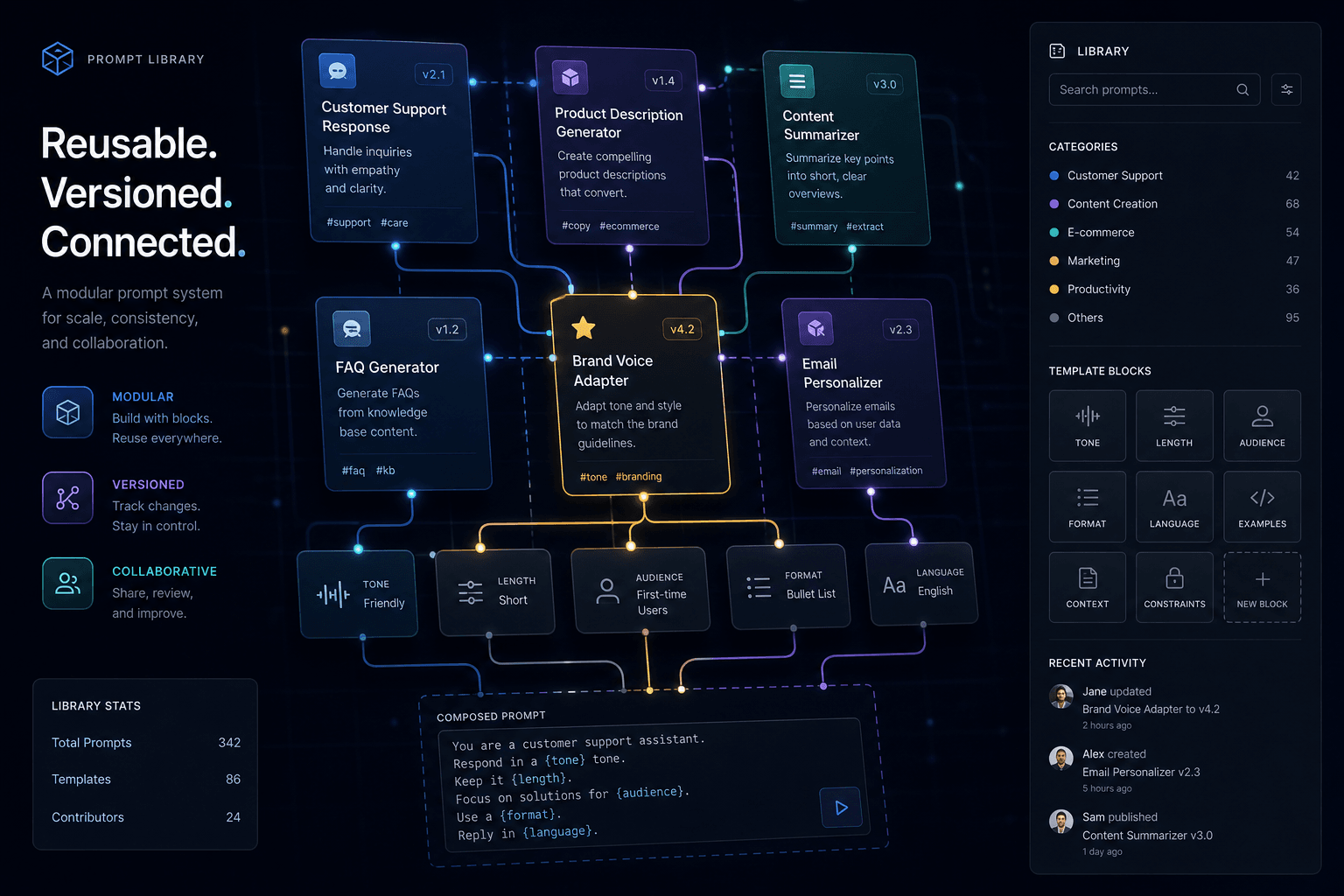
Building a Reusable Prompt Library for Your Team

Table of Contents
Building a Reusable Prompt Library for Your Team #
Table of Contents #
- Why Ad-Hoc Prompts Don't Scale Across Teams
- What Belongs in a Prompt Library
- How to Structure and Organize Your Library
- The Anatomy of a Production-Ready Prompt Template
- Parameterizing Prompts with Variables and Placeholders
- Versioning, Changelogs, and Rollback Strategy
- Testing and Evaluation Before Promotion
- Governance, Access Control, and Review Workflows
- Storing Prompts Where Your Team Actually Works
- Wiring Your Library into Automations and Agents
- Measuring Prompt Performance and ROI
- The Rollout Playbook: From First Prompt to Team Standard
- Frequently Asked Questions
Why Ad-Hoc Prompts Don't Scale Across Teams #
When everyone writes their own prompts from scratch, you get inconsistent output, untested quality, and zero ability to automate. I've watched this pattern destroy AI adoption at companies that should be thriving with it. Marketing writes prompts one way. Sales writes them another. Customer success has their own style. None of them share what works. None of them test what breaks.
The result is predictable: some people get great results, most get mediocre results, and nobody knows why. The people getting good results can't scale their advantage because their prompts live in chat histories, scattered documents, or their heads. When they leave, the knowledge walks out the door.
A reusable prompt library fixes this by treating prompts as managed assets — versioned, tested, documented, and accessible to everyone who needs them. It's the difference between every developer writing their own HTTP client versus importing a battle-tested library.
| Ad-hoc prompting | Library-based prompting |
|---|---|
| Output quality varies by individual skill | Consistent quality regardless of individual prompting skill |
| Improvements stay with the person who discovered them | Improvements propagate to all users automatically |
| No audit trail of what changed when | Full version history and changelog |
| Can't automate — prompts aren't structured | Ready for n8n, MCP, and agent integration |
| Onboarding new team members to AI is slow and uneven | New hires use proven templates on day one |
| Hallucinations and errors repeat | Evaluation catches issues before wide deployment |
The transition isn't just about organization. It's about turning individual experimentation into organizational capability. A good prompt library lets a junior team member produce output that matches your best prompt engineer's quality — because they're using the same proven template.
What Belongs in a Prompt Library #
A prompt library isn't just a folder of text files. It's a curated collection of validated, production-ready prompting assets that serve different purposes across your AI workflows.
| Asset type | Purpose | Example |
|---|---|---|
| System prompts | Define base behavior, tone, constraints for an AI assistant or agent | "You are a technical support analyst..." |
| Task templates | Reusable structures for specific recurring tasks | Email response, document summarization, code review |
| Few-shot example sets | Curated input-output pairs that teach the model a pattern | Classification examples, tone samples, format demonstrations |
| Output schemas | Structured format definitions (JSON, XML) | API response shapes, database schemas, report structures |
| Evaluation cases | Test inputs with expected outputs for quality assurance | Edge cases, regression tests, accuracy benchmarks |
| Persona definitions | Role assignments with detailed expertise profiles | "Senior copywriter who studied under Gary Halbert" |
| Constraint libraries | Reusable rules, guardrails, negative prompts | "Never promise specific ETAs," "Avoid these 12 buzzwords" |
Not every prompt you write deserves a place in the library. The bar is higher: it needs to be reusable across multiple situations, tested for reliability, and documented enough that someone else can use it without asking you questions.
| Include in library | Keep personal/local |
|---|---|
| Prompts used weekly or more | One-off research queries |
| Prompts with proven ROI | Experimental drafts not yet validated |
| Prompts that interface with automations | Highly context-specific one-time analyses |
| Prompts that define team standards | Personal preference variations |
| Prompts requiring specific domain expertise | Quick chat assistance |
The system prompt deserves special attention. In 2025, with Claude Opus 4, GPT-4.1, and Gemini 2.5 Pro, system prompts are how you configure the foundation of any AI interaction. A well-crafted system prompt in your library becomes the base layer that all user prompts build on — defining the assistant's expertise, tone, safety constraints, and default behaviors.
How to Structure and Organize Your Library #
Organization strategy depends on your team's size and workflow, but the core principle is discoverability: someone with a task should find the right prompt in under 30 seconds.
| Organization approach | Best for | Trade-off |
|---|---|---|
| By function (marketing, sales, support) | Teams with clear departmental boundaries | May duplicate similar prompts across functions |
| By task type (summarize, analyze, generate, classify) | Cross-functional teams | Requires users to know task taxonomy |
| By output format (email, report, JSON, code) | Automation-heavy workflows | Splits related tasks across folders |
| By complexity (quick/one-shot vs. multi-step chains) | Mixed user skill levels | Harder to find by use case |
I recommend a hybrid: top-level folders by function (for human browsing), with a flat tagged index for search and automation lookup. A prompt lives in /marketing/email-templates/ but also carries tags like task:generate, format:email, complexity:single-shot.
prompt-library/
├── system/
│   ├── support-analyst.md
│   ├── marketing-copywriter.md
│   └── technical-reviewer.md
├── marketing/
│   ├── email-campaign-template.md
│   ├── ad-copy-variants.md
│   └── competitive-analysis-brief.md
├── sales/
│   ├── prospect-research-summary.md
│   ├── follow-up-email-sequences.md
│   └── objection-handling-responses.md
├── support/
│   ├── ticket-classification.md
│   ├── response-drafting.md
│   └── escalation-detection.md
├── operations/
│   ├── meeting-action-extraction.md
│   ├── document-summarization.md
│   └── data-extraction-forms.md
├── examples/
│   ├── few-shot-classification.json
│   ├── tone-samples-marketing.json
│   └── code-review-examples.json
└── schemas/
    ├── ticket-classification-schema.json
    ├── meeting-summary-schema.json
    └── competitor-brief-schema.json
Naming conventions matter more than most teams think. A prompt named email-v1.md tells you nothing. A prompt named marketing-email-promotional-v2.3-claude.md tells you the function, version, and target model. I use this pattern: {function}-{variant}-{version}-{target-model}.{ext}.
The Anatomy of a Production-Ready Prompt Template #
A prompt in your library needs more than the text sent to the model. It needs metadata that makes it maintainable, discoverable, and automatable.
| Component | What it contains | Why it matters |
|---|---|---|
| Template body | The actual prompt text with variable placeholders | The executable asset |
| Variable schema | Definition of all placeholders and their expected values | Enables validation and UI generation |
| Frontmatter/metadata | Title, description, version, author, tags, model recommendations | Discoverability and governance |
| Usage instructions | When to use, what inputs are required, how to customize | Reduces support burden |
| Examples | 2-3 filled examples showing the template in use | Teaches usage faster than description |
| Test cases | Inputs with expected output characteristics | Enables automated quality checks |
| Changelog | Version history with what changed and why | Debugging and audit trail |
Here's a complete template structure I use:
---
title: "Support Ticket Response Generator"
version: "2.1.3"
author: "William Spurlock"
lastModified: "2025-06-19"
targetModels:
  - "claude-opus-4"
  - "claude-sonnet-4"
  - "gpt-4.1"
tags:
  - "support"
  - "email"
  - "customer-service"
complexity: "single-shot"
outputFormat: "email-body"
---

# Support Ticket Response Generator

## Description
Generates empathetic, solution-oriented email responses to customer support tickets. Calibrated for B2B SaaS with 4-hour SLA.

## Variables
- `{{TICKET_CONTENT}}`: Full text of the customer inquiry
- `{{CUSTOMER_TIER}}`: "starter", "pro", or "enterprise"
- `{{URGENCY}}`: "low", "medium", "high", "critical"
- `{{KNOWN_ISSUES}}`: List of active bugs/known problems (may be empty)

## Template

You are a senior customer support specialist for a B2B SaaS platform. You have 10 years of experience turning frustrated users into loyal advocates through clear, honest communication.

TICKET TO RESPOND TO:
{{TICKET_CONTENT}}

CONTEXT:
- Customer tier: {{CUSTOMER_TIER}}
- Urgency level: {{URGENCY}}
- Known issues that may be relevant: {{KNOWN_ISSUES}}

CONSTRAINTS:
- Lead with empathy, not apology
- Provide a clear next step or resolution timeline
- Never promise specific ETAs for bug fixes
- For enterprise tier, offer a call if the issue is complex
- Keep to 150 words maximum

OUTPUT:
Write the email response body only (no subject line, no signature).

## Example 1

**Input:**
- TICKET_CONTENT: "I've been charged twice this month. I only have one account. Please fix this immediately."
- CUSTOMER_TIER: "pro"
- URGENCY: "high"
- KNOWN_ISSUES: "Billing display lag affecting receipts (cosmetic only, no double-charging)"

**Output:**
I understand how concerning it must be to see duplicate charges on your statement. Let me clarify what's happening and get this resolved.

You're seeing a display issue in our billing dashboard where receipts are rendering twice due to a recent update. I can confirm in our system that you were charged only once on [DATE] for $[AMOUNT].

I'm attaching a screenshot of your actual transaction log, and I've filed this as case #12345 with our engineering team. The display issue should be fixed within 48 hours.

Does this match what you're seeing on your actual bank statement? If you do see two real charges, I'll escalate immediately and initiate a refund today.

## Example 2
[Additional example...]

## Test Cases

| Input | Expected characteristics |
|---|---|
| Angry enterprise customer with data loss allegation | Offers call, escalates to engineering, acknowledges severity |
| Starter tier asking about feature roadmap | Friendly but doesn't over-promise, suggests feedback portal |
| Billing issue (known bug) | References known issue, provides workaround, confirms no actual charge |

## Changelog

- 2.1.3 (2025-06-19): Added constraint about not promising ETAs after incident #4421
- 2.1.2 (2025-05-15): Expanded enterprise tier guidance to include call offers
- 2.1.0 (2025-04-20): Migrated from GPT-4o to Claude Sonnet 4 for tone consistency
- 2.0.0 (2025-03-01): Complete rewrite for new support SLA structure
This format gives you everything needed for human use, automation integration, and quality maintenance. The frontmatter can be parsed for catalog generation. The variable schema enables form builders. The test cases enable automated regression testing.
Parameterizing Prompts with Variables and Placeholders #
Hard-coded prompts are fragile. Parameterized prompts are infrastructure. The difference is variable substitution: designing your templates so that dynamic values are injected at runtime, not typed by hand.
| Variable type | Syntax example | Use case |
|---|---|---|
| Simple substitution | {{CUSTOMER_NAME}} |
Names, dates, identifiers |
| Conditional blocks | {{#if ENTERPRISE}}...{{/if}} |
Tier-specific guidance |
| List iteration | {{#each ITEMS}}...{{/each}} |
Dynamic context lists |
| JSON injection | {{CONTEXT_JSON}} |
Structured data from APIs |
| Model selection | {{MODEL_TEMPERATURE}} |
Runtime parameter tuning |
The syntax choice matters less than consistency. I use double-curly braces {{VAR}} because it's widely supported, visually distinct, and unlikely to conflict with natural text. Some teams prefer {% var %} (Jinja2 style) or ${VAR} (shell style). Pick one, document it, enforce it.
Conditional logic in prompts is often necessary. A support prompt should behave differently for enterprise versus starter customers. Rather than maintaining two nearly identical prompts, use conditionals:
{{#if CUSTOMER_TIER == "enterprise"}}
If this issue involves data integrity, security, or more than 10 affected users, immediately escalate to the on-call engineer and CC the customer success manager.
{{/if}}

{{#if URGENCY == "critical"}}
This is a P0. Skip normal triage and page the infrastructure team immediately.
{{/if}}
Validation matters. When a variable is required but empty, the prompt should fail loudly, not silently substitute an empty string. Your library should include a validation layer that checks all required variables are present and formatted correctly before sending to the model.
| Validation rule | Purpose |
|---|---|
| Required field check | Prevents empty substitutions that garble the prompt |
| Type validation | Ensures dates are dates, numbers are numbers |
| Length limits | Prevents context window overflow from oversized inputs |
| Allowed values | Enforces taxonomy (only "high", "medium", "low" for urgency) |
| Sanitization | Escapes or strips characters that could break JSON/XML |
For automation workflows, parameterization is what separates a demo from a production system. An n8n workflow that pulls ticket data from your CRM and injects it into a parameterized prompt runs hands-off. A hard-coded prompt that someone has to manually paste data into does not.
Versioning, Changelogs, and Rollback Strategy #
Prompts are code. They need version control, change tracking, and the ability to roll back when a "fix" breaks something else.
I use semantic versioning for prompts: MAJOR.MINOR.PATCH.
| Version bump | Trigger | Example |
|---|---|---|
| MAJOR (X.0.0) | Structural change, new required variables, different output format | Adding a new classification category |
| MINOR (x.X.0) | Behavioral change, new constraints, model target change | Tightening tone guidance, switching from GPT-4o to Claude |
| PATCH (x.x.X) | Bug fix, example addition, documentation improvement | Fixing a typo in constraints, adding a test case |
Every version change gets a changelog entry. The changelog lives in the prompt file's metadata section and accumulates over time. When a prompt has dozens of entries, archive old ones to a separate history file.
| Changelog element | Why it matters |
|---|---|
| Date of change | Correlates with any quality shifts in output |
| Author | Who to ask if the change is confusing |
| Reason for change | Context that prevents future regression |
| Expected impact | Whether users should expect different output |
| Breaking change flag | Whether dependent automations need updates |
Rollback strategy: Keep the last 3 versions of every prompt instantly accessible. When a change causes unexpected behavior, teams should be able to revert to the previous stable version within minutes, not hours. For critical production prompts, maintain a "golden" version that's only updated after extensive testing, while a "beta" version receives iterative improvements.
system/
├── support-analyst/
│   ├── current.md          -> support-analyst-v2.3.1.md (symlink)
│   ├── support-analyst-v2.3.1.md
│   ├── support-analyst-v2.3.0.md
│   ├── support-analyst-v2.2.5.md
│   └── beta.md             -> support-analyst-v2.4.0-rc1.md (symlink)
Git handles the backend of this beautifully. Every prompt change is a commit. Every commit is traceable. But git alone isn't enough for operational use — you need runtime access to specific versions, which is why the symlink structure above exists.
Testing and Evaluation Before Promotion #
A prompt that works once is not a prompt that works reliably. Testing catches the edge cases that break production workflows.
| Test type | What it verifies | How to implement |
|---|---|---|
| Unit tests | Prompt renders correctly with all variable combinations | Automated rendering with test data sets |
| Functional tests | Output meets format and content requirements | Schema validation, keyword checks |
| Regression tests | Changes don't break previously working cases | Run old test cases against new version |
| Edge case tests | Extreme inputs produce acceptable output | Empty strings, max-length inputs, unicode, special chars |
| Model compatibility | Prompt works across target model versions | Test on Claude Opus 4, Sonnet 4, GPT-4.1, Gemini 2.5 Pro |
| Human evaluation | Output quality meets subjective standards | Blind comparison, rating scales, inter-rater agreement |
Test case structure: Each test case should include the input variables, the expected output characteristics (not necessarily exact text), and any constraints the output must satisfy.
{
  "id": "support-ticket-test-001",
  "description": "Angry enterprise customer with data loss concern",
  "variables": {
    "TICKET_CONTENT": "Your system just deleted 6 months of our customer records. This is a complete disaster. Our CEO is asking questions I can't answer. FIX THIS NOW.",
    "CUSTOMER_TIER": "enterprise",
    "URGENCY": "critical",
    "KNOWN_ISSUES": "None matching this description"
  },
  "expected": {
    "tone": "empathetic_and_serious",
    "mentions_escalation": true,
    "offers_call": true,
    "contains_acknowledgment": true,
    "max_length_words": 150
  },
  "forbidden": [
    "dismissive language",
    "blame on user",
    "false reassurance about data recovery"
  ]
}
Evaluation rubrics turn subjective quality into measurable criteria. For a support response prompt, the rubric might include:
| Criterion | Weight | Measurement |
|---|---|---|
| Empathy score | 25% | Rated 1-5 by human evaluators |
| Action clarity | 25% | Contains specific next step (binary) |
| Length compliance | 15% | Within word limit (binary) |
| Format correctness | 15% | No subject line, no signature (binary) |
| Escalation appropriateness | 20% | Critical issues escalated (binary) |
A prompt version doesn't graduate from beta to production until it scores at least 4.0/5.0 on human evaluation and passes 100% of automated constraints.
A/B testing is valuable for major prompt changes. Run the new version on 10% of traffic, compare output quality and task completion rates, and only roll out widely after statistical confidence. This is how you avoid the "we thought it was better" trap that only shows up in aggregate metrics.
Governance, Access Control, and Review Workflows #
Prompts that touch customers, money, or compliance-sensitive data need governance. Not bureaucracy — lightweight guardrails that prevent expensive mistakes.
| Role | Permissions | Typical holder |
|---|---|---|
| Prompt author | Create new prompts, update their own drafts | Any team member |
| Prompt curator | Approve prompts for library inclusion, tag and organize | Senior IC or team lead |
| Prompt approver | Approve production promotion for critical prompts | Manager or domain expert |
| Prompt admin | Modify system prompts, change versioning policy | AI/ML lead or architect |
| Prompt consumer | Use approved prompts, cannot modify | Most team members |
Review workflow for production prompts:
- Draft → Author creates, tests locally, version 0.x.x
- Review → Peer review for clarity, completeness, safety — version 1.0.0-rc
- Beta → Deploy to limited users/flow, collect feedback — version 1.x.x-beta
- Production → Full approval, stable symlink updated — version 1.x.x
- Deprecated → Superseded by new version, sunset timeline set
Critical prompts — those in customer-facing automations, financial calculations, or compliance-sensitive workflows — need additional safeguards:
- Two-person approval for any change
- Automated testing must pass 100%, not just 95%
- Change window restrictions (no Friday deploys)
- Immediate rollback capability
- Output sampling and human review for first 100 production runs
Content policies for your library prevent prompts that generate harmful, non-compliant, or off-brand output. These aren't model safety filters (those exist at the API level) — they're organizational standards. A prompt that produces legally risky advice, violates your brand voice guidelines, or handles sensitive data improperly shouldn't make it into the library regardless of whether the model will execute it.
Storing Prompts Where Your Team Actually Works #
The best prompt library is the one people actually use. That means meeting them in their existing workflow, not forcing a new destination.
| Storage option | Best for | Integration approach |
|---|---|---|
| Git repository | Engineering-heavy teams, version control purists | Prompts as code, CI/CD testing, PR review |
| Notion database | Mixed technical/non-technical teams, document-centric culture | Database with properties for tags, versions, status; linked to docs |
| Airtable base | Operations teams, heavy automation users | Structured tables, API access, views by function/complexity |
| Dedicated prompt management platform | Large organizations, multi-team scale | PromptLayer, Humanloop, Langsmith — paid but feature-rich |
| n8n workflow storage | Teams already deep in n8n | Store in workflow JSON, version with workflow exports |
My recommendation for most teams: Start with git. It handles versioning, branching, and review workflows beautifully. Add a lightweight indexing layer — a JSON catalog or Notion database that mirrors the git structure — for discoverability by non-technical users.
The catalog entry for a prompt stored in git:
| Field | Source |
|---|---|
| Title | Parsed from frontmatter |
| Description | Parsed from frontmatter |
| Current version | Git tag or filename |
| Last modified | Git commit date |
| Author | Git commit author |
| Link | URL to rendered markdown |
| Tags | Parsed from frontmatter |
| Status | Parsed from frontmatter (draft/beta/production) |
This gives you the best of both worlds: git's power for technical users, a browsable catalog for everyone else, and a single source of truth.
For pure no-code teams, Notion is surprisingly effective. Create a database with these properties:
- Title (title)
- Function (select: marketing, sales, support, operations)
- Complexity (select: quick, standard, advanced)
- Status (select: draft, beta, production, deprecated)
- Target model (multi-select: Claude Opus 4, GPT-4.1, etc.)
- Version (text)
- Prompt text (text, full template)
- Variables (text, list with descriptions)
- Examples (text)
- Changelog (text)
The database view lets anyone filter to "production marketing prompts for Claude." The full template is right there for copy-paste into their AI tool of choice.
Wiring Your Library into Automations and Agents #
A prompt library that sits idle is a waste. The real value comes when prompts feed automations — n8n workflows, MCP servers, agent instructions — that run without human intervention.
n8n integration: Store prompts in a git repository, have n8n fetch the current version via HTTP request at workflow start, then inject variables into the template before sending to the LLM node. This means workflow behavior updates automatically when you merge a new prompt version.
n8n Workflow:
1. Trigger (webhook, schedule, or event)
2. Fetch prompt template from git/URL
   - GET https://raw.githubusercontent.com/org/prompts/main/support/response-current.md
3. Prepare variables from previous nodes
   - TICKET_CONTENT: from CRM node
   - CUSTOMER_TIER: from user lookup
   - URGENCY: from classification node
4. Render template (replace {{VAR}} with values)
5. LLM node: send rendered prompt to Claude/GPT
6. Parse response
7. Next action (send email, update CRM, etc.)
MCP (Model Context Protocol) integration: As of June 2025, MCP servers are becoming the standard way for AI systems to discover and use tools. A prompt library can expose itself as an MCP resource, allowing any MCP-compatible client (Claude Code, Cursor agents, custom agents) to pull the right prompt for a task dynamically.
The prompt library MCP server provides:
list_prompts: Browse available prompts by tag/functionget_prompt: Retrieve a specific prompt with variable schemarender_prompt: Return the prompt with variables substituted
Agent instructions from templates: When building AI agents that run autonomously, their system prompts and task instructions should come from the library, not hard-coded strings. This lets you improve agent behavior by updating the library, not redeploying the agent.
| Integration | How prompts flow | Update mechanism |
|---|---|---|
| n8n workflow | HTTP fetch at runtime | Restart workflow picks up new version |
| MCP server | Resource request from client | Client requests fresh copy per session |
| Agent system prompt | Loaded at agent initialization | Agent restart loads new version |
| IDE extension | API call to library index | Background sync or manual refresh |
| Slack bot | Lambda/edge function fetches prompt | Function redeploy or dynamic fetch |
Environment-specific prompts: The same logical prompt may need different versions for different contexts. A support response prompt for enterprise customers might have a stricter tone than the starter tier version. Rather than maintaining entirely separate prompts, use parameterization with environment flags:
{{ENVIRONMENT_CONTEXT}}

{{#if DEPLOYMENT_ENV == "enterprise"}}
This is for enterprise customers. Maintain formal tone, offer executive escalation path, reference account management.
{{/if}}

{{#if DEPLOYMENT_ENV == "starter"}}
This is for starter tier. Friendly, efficient tone, focus on self-service resources.
{{/if}}
Latency considerations: Fetching prompts dynamically adds network overhead. For high-throughput automations, cache prompts at the edge or in the automation platform's storage, with a background refresh mechanism. The library remains the source of truth; the automation has a hot copy.
Measuring Prompt Performance and ROI #
You can't improve what you don't measure. Prompt libraries need telemetry that connects prompt versions to business outcomes.
| Metric | What it measures | How to track |
|---|---|---|
| Usage volume | Which prompts are actually being used | API call logs, automation node execution counts |
| Success rate | Percentage of runs producing acceptable output | Human rating, automated constraint checks |
| Error rate | Format failures, hallucinations, constraint violations | Automated output validation |
| Cost per invocation | Token spend by prompt | LLM API logs correlated with prompt ID |
| Latency | Time from prompt submission to response | API response timing |
| Human override rate | How often automated output gets edited | Diff analysis on outputs vs. final versions |
| Task completion | Whether the prompt output achieved its goal | Downstream conversion/success events |
Version comparison is the core analysis. When you release prompt version 2.1, did success rate improve? Did cost per call stay flat? The comparison should happen across enough volume to be statistically significant — typically 100+ invocations per version for common prompts, 20+ for rarely used ones.
| Analysis | Question it answers |
|---|---|
| A/B test: version A vs. B | Does the new version actually perform better? |
| Model migration impact | Did switching from GPT-4o to Claude Sonnet 4 change quality or cost? |
| Usage trend | Is this prompt becoming more or less relevant? |
| Error clustering | Are failures concentrated on specific input types? |
| Cost trend | Is our prompt efficiency improving or degrading? |
ROI calculation: A good prompt library saves time (people don't write from scratch), improves quality (consistent best-practice output), and enables automation (runs without human involvement).
| Factor | Measurement approach |
|---|---|
| Time saved | (Time to write prompt from scratch - time to use template) × uses |
| Quality improvement | (Quality rating of library output - quality rating of ad-hoc output) × volume |
| Automation value | Hours of manual work replaced by automated prompt execution |
| Error reduction | Cost of errors prevented by tested, versioned prompts |
For a team of 10 people each using AI 10 times per day: if a library saves 3 minutes per use (conservative), that's 30 minutes per person per day, or 50 hours per week across the team. At $100/hour loaded cost, that's $260,000 annual value from time savings alone. The business case writes itself — if the library is actually used.
The Rollout Playbook: From First Prompt to Team Standard #
Building a prompt library is a change management project, not just a documentation task. Here's how to roll it out without the library becoming a graveyard of good intentions.
Phase 1: Seed (Week 1-2)
- Identify 3-5 high-frequency tasks where AI is already in use
- Extract the best prompts from your best performers
- Add metadata, examples, test cases — turn them into proper templates
- Store in your chosen system with basic organization
Phase 2: Pilot (Week 3-6)
- Recruit 3-5 early adopters from different functions
- Give them access, collect feedback on discoverability and usefulness
- Refine organization, naming, and documentation based on what confuses them
- Fix the first issues with variable substitution and edge cases
Phase 3: Core Library (Week 7-12)
- Expand to 15-20 prompts covering major team workflows
- Implement versioning and testing discipline
- Add prompts that feed into automations (n8n, etc.)
- Create onboarding guide for new library users
Phase 4: Team Standard (Week 13-20)
- Make library use the default for AI-assisted work
- Add prompts to onboarding materials for new hires
- Implement governance: review workflows, approval gates for production prompts
- Measure and report on library ROI
Phase 5: Automation-First (Ongoing)
- Shift focus from "prompts humans use" to "prompts that power systems"
- Library serves both human copy-paste and automated execution
- Prompts become infrastructure, maintained like API contracts
Common failure modes and how to avoid them:
| Failure | Cause | Prevention |
|---|---|---|
| Library goes unused | Discovery friction > perceived value | Start with high-ROI prompts, integrate into existing workflow |
| Prompts become stale | No ownership, no maintenance cycle | Assign curators, schedule quarterly reviews |
| Version chaos | No clear versioning policy | Enforce semantic versioning, automate changelog requirements |
| Quality degradation | Insufficient testing | Require test cases for production promotion |
| Team resistance | "My prompts are better" | Measure and prove library prompt superiority |
| Automation breakage | Prompt changes break downstream flows | Mark breaking changes, test against dependent automations |
The adoption curve: Expect 20% of your team to be enthusiastic early adopters, 60% to follow once the value is proven, and 20% to resist until using the library becomes easier than not using it. Design for the middle 60%: clear documentation, obvious value, minimal friction.
Start small, prove value, expand methodically. A library of 5 excellent, heavily used prompts beats a library of 50 neglected ones.
Frequently Asked Questions #
How is a prompt library different from just saving prompts in a document? #
A prompt library adds structure, version control, testing, and discoverability that a document cannot provide. A document is a static snapshot. A library has metadata (version, author, model compatibility), organization (searchable by function and complexity), quality gates (testing before promotion), and integration (usable by automations). Documents collect dust. Libraries get maintained because they're infrastructure.
What makes a prompt worthy of the library versus keeping it personal? #
Reusability, frequency, and impact are the criteria. If a prompt is used weekly or more, by multiple people, or feeds an automation, it belongs in the library. If it's a one-time research query, a highly personal style preference, or an experimental draft not yet validated, keep it local. The library is for proven, shared utility — not for every idea you try.
How do I handle prompts that need different versions for different models? #
Maintain separate variants with clear naming, or use conditional logic within a single template. Claude Opus 4, GPT-4.1, and Gemini 2.5 Pro each have different strengths — XML tags for Claude, specific formatting for GPT, long context handling for Gemini. I recommend separate files for model-specific optimizations (email-template-v2-claude.md vs. email-template-v2-gpt.md) with a shared base template for common structure. Alternatively, use conditionals: {{#if MODEL == "claude"}}...{{/if}}.
What's the minimum viable testing for a production prompt? #
At minimum: 5 diverse test cases covering happy path and edge cases, automated format validation, and one human sanity check. The test cases should include empty inputs, max-length inputs, and at least one case that previously caused a failure. Format validation ensures JSON schemas are returned correctly. The human check confirms the output isn't gibberish. This takes 30 minutes and catches 80% of issues.
Should non-technical team members be able to modify library prompts? #
No — at least not directly to production versions. The governance model should let anyone propose changes (via pull request, suggestion, or draft), but only curators or approvers should merge to production. This prevents well-intentioned "quick fixes" that break dependent automations or degrade quality. Create a frictionless path for suggestions, a controlled path for changes.
How do I migrate from ad-hoc prompts to a library without disrupting workflows? #
Start with additive change, not replacement. Introduce the library as an optional resource for new work. As people find value, they'll migrate existing workflows voluntarily. For critical automations, run the library prompt in parallel with the old version, compare output, and switch over only after confidence. Never force a cutoff date until usage data proves the library is superior.
Can one prompt library serve multiple teams with different needs? #
Yes, with namespacing and clear ownership boundaries. Use folder structure or tags to separate teams (marketing vs. engineering). Shared prompts (common utilities) live in a shared/ namespace. Each team owns their namespace and can move prompts to shared once they've proven cross-team value. The alternative — separate libraries — causes fragmentation and duplicated effort.
How do I prevent prompt library bloat — too many similar prompts? #
Establish a "merge or deprecate" policy. Quarterly, review prompts with overlapping functions. If two prompts do similar things, either merge them with parameterization (one prompt, multiple use cases) or deprecate the lower-quality one. Prompts unused for 90 days move to an archive folder. This keeps the active library lean and decision fatigue low.
What's the relationship between prompt libraries and fine-tuning? #
Prompt libraries are the prerequisite and often the alternative to fine-tuning. If you can't get consistent results with careful prompting and examples, fine-tuning won't save you. Conversely, if your library prompts work well but you're spending heavily on tokens for high-volume tasks, a fine-tuned model might be cheaper at scale. The library is your baseline; fine-tuning is an optimization for specific high-volume cases.
How do I measure if my prompt library is actually helping? #
Track usage volume, success rates, and time-to-task-completion before and after library adoption. The definitive metric: are people choosing to use library prompts over writing their own? If yes, you've built something valuable. Supplement with qualitative feedback — survey users on whether the library saves them time and improves their output quality. ROI follows from usage; usage follows from genuine utility.
Keep building your prompting infrastructure:
- How to Talk to AI: The Complete Prompt Engineering Guide — the foundation this library builds on
- Meta-Prompting: Using AI to Write Better Prompts — accelerate your library creation
- Structured Output Prompting: JSON, XML Tags, and Schemas — essential for automation-ready prompts
- System Prompts vs. User Prompts: Architecture — design your library's base layers
Ready to put your prompt library to work?
A well-built prompt library is the raw material for AI automations that run without you. I build custom n8n workflows and AI agent systems that take your proven, tested prompts and deploy them at scale — processing thousands of tasks per week, integrated with your CRM, support desk, and communication tools.
If you've got prompts that work and want to turn them into automations, book an AI automation strategy call. I'll show you how to wire your library into production workflows that save real hours every week.
Related Posts

How to Stop Client-Facing AI Agents From Hallucinating
Client-facing AI agents hallucinate when they answer without grounding. Here's the layered guardrail stack I use to keep agents accurate and on-script.

AI Sales Systems vs Traditional CRM Automation
Traditional CRM automation fires rules; AI sales systems reason about each lead. Here's how they differ, where each wins, and how to combine them.

The Manual Workflows With the Highest ROI When Replaced by AI Agents
Not every task is worth automating. Here are the manual workflows with the highest ROI when you replace them with AI agents, ranked by payback speed.