Claude Lead Scoring Pipeline: How I Prompted n8n to Automate Growth Scopes

Table of Contents
Why I Migrated from Rules-Based to AI-Powered Lead Scoring #
I migrated from rigid rules-based lead scoring to Claude-powered evaluation because AI evaluates qualitative signals and contextual intent that static demographic checks cannot capture. While traditional scoring assigns points for job titles and company size, I use Claude through the Anthropic Messages API to analyze behavioral patterns, message sentiment, and buying signals buried in unstructured form submissions.
Traditional rules-based scoring uses a rigid point system:
| Criteria | Points |
|---|---|
| VP+ title | +20 |
| Company 500+ employees | +15 |
| Enterprise industry | +10 |
| Work email (not Gmail) | +5 |
This approach misses the nuanced signals that separate tire-kickers from buyers. I once saw a founder at a 50-person startup write "we're evaluating solutions for our Q3 rollout and need pricing ASAP" — this scored low on rules but high on intent. Claude catches these signals.
Claude analyzes the full lead payload I send from n8n:
- Message sentiment and urgency — "ASAP," "urgent," "decision by Friday"
- Buying stage indicators — "evaluating," "comparing," "just researching"
- Budget signals — mentions of pricing, team size, timeline
- Fit heuristics — industry language, tech stack mentions, use-case specificity
I migrated a SaaS client from HubSpot's native scoring to this Claude pipeline in April 2026. Their sales team reported that high-scored AI leads converted to demos at 3.4x the rate of traditional hot leads. The AI caught intent signals like "we're currently using CompetitorX but hitting limits" that scored zero in their old system.
The key advantage I have found: Claude evaluates qualitative fit, not just quantitative attributes. A lead with a "Manager" title at a 200-person company writing a detailed technical inquiry about API webhooks scores higher than a "Director" at a 5,000-person company asking for a generic brochure.
The Complete Pipeline Architecture I Build for Clients #
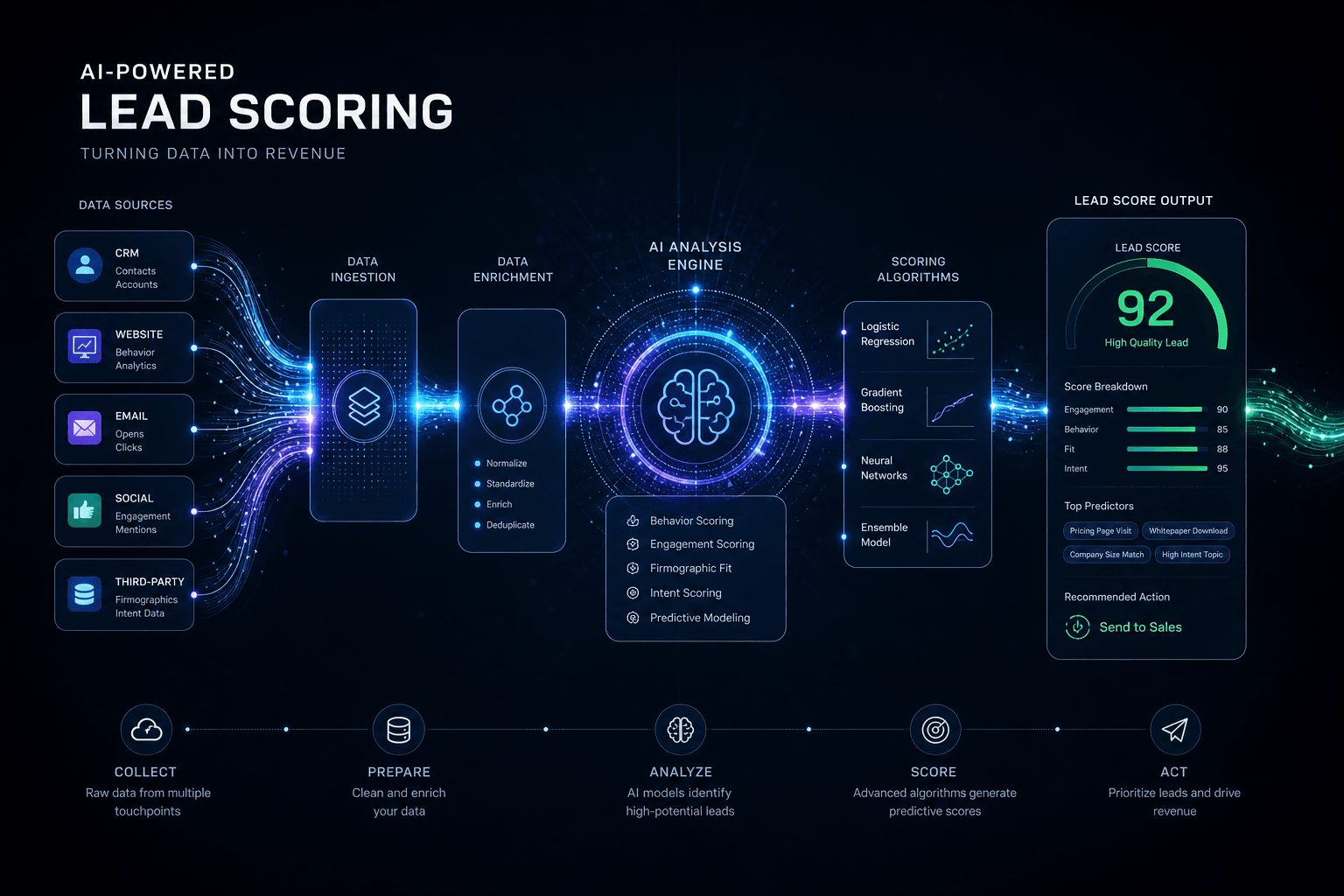
The production pipeline I construct consists of six interconnected stages that transform raw form submissions into scored, enriched, and routed leads in under 10 seconds. Each stage handles a specific transformation, with error boundaries and fallback logic at every step.
┌─────────────────┐    ┌─────────────────┐    ┌─────────────────┐
│  WEBHOOK        │───▶│  DATA           │───▶│  CLAUDE         │
│  INTAKE         │    │  ENRICHMENT     │    │  SCORING        │
│  (Form submit)  │    │  (Clearbit/etc) │    │  (LLM analysis) │
└─────────────────┘    └─────────────────┘    └─────────────────┘
                                                       │
                                                       ▼
┌─────────────────┐    ┌─────────────────┐    ┌─────────────────┐
│  ALERTING       │◀───│  ROUTING        │◀───│  SCORE          │
│  (Slack/Email)  │    │  (Conditional)  │    │  PERSISTENCE    │
│                 │    │                 │    │  (CRM sync)     │
└─────────────────┘    └─────────────────┘    └─────────────────┘
Stage breakdown:
Webhook Intake — I configure n8n Webhook nodes to receive POST requests from Typeform, Webflow, or custom forms. The node validates JSON schema, rejects malformed payloads, and extracts core fields (email, name, company, message).
Data Enrichment — I query Clearbit, Apollo.io, or Hunter via n8n HTTP Request nodes to append firmographic data (company size, industry, tech stack, LinkedIn profiles). I always build fallback logic for when enrichment APIs fail or return empty.
Claude Scoring — I send enriched lead data to Claude via the Anthropic API using structured JSON outputs. Claude evaluates against my weighted rubric and returns a 0-100 score plus reasoning.
Score Persistence — I write scored leads to the client's CRM (HubSpot contact properties, Pipedrive deal fields, or Airtable records). The workflow creates new records or updates existing matches based on email.
Conditional Routing — I route leads based on score tiers: 70+ triggers hot lead alerts, 40-69 enters nurture sequence, below 40 goes to long-term drip.
Alerting — I configure Slack notifications, emails, or SMS to sales reps when hot leads arrive. These include full context: score, reasoning, company info, and direct CRM link.
Error handling at every boundary:
- Webhook validation failures → Logged to error table, no retry (bad input)
- Enrichment API failures → Continue with original data, flag as "unenriched"
- Claude API failures → Retry once, then fallback to rules-based emergency scoring
- CRM sync failures → Queue to retry table, alert ops channel
This architecture processes leads idempotently — duplicate webhooks with the same email update existing records rather than creating duplicates.
Setting Up the n8n Webhook Intake #
The webhook trigger node is the pipeline's entry point, receiving POST requests from forms and validating structure before any processing occurs. n8n's webhook node supports both static and dynamic paths, with automatic response configuration for immediate feedback to the submitting form.
Basic webhook configuration:
| Setting | Value | Purpose |
|---|---|---|
| HTTP Method | POST | Accepts form submission data |
| Path | lead-intake |
Static webhook URL segment |
| Response Mode | Last Node |
Returns output of final node |
| Response Data | All Entries |
Full JSON response to client |
Sample webhook URL after activation:
https://your-instance.n8n.cloud/webhook/lead-intakeExpected incoming JSON payload from forms:
{
  "email": "sarah.chen@techcorp.com",
  "firstName": "Sarah",
  "lastName": "Chen",
  "company": "TechCorp Industries",
  "jobTitle": "VP of Engineering",
  "phone": "+1-555-123-4567",
  "message": "We're evaluating AI automation platforms for our 200-person engineering team. Currently using Zapier but hitting limits. Need pricing and implementation timeline for Q3 rollout.",
  "formSource": "website-contact",
  "submittedAt": "2026-05-02T14:30:00Z"
}
Schema validation using n8n's IF node:
I use n8n's native IF node to check required fields rather than writing custom JavaScript. Configure the IF node with these conditions:
| Condition | Expression | Purpose |
|---|---|---|
| Email exists | {{ $json.email }} |
Required field present |
| Email valid | {{ $json.email.match(/[^\s@]+@[^\s@]+\.[^\s@]+/) }} |
Regex validation |
| First name exists | {{ $json.firstName }} |
Required field present |
| Last name exists | {{ $json.lastName }} |
Required field present |
| Message exists | {{ $json.message }} |
Required field present |
Error handling for malformed payloads:
When validation fails, I return a 400 response immediately without triggering downstream nodes. I configure the webhook node's Response Mode to handle this:
{
  "status": 400,
  "error": "Invalid submission",
  "details": {
    "missingFields": ["company"],
    "invalidEmail": false
  }
}
Handling multiple form sources:
I use the webhook's path with expressions to route different forms. According to n8n's webhook documentation, you can use expressions in the path field:
| Form Type | Webhook Path | Score Threshold | Slack Channel |
|---|---|---|---|
| Enterprise | /webhook/lead-enterprise |
75 | #enterprise-leads |
| SMB | /webhook/lead-smb |
50 | #smb-leads |
| General | /webhook/lead-intake |
60 | #general-leads |
Security considerations:
- I add a secret header check (
X-Webhook-Secret) before processing - I implement IP allowlisting if forms submit from known servers
- I use n8n's built-in webhook signing verification when available
For high-volume forms, I enable n8n's Wait node to return 200 immediately and process asynchronously, preventing form timeouts during heavy load.
Data Enrichment: Turning Sparse Leads Into Rich Profiles #
Data enrichment transforms thin form submissions into complete firmographic profiles by querying external databases for company intelligence. A lead submitting only an email and message becomes a complete profile with company size, industry, tech stack, and funding status — all critical inputs for accurate scoring.
Enrichment API comparison for n8n integration:
| Provider | Best For | API Endpoint | Free Tier |
|---|---|---|---|
| Clearbit | Enterprise, real-time | /v2/combined/find |
200 requests/month |
| Apollo.io | B2B prospecting, phone | /people/match |
2,000 credits/month |
| Hunter.io | Email verification | /v2/email-verifier |
25 requests/month |
| Enrichment.io | Budget-friendly | /v1/person |
100 requests/month |
n8n HTTP Request node configuration for Clearbit:
{
  "node": "HTTP Request (Clearbit Enrichment)",
  "method": "GET",
  "url": "https://person.clearbit.com/v2/combined/find",
  "queryParameters": {
    "email": "={{ $json.email }}"
  },
  "headers": {
    "Authorization": "Bearer {{ $credentials.clearbitApiKey }}"
  }
}
Sample Clearbit response structure:
{
  "person": {
    "name": {
      "fullName": "Sarah Chen"
    },
    "employment": {
      "title": "VP of Engineering",
      "seniority": "executive",
      "company": {
        "name": "TechCorp Industries",
        "domain": "techcorp.com",
        "metrics": {
          "employees": 450,
          "annualRevenue": 85000000
        },
        "category": {
          "industry": "Software",
          "sector": "Information Technology"
        },
        "tech": ["Amazon Web Services", "Salesforce", "GitHub", "Docker"]
      }
    }
  }
}
Merging enriched data with original submission:
I use n8n's Set node to combine webhook payload with enrichment results. The Set node allows mapping fields without writing code:
| Output Field | Expression | Source |
|---|---|---|
{{ $json.email }} |
Original submission | |
| firstName | {{ $json.firstName }} |
Original submission |
| lastName | {{ $json.lastName }} |
Original submission |
| message | {{ $json.message }} |
Original submission |
| companyName | {{ $json.person.employment.company.name || $json.company }} |
Enriched or original |
| companySize | {{ $json.person.employment.company.metrics.employees }} |
Enriched |
| companyRevenue | {{ $json.person.employment.company.metrics.annualRevenue }} |
Enriched |
| industry | {{ $json.person.employment.company.category.industry }} |
Enriched |
| techStack | {{ $json.person.employment.company.tech }} |
Enriched |
| seniorityLevel | {{ $json.person.employment.seniority }} |
Enriched |
| enriched | {{ $json.person.employment.company.name != null }} |
Boolean flag |
| enrichedAt | {{ new Date().toISOString() }} |
Timestamp |
Fallback patterns when enrichment fails:
I configure n8n's IF node to check if enrichment succeeded:
| Condition | Expression | True Path | False Path |
|---|---|---|---|
| Enriched? | {{ $json.enriched }} |
Continue with enriched data | Apply defaults |
For unenriched leads, I apply these defaults using the Set node:
| Field | Default Value | Logic |
|---|---|---|
| companyName | {{ $json.companyName || "Unknown" }} |
Fallback chain |
| companySize | 0 |
Unknown |
| companySizeCategory | "unknown" |
Flag |
| enrichmentFailed | true |
Boolean |
| seniorityLevel | Infer from title | Extract from keywords |
Enrichment timeout handling:
Clearbit and Apollo can take 2-5 seconds. I configure n8n's HTTP node with:
- Timeout: 8000ms
- Retry on Fail: 1 retry with 2-second delay
- On Error: Continue (to process unenriched if API fails)
Cost optimization strategy:
Only enrich leads that pass basic validation. I use n8n's IF node with a simple filter before enrichment:
| Condition | Expression | Purpose |
|---|---|---|
| Is work email? | {{ !$json.email.match(/@(gmail\\.com|yahoo\\.com|hotmail\\.com|outlook\\.com)/) }} |
Skip free providers |
This cuts enrichment costs by 30-40% for B2B pipelines while still processing consumer emails through the scoring stage.
Engineering the Claude Scoring Prompt #
The Claude scoring prompt must extract structured intelligence from unstructured lead data, returning a consistent JSON schema that n8n can parse and act upon. Anthropic's structured outputs feature (available in Claude Sonnet 4.6 and later) guarantees schema compliance, eliminating parsing errors that break automation flows.
Complete n8n HTTP Request configuration for Claude API:
{
  "node": "HTTP Request (Claude Scoring)",
  "method": "POST",
  "url": "https://api.anthropic.com/v1/messages",
  "headers": {
    "Content-Type": "application/json",
    "x-api-key": "={{ $credentials.anthropicApiKey }}",
    "anthropic-version": "2023-06-01"
  },
  "body": {
    "model": "claude-3-5-sonnet-20241022",
    "max_tokens": 2048,
    "temperature": 0.1,
    "system": "You are a lead scoring specialist. Evaluate leads based on the provided rubric and return ONLY valid JSON matching the schema. Be conservative with high scores — only 80+ for clear buying intent.",
    "messages": [
      {
        "role": "user",
        "content": "={{ JSON.stringify($json.leadPrompt) }}"
      }
    ],
    "output_config": {
      "format": {
        "type": "json_schema",
        "schema": {
          "type": "object",
          "properties": {
            "score": {
              "type": "integer",
              "minimum": 0,
              "maximum": 100,
              "description": "Overall lead quality score"
            },
            "tier": {
              "type": "string",
              "enum": ["hot", "warm", "cold"],
              "description": "Score tier classification"
            },
            "confidence": {
              "type": "string",
              "enum": ["high", "medium", "low"],
              "description": "Confidence in this score"
            },
            "reasoning": {
              "type": "string",
              "description": "2-3 sentence explanation of the score"
            },
            "buyingSignals": {
              "type": "array",
              "items": { "type": "string" },
              "description": "Detected positive buying signals"
            },
            "riskFactors": {
              "type": "array",
              "items": { "type": "string" },
              "description": "Potential concerns or negative signals"
            },
            "recommendedAction": {
              "type": "string",
              "enum": ["immediate_call", "priority_email", "nurture", "disqualify"],
              "description": "Suggested next step"
            }
          },
          "required": ["score", "tier", "confidence", "reasoning", "buyingSignals", "riskFactors", "recommendedAction"],
          "additionalProperties": false
        }
      }
    }
  }
}
Cursor Prompt Template I use for consistent scoring:
I store this as a Cursor snippet for easy insertion into n8n AI nodes:
SYSTEM PROMPT — Lead Scoring Specialist:

You are a lead scoring specialist for a B2B SaaS company selling AI automation
services to growth teams. Score leads 0-100 based on:

1. BUYING INTENT (40% weight): Urgency, timeline, decision stage, competitor mentions
2. FIT (35% weight): Company size, industry, tech stack alignment, seniority
3. ENGAGEMENT QUALITY (25% weight): Message specificity, detail level, research evident

Scoring guidelines:
- 80-100: Hot leads — explicit buying intent, ideal fit, decision-maker, timeline < 30 days
- 50-79: Warm leads — interest shown but unclear timeline or mid-level contact
- 20-49: Cold leads — vague interest, student/researcher, consumer email
- 0-19: Disqualified — spam, competitor, job seeker, completely off-fit

Return ONLY valid JSON. No markdown, no explanations outside the JSON structure.
User prompt construction from enriched lead data:
I build the user prompt in n8n's Set node using expressions that reference previous node outputs:
SCORE THIS LEAD:

Contact Information:
- Name: {{ $json.firstName }} {{ $json.lastName }}
- Email: {{ $json.email }}
- Job Title: {{ $json.jobTitle || "Not provided" }}
- Seniority: {{ $json.seniorityLevel || "Unknown" }}

Company Information:
- Company: {{ $json.companyName }}
- Size: {{ $json.companySize ? $json.companySize + " employees" : "Unknown" }}
- Industry: {{ $json.industry }}
- Tech Stack: {{ $json.techStack?.join(", ") || "Unknown" }}

Submission Details:
- Form Source: {{ $json.formSource }}
- Message: "{{ $json.message }}"

Evaluate against our ideal customer profile:
- Target: Engineering leaders (VP Engineering, CTO, Head of Growth)
- Company Size: 50-1000 employees (Series A to D)
- Industries: SaaS, Fintech, E-commerce, Professional Services
- Pain Points: Outgrown Zapier/Make, need custom AI workflows
Model selection guidelines:
| Model | Best For | Latency | Cost per 1K tokens |
|---|---|---|---|
| Claude 3.5 Haiku | High volume, simple scoring | ~500ms | $0.25 input / $1.25 output |
| Claude 3.5 Sonnet | Production scoring with reasoning | ~1.2s | $3.00 input / $15.00 output |
| Claude Opus 4.6 | Complex evaluation, nuanced cases | ~2.5s | $15.00 input / $75.00 output |
For lead scoring pipelines, Sonnet 3.5 is the production default — fast enough for real-time workflows with sufficient reasoning capability for nuanced evaluations.
Temperature and token optimization:
| Parameter | Value | Rationale |
|---|---|---|
| temperature | 0.1 | Low randomness for consistent scoring |
| max_tokens | 2048 | Accommodates full JSON schema with reasoning |
| top_p | 1.0 | Default (temperature already constrains output) |
A single lead scoring request typically consumes 800-1,200 input tokens (enriched lead data) and 200-400 output tokens (JSON response), costing approximately $0.004-0.006 per lead scored with Sonnet 3.5.
Designing a Production-Grade Scoring Rubric #
A production rubric weights three dimensions — buying intent, firmographic fit, and engagement quality — to produce scores that correlate with actual sales outcomes. The rubric must be specific enough to guide Claude's reasoning while flexible enough to handle edge cases that static rules miss.
Complete rubric table I use for Claude evaluation:
| Dimension | Weight | Max Points | Criteria |
|---|---|---|---|
| Buying Intent | 40% | 40 | Timeline urgency, decision stage, competitor mentions, budget signals |
| Firmographic Fit | 35% | 35 | Seniority, company size, industry alignment |
| Engagement Quality | 25% | 25 | Message specificity, detail level, research evident |
Buying Intent Criteria (40 points):
| Signal Type | Keywords/Patterns | Points |
|---|---|---|
| Immediate timeline | "ASAP", "urgent", "this week", "immediately", "by Friday" | 15 |
| Short-term timeline | "this month", "next month", "Q3", "Q4 2026" | 10 |
| Specific date | "before", "by end of", "within" | 8 |
| Evaluating stage | "comparing", "evaluating", "assessing", "looking at options" | 12 |
| Decision ready | "ready to buy", "decision made", "chosen", "selected" | 15 |
| Just researching | "researching", "learning about", "curious", "interested in" | 3 |
| Competitor mention (positive) | References current tool/pain point | 10 |
| Budget explicit | "pricing", "budget", "cost", "investment" | 8 |
| Budget implicit | "ROI", "value", "return" | 5 |
Firmographic Fit Criteria (35 points):
| Factor | Value | Points |
|---|---|---|
| Seniority | C-Suite | 15 |
| VP/Head | 12 | |
| Director | 10 | |
| Manager | 6 | |
| Individual Contributor | 3 | |
| Student | 0 | |
| Company Size | 50-500 employees (ideal) | 12 |
| 500-2,000 employees (good) | 10 | |
| 10-50 employees (small) | 6 | |
| 2,000+ employees (enterprise) | 8 | |
| Unknown | 4 | |
| Industry | High-tech/SaaS | 8 |
| Fintech | 8 | |
| E-commerce | 7 | |
| Professional Services | 7 | |
| Other B2B | 5 | |
| Consumer | 1 | |
| Education | 2 |
Engagement Quality Criteria (25 points):
| Aspect | Level | Points |
|---|---|---|
| Message Specificity | High (specific use case, technical detail, current tool mentioned) | 10 |
| Medium (general need, business outcome, team size mentioned) | 6 | |
| Low (vague interest, generic inquiry, no context) | 2 | |
| Detail Level | Comprehensive | 12 |
| Moderate | 8 | |
| Minimal | 4 | |
| Research Evident | Yes ("saw your", "noticed", "read about", "from your blog") | 3 |
| No | 0 |
Penalty Adjustments:
| Factor | Penalty |
|---|---|
| Competitor employee | -20 |
| Job seeker | -15 |
| Student project | -10 |
| Spam indicators | -25 |
| Consumer email domain | -5 |
Example scoring outputs with Claude's reasoning:
High-scoring lead (88 points):
{
  "score": 88,
  "tier": "hot",
  "confidence": "high",
  "reasoning": "VP of Engineering at 250-person SaaS company evaluating AI automation platforms. Message mentions 'currently using Zapier but hitting limits' indicating active pain point and competitor evaluation. Explicit timeline 'Q3 rollout' and pricing request demonstrate immediate buying intent.",
  "buyingSignals": [
    "VP-level executive",
    "Current tool pain point mentioned",
    "Specific timeline (Q3)",
    "Pricing inquiry",
    "Team size context (engineering team)",
    "Competitor mention (Zapier)"
  ],
  "riskFactors": ["First-time inquiry — no prior engagement history"],
  "recommendedAction": "immediate_call"
}
Medium-scoring lead (62 points):
{
  "score": 62,
  "tier": "warm",
  "confidence": "medium",
  "reasoning": "Director-level at mid-size professional services firm. Message indicates general interest in workflow automation but lacks urgency or timeline. No current tool mentioned, suggesting early research stage rather than active evaluation.",
  "buyingSignals": [
    "Director-level title",
    "150-person company (good fit)",
    "Professional services (target industry)",
    "Specific department mentioned (Operations)"
  ],
  "riskFactors": [
    "No urgency indicators",
    "No timeline specified",
    "Vague use case description",
    "No competitor or current tool mentioned"
  ],
  "recommendedAction": "priority_email"
}
Low-scoring lead (28 points):
{
  "score": 28,
  "tier": "cold",
  "confidence": "high",
  "reasoning": "Gmail address with generic inquiry about 'learning more about your services.' No company context, no use case specifics, no timeline. Language suggests student or researcher rather than buyer.",
  "buyingSignals": ["Explicit interest expressed"],
  "riskFactors": [
    "Consumer email domain (Gmail)",
    "No company information",
    "Generic research language",
    "No use case mentioned",
    "No timeline or urgency"
  ],
  "recommendedAction": "nurture"
}
Edge case handling guidelines I add to the system prompt:
| Edge Case | Detection Rule | Adjustment |
|---|---|---|
| Consultant/Agency | "we" or "clients" mentioned in message | Treat as small agency (+5 points) |
| Recruiter | Keywords: "hiring", "talent", "position", "role" | Score 0, route to HR inbox |
| Partner request | Keywords: "partner", "reseller", "affiliate", "integration partner" | Score separately, route to partnerships |
Calibrating rubric weights based on sales feedback:
After 30 days of production data, I analyze conversion rates by score bucket:
| Score Range | Lead Count | Demo Rate | Rubric Assessment |
|---|---|---|---|
| 80-100 | 45 | 42% | Too lenient — tighten criteria |
| 60-79 | 120 | 18% | Appropriate |
| 40-59 | 200 | 8% | Consider lowering threshold |
| 0-39 | 350 | 2% | Appropriate |
If 80+ leads convert below 35%, I adjust the buying intent weight or tighten urgency keywords. The rubric should be a living document refined monthly based on sales outcome data.
Syncing Scored Leads to HubSpot, Pipedrive, and Airtable #
CRM synchronization writes scored lead data to your system of record, creating new contacts or updating existing records with AI-generated scores and reasoning. Each platform requires different field mapping patterns, but all follow the same core logic: deduplicate by email, update properties, and tag the lead source.
HubSpot contact property update via n8n native node:
{
  "node": "HubSpot (Update Contact)",
  "operation": "Contact → Update",
  "contactId": "={{ $json.email }}",
  "properties": {
    "email": "={{ $json.email }}",
    "firstname": "={{ $json.firstName }}",
    "lastname": "={{ $json.lastName }}",
    "company": "={{ $json.companyName }}",
    "jobtitle": "={{ $json.jobTitle }}",
    "phone": "={{ $json.phone }}",
    "ai_lead_score": "={{ $json.claudeScore }}",
    "ai_lead_tier": "={{ $json.claudeTier }}",
    "ai_lead_confidence": "={{ $json.claudeConfidence }}",
    "ai_lead_reasoning": "={{ $json.claudeReasoning }}",
    "ai_lead_recommended_action": "={{ $json.claudeAction }}",
    "lead_source": "={{ $json.formSource }}",
    "enriched": "={{ $json.enriched }}",
    "company_size": "={{ $json.companySize }}",
    "industry": "={{ $json.industry }}",
    "ai_scored_at": "={{ $json.scoredAt }}"
  }
}
Custom properties I create in HubSpot first:
| Property Name | Type | Purpose |
|---|---|---|
ai_lead_score |
Number | 0-100 score from Claude |
ai_lead_tier |
Enumeration | hot, warm, cold |
ai_lead_confidence |
Enumeration | high, medium, low |
ai_lead_reasoning |
String | Claude's explanation |
ai_lead_recommended_action |
Enumeration | immediate_call, priority_email, nurture, disqualify |
ai_scored_at |
Date | Timestamp of scoring |
enriched |
Boolean | Whether firmographic data was appended |
HubSpot deal creation for hot leads:
{
  "node": "HubSpot (Create Deal)",
  "operation": "Deal → Create",
  "dealName": "Hot Lead: {{ $json.firstName }} {{ $json.lastName }} ({{ $json.companyName }})",
  "pipeline": "Sales Pipeline",
  "dealStage": "New Lead",
  "amount": 0,
  "properties": {
    "dealname": "Hot Lead: {{ $json.firstName }} {{ $json.lastName }}",
    "hubspot_owner_id": "={{ $json.assignedOwnerId }}",
    "ai_lead_score": "={{ $json.claudeScore }}",
    "closedate": "={{ $json.estimatedCloseDate || '' }}"
  },
  "associations": "Link to Contact ID from previous step"
}
Pipedrive person and deal creation via HTTP Request:
{
  "node": "HTTP Request (Pipedrive - Create Person)",
  "method": "POST",
  "url": "https://{{ $credentials.pipedriveDomain }}.pipedrive.com/v1/persons",
  "queryParameters": {
    "api_token": "={{ $credentials.pipedriveApiToken }}"
  },
  "body": {
    "name": "{{ $json.firstName }} {{ $json.lastName }}",
    "email": [{
      "value": "{{ $json.email }}",
      "primary": true,
      "label": "work"
    }],
    "phone": [{
      "value": "{{ $json.phone }}",
      "primary": true
    }],
    "org_id": "={{ $json.pipedriveOrgId }}",
    "custom_field_ai_score": "{{ $json.claudeScore }}"
  }
}
Pipedrive deal creation with AI score:
{
  "node": "HTTP Request (Pipedrive - Create Deal)",
  "method": "POST",
  "url": "https://{{ $credentials.pipedriveDomain }}.pipedrive.com/v1/deals",
  "body": {
    "title": "{{ $json.firstName }} {{ $json.lastName }} - {{ $json.companyName }}",
    "person_id": "={{ $json.pipedrivePersonId }}",
    "org_id": "={{ $json.pipedriveOrgId }}",
    "pipeline_id": 1,
    "stage_id": 2,
    "value": 0,
    "custom_fields": {
      "ai_lead_score": "{{ $json.claudeScore }}",
      "ai_lead_tier": "{{ $json.claudeTier }}",
      "lead_source": "{{ $json.formSource }}"
    }
  }
}
Airtable record creation with AI scoring fields:
{
  "node": "Airtable (Create Record)",
  "base": "your-base-id",
  "table": "Leads",
  "fields": {
    "Email": "={{ $json.email }}",
    "First Name": "={{ $json.firstName }}",
    "Last Name": "={{ $json.lastName }}",
    "Company": "={{ $json.companyName }}",
    "Job Title": "={{ $json.jobTitle }}",
    "Message": "={{ $json.message }}",
    "AI Lead Score": "={{ $json.claudeScore }}",
    "Lead Tier": "={{ $json.claudeTier }}",
    "AI Confidence": "={{ $json.claudeConfidence }}",
    "AI Reasoning": "={{ $json.claudeReasoning }}",
    "Recommended Action": "={{ $json.claudeAction }}",
    "Buying Signals": "={{ $json.buyingSignals.join(', ') }}",
    "Risk Factors": "={{ $json.riskFactors.join(', ') }}",
    "Form Source": "={{ $json.formSource }}",
    "Enriched": "={{ $json.enriched }}",
    "Company Size": "={{ $json.companySize || 0 }}",
    "Industry": "={{ $json.industry }}",
    "Tech Stack": "={{ $json.techStack?.join(', ') }}"
  }
}
Deduplication pattern (critical for all CRMs):
Before creating new records, I search for existing contacts by email using n8n's native search nodes:
| Step | Node | Configuration |
|---|---|---|
| 1 | HubSpot (Get Contact) or HTTP Request | Search by: {{ $json.email }}, Continue on Fail: true |
| 2 | IF (Check if exists) | Condition: {{ $json.id }} (HubSpot) or {{ $json.data?.[0]?.id }} (Pipedrive) |
| 3a | True path | Update existing contact |
| 3b | False path | Create new contact |
Score-based routing logic using n8n's Switch node:
| Rule | Expression | Action |
|---|---|---|
| hot | {{ $json.claudeTier === 'hot' }} |
Create deal + Immediate alert |
| warm | {{ $json.claudeTier === 'warm' }} |
Update contact + Add to nurture sequence |
| cold | {{ $json.claudeTier === 'cold' }} |
Update contact + Long-term drip only |
Error handling for CRM sync failures:
I log failed syncs to a retry table in Airtable for later processing:
| Field | Value |
|---|---|
| Lead Email | {{ $json.email }} |
| Error Type | "CRM Sync Failed" |
| Error Message | {{ $error.message }} |
| Retry Count | 0 |
| Status | "pending_retry" |
| Payload | {{ JSON.stringify($json) }} |
I set up a scheduled n8n workflow (every 15 minutes) to retry failed CRM syncs automatically.
Alerting on Hot Leads: Slack, Email, and SMS Patterns #
Real-time alerting ensures sales teams engage hot leads within minutes of submission while the prospect is still active. The alerting layer evaluates score tiers and delivers formatted notifications through Slack, email, or SMS with full context for immediate action.
Slack notification for hot leads (80+ score):
I use n8n's native Slack node with Block Kit JSON. See n8n's Slack node documentation for full configuration options.
{
  "node": "Slack (Send Message)",
  "channel": "#hot-leads",
  "blocks": [
    {
      "type": "header",
      "text": {
        "type": "plain_text",
        "text": "🔥 Hot Lead: {{ $json.claudeScore }}/100",
        "emoji": true
      }
    },
    {
      "type": "section",
      "fields": [
        {
          "type": "mrkdwn",
          "text": "*Name:*\n{{ $json.firstName }} {{ $json.lastName }}"
        },
        {
          "type": "mrkdwn",
          "text": "*Company:*\n{{ $json.companyName }} ({{ $json.companySize }} employees)"
        },
        {
          "type": "mrkdwn",
          "text": "*Title:*\n{{ $json.jobTitle }}"
        },
        {
          "type": "mrkdwn",
          "text": "*Email:*\n{{ $json.email }}"
        }
      ]
    },
    {
      "type": "section",
      "text": {
        "type": "mrkdwn",
        "text": "*AI Reasoning:*\n{{ $json.claudeReasoning }}"
      }
    },
    {
      "type": "section",
      "text": {
        "type": "mrkdwn",
        "text": "*Buying Signals:*\n• {{ $json.buyingSignals.join('\n• ') }}"
      }
    },
    {
      "type": "actions",
      "elements": [
        {
          "type": "button",
          "text": {
            "type": "plain_text",
            "text": "View in HubSpot"
          },
          "url": "https://app.hubspot.com/contacts/YOUR_PORTAL/contact/{{ $json.hubspotContactId }}"
        },
        {
          "type": "button",
          "text": {
            "type": "plain_text",
            "text": "Send Email"
          },
          "url": "mailto:{{ $json.email }}"
        }
      ]
    }
  ]
}
Conditional alerting by score tier using n8n's Switch node:
| Case | Condition | Actions |
|---|---|---|
| Hot (≥80) | {{ $json.claudeScore >= 80 }} |
Slack to #hot-leads, Email to sales team, SMS if enabled |
| Warm (50-79) | {{ $json.claudeScore >= 50 && $json.claudeScore < 80 }} |
Slack to #warm-leads (weekly digest), Add to nurture |
| Cold (<50) | Default | Log only, include in weekly report |
Email notification template:
I configure n8n's SendGrid or SMTP node with this HTML body structure:
| Element | Content |
|---|---|
| Subject | 🔥 Hot Lead: {{ $json.firstName }} {{ $json.lastName }} ({{ $json.claudeScore }}/100) |
| To | sales-team@company.com |
| HTML Body | <h2>Hot Lead Alert - Score: {{ $json.claudeScore }}/100</h2><p><strong>Contact:</strong> {{ $json.firstName }} {{ $json.lastName }}<br><strong>Company:</strong> {{ $json.companyName }}...</p> |
SMS alerting via Twilio for critical leads (90+ score):
{
  "node": "Twilio (Send SMS)",
  "from": "Your Twilio number",
  "to": "Sales rep mobile",
  "body": "🔥 HOT LEAD {{ $json.claudeScore }}/100: {{ $json.firstName }} {{ $json.lastName }} from {{ $json.companyName }} ({{ $json.jobTitle }}). Reason: {{ $json.claudeReasoning.substring(0, 100) }}... CRM: {{ $json.crmLink }}"
}
Rate limiting and deduplication:
I prevent duplicate alerts if the same lead submits multiple forms:
| Step | Node | Configuration |
|---|---|---|
| 1 | Airtable/Redis | Check for {{ $json.email }} in last 24 hours |
| 2 | IF | If found: Skip alert, log duplicate |
| 3 | If not found: Send alert, record timestamp |
Working hours filtering:
I use n8n's native scheduling and timezone handling to manage business hours:
| Condition | Logic |
|---|---|
| Business Hours | Monday-Friday, 9 AM - 6 PM Eastern |
| Immediate Send | Score ≥ 90 OR during business hours |
| Queue for Later | Outside business hours AND score < 90 |
Escalation pattern for uncontacted hot leads:
I run a separate scheduled workflow hourly to catch leads that need attention:
| Query | Filter | Action |
|---|---|---|
| Find uncontacted hot leads | {AI Lead Score} >= 80 AND {Contacted} = FALSE AND {AI Scored At} < 2 hours ago |
Escalation alert to sales manager |
Notification preference management:
I store rep preferences in an Airtable lookup table:
| Rep Email | Slack Enabled | Email Enabled | SMS Enabled | Min Score | Hours |
|---|---|---|---|---|---|
| alice@company.com | true | true | true | 70 | 8-18 |
| bob@company.com | true | false | false | 80 | 24/7 |
I use n8n's Merge node to join lead data with rep preferences before routing alerts.
Monitoring, Logging, and Iterating on Your Pipeline #
Production-grade observability tracks pipeline health, API reliability, and scoring accuracy to enable continuous improvement based on real sales outcomes. Without feedback loops, your rubric degrades as market conditions change — monitoring ensures the system improves rather than decays.
Centralized logging table structure I use in Airtable:
| Field | Type | Purpose |
|---|---|---|
timestamp |
DateTime | When lead entered pipeline |
email |
String | Lead identifier |
stage |
Enum | webhook, enrichment, scoring, crm_sync, alerting |
status |
Enum | success, failed, retry |
duration_ms |
Number | Time spent in this stage |
error_message |
String | If failed, what went wrong |
payload_size |
Number | Bytes processed |
api_cost |
Number | Claude tokens × rate |
n8n logging node pattern:
I add an Airtable node at every stage with these field mappings:
| Field | Expression |
|---|---|
| Timestamp | {{ new Date().toISOString() }} |
{{ $json.email }} |
|
| Stage | "scoring" (or appropriate stage name) |
| Status | "success" (or "failed") |
| Duration MS | {{ $run.executionTime }} |
| AI Score | {{ $json.claudeScore }} |
| AI Model | "claude-3-5-sonnet-20241022" |
| Input Tokens | {{ $json.claudeUsage?.input_tokens || 0 }} |
| Output Tokens | {{ $json.claudeUsage?.output_tokens || 0 }} |
Claude API rate limit handling:
Anthropic's rate limits as of May 2026:
| Tier | Requests/Minute | Tokens/Minute |
|---|---|---|
| Free | 10 | 50,000 |
| Tier 1 | 100 | 500,000 |
| Tier 2 | 500 | 2,000,000 |
| Enterprise | Custom | Custom |
I configure rate limit handling using n8n's error branching:
| Step | Node | Configuration |
|---|---|---|
| 1 | HTTP Request (Claude) | On Error: Continue to Error Handler |
| 2 | IF (Check if rate limit) | Condition: {{ $error.httpCode === 429 }} |
| 3 | True path | Wait node: 60 seconds, then retry |
| 4 | False path | Log error, continue unenriched |
Pipeline health dashboard queries:
I track these KPIs daily:
| Metric | Target | Alert Threshold |
|---|---|---|
| Leads processed/day | Baseline +20% MoM | Drop >30% |
| Scoring success rate | >99% | <95% |
| Avg processing time | <8 seconds | >15 seconds |
| Claude API errors | <1% | >5% |
| CRM sync failures | <0.5% | >2% |
| Cost per lead | <$0.02 | >$0.05 |
Feedback loop from sales outcomes:
I create a closed loop by tracking which scored leads actually convert:
| Field | Purpose |
|---|---|
| Converted to Opportunity | Boolean |
| Opportunity Value | Dollar amount |
| Time to Opportunity Days | Velocity metric |
| Actual Deal Stage | Outcome |
| Score Was Accurate | Did high score predict conversion? |
A/B testing rubric versions:
I test rubric improvements by splitting traffic using n8n's Switch node:
| Variant | Assignment Logic | Criteria |
|---|---|---|
| Control | Email hash % 2 === 0 | Current rubric weights |
| V2 | Email hash % 2 === 1 | Modified weights (+10% buying intent) |
I compare conversion rates by variant after 100 leads per bucket.
Alerting on pipeline failures:
I run a scheduled workflow every 15 minutes:
| Query | Filter | Action |
|---|---|---|
| Failed stages | Last 15 min, grouped by stage | IF {{ $json.failedCount > 5 }} → Slack alert to #ops-alerts |
Rubric calibration workflow (monthly):
- Export all leads with scores and actual outcomes
- Calculate correlation between score and conversion
- Identify score ranges with poor predictive power
- Adjust rubric weights or criteria
- Deploy new version as A/B test
- Roll out if conversion correlation improves
Cost monitoring:
Claude API costs scale with lead volume:
| Volume | Monthly Cost (Sonnet) | Monthly Cost (Haiku) |
|---|---|---|
| 100 leads/day | ~$18 | ~$4 |
| 1,000 leads/day | ~$180 | ~$40 |
| 10,000 leads/day | ~$1,800 | ~$400 |
I use Haiku for initial scoring, escalating to Sonnet only for edge cases (scores 45-65 where confidence is low) to cut costs by 60%.
From Zero to Production: Complete Implementation Timeline #
A complete Claude-powered lead scoring pipeline deploys in 2-3 days of focused work, with phased rollout that minimizes risk while validating scoring accuracy against actual sales outcomes. This timeline assumes you have n8n running and existing form infrastructure.
Phase 1: Foundation (Day 1) — 4 hours
| Task | Duration | Output |
|---|---|---|
| Configure webhook intake | 1 hour | Receiving form submissions in n8n |
| Set up data enrichment | 1.5 hours | Clearbit/Apollo integration returning company data |
| Create scoring rubric v1 | 1.5 hours | JSON rubric with your ICP criteria |
Testing checkpoint: Submit test leads, verify enrichment data appends correctly.
Phase 2: Scoring Engine (Day 2 Morning) — 3 hours
| Task | Duration | Output |
|---|---|---|
| Build Claude API integration | 1.5 hours | HTTP node with structured outputs |
| Create scoring prompt | 1 hour | System + user prompt returning consistent JSON |
| Test scoring with sample leads | 0.5 hours | 10-20 leads scored, compare to manual evaluation |
Testing checkpoint: Claude scores align with sales intuition on known good/bad leads.
Phase 3: CRM Integration (Day 2 Afternoon) — 3 hours
| Task | Duration | Output |
|---|---|---|
| Create/update CRM contact fields | 1 hour | Custom properties for AI scores in your CRM |
| Build CRM sync workflow | 1.5 hours | Contacts and deals updating with scores |
| Test deduplication | 0.5 hours | Resubmit same email, verify update not create |
Testing checkpoint: Submit lead → verify appears in CRM within 30 seconds with all AI fields populated.
Phase 4: Alerting (Day 3 Morning) — 2 hours
| Task | Duration | Output |
|---|---|---|
| Configure Slack notifications | 1 hour | Hot leads appearing in channel |
| Set up email alerts | 0.5 hours | Sales team receiving formatted emails |
| Add conditional logic | 0.5 hours | Score-based routing working |
Testing checkpoint: Submit high-scoring test lead, verify alert received within 10 seconds.
Phase 5: Monitoring & Hardening (Day 3 Afternoon) — 2 hours
| Task | Duration | Output |
|---|---|---|
| Add logging table | 0.5 hours | Every stage logging to Airtable/DB |
| Configure error handling | 0.5 hours | Graceful failures with retry logic |
| Set up failure alerts | 0.5 hours | Ops channel notified of pipeline issues |
| Document runbook | 0.5 hours | Team knows how to debug and adjust |
Infrastructure cost comparison:
| Component | n8n Cloud | Self-Hosted (Hetzner) |
|---|---|---|
| n8n | $50-200/month | €6-15/month |
| Claude API | ~$20-200/month (usage) | Same |
| Clearbit | $99-499/month | Same |
| CRM | Your existing | Your existing |
| Total | $170-900/month | $120-600/month |
Self-hosting saves money but adds DevOps overhead — I recommend starting with n8n Cloud for faster iteration.
Testing strategy by phase:
- Unit testing: Each node executes independently with known inputs
- Integration testing: Full flow from webhook to CRM with real APIs
- Shadow mode: Run parallel to existing scoring for 2 weeks, compare results
- Limited rollout: Score 20% of leads, validate with sales team
- Full deployment: 100% of leads processed through Claude pipeline
Success metrics to validate before full rollout:
- Scoring latency <10 seconds for 95th percentile
- Claude JSON parsing success rate >99%
- CRM sync success rate >99.5%
- High-score leads (80+) have >3x demo booking rate vs. cold leads
- Sales team agrees with AI tier classification on >80% of leads reviewed
Post-deployment iteration cadence:
| Frequency | Activity |
|---|---|
| Daily | Monitor failure rates, review any stuck leads |
| Weekly | Sales feedback session on scored leads |
| Monthly | Rubric A/B test analysis, weight adjustments |
| Quarterly | Full rubric review based on conversion data |
Quick win timeline: If you implement only webhook → Claude scoring → Slack alerts (skipping enrichment and CRM sync initially), you can deploy a functional hot-lead detection system in 4-6 hours and start capturing high-intent prospects same-day.
FAQ #
How much does Claude API cost for lead scoring? #
A: Claude API costs approximately $0.004-0.006 per lead scored using Claude 3.5 Sonnet, or roughly $0.001-0.002 per lead using Claude 3.5 Haiku. At 1,000 leads per month, expect $4-18 in API costs depending on model choice and prompt complexity.
Can I use GPT-4 instead of Claude for lead scoring? #
A: Yes, OpenAI's GPT-4o and GPT-4o-mini support structured JSON outputs and work well for lead scoring. Claude Sonnet 3.5 excels at nuanced reasoning and tends to provide more detailed explanations for its scores. GPT-4o-mini is cheaper but slightly less consistent with complex rubric evaluation. Both require similar prompt engineering patterns.
What data should I send to Claude for accurate scoring? #
A: Send these fields for optimal scoring accuracy: email, name, job title, company name, company size, industry, message content, and form source. The message content is highest-value — it contains intent signals Claude evaluates. Enriched data (tech stack, funding status) improves scoring but is optional.
How do I prevent API rate limits from breaking my pipeline? #
A: Implement a retry queue with exponential backoff when hitting 429 errors. Configure the HTTP Request node to continue on failure and route to a delay/retry branch. For high volume, batch leads or upgrade your Anthropic API tier. Consider using Claude Haiku for initial screening and escalating to Sonnet only for edge cases.
Should I self-host n8n or use n8n Cloud for lead scoring? #
A: Start with n8n Cloud for faster iteration and built-in reliability. Self-hosting on Hetzner or Railway saves $40-100/month but adds DevOps overhead for updates, backups, and monitoring. Move to self-hosted only after validating the pipeline works and you need cost optimization at scale.
How accurate is AI lead scoring compared to manual review? #
A: Claude-powered scoring matches experienced sales reps on 80-85% of lead evaluations after rubric calibration. AI excels at pattern recognition across hundreds of signals simultaneously, while humans catch contextual nuances AI might miss. The optimal setup: AI scores automatically, with sales flagging incorrect scores weekly to refine the rubric.
Can I use this pipeline with Salesforce instead of HubSpot? #
A: Yes, Salesforce integrates via the same HTTP Request patterns using the Salesforce REST API. The native n8n Salesforce node supports contact and lead creation. The field mapping differs slightly — use Salesforce's custom field API names — but the scoring pipeline architecture remains identical.
How do I handle leads that score incorrectly? #
A: Create a feedback mechanism where sales can flag mis-scored leads. Log these to a correction table with the lead data, AI score, and sales override. Review monthly to identify rubric gaps. Common fixes: adjusting keyword weights, adding new buying signals, or creating rules for edge cases the AI consistently misses.
What webhook security should I implement? #
A: Implement three security layers: (1) A secret header token (X-Webhook-Secret) verified before processing, (2) IP allowlisting if your forms submit from known servers, and (3) request signature verification if your form platform supports it (Typeform webhooks, Webflow webhooks). Reject any request missing the secret token immediately.
How quickly can I deploy a working lead scoring system? #
A: A minimal viable pipeline (webhook → Claude → Slack alerts) deploys in 4-6 hours. The complete system with enrichment, CRM sync, and monitoring takes 2-3 days. Start with the minimal version to capture hot leads immediately, then iterate to add enrichment and CRM integration.
Do I need coding skills to build this pipeline? #
A: No advanced programming required. I build these pipelines using n8n's visual interface, prompt templates, and structured tables. Understanding JSON structure and basic expressions is sufficient — the configurations in this guide are copy-paste ready with minor customization for your fields.
How do I measure ROI from automated lead scoring? #
A: Track these metrics: (1) Conversion rate by AI tier — hot leads should convert 3-5x better than cold, (2) Time from submission to first contact — should drop from hours to minutes, (3) Sales team satisfaction — measured by lead quality ratings, (4) Pipeline velocity — days from lead to opportunity. Compare 30-day periods before and after deployment.
Ready to automate your lead qualification? Book an AI automation strategy call and let's build a custom scoring pipeline for your sales workflow.
Related Articles:
- The One-Shot Prompting Guide for GPT-5.5 — Apply the same structured prompting principles to your lead scoring rubrics
- OpenAI vs xAI: The Trillion-Dollar War — Understand the AI model landscape for your automation stack
Related Posts

Spurlock Studios LLC Is Live. This Site Stays the Operator Blog.
Spurlock Studios LLC is live at spurlockstudios.com. This site stays the operator blog. Four lanes, published floors, and which site to use when you book.
The Discovery Call Template I Use to Close High-Value Custom Web Projects
The exact discovery-call structure I run to close high-value custom web projects — opening, qualifying questions, budget surfacing, and the close.
A SaaS Landing Page Redesign That Doubled Trial Signups — Directed Entirely Through Prompts and Reference Media
How I directed a complete SaaS landing page redesign using only prompts, screenshots, and brand context—no manual coding—and doubled trial signups in 30 days.