MCP Servers Day-One: Filesystem, SQLite, Git, Slack, GitHub, Postgres, Brave Search

Table of Contents
MCP Servers Day-One: Filesystem, SQLite, Git, Slack, GitHub, Postgres, Brave Search #
Yesterday, Anthropic launched the Model Context Protocol—an open standard that lets AI assistants securely connect to data sources, business tools, and development environments. Today, I'm walking you through the complete setup of every first-wave reference server so you can start building with MCP immediately.
What Is the Model Context Protocol? #
MCP is Anthropic's open-source standard for connecting Claude to external systems. Released on November 25, 2024, it solves a fundamental problem: AI assistants have been trapped behind context windows, unable to interact with your actual files, databases, or tools in real-time.
Think of MCP like USB-C for AI applications. Just as USB-C standardizes how devices connect to peripherals, MCP standardizes how AI models connect to data sources. Instead of every integration requiring custom code, MCP provides a universal protocol that any client or server can implement.
The protocol specifies three core primitives:
| Primitive | Purpose | Example |
|---|---|---|
| Resources | Data that Claude can read | Files, database records, API responses |
| Tools | Actions Claude can execute | Git commits, Slack messages, SQL queries |
| Prompts | Reusable templates for common tasks | Code review prompts, analysis workflows |
The First-Wave Reference Servers #
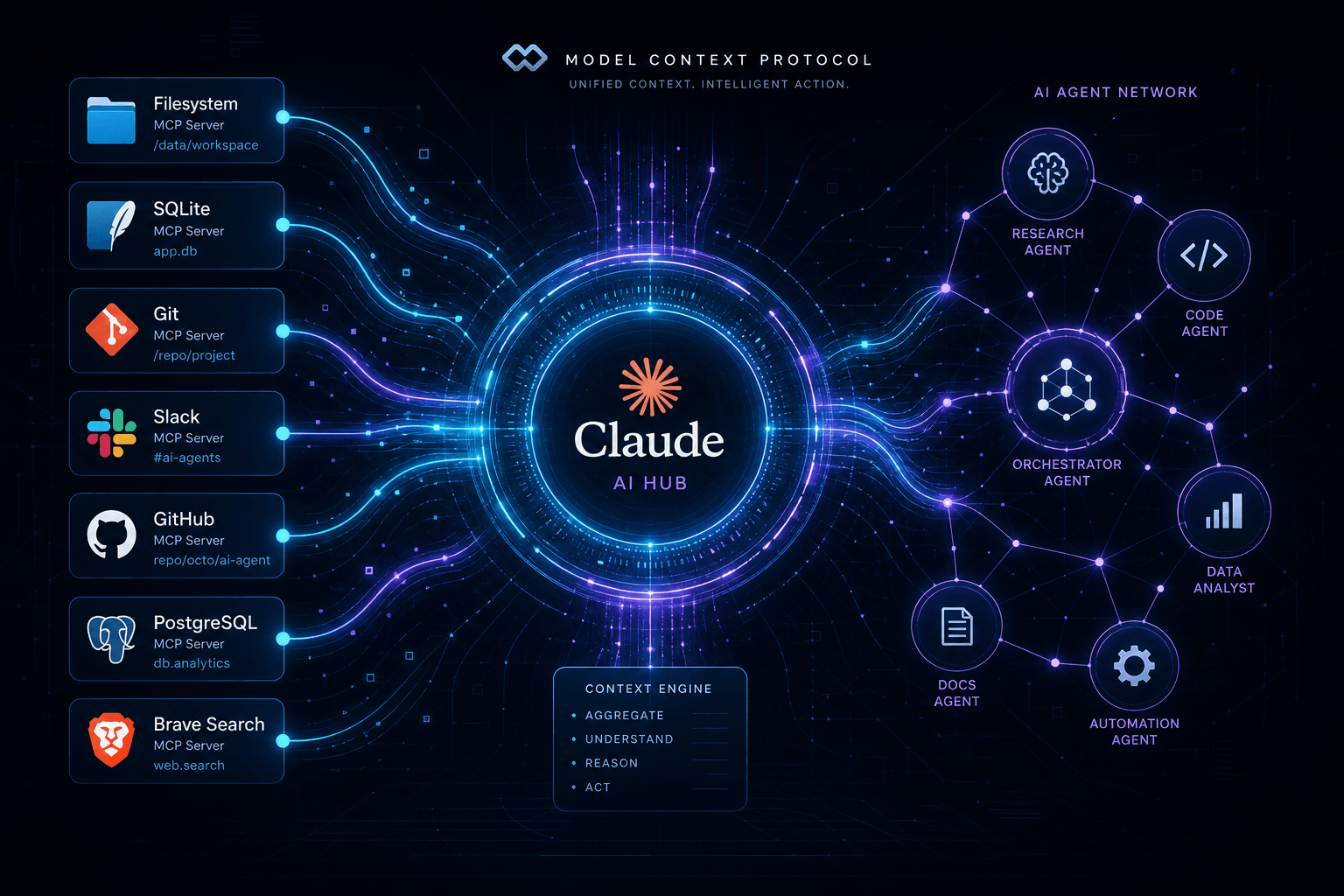
Anthropic shipped seven production-ready reference servers on day one. These aren't toy examples—they're full implementations you can deploy immediately:
- Filesystem – Secure file operations with granular access controls
- SQLite – Database interaction and business intelligence capabilities
- Git – Repository reading, searching, and manipulation
- Slack – Channel management and messaging
- GitHub – Repository management and API integration
- PostgreSQL – Read-only database access with schema inspection
- Brave Search – Web and local search via Brave's API
Each server runs as a separate process that Claude Desktop communicates with via stdio or HTTP. They sandbox their operations—you explicitly grant access to specific directories, repositories, or databases rather than giving Claude free rein across your entire system.
Prerequisites Before You Start #
You'll need three things to follow this tutorial:
- Node.js 18 or higher – Check with
node --version. Install from nodejs.org if needed. - Claude Desktop app – Download from claude.ai/download. The web version doesn't support MCP.
- A text editor – VS Code, Cursor, or even TextEdit works fine.
All MCP servers in this guide install via npx, which ships with Node.js. No global package installation required.
Locating Your Claude Desktop Configuration #
MCP servers configure through a single JSON file that Claude Desktop reads on startup. Location varies by OS:
| Operating System | Configuration Path |
|---|---|
| macOS | ~/Library/Application Support/Claude/claude_desktop_config.json |
| Windows | %APPDATA%\Claude\claude_desktop_config.json |
| Linux | ~/.config/Claude/claude_desktop_config.json |
If the file doesn't exist, create it with this skeleton structure:
{
  "mcpServers": {}
}
Critical note: After editing this file, you must fully quit and restart Claude Desktop. Closing the window isn't sufficient—right-click the Claude icon and select "Quit" or "Exit." MCP configuration doesn't hot-reload.
Server 1: Filesystem – Controlled File Access #
The Filesystem server gives Claude read and write access to specific directories you designate. This isn't unrestricted access to your entire drive—you explicitly whitelist paths.
Setup Instructions #
Add this to your claude_desktop_config.json inside the mcpServers object:
"filesystem": {
  "command": "npx",
  "args": ["-y", "@modelcontextprotocol/server-filesystem", "/Users/yourname/Documents/Projects"]
}
On Windows, wrap the command:
"filesystem": {
  "command": "cmd",
  "args": ["/c", "npx", "-y", "@modelcontextprotocol/server-filesystem", "C:\\Users\\yourname\\Documents\\Projects"]
}
You can grant access to multiple directories by adding more paths to the args array:
"args": ["-y", "@modelcontextprotocol/server-filesystem",
  "/Users/yourname/Documents/Projects",
  "/Users/yourname/Documents/Notes",
  "/Users/yourname/Downloads"
]
What You Can Do #
Once configured, Claude can:
- Read file contents and directory listings
- Create new files and directories
- Edit existing files
- Search across file contents
- Get file metadata (size, modification time, permissions)
Security Model #
The Filesystem server implements path traversal protection. Even if Claude tries to access files outside your whitelisted directories—like ../../../etc/passwd—the server blocks the request. Access is strictly limited to paths you explicitly granted.
Use Cases #
- Codebase analysis – Ask Claude to review your entire project structure
- Documentation generation – Have Claude read your source files and generate READMEs
- File migration scripts – Let Claude write and execute batch file operations
- Configuration auditing – Search for misconfigurations across multiple config files
Server 2: Git – Repository Operations #
The Git server exposes your local repositories to Claude, enabling sophisticated code analysis and repository manipulation without copy-pasting into chat windows.
Setup Instructions #
The Git server requires Python. Install via uvx (recommended) or pip:
"git": {
  "command": "uvx",
  "args": ["mcp-server-git", "--repository", "/path/to/your/repo"]
}
Or with pip:
"git": {
  "command": "python",
  "args": ["-m", "mcp_server_git", "--repository", "/path/to/your/repo"]
}
You can configure multiple repositories:
"git": {
  "command": "uvx",
  "args": ["mcp-server-git",
    "--repository", "/Users/will/projects/website",
    "--repository", "/Users/will/projects/api"
  ]
}
Available Tools #
The Git server exposes these operations:
| Tool | Purpose |
|---|---|
git_status |
Check working tree status |
git_log |
View commit history with filtering |
git_diff |
Show changes between commits, branches, or working tree |
git_show |
Display contents of specific commits |
git_branch |
List, create, or delete branches |
git_search |
Search commit messages and code |
Use Cases #
- Code archaeology – "Show me all commits that modified the authentication module in the last month"
- PR preparation – "Generate a summary of changes between my feature branch and main"
- Commit analysis – "Find the commit that introduced this regression"
- Repository exploration – "List all files that haven't been modified in 6 months"
Server 3: SQLite – Database Intelligence #
SQLite is the world's most deployed database—it's in your phone, browser, and countless applications. The SQLite MCP server lets Claude query and analyze SQLite databases directly.
Setup Instructions #
"sqlite": {
  "command": "npx",
  "args": ["-y", "@modelcontextprotocol/server-sqlite", "/path/to/database.db"]
}
The server connects to a single database file. For multiple databases, configure separate server entries:
"sqlite-analytics": {
  "command": "npx",
  "args": ["-y", "@modelcontextprotocol/server-sqlite", "/Users/will/data/analytics.db"]
},
"sqlite-app": {
  "command": "npx",
  "args": ["-y", "@modelcontextprotocol/server-sqlite", "/Users/will/projects/app/data.db"]
}
Business Intelligence Features #
The SQLite server is particularly powerful for analysis. Claude can:
- Inspect database schemas (tables, columns, indexes, foreign keys)
- Execute arbitrary SELECT queries
- Generate summary statistics and aggregations
- Write data analysis reports based on query results
- Suggest schema optimizations
Example Queries Through Claude #
Once configured, you might ask:
- "Show me the schema of this database"
- "What's the average order value by month for the past year?"
- "Find all customers who haven't placed an order in 90 days"
- "Generate a report of top-performing products by revenue"
Use Cases #
- Application debugging – Query your app's local database to diagnose issues
- Analytics exploration – Analyze exported data without writing SQL manually
- Data migration planning – Inspect schemas and data patterns before migrations
- Reporting automation – Generate recurring business reports from application databases
Server 4: Slack – Team Communication #
The Slack server transforms Claude into a team member that can read channels, send messages, and participate in your team's communication workflows.
Setup Instructions #
You'll need a Slack bot token. Create one at api.slack.com/apps:
- Click "Create New App" → "From scratch"
- Navigate to "OAuth & Permissions"
- Add these bot token scopes:
chat:write,channels:read,groups:read,im:read,mpim:read - Install the app to your workspace and copy the "Bot User OAuth Token"
Add to your config:
"slack": {
  "command": "npx",
  "args": ["-y", "@modelcontextprotocol/server-slack"],
  "env": {
    "SLACK_BOT_TOKEN": "xoxb-your-token-here",
    "SLACK_TEAM_ID": "T1234567890"
  }
}
Get your Team ID from Slack: click your workspace name → Settings → Workspace Settings. The Team ID appears in the URL.
Available Operations #
| Tool | Purpose |
|---|---|
slack_list_channels |
List accessible channels |
slack_post_message |
Send messages to channels or users |
slack_get_channel_history |
Retrieve message history |
slack_get_thread_replies |
Fetch threaded conversations |
Use Cases #
- Standup automation – "Post yesterday's completed tasks to #engineering-standup"
- Alert integration – Wire Claude to monitor systems and alert Slack channels
- Meeting summaries – "Summarize the last 50 messages in #product-meetings"
- Knowledge retrieval – "Find all mentions of the authentication refactor in #backend"
Server 5: GitHub – Repository Management #
The GitHub server connects Claude directly to GitHub's API, enabling repository management, issue tracking, and code review workflows without leaving your chat interface.
Setup Instructions #
Generate a personal access token at github.com/settings/tokens:
- Click "Generate new token (classic)"
- Select scopes:
repo(full repository access),read:org(organization read),read:user(user profile read) - Copy the generated token
Add to your config:
"github": {
  "command": "npx",
  "args": ["-y", "@modelcontextprotocol/server-github"],
  "env": {
    "GITHUB_PERSONAL_ACCESS_TOKEN": "ghp_your_token_here"
  }
}
Available Tools #
The GitHub server exposes these operations:
| Tool | Purpose |
|---|---|
github_search_repositories |
Find repositories by query |
github_search_code |
Search code across GitHub |
github_search_issues |
Search issues and pull requests |
github_search_users |
Find GitHub users |
github_list_commits |
List commits in a repository |
github_get_issue |
Get details of a specific issue |
github_list_issue_comments |
List comments on an issue |
github_create_issue |
Create a new issue |
github_update_issue |
Update existing issues |
github_add_issue_comment |
Comment on issues |
github_list_pull_requests |
List pull requests |
github_merge_pull_request |
Merge pull requests |
github_get_file_contents |
Read file contents from repos |
github_push_files |
Commit and push file changes |
github_create_repository |
Create new repositories |
github_fork_repository |
Fork existing repositories |
github_create_branch |
Create branches |
github_list_branches |
List repository branches |
Use Cases #
- Issue triage – "Find all open bugs labeled 'high-priority' in our frontend repo"
- Code review prep – "Show me the files changed in PR #247 and summarize the changes"
- Release notes – "Generate release notes from commits since the last tag"
- Repository management – "Create a new repo for the marketing site with a standard Next.js setup"
Server 6: PostgreSQL – Enterprise Database Access #
PostgreSQL powers everything from small applications to massive data warehouses. The Postgres MCP server provides read-only access with schema introspection—perfect for analysis without the risk of accidental data modification.
Setup Instructions #
"postgres": {
  "command": "npx",
  "args": ["-y", "@modelcontextprotocol/server-postgres", "postgresql://user:password@localhost:5432/database"]
}
For production databases, use environment variables to avoid exposing credentials in your config file:
"postgres": {
  "command": "npx",
  "args": ["-y", "@modelcontextprotocol/server-postgres", "postgresql://localhost/analytics"],
  "env": {
    "PGUSER": "analytics_user",
    "PGPASSWORD": "your-password"
  }
}
Read-Only Design #
The PostgreSQL server intentionally operates in read-only mode. Claude can:
- Execute SELECT queries
- Inspect table schemas, indexes, and constraints
- Query system catalogs
- Generate analysis reports
But it cannot:
- INSERT, UPDATE, or DELETE data
- CREATE or DROP tables
- Modify schema
- Execute administrative commands
This makes it safe to connect to production databases for analysis and reporting.
Use Cases #
- Production debugging – Query live databases to investigate issues
- Business reporting – Generate recurring reports from your data warehouse
- Schema exploration – "Show me all tables related to user billing"
- Performance analysis – "Find the slowest queries from pg_stat_statements"
- Data validation – "Check for orphaned records in the orders table"
Server 7: Brave Search – Web Intelligence #
The Brave Search server gives Claude the ability to search the web in real-time, access current information, and ground its responses in factual, up-to-date sources.
Setup Instructions #
- Visit api-dashboard.search.brave.com
- Create a free account (no credit card required)
- Navigate to "API Keys" and click "Add API Key"
- Copy your new key
Add to your config:
"brave-search": {
  "command": "npx",
  "args": ["-y", "@modelcontextprotocol/server-brave-search"],
  "env": {
    "BRAVE_API_KEY": "your-api-key-here"
  }
}
The free tier includes 2,000 queries per month—more than sufficient for most development workflows.
Search Capabilities #
The Brave Search server provides two main tools:
| Tool | Purpose |
|---|---|
brave_web_search |
General web search for current information |
brave_local_search |
Find local businesses and places |
Use Cases #
- Current events – "What happened at OpenAI's DevDay this week?"
- Documentation lookup – "Find the latest Next.js App Router documentation"
- Competitor research – "Search for alternatives to our current payment processor"
- Fact verification – "Confirm the release date of Claude 3.5 Sonnet"
- Local discovery – "Find coffee shops with WiFi near this address"
Complete Configuration Example #
Here's a complete claude_desktop_config.json with all seven servers configured:
{
  "mcpServers": {
    "filesystem": {
      "command": "npx",
      "args": ["-y", "@modelcontextprotocol/server-filesystem",
        "/Users/will/Documents/Projects",
        "/Users/will/Documents/Notes"
      ]
    },
    "git": {
      "command": "uvx",
      "args": ["mcp-server-git", "--repository", "/Users/will/projects/website"]
    },
    "sqlite": {
      "command": "npx",
      "args": ["-y", "@modelcontextprotocol/server-sqlite", "/Users/will/data/analytics.db"]
    },
    "slack": {
      "command": "npx",
      "args": ["-y", "@modelcontextprotocol/server-slack"],
      "env": {
        "SLACK_BOT_TOKEN": "xoxb-your-token",
        "SLACK_TEAM_ID": "T123456789"
      }
    },
    "github": {
      "command": "npx",
      "args": ["-y", "@modelcontextprotocol/server-github"],
      "env": {
        "GITHUB_PERSONAL_ACCESS_TOKEN": "ghp_your_token"
      }
    },
    "postgres": {
      "command": "npx",
      "args": ["-y", "@modelcontextprotocol/server-postgres", "postgresql://localhost/production"],
      "env": {
        "PGUSER": "analytics",
        "PGPASSWORD": "password"
      }
    },
    "brave-search": {
      "command": "npx",
      "args": ["-y", "@modelcontextprotocol/server-brave-search"],
      "env": {
        "BRAVE_API_KEY": "your-brave-key"
      }
    }
  }
}
Remember to replace placeholder values with your actual tokens and paths.
Verifying Your Setup #
After restarting Claude Desktop, verify that your servers connected successfully:
- Open a new conversation
- Click the hammer icon in the bottom right (appears when MCP tools are active)
- Ask: "What tools do you have available?"
Claude should list all configured servers and their tools. If any server failed to connect, check Claude's logs:
macOS: ~/Library/Logs/Claude/mcp.log
Windows: %APPDATA%\Claude\logs\mcp.log
Common issues:
- "command not found" – Node.js isn't in your PATH. Restart your terminal or reinstall Node.js.
- Authentication errors – Double-check your API tokens and permissions.
- Path errors – Ensure directories and database files exist at the specified paths.
- Port conflicts – Some servers use local ports; ensure nothing else is bound.
Building Your First Multi-Server Workflow #
The real power of MCP emerges when you combine multiple servers. Here's a practical example:
Scenario: You need to analyze last month's sales data, generate a report, and share it with your team.
Workflow:
- PostgreSQL – "Query the sales database for November revenue by product category"
- Filesystem – "Save the query results to a CSV file in my Reports folder"
- SQLite – "Load the CSV into a local analysis database and calculate growth rates"
- Git – "Create a new branch for the monthly report"
- Filesystem – "Generate a Markdown report with charts and analysis"
- Git – "Commit the report to the new branch"
- GitHub – "Create a pull request for the monthly sales report"
- Slack – "Post a summary and PR link to #sales-team"
All of this happens within a single Claude conversation, with each server handling its specialty.
Security Best Practices #
MCP servers extend Claude's capabilities but also expand the attack surface. Follow these guidelines:
| Practice | Implementation |
|---|---|
| Least privilege | Grant access to only the directories, repos, and databases you actually need |
| Token rotation | Rotate API keys quarterly; use environment variables instead of hardcoding |
| Scope limitation | Create dedicated Slack apps and GitHub tokens with minimal permissions |
| Network isolation | Run Postgres servers on isolated networks; avoid exposing production databases |
| Audit logging | Enable query logging on database servers to track Claude's access |
| Regular review | Periodically audit your claude_desktop_config.json for unused servers |
What's Next for MCP #
The November 2024 launch is just the beginning. Anthropic has signaled several upcoming developments:
- Remote MCP servers – Connect to hosted MCP servers over HTTP, not just local processes
- Authentication standards – OAuth and API key management improvements
- Additional SDKs – More language implementations beyond TypeScript and Python
- Enterprise features – Team-wide server management and access controls
Early adopters including Block and Apollo are already integrating MCP into production systems. Development tool companies like Zed, Replit, Codeium, and Sourcegraph have announced MCP support is coming to their platforms.
Frequently Asked Questions #
Do I need coding experience to use MCP servers? #
No. If you can edit a JSON file and restart an application, you can configure MCP servers. The servers handle the technical complexity—you just specify what Claude can access.
Are MCP servers free to use? #
The servers themselves are free and open-source. However, some servers require API keys that may have usage limits or costs. Brave Search offers 2,000 free queries/month. GitHub tokens are free for public repositories. Slack requires a workspace with API access.
Can I use MCP servers with Claude on the web? #
No. MCP servers only work with the Claude Desktop application. The web version of Claude doesn't support external tool connections. Download the desktop app from claude.ai/download.
How do I troubleshoot a server that won't start? #
Check the MCP logs first. On macOS, look at ~/Library/Logs/Claude/mcp.log. Common issues include missing Node.js (ensure version 18+), incorrect paths, or authentication errors. Verify your JSON syntax—trailing commas and unclosed braces break the entire configuration.
Can I write my own MCP servers? #
Yes. Anthropic provides SDKs for TypeScript, Python, and other languages. The protocol is open-source, and the community is already building servers for everything from Notion to AWS. Start with the official documentation.
What's the difference between resources and tools in MCP? #
Resources are read-only data that Claude can access, like file contents or database records. Tools are actions that Claude can execute, like sending a Slack message or committing code. Think of resources as "what Claude knows" and tools as "what Claude can do."
Are MCP servers safe to use with production databases? #
The PostgreSQL server is read-only by design—it's safe for production analysis. However, the SQLite and Filesystem servers can write data. Always review server capabilities before connecting to production systems, and use environment variables for credentials instead of hardcoding them in your config file.
How many MCP servers can I configure? #
There's no hard limit. You can configure as many servers as your system resources allow. Each server runs as a separate process, so memory and CPU are your practical constraints. Most users run 3-7 servers comfortably.
Can I share my MCP configuration with my team? #
Share the structure, not the secrets. You can commit a template configuration file with placeholder values for API keys and paths. Team members fill in their own credentials. Never commit actual tokens to version control.
Will MCP replace n8n, Make, or Zapier? #
No—MCP complements workflow automation platforms. MCP enables Claude to interact with systems conversationally. n8n and similar tools handle event-driven automation, scheduling, and complex multi-step workflows. They work well together: MCP gives Claude capabilities, while n8n orchestrates processes. I've written about building AI workflows with n8n separately.
Can servers see each other's data? #
No. Each MCP server operates independently. They don't share state or communicate directly. Claude acts as the coordinator, passing context between servers as needed during a conversation.
What happens if a server crashes? #
Claude detects the disconnection and informs you. Restart Claude Desktop to reconnect. Your conversation history remains intact, but you'll need to re-establish any in-progress workflows that depended on the crashed server.
Closing: The New Shape of AI Integration #
The Model Context Protocol represents a fundamental shift in how AI assistants interact with the world. Before MCP, we were stuck in a loop of copying context into chat windows, hitting token limits, and losing state between conversations. Now Claude can work directly with your actual systems—your files, your databases, your tools—through secure, standardized connections.
The seven reference servers covered in this guide are just the beginning. The open-source community is already building hundreds of additional servers, and enterprise adoption is accelerating. If you're building AI-powered workflows today, understanding MCP isn't optional—it's foundational.
If you need help architecting AI automation systems that combine MCP, n8n, and custom agents for your specific use case, book an AI automation strategy call. I've implemented these systems for teams ranging from seed-stage startups to Fortune 500 companies, and the productivity gains are immediate and substantial.
Related Reading:
Related Posts

How to Stop Client-Facing AI Agents From Hallucinating
Client-facing AI agents hallucinate when they answer without grounding. Here's the layered guardrail stack I use to keep agents accurate and on-script.

AI Sales Systems vs Traditional CRM Automation
Traditional CRM automation fires rules; AI sales systems reason about each lead. Here's how they differ, where each wins, and how to combine them.

The Manual Workflows With the Highest ROI When Replaced by AI Agents
Not every task is worth automating. Here are the manual workflows with the highest ROI when you replace them with AI agents, ranked by payback speed.




