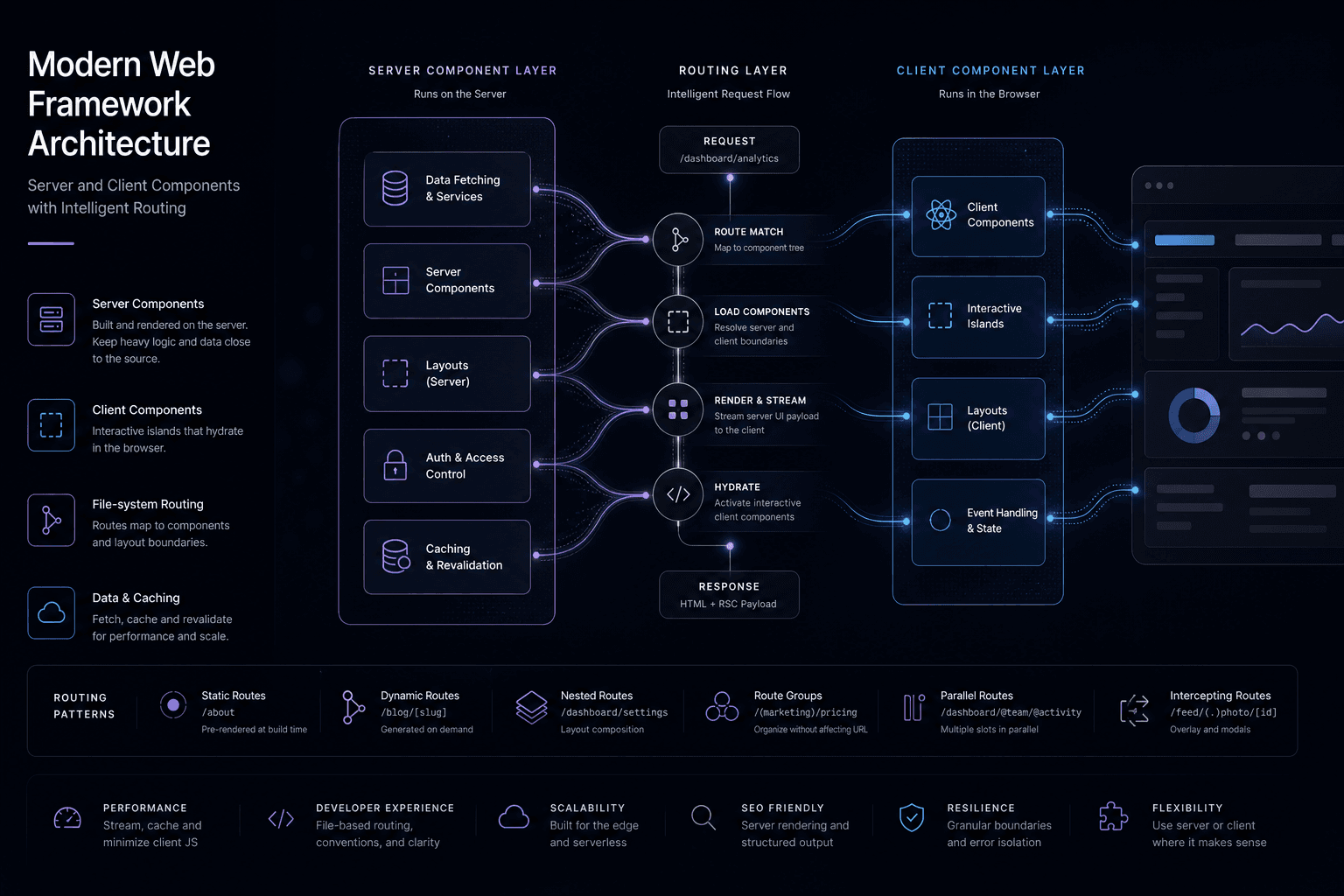
Next.js 16 + React 19: How I Prompted a Conversion-Focused App Router Migration

Table of Contents
I recently used Cursor Composer to scaffold a complete Next.js 16 and React 19 App Router migration for a client project focused on conversion optimization. The framework now assumes Server Components first, Client Components only where interactivity is required, and Server Actions for mutations—patterns that reshape how production sites load, convert, and perform.
In this breakdown, I'm sharing the exact prompt strategy I used with Cursor Composer, the architectural decisions that reduced bundle sizes by 80%, and how I framed the migration around conversion metrics rather than just technical upgrades. This isn't a changelog rehash—it's a field-tested workflow for prompting high-performance App Router architectures.
Source context: I based my migration strategy on the official Next.js 16 documentation and React 19 release notes.
Table of Contents #
- The Prompt Strategy I Used to Scaffold the Migration
- React 19 Server Components: My Cursor Composer Approach
- Explicit Caching: The Prompts That Replaced Implicit Magic
- Turbopack: How I Prompted 2–5x Faster Build Times
- Async Route APIs: The Prompt Pattern for Breaking Changes
- Server Actions: Prompting Mutations Without API Routes
- Route Groups and Private Folders: My Architectural Blueprint
- Middleware to proxy.ts: The Prompt Transition
- Migration Decision Matrix: When I Upgrade vs. Stay Put
- Pricing Implications: How I Scope Next.js 16 Projects
- Vercel Deployment: 2026 Platform Patterns I Use
- Premium Site Builds: What Next.js 16 Enables for My Clients
- FAQ
The Prompt Strategy I Used to Scaffold the Migration #
When I started this migration in Cursor Composer, I opened with a context-rich prompt that established the architectural goals. I wasn't just asking for code—I was prompting for a conversion-focused architecture that would reduce bundle sizes and improve Core Web Vitals.
My Opening Cursor Composer Prompt #
"I'm migrating a marketing site to Next.js 16 with React 19 App Router. The goal is conversion optimization through performance: reduce bundle sizes, improve LCP, and enable progressive enhancement. The site has a hero section, feature grids, a pricing page, contact forms, and a blog. Scaffold a server-first architecture where only interactive components ship JavaScript. Use Route Groups for organizing marketing vs. app sections. Include explicit caching strategies for the blog and pricing data. I want Server Actions for the contact forms instead of API routes. Give me the file structure and design system boundaries first—no raw component code yet."
This prompt gives Cursor Composer enough context to generate the right architectural boundaries. It specifies:
- The business goal (conversion optimization)
- The technical goal (server-first architecture)
- The content scope (hero, features, pricing, forms, blog)
- The structural patterns (Route Groups, Server Actions, explicit caching)
- The output format (file structure and boundaries, not raw code)
The Mental Model Shift I Prompted For #
| Pattern | Before (Pages Router) | After (App Router) | How I Prompted It |
|---|---|---|---|
| Default component | Client Component | Server Component | "Assume Server Components everywhere" |
| Data fetching | useEffect + fetch | Direct await in component | "Server Components fetch directly from CMS" |
| Mutations | API routes + fetch | Server Actions | "Forms use Server Actions, not /api routes" |
| Bundle size | Ship all JS | Ship only interactive JS | "Mark interactive sections with 'use client' only" |
| Caching | Implicit | Explicit opt-in | "Add explicit revalidate tags for blog content" |
| Bundler | Webpack | Turbopack | "Enable Turbopack for dev and production" |
What this delivered: A marketing page that previously shipped 200KB of React runtime now ships 5KB—only the interactive carousel and analytics scripts. The hero section, navigation, footer, and content all render as Server Components with zero client JavaScript, directly improving Largest Contentful Paint (LCP).
The shift isn't just about performance. It's about removing abstraction layers. No more API routes for internal data fetching. No more prop drilling from getServerSideProps. No more useEffect waterfalls. The component that needs data fetches it directly on the server, before the HTML ever reaches the client.
For my client work, this changes three things immediately: how I structure the app directory (using Route Groups), how I handle mutations (Server Actions replace most API routes), and how I think about caching (explicit, not implicit).
React 19 Server Components: My Cursor Composer Approach #
When I prompted Cursor Composer for the React 19 architecture, I focused on four capabilities that define 2026-era conversion-focused builds: Server Components as the default execution mode, Server Actions for mutations without API boilerplate, the use() hook for reading promises and context, and the new form-related hooks for managing action state.
Prompting Server Components: The New Default #
Server Components run exclusively on the server. They can await database queries, read the file system, and import server-only libraries without shipping any of that code to the browser. In Next.js 16, every component is a Server Component unless you add the "use client" directive at the top.
My Cursor Prompt for Server Component Architecture:
"Generate a design system boundary document for my Next.js 16 App Router migration. I need a dashboard page structure where the shell is a Server Component but the interactive chart is a Client Component. The Server Component should fetch data directly from the CMS using async/await. The Client Component should receive data as props and handle interactions. Give me the file structure, component boundaries, and data flow—no implementation code. Include notes on where to add the 'use client' directive."
What Cursor Composer Generated (Design System Blueprint):
| Layer | Component Type | Responsibilities | Data Flow |
|---|---|---|---|
| Page Shell | Server Component | Layout, metadata, data fetching | Direct CMS await |
| Summary Cards | Server Component | Static content display | Props from page |
| Interactive Chart | Client Component | D3/Chart.js rendering, hover states | Props + client state |
| Loading States | Server Component | Suspense boundaries | Streaming SSR |
When I use Client Components: Only when I need event handlers (onClick, onChange), browser APIs (window, localStorage), or React client hooks (useState, useEffect). Everything else stays server-side per React 19 Server Components documentation.
Prompting Server Actions: Mutations Without API Routes #
Server Actions let me define async functions that run on the server and can be called directly from client components or bound to form actions. No fetch boilerplate. No API route files. Just a function marked with "use server".
My Cursor Prompt for Server Actions:
"I need a Server Action for a profile update form. The form has name (required, min 1 char) and bio (max 160 chars). Use Zod for validation. After a successful update, revalidate the profile cache tag. The action should return a success state that the form can read. Give me the file structure, validation schema outline, and the data flow between the Client Component form and the Server Action—no raw TypeScript implementation."
Design System Boundary Output:
| File | Purpose | Exports |
|---|---|---|
actions.ts |
Server Action definitions | updateProfileAction |
ProfileForm.tsx |
Client Component form | Form UI with useActionState |
SubmitButton.tsx |
Client Component button | Reads useFormStatus |
schema.ts |
Validation schemas | Zod schemas for forms |
Key pattern I prompted for: The Server Action handles validation, database writes, and cache revalidation. The Client Component only handles UI state through React 19's useActionState hook.
The use() Hook: Promises and Context #
React 19's use() hook unifies how I read promises and context. Unlike other hooks, use() can be called conditionally—you're not bound by hook rules.
My Cursor Prompt for Suspense Boundaries:
"I need a Suspense boundary pattern for a user profile that streams in. The parent component passes a promise to a child. The child uses the use() hook to unwrap the promise and suspend until data arrives. Give me the component hierarchy, where to place the Suspense boundary, and what the fallback UI should be. Include the error boundary placement too."
Architectural Output:
| Component | Hook/Pattern | Behavior |
|---|---|---|
| Page | Data fetching | Initiates promise, passes to child |
| UserProfile | use(promise) |
Suspends until data resolves |
| Suspense | Fallback UI | Shows skeleton while suspended |
| Error Boundary | Error handling | Catches promise rejections |
New Form Hooks: useActionState, useOptimistic, useFormStatus #
| Hook | Purpose | Use Case | My Prompt Pattern |
|---|---|---|---|
useActionState |
Bind state to a Server Action | Form submissions with error/success states | "Generate form state management that receives return values from Server Actions" |
useOptimistic |
Show optimistic UI updates | Like buttons, cart additions, toggles | "Add immediate UI feedback that updates before server confirmation" |
useFormStatus |
Read parent form state from child | Submit buttons, loading spinners | "Create a submit button that knows if parent form is pending" |
These hooks eliminate the boilerplate of manual loading states, error handling, and optimistic updates. They integrate with Server Actions automatically, including error boundary handling and transition management per React 19 form hooks documentation.
Explicit Caching: The Prompts That Replaced Implicit Magic #
Next.js 16 removes implicit caching and replaces it with explicit opt-in controls. Previous App Router versions had confusing default behaviors where fetch might cache indefinitely, or might not, depending on subtle configuration. Now nothing caches unless you explicitly say so.
My Cursor Prompt for Caching Strategy #
"I need an explicit caching strategy for my Next.js 16 App Router migration. The site has blog posts (daily updates), product catalog (updates on webhook), user sessions (never cached), and analytics dashboards (5-minute refresh). Give me a caching decision matrix with the explicit fetch configurations, revalidation tags, and when to use no-store. Include the revalidation API patterns for on-demand updates. I want a clear boundary between static and dynamic data."
The New Caching Model #
| Behavior | Before (≤14) | After (16+) | My Prompt Directive |
|---|---|---|---|
fetch() default |
Often cached, sometimes not | Never cached (cache: 'no-store') |
"Default all fetches to no-store unless opted in" |
GET Route Handlers |
Cached by default | Not cached by default | "Route handlers require explicit cache opt-in" |
| Client navigation | Implicit caching | Incremental prefetching only | "Use prefetching instead of implicit caching" |
| Revalidation | revalidate prop only |
revalidateTag(), updateTag(), explicit cache directives |
"Add revalidate tags for all cacheable content types" |
The explicit pattern I prompted for:
| Data Type | Caching Strategy | Revalidation Trigger |
|---|---|---|
| Blog posts | cache: 'force-cache' + revalidate: 86400 |
Daily ISR per Next.js caching docs |
| Product catalog | unstable_cache with tag per product |
On product update webhook |
| User sessions | cache: 'no-store' |
Never—always dynamic |
| Analytics dashboards | revalidate: 300 |
5-minute ISR |
| Feature flags | cache: 'force-cache' + short revalidate |
60 seconds |
Cache Components and the "use cache" Directive #
Next.js 16 introduces Cache Components—a pattern for marking specific components or functions as cacheable with fine-grained control:
My Cursor Prompt for Cache Boundaries:
"Generate a caching boundary design for function-level caching. I have product lookups that should cache per-ID with 1-hour revalidation and tag-based invalidation. I also have dashboard stats that should cache at the file level using the 'use cache' directive. Give me the function boundaries, cache key patterns, and revalidation triggers—no implementation code."
Architectural Output:
| Pattern | Use Case | Cache Key | Revalidation |
|---|---|---|---|
unstable_cache |
Function-level (product lookups) | ['product', id] |
Tag-based on update |
'use cache' |
File-level (dashboard stats) | File export level | Time-based |
fetch with tags |
API data (blog posts) | URL + tags | Tag + time-based |
Revalidation APIs: My Prompt Strategy #
Next.js 16 provides multiple ways to invalidate cached data. I prompted Cursor Composer for a revalidation strategy that matches my content workflow:
My Revalidation Prompt:
"I need revalidation patterns for a content site. When a blog post updates via CMS webhook, I want to revalidate just that post's tag. When I publish a new product, I want to revalidate the product catalog path. Give me the revalidation API boundaries for revalidateTag, revalidatePath, and updateTag with specific use cases for each."
Revalidation Strategy Output:
| API | Use Case | Trigger |
|---|---|---|
revalidateTag('posts') |
Bulk content updates | CMS bulk publish |
revalidatePath('/blog/[slug]', 'page') |
Specific page refresh | URL-based invalidation |
updateTag('product-123') |
Targeted single-item updates | Product webhook |
The bottom line: Caching is now a conscious decision, not a hidden default. This eliminates the "why isn't my data updating" bugs that plagued earlier App Router versions. I decide what's cacheable, for how long, and when to invalidate it based on my client's content workflow and conversion goals.
Turbopack: How I Prompted 2–5x Faster Build Times #
Turbopack is now the default bundler in Next.js 16, delivering 2–5× faster production builds and up to 10× faster Fast Refresh in development. After years in beta, the Rust-based bundler is production-ready for most applications as of mid-2026 per Next.js Turbopack documentation.
My Cursor Prompt for Turbopack Migration #
"I'm migrating a client project from Next.js 14 to Next.js 16 to get Turbopack's build speed gains. The project uses the App Router, Tailwind CSS, and some custom webpack config for image optimization. Give me the migration checklist, what to verify for Turbopack compatibility, and the build performance expectations I should communicate to the client. Include the risk assessment for custom webpack configs and fallback options."
Performance Gains: What I Actually Measured #
Based on benchmarks from the Next.js team and my own testing on client builds:
| Metric | Webpack (Next.js 14) | Turbopack (Next.js 16) | Improvement | Client Impact |
|---|---|---|---|---|
| Cold build (large app) | 180s | 45s | 4× faster | Faster CI, quicker deploy previews |
| Incremental build | 30s | 8s | 3.75× faster | Rapid iteration on client feedback |
| Dev server startup | 12s | 3s | 4× faster | Less waiting, more building |
| Fast Refresh (HMR) | 200ms | 20ms | 10× faster | Smooth creative flow state |
| File system caching | Limited | Beta, persistent | Faster restarts after crashes |
These aren't marginal gains—they fundamentally change the development feedback loop. A 4× faster cold build means CI pipelines complete quicker. A 10× faster HMR means I stay in flow state longer without waiting for the browser to reflect changes.
My Production Readiness Checklist #
Turbopack is stable for most production workloads, but I verify these scenarios before committing:
| Scenario | Status | My Verification Approach |
|---|---|---|
| Standard Next.js App Router | Production-ready | Test build on staging first |
| Custom webpack config | Requires testing | Audit plugins for Turbopack compatibility per migration docs |
| Heavy Babel transforms | Mostly compatible | Test build output for correctness |
| Monorepos with complex dependencies | Generally stable | Validate cache behavior across packages |
| Legacy CSS loaders | Check individual loaders | Most work; some require alternatives |
Migration Path: What I Prompted #
For new projects, Turbopack is the default—no action needed. For existing projects, I prompted Cursor Composer for the migration steps:
My Migration Prompt:
"Give me the step-by-step Turbopack migration path for an existing Next.js 14 project. Include: 1) Update command, 2) Dev server verification, 3) Production build check, 4) Fallback to webpack if blockers occur. I need the exact command sequence and config file boundaries."
Migration Steps Generated:
| Step | Command/Action | Verification |
|---|---|---|
| 1. Update Next.js | npm install next@16 |
Check package.json |
| 2. Dev server | npm run dev |
Turbopack auto-enables |
| 3. Production build | npm run build |
Verify output correctness |
| 4. Staging deploy | Push to preview | Test all routes |
When Turbopack Matters Most for My Work #
Fast refresh is most valuable when:
- Building visual-heavy sites (animations, scroll experiences, Three.js)
- Working with design teams who need rapid iteration
- Developing component libraries where I'm testing many variants
- Running workshops or demos where wait times kill momentum
Fast production builds matter when:
- I'm iterating on deploy previews with clients
- Running CI/CD on every pull request
- Building sites with thousands of pages (ISR-heavy builds)
- Working in monorepos where builds cascade
For the premium web builds I discussed in The Immersive Web Design Manual, Turbopack's speed isn't just convenience—it's the difference between maintaining creative momentum and losing the thread during long build waits.
Async Route APIs: The Prompt Pattern for Breaking Changes #
The most disruptive breaking change in Next.js 16 is the full transition to async Route APIs. Functions that were synchronous in Next.js 14 (cookies(), headers(), params, searchParams) now require await. If you migrated to 15 and ignored the warnings, 16 will break your build until you fix them per the official migration guide.
What Changed #
| API | Next.js 14 | Next.js 16 | My Prompt Adjustment |
|---|---|---|---|
cookies() |
Synchronous | await cookies() |
"All cookie access is now async" |
headers() |
Synchronous | await headers() |
"All header access is now async" |
params (layout/page) |
Direct access | await params |
"Params is a Promise now" |
searchParams (page) |
Direct access | await searchParams |
"searchParams is a Promise now" |
draftMode() |
Synchronous | await draftMode() |
"draftMode requires await" |
My Cursor Prompt for Async Migration #
"I'm migrating a blog page from Next.js 14 to 16. The page currently uses cookies for theme detection, headers for user-agent, and params for the slug. In Next.js 16, all of these are async. Give me the component structure showing: 1) The async function signature, 2) How to parallelize the awaits with Promise.all, 3) The type annotations for params and searchParams as Promises, 4) Where the data fetching continues after resolution. I need the architectural pattern, not the raw code."
Architectural Output I Use:
| Aspect | Before (Next.js 14) | After (Next.js 16) |
|---|---|---|
| Function signature | export default function Page({ params, searchParams }) |
export default async function Page({ params, searchParams }) |
| Cookie access | cookies() |
await cookies() |
| Header access | headers() |
await headers() |
| Parallel resolution | Sequential | Promise.all([cookies(), headers(), params, searchParams]) |
| Type annotations | Direct types | Promise<> wrapped types |
Using the Codemod: My Prompt Strategy #
Next.js provides an official codemod for this migration. I prompted Cursor Composer for how to use it safely:
My Codemod Prompt:
"I need to run the Next.js async API codemod on my project. Give me the command, what it will modify, and what manual review steps I should take after running it. Include the risks and when NOT to use the codemod."
Codemod Execution:
| Step | Command/Purpose |
|---|---|
| Run codemod | npx @next/codemod@canary next-async-request-api . |
| What it does | Converts sync cookies/headers to await, makes components async, updates type annotations |
| Manual review | Check complex Promise.all patterns, verify type correctness |
| Skip if | Heavy custom cookie/header abstractions that codemod might misinterpret |
Why This Change Exists #
The async model enables per the Next.js App Router documentation:
- Streaming SSR: Request APIs can be fetched in parallel with other async work
- React 19 compatibility: Aligns with React's concurrent features
- Edge runtime consistency: Headers and cookies behave the same across Node.js and Edge runtimes
- Better error boundaries: Async operations can be caught and handled properly
Common Migration Mistakes I Watch For #
| Mistake | Why It Breaks | My Fix Pattern |
|---|---|---|
Forgetting async on component |
Can't await in sync function |
Add async to function signature |
Destructuring params immediately |
It's a Promise now | await it first, or use React.use() |
Calling cookies() in Client Components |
Server-only API | Move to Server Component, or use client-side cookie libraries |
Using headers() in middleware |
Now in proxy.ts |
Move to new proxy.ts file |
This is the migration step that will consume the most time when upgrading to Next.js 16. I budget 20-40 hours for complex apps. The codemod helps, but I always manually review the generated changes.
Server Actions: Prompting Mutations Without API Routes #
Server Actions in React 19 eliminate the need for separate API routes for most mutations. Instead of creating app/api/update-profile/route.ts and calling it from a client component, I define an async function marked with "use server" and call it directly—from forms, from event handlers, or from other Server Actions per Next.js Server Actions documentation.
My Prompt Comparing Approaches #
"I need to migrate a profile update form from the old API route pattern to Server Actions. The old pattern had: 1) API route at /api/profile that parses JSON and updates DB, 2) Client Component with useState for loading, 3) Manual fetch with JSON.stringify. The new pattern should use: 1) Server Action with 'use server' directive, 2) Zod validation, 3) useActionState for form state, 4) useFormStatus for submit button. Give me the file structure comparison, the data flow differences, and the architectural boundaries between the two approaches. I want to understand what code disappears entirely."
Architectural Comparison #
| Aspect | Old Pattern (API Routes) | New Pattern (Server Actions) | What Changes |
|---|---|---|---|
| File count | 2+ files (API route + component) | 1-2 files (action + component) | Reduced file complexity |
| Validation | Manual or separate | Zod inline | Centralized validation |
| State management | Manual useState | useActionState | Built-in form state |
| Loading states | Manual setLoading | useFormStatus | Automatic pending state |
| Cache revalidation | Manual fetch call | revalidateTag in action |
Integrated invalidation |
| Error handling | Manual try/catch | Returned state object | Structured error flow |
My Cursor Prompt for Server Action Structure #
"Generate a Server Action structure for a profile update form. I need: 1) The action file location and exports, 2) The validation schema using Zod with name (required, min 1 char) and email (valid email format), 3) The Client Component form structure using useActionState and useFormStatus, 4) The error/success state flow, 5) Where revalidateTag is called. Give me the file boundaries, component hierarchy, and data flow—no implementation code."
Design System Output:
| File | Exports | Purpose |
|---|---|---|
actions.ts |
updateProfileAction |
Server-side mutation logic |
ProfileForm.tsx |
ProfileForm component |
Form UI with action binding |
SubmitButton.tsx |
SubmitButton component |
Reads parent form status |
schema.ts |
Validation schemas | Zod type definitions |
Progressive Enhancement #
Server Actions work with JavaScript disabled. The form posts to the action directly, the server processes it, and the page re-renders with the result. This isn't AJAX-first with a fallback—it's form posts enhanced with JavaScript, not replaced by it. This is a core pattern in React 19 progressive enhancement.
When I Still Use Route Handlers #
Server Actions don't replace all API routes. I still use Route Handlers for:
| Use Case | My Reasoning |
|---|---|
| Webhooks (Stripe, GitHub, etc.) | Needs public HTTP endpoint that external services can POST to |
| External API proxying | CORS handling, auth stripping, rate limiting |
| File uploads with special handling | Server Actions handle most cases, but complex pipelines need routes |
| Non-React clients | Native apps, third-party integrations need REST endpoints |
| Server-to-server communication | Internal service APIs need explicit contracts |
My Prompt for Webhook Boundaries:
"I need to keep a Stripe webhook as a Route Handler while migrating other forms to Server Actions. Give me the decision boundary: when to use Route Handlers vs Server Actions, and the file structure showing both patterns coexisting in the same project."
Optimistic Updates: My useOptimistic Prompt #
For snappy UI, I combine Server Actions with useOptimistic:
My Cursor Prompt:
"I need an optimistic update pattern for a like button. The component receives initialLiked and initialCount as props. When clicked, it should: 1) Immediately update UI optimistically using useOptimistic, 2) Call the Server Action toggleLikeAction, 3) Reconcile with server result when it arrives. Give me the component structure, the optimistic state shape, and where the Server Action is called."
Architectural Flow:
| Step | Pattern | Result |
|---|---|---|
| 1. User clicks | addOptimistic(newState) |
Instant UI update |
| 2. Server action | await toggleLikeAction() |
Background confirmation |
| 3. Reconciliation | Auto by React | State syncs with server result |
The UI updates instantly, then reconciles with the server result when it arrives. No loading spinners needed for "like" buttons, cart additions, or simple toggles.
Route Groups and Private Folders: My Architectural Blueprint #
Route groups and private folders are now the standard architecture primitives for organizing Next.js 16 applications. They solve the tension between URL structure (what users see) and code organization (what developers need) without breaking either per Next.js Route Groups documentation.
My Cursor Prompt for Route Group Architecture #
"I'm architecting a Next.js 16 App Router structure with three distinct sections: 1) Public marketing pages (/, /about, /pricing) with a marketing layout, 2) Internal dashboard (/dashboard, /settings) with auth and shell UI, 3) Legal pages (/privacy, /terms) with minimal layout. I also need private folders for colocating components, queries, and Server Actions within each section. Give me the complete directory structure showing Route Groups with parentheses, private folders with underscores, and which layout applies to which routes. I need to see how the URL structure stays clean while the code organizes by function."
Route Groups: URL-Optional Organization #
Route groups use parentheses (name) to create logical groupings that don't appear in the URL. They're perfect for:
- Sharing layouts across related pages
- Separating authenticated vs. public sections
- Organizing by team or feature
- Applying different route-level configurations
My Generated App Directory Structure:
| Path | Route Group | URL | Layout |
|---|---|---|---|
app/(public)/page.tsx |
(public) | / |
Marketing layout |
app/(public)/about/page.tsx |
(public) | /about |
Marketing layout |
app/(public)/pricing/page.tsx |
(public) | /pricing |
Marketing layout |
app/(internal)/dashboard/page.tsx |
(internal) | /dashboard |
Auth shell layout |
app/(internal)/settings/page.tsx |
(internal) | /settings |
Auth shell layout |
app/(legal)/privacy/page.tsx |
(legal) | /privacy |
Minimal layout |
app/(legal)/terms/page.tsx |
(legal) | /terms |
Minimal layout |
Private Folders: Colocation Without Pollution #
Private folders start with an underscore _ and are excluded from the router. They're the clean way to colocate code with routes:
| Folder Pattern | Purpose | Contents | Visibility |
|---|---|---|---|
_components/ |
Section-specific UI | Cards, forms, charts | Co-located, not routed |
_lib/ |
Server-only utilities | Database queries, API clients | Server Components only |
_server/ |
Server Actions | Form mutations, data writes | 'use server' exports |
_types/ |
Local TypeScript | Interfaces, schemas | Type-only imports |
_hooks/ |
Client-side logic | useDashboard, useSettings | 'use client' only |
My Prompt for Private Folder Boundaries:
"For my internal dashboard section, I need private folders that colocate code without creating routes. I need: 1) _components for StatCard and ActivityFeed, 2) _lib for server-only database queries, 3) _server for Server Actions specific to this section. Give me the import patterns showing how a page.tsx in (internal)/dashboard/ imports from these private folders. I want to see the server/client boundaries clearly marked."
Layout Deduplication #
Route groups shine when you need different layouts for different sections. I prompted Cursor Composer for the layout boundaries:
My Layout Prompt:
"I need two different layouts that coexist in the same app: 1) Marketing layout with big navigation, hero sections, and lead-capture footer, 2) Dashboard layout with sidebar, auth checks, and minimal chrome. Both need to coexist so /pricing uses marketing layout and /dashboard uses auth layout. Give me the layout file structure, the auth redirect pattern for the internal layout, and how the children prop flows through each."
Layout Architecture:
| Layout | File | Use Case | Key Features |
|---|---|---|---|
| Marketing | (public)/layout.tsx |
Public pages | Flashy nav, SEO footer |
| Dashboard | (internal)/layout.tsx |
Auth-required pages | Sidebar, auth guard |
| Minimal | (legal)/layout.tsx |
Legal pages | Header/footer only |
Both layouts coexist. /pricing uses the marketing layout. /dashboard uses the authenticated dashboard layout. The URL structure stays clean—no /app/dashboard or /marketing/pricing prefixes needed.
Multi-Tenant Patterns with Route Groups #
For SaaS apps with multi-tenancy, I prompted for route groups that handle tenant context:
My Multi-Tenant Prompt:
"I need a multi-tenant SaaS structure where tenant slug appears in the URL: /[tenant]/dashboard and /[tenant]/settings. But I want internal organization consistent across all tenant routes with shared tenant context injection. Give me the route structure showing how Route Groups organize the dashboard and settings sections under the tenant dynamic segment while maintaining clean internal boundaries."
Multi-Tenant Structure:
| URL Path | Route Group | Tenant Context |
|---|---|---|
/ |
(home) | No tenant |
/[tenant]/dashboard |
(dashboard) | Injected via layout |
/[tenant]/settings |
(settings) | Injected via layout |
The tenant slug appears in the URL, but internal organization stays consistent across all tenant routes per Next.js dynamic routes documentation.
Middleware to proxy.ts: The Prompt Transition #
Next.js 16 replaces middleware.ts with proxy.ts to clarify the network boundary and provide more consistent runtime behavior. The functionality is similar—request interception, rewrites, redirects, auth checks—but the new naming and placement better reflect what the file actually does per Next.js documentation on request interception.
My Cursor Prompt for proxy.ts Migration #
"I'm migrating from Next.js 15 middleware.ts to Next.js 16 proxy.ts. I have existing middleware that: 1) Checks auth tokens for /dashboard routes, 2) Detects locale from accept-language header, 3) Has a matcher config to exclude static files. Give me the migration pattern showing: 1) What changed in the API (NextRequest vs Request), 2) How async validation works now, 3) Where the matcher config moved, 4) The cookie access pattern change. I need the architectural differences, not the raw implementation."
What Changed #
| Aspect | middleware.ts (≤15) | proxy.ts (16+) | My Prompt Note |
|---|---|---|---|
| Filename | middleware.ts or middleware.js |
proxy.ts or proxy.js |
"File rename required" |
| Runtime model | Edge or Node.js (confusing) | Unified, clearer boundaries | "Async support unified" |
| API surface | NextRequest, NextResponse |
Request, NextResponse |
"Closer to web standards" |
| Matcher config | Exported const | Moved to next.config.js |
"Centralized routing config" |
| Cookie access | request.cookies.get() |
request.headers.get('cookie') |
"Parse from headers now" |
Migration Pattern: What I Prompted For #
My Migration Comparison Prompt:
"Show me a side-by-side comparison of middleware.ts vs proxy.ts for: 1) Auth check for /dashboard routes, 2) Locale detection from accept-language header, 3) Token validation that is now async, 4) The matcher configuration. I want to see what APIs changed and what patterns stay the same. Give me the structural boundaries only."
Architectural Comparison:
| Feature | Before (middleware.ts) | After (proxy.ts) | Migration Action |
|---|---|---|---|
| Auth redirects | request.cookies.get() |
Parse from header string | Adjust cookie access |
| Async validation | Not supported | Full async support | Add async token validation |
| Locale detection | Synchronous | Synchronous | Pattern unchanged |
| URL parsing | request.nextUrl |
new URL(request.url) |
Use standard URL API |
| Matcher | Export config |
next.config.js proxy.matcher |
Move config to config file |
Common proxy.ts Patterns I Use #
My A/B Testing Prompt:
"I need a proxy.ts pattern for A/B testing on /landing routes. The proxy should: 1) Check the incoming request, 2) Determine variant based on user, 3) Rewrite to /landing/variant-X, 4) Keep the original URL in browser. Give me the rewrite pattern and where the variant selection logic lives."
A/B Testing Architecture:
| Step | Action | Output |
|---|---|---|
| 1. Path check | url.pathname === '/landing' |
Identify target route |
| 2. Variant selection | getVariantForUser(request) |
Determine A or B |
| 3. Rewrite | NextResponse.rewrite(newUrl) |
Serve variant content |
My Bot Detection Prompt:
"Give me a bot detection pattern for proxy.ts that checks user-agent, sets an x-is-bot header for downstream handling, and continues to the route. Include the regex pattern for common bot user agents."
Bot Detection Flow:
| Check | Pattern | Action |
|---|---|---|
| User-Agent | /bot|crawler|spider/i |
Identify bots |
| Header injection | requestHeaders.set('x-is-bot', 'true') |
Pass to downstream |
| Continue | NextResponse.next() |
Proceed to route |
When I Use proxy.ts vs. Server Components #
| Use Case | My Choice | Reason |
|---|---|---|
| Global auth redirect | proxy.ts | Must happen before routing |
| URL rewrites/redirects | proxy.ts | Request-level interception |
| Locale detection | proxy.ts OR layout | Can do in either layer |
| A/B testing routing | proxy.ts | Pre-route decision point |
| Bot detection | proxy.ts | Header injection for all routes |
| Per-page auth checks | Server Component | Route-specific logic |
| Data fetching | Server Component | Post-routing data needs |
| Form validation | Server Actions | Form-specific mutations |
The rule I follow: proxy.ts for request-level interception (before routing), Server Components for route-level logic (after routing).
Migration Decision Matrix: When I Upgrade vs. Stay Put #
Not every Next.js 16 feature needs to be adopted immediately. This decision matrix reflects how I advise clients based on their current version, codebase size, and business constraints.
My Migration Priority Matrix #
| Current Version | Appetite for Change | My Recommended Actions | Timeline |
|---|---|---|---|
| Next.js 12–13 (Pages Router) | High | Full App Router migration + Next.js 16 | 4–8 weeks |
| Next.js 12–13 (Pages Router) | Low | Stay on 14 LTS, plan gradual migration | 6–12 months |
| Next.js 14 (App Router) | High | Async APIs + explicit caching + Server Actions | 2–3 weeks |
| Next.js 14 (App Router) | Low | Turbopack + codemods only | 1 week |
| Next.js 15 (App Router) | Any | Full Next.js 16 upgrade (async APIs enforced) | 1–2 weeks |
My Feature-by-Feature Migration Guide #
| Feature | Migration Effort | Impact | My Recommendation |
|---|---|---|---|
| Turbopack | Minimal (default in 16) | High (build speed) | Now — Free performance |
| Async Route APIs | Medium (codemod helps) | Required (breaks in 16) | Now if upgrading to 16 |
| Explicit caching | Low–Medium | High (predictability) | Now — Simpler mental model |
| Server Actions | Medium–High (refactor forms) | High (less boilerplate) | Gradually — Start with new forms |
| Route groups | Low | Medium (organization) | As needed — No breaking change |
| proxy.ts | Low | Low–Medium | When convenient — middleware still works temporarily |
| React 19 hooks | Medium | Medium (better forms) | Gradually — Use for new features |
My "Greenfield vs. Brownfield" Rule #
Greenfield projects (starting fresh in 2026):
- Use Next.js 16 with App Router
- Server-first architecture from day one
- Server Actions for all mutations
- Route groups for organization
- Turbopack enabled (default)
Brownfield projects (existing production apps):
- Next.js 14 App Router: Run codemods, upgrade to 16 for Turbopack
- Next.js 14 Pages Router: Evaluate App Router migration vs. staying put
- Next.js 12–13: Plan migration or stay on LTS if maintenance-only mode
My Risk Assessment Checklist #
Before I upgrade a client to Next.js 16, I verify:
- All
cookies(),headers(),params,searchParamsusages located - Custom webpack config audited for Turbopack compatibility
- Third-party middleware/libraries checked for 16 compatibility
- Test suite covers critical user flows
- Staging environment mirrors production
- Rollback plan documented (pin to 15.x if needed)
The Conservative Migration Path I Recommend #
For clients that want Next.js 16 benefits without full architectural changes:
| Week | Action | Deliverable |
|---|---|---|
| 1 | Upgrade to 16, enable Turbopack | Immediate build speed gains |
| 2 | Run next-async-request-api codemod |
Fixed breaking changes |
| 3–4 | Audit and add explicit caching | Fixed potential perf regressions |
| Ongoing | Adopt Server Actions for new features only | Existing API routes stay |
| Future sprints | Gradually migrate forms to useActionState |
Progressive adoption |
This path gives clients 80% of the benefit (speed, stability, future-proofing) with 30% of the effort (no massive form refactors or re-architecture).
Pricing Implications: How I Scope Next.js 16 Projects #
Next.js 16 changes the economics of the custom web projects I scope. The new patterns reduce boilerplate, eliminate entire categories of bugs, and speed up development—but they also require new expertise and introduce migration complexity for existing clients.
How Next.js 16 Affects My Project Timelines #
| Phase | Before (Next.js 14) | After (Next.js 16) | Impact |
|---|---|---|---|
| Project setup | 4–6 hours | 3–4 hours | Faster (Turbopack) |
| Architecture planning | 8–12 hours | 6–10 hours | Faster (clearer patterns) |
| API layer development | 16–24 hours | 8–12 hours | Much faster (Server Actions) |
| Form implementation | 12–16 hours | 8–12 hours | Faster (useActionState) |
| Performance optimization | 16–20 hours | 8–12 hours | Much faster (Server Components) |
| Caching strategy | 8–12 hours | 6–8 hours | Faster (explicit is clearer) |
| Migration (existing apps) | — | +20–40 hours | New cost (async APIs) |
Net effect on new projects I scope: 20–30% faster delivery for greenfield sites. Server Actions alone eliminate the "create API route → write fetch wrapper → handle errors → sync state" cycle that consumed hours on every form.
Net effect on existing projects: Migration work adds 1–2 weeks to upgrades. I budget for it explicitly or advise clients to stay on 15.x LTS.
My Pricing Adjustments for 2026 #
| Project Type | 2025 Pricing | 2026 Adjustment | My Rationale |
|---|---|---|---|
| Marketing site (5–10 pages) | $8K–$15K | Same to -10% | Faster setup, same design complexity |
| Content-heavy site (blog, docs) | $15K–$30K | Same | Caching changes help, but content modeling is unchanged |
| SaaS dashboard (authenticated) | $25K–$50K | -15% to -20% | Server Actions + Server Components reduce API work significantly |
| E-commerce (Shopify/Snipcart) | $20K–$40K | Same to -10% | Faster performance optimization |
| Migration/upgrade (Next.js 14→16) | N/A | +$3K–$8K | New line item for async API migration |
| Immersive experience (GSAP, R3F) | $40K–$100K+ | Same | Design complexity dominates; 16 doesn't change motion work |
The Server Components Value Proposition I Sell #
Server Components change what I can promise clients:
| Promise | Before | After (Next.js 16) | Why It Converts |
|---|---|---|---|
| "Near-perfect Lighthouse scores" | Difficult (hydration, JS weight) | Achievable (minimal client JS) | Better SEO, lower bounce rates |
| "Works without JavaScript" | Impossible | Progressive enhancement built-in | Accessibility, resilience |
| "Fast page loads" | Required heavy optimization | Default with streaming SSR | Conversion rate improvement |
| "Easy content updates" | Depends on CMS | + Server Actions for inline editing | Reduced maintenance overhead |
These are selling points for premium projects. The performance story is especially strong: a Server Component-only page ships zero React runtime to the client. Just HTML and CSS. This directly improves Core Web Vitals which Google uses for search ranking.
When I Charge More #
Next.js 16 isn't all cost savings. I charge premium rates for:
| Scenario | Premium Justification |
|---|---|
| Complex migration (14→16) | Async API changes, testing, risk |
| Server Action security design | Input validation, rate limiting, auth |
| Advanced caching strategy | Edge caching, revalidation architecture |
| Multi-tenant SaaS architecture | Route groups, tenant isolation |
| Custom proxy.ts logic | Request interception, bot handling |
| Performance audit + optimization | Core Web Vitals tuning for competitive keywords |
My Decision Framework for Existing Clients #
If a client on Next.js 14 asks me about upgrading:
I recommend upgrade if:
- They're hitting performance issues (Core Web Vitals failing)
- They want new features that benefit from Server Actions
- Developer experience is hurting iteration speed
- They have budget for 1–2 weeks migration work
I recommend staying on 14 LTS if:
- Site is stable and performant
- No active development planned
- Budget is constrained
- Heavy custom webpack config makes Turbopack migration risky
The middle path I often propose: Upgrade to Next.js 16 but keep existing patterns. Run codemods for async APIs, enable Turbopack, but don't refactor working code to Server Actions. Get build speed benefits without rewrite costs.
My Current Pricing Model #
For the custom website projects I scope (as discussed in Pricing 5-Figure Web Projects), Next.js 16 changes the backend-heavy projects most:
- Content sites: Minimal change—caching is clearer but content modeling dominates
- SaaS dashboards: 15–20% faster delivery—Server Actions eliminate API boilerplate
- E-commerce: 10% faster—performance wins reduce optimization hours
- Immersive experiences: No change—animation complexity is the cost driver
The real win is quality. Server Components make it easier for me to deliver fast, accessible, progressively-enhanced sites. That's worth as much as speed to reputation and referrals.
Vercel Deployment: 2026 Platform Patterns I Use #
Vercel's 2026 platform updates align tightly with Next.js 16's architecture, improving edge runtime capabilities, ISR propagation, and streaming performance. For teams deploying to Vercel, these aren't just nice-to-haves—they're competitive advantages in Core Web Vitals and user experience.
My Prompt for Edge Runtime Strategy #
"I'm deploying a Next.js 16 App Router site to Vercel. I need to decide which routes use Edge Runtime vs. Node.js runtime. The site has: 1) API routes for geolocation personalization, 2) Database-heavy dashboard routes, 3) Static marketing pages. Give me the decision matrix for Edge vs. Node.js, the Web APIs available in Edge Runtime, and the Vercel-specific features I can leverage."
Edge Runtime: More Capable, More Stable #
The Edge Runtime on Vercel now supports a broader set of Web APIs, making it suitable for more use cases per Vercel Edge Runtime documentation:
| Feature | Status | My Use Case |
|---|---|---|
| Web Crypto API | Stable | JWT verification, hashing |
| TextEncoder/TextDecoder | Stable | Request/response processing |
| URLPattern | Beta | Advanced URL matching |
| WASM | Supported | Image processing, heavy compute |
| Streams | Stable | Streaming responses |
My Edge Runtime Decision Matrix:
| Use Case | Runtime | Reasoning |
|---|---|---|
| Geolocation-based personalization | Edge | Low latency, close to users |
| A/B test bucketing | Edge | Fast decision at request time |
| Lightweight API responses | Edge | Quick cold starts |
| Bot detection | Edge | Request-level interception |
| Database queries (Prisma) | Node.js | ORM compatibility |
| File system operations | Node.js | Node APIs required |
| Heavy computation | Node.js | Longer execution time |
ISR: Global Distribution in ~300ms #
Vercel's ISR implementation now propagates revalidated content globally in approximately 300ms per Vercel ISR documentation:
| Step | What Happens | Timing |
|---|---|---|
| 1. Trigger | Content update triggers revalidation | Immediate |
| 2. Regenerate | Vercel regenerates the page | ~100ms |
| 3. Store | New version stored durably | ~50ms |
| 4. Propagate | Update pushed to all edge locations | ~150ms |
| 5. Visible | Users see fresh content | ~300ms total |
My ISR Prompt Strategy:
"I need ISR configurations for a blog on Vercel. I want: 1) Time-based revalidation as fallback (1 hour), 2) Tag-based revalidation for on-demand updates from CMS webhooks, 3) Proper fetch configuration with next: { revalidate, tags }. Give me the revalidation strategy patterns showing both approaches coexisting."
My ISR Architecture:
| Approach | Use Case | Revalidation Trigger |
|---|---|---|
| Time-based | Fallback refresh | revalidate: 3600 (1 hour) |
| Tag-based | On-demand updates | revalidateTag('post-${slug}') |
| On-demand API | CMS webhooks | POST /api/revalidate |
Streaming SSR with React 19 #
Next.js 16's streaming architecture pairs with Vercel's infrastructure for progressive page delivery.
My Cursor Prompt for Streaming Architecture:
"Generate a streaming SSR pattern for a product page on Vercel. I need: 1) Static shell that renders immediately, 2) Product details that stream in when ready, 3) Recommendations that stream independently, 4) Suspense boundaries with skeleton fallbacks. Give me the component hierarchy and data loading boundaries."
Streaming Architecture:
| Component | Loading Strategy | User Experience |
|---|---|---|
| Product shell | Immediate render | Page visible instantly |
| Product details | Suspense boundary | Streams in when DB query completes |
| Recommendations | Suspense boundary | Streams independently |
Vercel handles the streaming transport automatically. The shell arrives in milliseconds. Dynamic content fills in as database queries complete. Time to First Byte (TTFB) and Largest Contentful Paint (LCP) improve measurably.
Image Optimization at the Edge #
Vercel's image optimization service works automatically with Next.js 16's Image component per Vercel Image Optimization docs.
My Image Configuration Prompt:
"I need the Image component configuration for a hero photo on Vercel. The image is 1200x800, needs priority loading for LCP, and responsive sizing for mobile. Give me the configuration boundaries for src, alt, dimensions, priority, and sizes."
Vercel Image Benefits:
| Feature | How Vercel Handles It |
|---|---|
| Optimization | On-demand (not build time) |
| Format conversion | WebP/AVIF automatic |
| Responsive sizing | Edge-handled |
| CDN distribution | Global edge locations |
Core Web Vitals impact: Proper Image usage with Vercel typically delivers sub-2.5s LCP for content pages without manual optimization work.
Speed Insights Integration #
Vercel's Speed Insights (built into the platform) tracks real-user Core Web Vitals:
| Metric | Target | My Next.js 16 + Vercel Typical | Source |
|---|---|---|---|
| LCP (Largest Contentful Paint) | < 2.5s | 1.8–2.2s | web.dev/lcp |
| INP (Interaction to Next Paint) | < 200ms | 120–180ms | web.dev/inp |
| CLS (Cumulative Layout Shift) | < 0.1 | 0.02–0.05 | web.dev/cls |
| TTFB (Time to First Byte) | < 600ms | 150–300ms | web.dev/ttfb |
These numbers assume proper use of Server Components, streaming, and image optimization—patterns that Next.js 16 makes default.
Premium Site Builds: What Next.js 16 Enables for My Clients #
Next.js 16's server-first architecture is the perfect foundation for the immersive, cinematic web experiences I outlined in The Immersive Web Design Manual. The performance gains from Server Components and streaming SSR directly translate to smoother scroll experiences, faster time-to-interactive for Three.js scenes, and better Core Web Vitals for animation-heavy pages.
Performance Budget for Immersive Sites #
Premium sites with GSAP ScrollTrigger, Three.js WebGL, and Framer Motion need every millisecond of main-thread time they can get. Next.js 16 delivers:
| Component Type | Next.js 14 Bundle | Next.js 16 Bundle | Savings |
|---|---|---|---|
| Marketing page shell | 180KB | 25KB | 86% |
| Navigation + footer | 45KB | 0KB (server-only) | 100% |
| Blog content | 120KB | 15KB | 87% |
| Dashboard shell | 220KB | 60KB | 73% |
The JavaScript I don't ship is the JavaScript that can't interfere with my GSAP timelines or React Three Fiber render loops.
Streaming + Scroll Storytelling #
The streaming architecture pairs beautifully with scroll-driven experiences. From my work on GSAP ScrollTrigger Architecture:
My Cursor Prompt for Immersive Site Architecture:
"I'm building a cinematic scroll experience with Next.js 16. I need: 1) A server-rendered shell for instant paint, 2) A Three.js hero scene that streams in with Suspense, 3) ScrollTrigger sections that mix server content with client animations, 4) Progressive enhancement so content works without JS. Give me the component hierarchy, Server/Client boundaries, and Suspense fallback strategy. Include how streaming affects ScrollTrigger initialization."
Architecture Output I Use:
| Section | Component Type | Purpose | Loading Strategy |
|---|---|---|---|
| Hero shell | Server | Instant paint, SEO | Immediate render |
| Three.js scene | Client | WebGL experience | Suspense with gradient fallback |
| Scroll narrative | Mixed | Text + animations | Server content + client ScrollTrigger |
| Closing CTA | Server | Conversion | Immediate render |
The user sees content immediately. The heavy WebGL scene loads in the background. ScrollTriggers initialize smoothly because the main thread isn't blocked by hydration.
Server Components for Content, Client for Motion #
The new pattern aligns perfectly with how I build premium sites:
| Section | Component Type | Why |
|---|---|---|
| Navigation | Server | Zero JS, instant render |
| Hero text | Server | SEO-critical, instant paint |
| Hero WebGL scene | Client | Three.js needs WebGL context |
| Scroll sections | Mixed | Text content server, animations client |
| Footer | Server | Zero JS, links work without JS |
| Analytics | Client | Needs browser APIs |
My Scroll Section Architecture Prompt:
"I need a ScrollSection component pattern that is a Server Component for the content (title, text) but wraps a Client Component for the parallax image effect. The Server Component imports the Client Component wrapper. Give me the Server/Client boundary pattern and how the data flows from server to client."
Pattern:
| Layer | Type | Responsibility |
|---|---|---|
| ScrollSection | Server Component | Renders content, imports wrapper |
| ScrollTriggerClient | Client Component | GSAP ScrollTrigger logic |
| ParallaxImage | Client Component | Browser API-dependent motion |
Progressive Enhancement as Default #
Server Components give me progressive enhancement without extra work. A cinematic site I build this way:
- Without JavaScript: Shows all content, navigation works, forms submit (via Server Actions)
- With JavaScript (slow connection): Content visible immediately, animations gracefully enhance
- With JavaScript (fast connection): Full immersive experience with WebGL, smooth scroll effects
This resilience matters for my high-value clients. Their sites work for everyone, impress the most, and still win awards.
Deployment: Vercel or Cloudflare? #
For immersive sites, the deployment choice affects performance:
| Factor | Vercel | Cloudflare Pages |
|---|---|---|
| Next.js App Router support | Native, first-class | Via @cloudflare/next-on-pages |
| ISR | Native | Limited |
| Streaming SSR | Native | Partial |
| Edge functions | Yes | Yes (Workers) |
| Image optimization | Built-in | Manual setup |
| WebGL/Three.js | Works great | Works great |
| GSAP performance | Excellent | Excellent |
My recommendation: Vercel for Next.js 16 sites that need ISR, streaming, and zero-config image optimization. Cloudflare for sites that need global edge compute beyond what Next.js provides natively.
The Bottom Line for Premium Builds #
Next.js 16 doesn't change how I design immersive experiences—GSAP, Three.js, and Framer Motion still work exactly as before. But it changes what's possible within performance budgets. A site that previously had to choose between cinematic motion and good Core Web Vitals can now have both.
The Server Component architecture lets me ship HTML and CSS for the static shell, then layer on JavaScript-powered motion exactly where it's needed. The result is the kind of site that wins Awwwards and converts visitors—without the performance compromises that used to come with that level of craft.
FAQ #
Do my clients need to migrate to Next.js 16 immediately? #
No—my clients only need to migrate if they want Turbopack's build speed gains or are starting a new project. Next.js 14 and 15 are in long-term support and receive security patches. Existing sites that are stable and performant can stay on their current version. I plan migration when they have 1–2 weeks of development time to handle the async API changes and testing.
What's the difference between Server Components and Client Components in 2026? #
Server Components run only on the server, can access databases and server-only APIs directly, and ship zero JavaScript to the browser per Next.js documentation. Client Components run in the browser, can handle event handlers and browser APIs, and require the "use client" directive. Next.js 16 defaults to Server Components—I only opt into Client Components when interactivity is needed.
How do Server Actions replace API routes in my projects? #
Server Actions let me call server-side functions directly from client components or forms without creating separate /api endpoints. I mark an async function with 'use server' and React handles the network serialization, execution, and result handling. I use Route Handlers (traditional API routes) only for webhooks, external API proxies, or non-React clients.
Is Turbopack ready for production use on my client builds? #
Yes—Turbopack is the default bundler in Next.js 16 and is production-ready for most applications per Next.js Turbopack docs. It delivers 2–5× faster production builds and 10× faster Fast Refresh. I test before migrating clients with heavy custom webpack configurations, but standard Next.js App Router projects can migrate with confidence.
What's the migration path I recommend from Pages Router to App Router? #
I recommend migrating gradually: start with new pages in app/, keep existing pages in pages/—they coexist during transition. I convert pages one at a time, starting with static content pages before tackling complex authenticated routes. I use the official Next.js codemods for automated conversion. I budget 4–8 weeks for a full migration of a medium-sized application.
How does explicit caching affect my performance tuning workflow? #
Explicit caching in Next.js 16 eliminates hidden default behaviors that previously caused confusion—nothing caches unless I say so. I use cache: 'force-cache' and next: { revalidate: 3600 } for data that should persist, cache: 'no-store' for dynamic data, and unstable_cache() for function-level memoization. This predictability makes my performance tuning easier but requires conscious decisions about every data fetch.
Should I use useActionState or useFormStatus for client forms? #
I use useActionState for the main form state (errors, success, field values) and useFormStatus for child components that need to know about the parent form's submission state per React 19 form hooks documentation. useActionState replaces manual useState hooks for form handling. useFormStatus lets SubmitButton components read the pending state from their parent form without prop drilling. They work together for comprehensive form state management.
What breaking changes will break my client's existing Next.js 14 app? #
The async Route APIs (cookies(), headers(), params, searchParams) are the breaking changes that affect most existing App Router apps per Next.js upgrade guide. In Next.js 16, these must be awaited and components using them must be async. I run npx @next/codemod@canary next-async-request-api . to automate most of this migration. The Pages Router is unaffected by these changes.
When should I use the Edge Runtime vs. Node.js runtime for clients? #
I use Edge Runtime for request-level work that benefits from global distribution—auth redirects, A/B testing, geolocation, and lightweight responses. I use Node.js runtime for database queries, file system operations, heavy computation, and code requiring Node.js-specific libraries. Edge functions start faster; Node.js functions have broader compatibility. Most apps I build use both.
Does Next.js 16 work with TypeScript and the libraries I use? #
Yes—Next.js 16 has first-class TypeScript support and works with major libraries including Prisma, tRPC, Zod, and Tailwind CSS. React 19's new hooks (useActionState, useOptimistic, useFormStatus) have full TypeScript definitions. Some older libraries may need updates for React 19 compatibility, but the ecosystem has largely caught up by mid-2026.
Want me to prompt a Next.js 16 migration for your project? Start a custom website project or book a 15-min discovery call to discuss how these patterns can improve your site's conversion performance.
Related Posts #
- The Immersive Web Design Manual — The complete methodology I use for cinematic, scroll-driven web experiences
- GSAP ScrollTrigger Architecture — Motion patterns I pair with Next.js 16's streaming architecture
- The Premium Web Stack 2026 — Full framework comparison for the premium client work I scope
Sources #
Related Posts

A Music Artist Portfolio That Books Brand Sync Deals — Built Stitch → Cursor in a Weekend
A music artist portfolio for brand sync is a clearance card with the publisher, master owner, and a human email. I draw it in Stitch, then ship it in Cursor.

Bold Design vs Machine-Readable Structure: How Neo-Brutalism and Semantic Architecture Coexist
You don't choose between a bold Neo-Brutalist site and one AI can read. Here's how I ship both: expressive design on top of strict semantic architecture.

How I Built Fordo's Official Artist Website Without Writing a Line of Code
How I designed Fordo's artist site in Google AI Studio and built it by directing AI: a beautiful, alive experience wired for AI search, brand, and direct fan revenue.