OpenAI Responses API + Agents SDK: How I Prompted Autonomous Multi-Agent Workflows

Table of Contents
I spent the last week orchestrating multi-agent workflows with OpenAI's new Responses API and Agents SDK—and it's the most significant architectural shift I've worked with since function calling dropped in 2023. On March 11, 2025, OpenAI officially sunsetted the Assistants API v2 in favor of a stateless, bring-your-own-state architecture that puts them in direct competition with LangChain, CrewAI, and Anthropic's emerging patterns. In this post, I'm showing exactly how I prompted these systems into existence using Cursor Composer, with the actual prompts and configuration blueprints I used.
What Exactly Is the Responses API? #
The Responses API is OpenAI's new stateless primitive for building agentic applications, combining the simplicity of Chat Completions with the tool-use power of the Assistants API. It represents a fundamental architectural shift from managed conversation state to bring-your-own-state flexibility.
At its core, the Responses API is a single-turn primitive that handles complex multi-step agent loops within one request. Unlike the Assistants API, which managed threads, runs, and conversation state on OpenAI's servers, the Responses API gives me full control over state management while providing structured outputs for every step of an agent's reasoning process.
The key innovation is the item-based design. Where Chat Completions returns an array of messages with multiple concerns glued together, the Responses API returns typed items—discrete units representing messages, function calls, function outputs, reasoning steps, and tool invocations. Each response has a unique id and can be chained using previous_response_id to maintain context across turns.
Here's the Cursor Composer prompt I used to generate my first Responses API configuration:
Create a Responses API configuration that uses web search preview. Include: model selection (gpt-4o), tools array with web_search_preview type, input string, and store flag set to true for state chaining. Show me how to access the typed output items and the SDK helper for text extraction.
The API supports multiple input formats—strings, message lists, or structured instructions—making it adaptable to various integration patterns. Crucially, the Responses API is a superset of Chat Completions: any model that works with Chat Completions works with Responses, but Responses adds built-in tools, better reasoning model support, and native agentic loops. See the official OpenAI Responses API documentation for the complete schema reference.
Key architectural differences:
| Aspect | Chat Completions | Responses API |
|---|---|---|
| State management | Manual | Optional (store: true) |
| Return structure | choices[].message |
output[] items |
| Built-in tools | None | Web search, file search, computer use |
| Reasoning models | Limited tool support | Full tool support |
| Conversation chaining | Manual message array | previous_response_id |
| Storage | Opt-in | Default (disable with store: false) |
The Responses API is available to all developers today at standard token rates—there's no separate API pricing. OpenAI explicitly recommends it for all new integrations, though Chat Completions remains supported for existing applications that don't require built-in tools.
From Managed State to Stateless Primitives: The Architecture Breakdown #
OpenAI has abandoned the managed-state paradigm that defined the Assistants API in favor of a bring-your-own-state architecture that gives me explicit control over conversation context, tool history, and reasoning chains. This is the most significant philosophical shift in OpenAI's API design since the introduction of function calling—exactly the control I need for production deployments.
The Assistants API v2 managed conversation state through three core abstractions: Assistant (configuration), Thread (conversation container), and Run (execution instance). When I sent a message, OpenAI stored it, maintained the full context window, and handled retrieval, file search, and code interpreter state internally. This seemed convenient—less code to write—but introduced three critical production problems I ran into repeatedly.
First, state opacity. I couldn't see exactly what context the model was receiving without polling the API and reconstructing threads. For debugging complex agent loops, this was maddening. Second, vendor lock-in. My conversation state lived on OpenAI's servers, making it difficult to migrate, audit, or integrate with external systems. Third, latency and cost overhead. Every tool invocation required round-trips to OpenAI's state management layer, adding unnecessary latency for applications that already had their own state infrastructure.
The Responses API inverts this model entirely. Every call is stateless by default. I pass exactly the context I want—including previous response IDs if I want continuity—and I receive a complete, inspectable record of everything that happened: the model's reasoning, every tool call, every output, every intermediate step. My application owns the state.
Here's how I prompted Cursor Composer to contrast the two approaches:
Generate a comparison between Assistants API v2 and Responses API architecture. Show the Assistants API pattern with thread creation, message creation, and run polling. Then show the Responses API equivalent with explicit state management: model selection (gpt-4o), tools array containing file_search with vector_store_ids and web_search_preview, input string, store flag set to true. Explain how the output array gives full visibility into every step.
This shift aligns OpenAI with how I've been building production agent systems. Serious applications—whether they're customer support bots, coding agents, or research assistants—already have databases, caches, and state management layers. I don't need OpenAI to store conversation history; I need clean primitives that integrate with my existing infrastructure. The OpenAI platform documentation explains this architectural shift in detail.
From my experience with both architectures, the trade-offs are clear:
| Concern | Assistants API (Managed State) | Responses API (Stateless) |
|---|---|---|
| Setup complexity | Lower (OpenAI manages state) | Higher (you manage state) |
| Debugging visibility | Poor (opaque threads) | Excellent (explicit items) |
| Integration flexibility | Limited (tied to OpenAI) | Unlimited (bring your own) |
| Production control | Low | High |
| Latency for complex loops | Higher (state round-trips) | Lower (single request) |
| Migration portability | Difficult | Straightforward |
OpenAI's bet is that developers like me building production agents prefer control over convenience. Based on the community feedback that drove this redesign—complaints about thread debugging, state export limitations, and integration friction—that bet appears correct. The Responses API is what the Assistants API should have been from the start: a clean primitive that does one thing well, rather than a half-baked application framework.
The Agents SDK: Python-First Orchestration Layer #
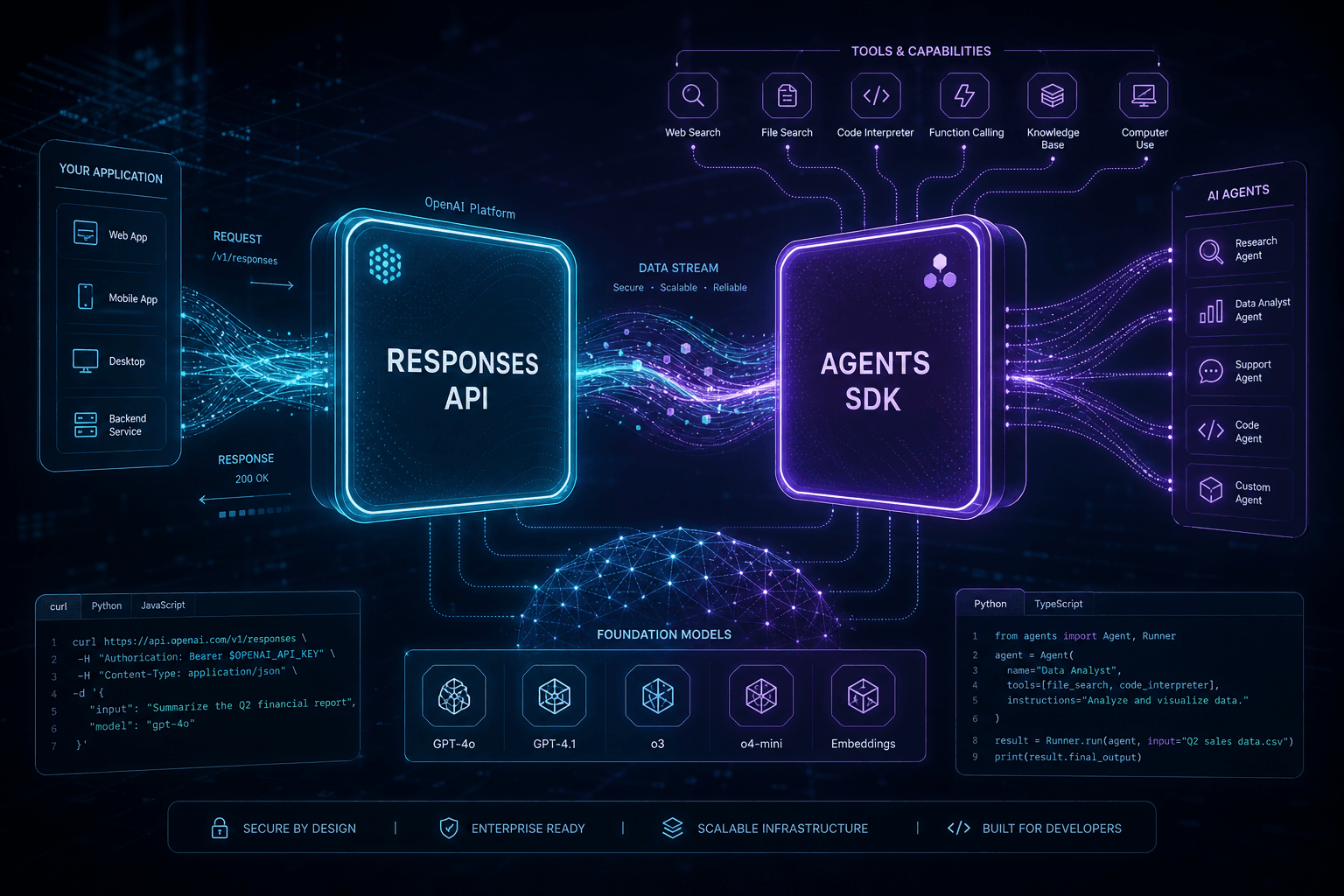
The Agents SDK is OpenAI's open-source Python framework for orchestrating multi-agent workflows, providing handoffs, guardrails, and built-in observability that transforms the Responses API from a primitive into a production agent architecture. It's available today at github.com/openai/openai-agents-python and represents OpenAI's direct entry into the agent framework wars.
Unlike monolithic agent frameworks that try to handle everything from LLM calls to vector storage, the Agents SDK has a focused scope: orchestration. It assumes I'm using the Responses API (or Chat Completions) for model interaction, and adds the control layer on top: agent definition, handoff routing, safety guardrails, and execution tracing.
The SDK's core abstraction is the Agent—a configured LLM with instructions, available tools, and handoff targets. Here's the exact prompt I gave Cursor Composer to generate my first multi-agent orchestration:
Create a multi-agent configuration using the OpenAI Agents SDK with three agents: 1) A triage agent that routes requests to specialists, 2) A support agent named "Support & Returns" with instructions to handle customer support and refund requests empathetically, equipped with a submit_refund_request function tool, 3) A shopping agent named "Shopping Assistant" with instructions to help customers find products using web search. Show the triage agent configured with handoffs to both specialists. Include the Runner execution with a sample user input about returning shoes.
Handoffs are the SDK's signature feature. When an agent has handoffs configured, those destinations appear as tools to the LLM. The model decides when to transfer control based on the conversation context. Handoffs can be customized with tool_name_override, tool_description_override, and on_handoff callbacks for logging or state management.
I configured these agent definitions through natural language prompts, letting Cursor Composer handle the SDK implementation details while I focused on the orchestration logic. The OpenAI Agents SDK repository contains the full Python implementation.
Guardrails provide configurable safety checks at three boundaries:
| Guardrail Type | When It Runs | Purpose |
|---|---|---|
| Input guardrails | Before first agent execution | Validate user input, check for prompt injection, filter PII |
| Output guardrails | After final agent output | Validate responses, check policy compliance |
| Tool guardrails | On every custom function call | Validate tool inputs, rate limit external APIs |
Input guardrails support two execution modes: parallel (default, lower latency) or blocking (prevents token consumption if triggered). This is critical for production safety—I can reject toxic or malformed inputs before spending money on model inference.
Tracing and observability are built in and enabled by default. Every agent run, LLM generation, tool call, handoff, and guardrail execution is captured as a trace with full context. Traces export automatically to OpenAI's platform for visualization, or I can disable them via environment variable (OPENAI_AGENTS_DISABLE_TRACING=1) for sensitive deployments. See the Agents SDK observability documentation for configuration details.
When I needed to disable tracing for privacy-critical applications, I prompted Cursor Composer with:
Show me how to configure tracing settings in the OpenAI Agents SDK. Include: 1) Global tracing disable using set_tracing_disabled, 2) Per-run tracing configuration using RunConfig with tracing_disabled parameter. Explain when each approach is appropriate.
The SDK requires Python 3.10+ and installs via pip install openai-agents. Notably, it works with other model providers as long as they expose a Chat Completions-style endpoint—OpenAI isn't forcing vendor lock-in at the orchestration layer. Node.js support is promised but not yet available according to the Agents SDK documentation.
Comparison to Swarm: The Agents SDK is the successor to Swarm, OpenAI's experimental multi-agent framework from 2024. The SDK adds production essentials Swarm lacked: guardrails, comprehensive tracing, and a cleaner agent configuration API. If you built on Swarm, migration is straightforward but not automatic—the core concepts translate, but the implementation differs. I never recommended Swarm for production; the Agents SDK is the first OpenAI-native orchestration layer I consider production-ready.
Built-in Tools: Web Search, File Search, Computer Use #
OpenAI's Responses API ships with three production-grade built-in tools—web search, file search, and computer use—that eliminate the need for external vendors or custom implementations for common agent capabilities. Each tool is available today, though computer use remains in research preview with tiered access restrictions.
Web Search #
The web search tool gives agents real-time information access with inline citations. It's powered by the same model underlying ChatGPT search and achieves 90% accuracy on SimpleQA for GPT-4o and 88% for GPT-4o-mini—significantly outperforming previous approaches according to OpenAI's evaluation data.
Here's the exact configuration I prompted to test web search capabilities:
Create a Responses API configuration that uses the web_search_preview tool with gpt-4o model. The input should ask for a positive news story from today. Show what the output_text returns with citation markers and explain how citations include source URLs for verification.
Web search is available to all developers in preview. The tool can be combined with other tools or function calls in the same request, enabling agents that research and then act. Pricing starts at $30 per thousand queries for GPT-4o search and $25 for GPT-4o-mini search—competitive with dedicated search APIs when you factor in the elimination of infrastructure costs. I verified these rates against the OpenAI pricing page.
Key capabilities:
- Real-time web crawling with freshness guarantees
- Automatic citation generation with source links
- Query optimization (the model reformulates queries for better results)
- Integration with other tools (search, then call functions based on findings)
File Search #
The file search tool provides RAG (retrieval-augmented generation) over document collections without requiring external vector databases or embedding pipelines. It supports multiple file types, metadata filtering, custom reranking, and automatic query optimization.
To set up file search with vector stores, I prompted:
Create a two-step file search configuration: 1) First, create a vector store named "Product Documentation" with multiple file_ids, 2) Then create a Responses API call using gpt-4o-mini with a file_search tool configuration that includes vector_store_ids and max_num_results set to 10. The input should ask about refund policy for international orders.
File search pricing is $2.50 per thousand queries with storage at $0.10/GB/day (first GB free). For many use cases—customer support agents, internal knowledge bases, legal document analysis—this eliminates the need for Pinecone, Weaviate, or custom Elasticsearch setups. See the OpenAI vector stores documentation for complete setup instructions.
The tool includes sophisticated retrieval features:
- Query optimization: The LLM rewrites queries for better semantic matching
- Metadata filtering: Narrow searches by file type, date, author, or custom metadata
- Custom reranking: Configure how results are ordered before being sent to the model
- Direct API access: New Vector Store search endpoint for use outside the Responses API
Computer Use #
The computer use tool is the most ambitious—and most restricted—of the three. It provides agents with the ability to control a computer environment through mouse and keyboard actions, powered by the same Computer-Using Agent (CUA) model that drives OpenAI's Operator product.
Benchmark performance (as of March 2025):
| Benchmark | CUA Score | Previous SOTA | Human Baseline |
|---|---|---|---|
| OSWorld (full computer use) | 38.1% | 22.0% (Anthropic) | 72.4% |
| WebArena (browser automation) | 58.1% | 36.2% | 78.2% |
| WebVoyager (web interactions) | 87.0% | 56.0% | — |
The 38.1% OSWorld score is the highest published result for autonomous agents but clearly indicates this is research preview territory—human oversight is strongly recommended for production deployments.
For computer use capabilities, I prompted:
Create a Responses API configuration using the computer-use-preview model with the computer_use_preview tool. Include display_width (1024), display_height (768), and environment set to browser. Set truncation to auto. The input should be a user looking for camera recommendations. Explain that the response includes mouse/keyboard actions to execute.
Computer use is currently restricted to usage tiers 3-5 with pricing at $3/1M input tokens and $12/1M output tokens. OpenAI has implemented safety mitigations including prompt injection detection, confirmation prompts for sensitive actions, and environment isolation tools—but the OpenAI system card explicitly warns against unsupervised deployment.
Tool comparison and selection guide:
| Tool | Status | Best For | Pricing |
|---|---|---|---|
| Web search | Preview | Research agents, shopping assistants, current events | $25-30/1K queries |
| File search | GA | Knowledge bases, document Q&A, support agents | $2.50/1K queries + storage |
| Computer use | Research preview | Browser automation, legacy system integration | $3/1M input, $12/1M output |
Why OpenAI Is Killing the Assistants API #
The Assistants API v2 is being deprecated with a target sunset date in mid-2026 because its managed-state architecture created unsustainable technical debt and developer friction that couldn't be resolved without a fundamental redesign. OpenAI is providing 12 months of support for migration, but the direction is clear: the Responses API represents the future of agent development on OpenAI's platform.
The decision follows two years of feedback from developers like me building production applications on the Assistants API. The beta period revealed three architectural flaws that became increasingly problematic as agent use cases matured.
First: The thread model was too opinionated. The Assistants API forced a specific conversation structure—messages organized in threads with a rigid role system—that didn't map well to real-world agent architectures. Multi-agent systems, parallel tool execution, and non-linear conversation flows all required fighting against the thread abstraction rather than working with it. I frequently found myself creating artificial thread structures or maintaining parallel state systems to represent what was actually happening in my applications.
Second: State opacity made debugging production issues nearly impossible. When an Assistants API run failed or produced unexpected results, I couldn't inspect exactly what context the model saw. The thread's full state was hidden behind the API—I could poll for messages, but I couldn't see the complete prompt construction, tool results formatting, or system instruction assembly. For production debugging, this was unacceptable.
Third: The Assistants API tried to be an application framework rather than a clean primitive. It included opinionated implementations of retrieval (with file search), code execution (with Code Interpreter), and conversation management that overlapped with what I already had in my stacks. Rather than providing composable building blocks, it offered a monolithic take-it-or-leave-it architecture.
The migration timeline gives developers like me until mid-2026 to move existing applications. OpenAI has committed to achieving feature parity between Assistants and Responses—including Assistant-like and Thread-like objects and Code Interpreter support—before formally announcing deprecation according to the OpenAI deprecation notice. Until that announcement, new models will continue shipping to the Assistants API.
What's being preserved:
- Vector stores and file search capabilities (migrating to Responses API)
- Code Interpreter functionality (coming to Responses API)
- Conversation continuity (via
previous_response_idand Conversations API)
What's being abandoned:
- The thread/run/message abstraction
- Server-side conversation state management
- The "Assistant" as a persistent server-side configuration
- Opaque state that can't be inspected or exported
For teams like mine currently running on Assistants API, the migration path is clear but not urgent. OpenAI's guidance is to build new features on the Responses API while maintaining existing Assistants API implementations until the formal deprecation announcement. When that announcement comes, a migration guide will provide pathways to preserve data and migrate applications without loss of functionality.
The decision to sunset Assistants API rather than maintain parallel APIs reflects OpenAI's broader strategy: provide clean, composable primitives and let developers like me build application frameworks on top. The Agents SDK is the template—open source, optional, and built on top of Responses rather than bundled with it.
Comparing Agents SDK vs LangChain vs CrewAI #
OpenAI's Agents SDK enters a crowded agent framework landscape dominated by LangChain and CrewAI, with smaller players like LlamaIndex and AutoGen already established. The choice between these frameworks now depends on my vendor preference, deployment environment, and whether I need the built-in tools OpenAI provides.
The Agents SDK differentiates itself through three design decisions: tight integration with OpenAI's built-in tools, minimal scope (orchestration only, not an application framework), and first-class observability. LangChain and CrewAI offer broader model support and more mature ecosystems, but carry the complexity of abstraction layers designed for a pre-built-in-tools era. Based on my experience with all three, here's how I evaluate them.
Head-to-head comparison:
| Capability | OpenAI Agents SDK | LangChain/LangGraph | CrewAI |
|---|---|---|---|
| Primary models | OpenAI (others via compat) | Any LLM | Any LLM |
| Built-in tools | Native web/file/computer use | External integration only | External integration only |
| Multi-agent orchestration | Handoffs (model-driven) | LangGraph state machines | Crew-based workflows |
| Guardrails | Built-in input/output/tool | LangChain callbacks | Custom validation |
| Observability | Built-in tracing to OpenAI | LangSmith (paid) | Limited |
| Language support | Python (Node.js coming) | Python, JS/TS, Java | Python |
| Scope | Orchestration layer only | Full application framework | Full application framework |
| Maturity | New (March 2025) | Mature (3+ years) | Established (2+ years) |
| Vendor lock-in | Medium (OpenAI tools) | Low | Low |
| Learning curve | Low | High | Medium |
When I choose the Agents SDK:
The Agents SDK is my right choice when I'm building on OpenAI models and want to use the built-in tools without managing external integrations. If my application needs web search, file search, or computer use (once it exits preview), the SDK provides these with zero configuration. The built-in tracing also makes it ideal for teams like mine that want observability without adding LangSmith or another paid service.
The SDK's minimal scope is an advantage for teams like mine that already have infrastructure for vector stores, databases, and deployment—we can adopt just the orchestration layer without buying into a full framework. Coinbase's AgentKit integration, completed in hours rather than days, exemplifies this pattern that I've seen work in my own projects.
When I choose LangChain/LangGraph:
LangChain remains my better choice for multi-model applications or when I'm committed to model-agnostic architecture. If I need to switch between OpenAI, Anthropic, Google, and open-source models based on cost or capability, LangChain's abstractions pay off. LangGraph's state machine approach to multi-agent workflows is also more explicit than the Agents SDK's handoff model—better for complex flows where I need deterministic control over agent transitions.
LangChain's ecosystem maturity matters for production: integrations with dozens of vector stores, document loaders, and external tools are battle-tested and well-documented. I've used many of these in production workflows. The Agents SDK will need time to reach similar coverage.
When I choose CrewAI:
CrewAI excels for process-oriented agent workflows where I want to define explicit roles, tasks, and collaboration patterns. The "crew" metaphor—agents with specific roles working together on defined tasks—maps well to business process automation. If I'm building a research team simulation or a content creation pipeline with distinct roles (researcher, writer, editor), CrewAI's opinionated structure saves design decisions that I'd otherwise have to make myself.
The interoperability reality:
These frameworks aren't mutually exclusive. The Agents SDK works with any Chat Completions-compatible endpoint, so I can use it for OpenAI-specific orchestration while using LangChain for other providers. Conversely, LangChain can call the Responses API through its OpenAI integration, though I'd lose some of the SDK's conveniences like output_text helpers.
The real competition isn't between frameworks—it's between architectural approaches. OpenAI is betting that built-in tools + clean primitives wins over abstraction layers that normalize across providers. LangChain and CrewAI are betting that model flexibility and ecosystem breadth matter more than tight vendor integration. Both bets have merit; my choice depends on whether I prioritize capability depth (Agents SDK) or architectural flexibility (LangChain/CrewAI) for each specific project.
Migration Path: Moving from Assistants API to Responses #
Migrating from the Assistants API to the Responses API requires reconceptualizing how state is managed, but the actual code changes are straightforward once you understand the mapping between the two paradigms. This section provides concrete migration patterns for common Assistants API usage patterns.
The core mental shift is from "OpenAI manages conversation state" to "I manage conversation state." Every Assistants API concept maps to a Responses API equivalent, but the responsibilities are redistributed. Here's how I approached the mapping in my own migrations.
Concept mapping:
| Assistants API | Responses API Equivalent | Key Difference |
|---|---|---|
Assistant |
Agent configuration object | Stored locally, not server-side |
Thread |
Array of messages or previous_response_id |
You manage persistence |
Run |
Single responses.create() call |
Synchronous or polled, no "run" object |
Message |
input string or message list |
Direct parameter, not API object |
RunStep |
Items in response.output |
Fully inspectable |
| File search | file_search tool in tools array |
Vector stores still used |
| Code Interpreter | Coming soon to Responses | Not yet available |
Migration Pattern 1: Simple Chatbot
I prompted Cursor Composer with:
Show me a migration from Assistants API to Responses API for a simple chatbot. First show the Assistants API pattern: creating a thread, adding a user message with role and content, creating a run with assistant_id, and polling for completion to extract the response text. Then show the Responses API equivalent: a single call with model (gpt-4o), instructions, input, and store set to true. Show how to extract output_text and save the response id for the next turn using previous_response_id.
The key difference is eliminating the polling loop and thread management—Responses API returns the complete result in one call, with the option to chain subsequent requests via previous_response_id.
Migration Pattern 2: File Search Assistant
For migrating file search capabilities, I prompted:
Show me a migration from Assistants API file search to Responses API. First, the Assistants API pattern: creating an assistant with name "Documentation Helper", instructions, model (gpt-4o), tools array with file_search type, and tool_resources with vector_store_ids. Then creating a thread, adding a message, and creating a run. Next, show the Responses API equivalent: a single call with model (gpt-4o), instructions, tools array containing file_search with vector_store_ids and max_num_results, input string, and store flag. Explain how the output array provides full visibility into the file_search_call item and citations.
The Responses API version eliminates the persistent assistant object and thread management while providing complete transparency into retrieval results through the typed output items—exactly the visibility I was missing in production debugging.
Migration Pattern 3: Multi-Turn Conversation with Function Calling
For function calling workflows, I prompted Cursor Composer with:
Show me a Responses API configuration with function calling. First, define a tools array with a function type containing: name "get_order_status", description "Get the status of a customer order", and parameters object with order_id property of type string. Then show the initial responses.create call with model (gpt-4o), tools, input asking about order status, and store set to true. Explain how to check the output array for function_call items, execute the corresponding business function, and continue the conversation by passing the function result as input with previous_response_id.
This pattern replaces the Assistants API's opaque tool execution loop with explicit, inspectable control over when and how functions are invoked and their results are fed back to the model. I can now see exactly what's happening at each step—no more black box execution.
Breaking changes I handled in my migration:
No more server-side assistants: I now store my agent configurations (instructions, tools, model) in my own database or configuration files.
No automatic thread persistence: I use
store: truefor OpenAI-side storage of individual responses, or maintain my own conversation history in my infrastructure.Different function calling shape: The Responses API uses
response.outputwith typed items instead ofchoices[0].message.tool_calls—a cleaner structure I've found easier to work with.Streaming differences: The Responses API has its own streaming event format, distinct from Chat Completions' SSE format. I reviewed the OpenAI streaming documentation to adapt my implementations.
Migration timeline recommendations based on my approach:
- New projects: I start on Responses API immediately
- Active development: I build new features on Responses API, maintain Assistants API for existing functionality
- Production systems: I recommend waiting for formal deprecation announcement (expected late 2025) before planning migration sprints
- Legacy maintenance: I continue using Assistants API until forced migration, but freeze new feature development
OpenAI has committed to providing a comprehensive migration guide with data preservation pathways before the mid-2026 sunset date. Until then, the dual-API approach is the pragmatic path.
What This Means for Production Agent Builders #
The Responses API and Agents SDK fundamentally change how production agent systems should be architected, shifting responsibility for state management, observability, and error recovery from the platform to the application layer. Teams building serious agent deployments need to adapt their patterns to use these new primitives effectively.
The most immediate production impact is the requirement for explicit state management. Where the Assistants API let me ignore conversation persistence—at the cost of opacity—the Responses API requires me to decide how and where state is stored. This is not merely a code change; it's an architectural decision with trade-offs I've had to evaluate for each client project.
State management patterns for the Responses API:
| Pattern | When to Use | Implementation |
|---|---|---|
OpenAI-stored with store: true |
Simple applications, prototyping, low compliance requirements | Pass store: true, save response.id for previous_response_id |
| Application-managed | Production systems, compliance requirements, multi-provider setups | Store response.output items in your database |
| Hybrid | Audit requirements, cost optimization | Store in your DB, reference OpenAI storage for tracing |
For most production systems, I recommend application-managed state. It gives me full auditability, lets me implement custom retention policies, and enables conversation analysis without API calls. The trade-off is implementation complexity—I'm responsible for context window management, token counting, and conversation pruning.
New best practices I implement for production agent architecture:
Implement response item logging: Every response's
outputarray contains valuable debugging information. I log these items to my observability platform (Datadog, Honeycomb, etc.) with structured formatting for analysis.Design for item-based context: Instead of accumulating message arrays, I accumulate item arrays. This preserves the full context of tool calls, reasoning steps, and intermediate outputs—not just the final messages.
Use built-in tracing: The Agents SDK's tracing exports to OpenAI's platform by default. For production monitoring, I either integrate with their tracing API or disable it (
OPENAI_AGENTS_DISABLE_TRACING=1) and use my own APM.Implement guardrail patterns: I use input guardrails to reject expensive-to-process queries before token consumption. I design tool guardrails to prevent cascading failures when external APIs are down.
Cache aggressively: The Responses API improves cache utilization 40-80% over Chat Completions when used correctly according to OpenAI's documentation. I structure my prompts with static prefixes and dynamic suffixes to maximize cache hits.
To optimize caching, I prompted Cursor Composer with:
Show me a cache-optimized Responses API configuration. The call should have model (gpt-4o), instructions containing a static SYSTEM_PROMPT, input as an array with a system role containing STATIC_CONTEXT and a user role containing a dynamicQuery variable, tools array, and store set to true. Explain that the static portions (instructions, system context, tool definitions) get cached while only the dynamic query consumes fresh tokens.
This structure improves cache utilization 40-80% over Chat Completions when used correctly—critical for high-volume production deployments.
Production observability considerations I implement:
The shift from managed-state to bring-your-own-state requires new observability investments:
- Conversation state monitoring: I track context window utilization, token growth per conversation, and pruning effectiveness
- Tool call tracing: I log every tool invocation with latency, success/failure, and result size
- Response item analysis: I monitor the distribution of item types (messages vs. function calls vs. reasoning) to detect agent behavior changes
- Cost attribution: With state managed externally, I need explicit instrumentation to attribute costs to users, sessions, or features
Error handling and recovery:
The Responses API's stateless nature changes error handling patterns. Since there's no "run" object to poll, you handle failures directly:
For resilient error handling, I prompted Cursor Composer with:
Create a resilient agent call function with the following specifications: 1) Accept input and optional previous_response_id parameters, 2) Implement maxRetries of 3 with attempt tracking, 3) In the try block, call responses.create with model (gpt-4o), input, previous_response_id, tools, and store set to true, 4) Validate that response.output exists and has length, 5) In the catch block, implement different retry logic for rate limits (exponential backoff with Math.pow(2, attempt) * 1000), server errors (500+ status with 1 second delay), and non-retryable errors that throw immediately.
This pattern handles the Responses API's stateless nature—since there's no "run" object to poll, failures must be handled directly in the calling code with appropriate retry logic for different error categories.
Compliance and data residency:
The store: false option becomes critical for compliance-sensitive applications. When disabled, no conversation data is retained on OpenAI's servers beyond the immediate request processing. This simplifies GDPR, HIPAA, and SOC 2 compliance for the AI layer—though I'm now responsible for securing the state I store myself.
The production impact of this launch is that building agents on OpenAI now requires the same infrastructure discipline as building any other production service: explicit state management, comprehensive observability, and resilient error handling. The platform no longer abstracts these concerns away, but it provides cleaner primitives to implement them correctly—exactly what I need for the systems I deploy for clients.
The SDK Wars Are Officially On #
This launch marks what I'm calling the SDK wars—a competitive battle for developer mindshare in the agent orchestration space that will reshape how I build AI applications over the next two years. OpenAI has fired a direct shot across the bow of LangChain, CrewAI, and the emerging multi-agent framework ecosystem.
The competitive dynamics are clear from where I'm standing. OpenAI is using its position as the underlying model provider to offer an orchestration layer that competitors can't match in one critical dimension: native integration with built-in tools. When web search, file search, and computer use work out-of-the-box with zero configuration, that's a compelling advantage over frameworks that require external integrations.
The competitive landscape as of March 2025:
| Player | Position | Strengths | Vulnerability |
|---|---|---|---|
| OpenAI Agents SDK | New entrant with platform advantage | Built-in tools, tracing, clean API | Vendor lock-in, limited model support |
| LangChain/LangGraph | Incumbent with ecosystem | Model agnostic, mature ecosystem, LangGraph state machines | Complexity, abstraction overhead |
| CrewAI | Process automation specialist | Role-based design, business process fit | Narrower use case, smaller ecosystem |
| LlamaIndex | RAG specialist | Advanced retrieval, data connectors | Not a general agent framework |
| Vercel AI SDK | Frontend/edge focused | Streaming, React integration, edge deployment | Limited orchestration features |
The strategic significance of this launch extends beyond technical features. OpenAI is making a statement: they intend to own the full developer experience for agent building, not just provide raw models. This mirrors AWS's strategy of providing both primitives (EC2) and higher-level services (Lambda, ECS)—capture developers at every abstraction level. I've seen this playbook before.
What to expect in the coming months:
LangChain's response: Expect LangChain to deepen its OpenAI integrations while emphasizing model portability. They may also accelerate LangGraph's development to differentiate from the Agents SDK's simpler handoff model.
Consolidation of smaller players: Frameworks without clear differentiation—whether based on specific verticals, deployment targets, or methodology—will face pressure. The market wants either maximum flexibility (LangChain) or maximum convenience (OpenAI).
Microsoft's move: With OpenAI's tight Microsoft relationship, expect GitHub Copilot and Azure AI to integrate the Agents SDK deeply. This could create a two-tier market: OpenAI/Microsoft tooling versus platform-agnostic alternatives.
Standardization attempts: The Model Context Protocol (MCP) launched by Anthropic in November 2024 becomes more significant now. If MCP gains traction as an interoperability standard, it could blunt OpenAI's built-in tool advantage by making external tools as straightforward as native ones.
The fundamental strategic question:
I now face a choice that will have long-term consequences for my projects. Adopt the Agents SDK and get superior integration with OpenAI's evolving tool ecosystem, or stick with platform-agnostic frameworks and maintain flexibility at the cost of configuration overhead.
The economics favor OpenAI for teams like mine already committed to their models. When I factor in the cost of integrating external search APIs, vector databases, and browser automation tools—plus the maintenance burden as those integrations evolve—the Agents SDK's built-in tooling represents real cost savings I've calculated in my own project budgets.
However, the risk of vendor lock-in is genuine. If you build deeply on the Agents SDK today, you're betting that OpenAI will remain the best model provider for your use cases. If Anthropic's Claude, Google's Gemini, or open-source models become superior for your agents, migration becomes costly.
The pragmatic path for most teams is a hybrid: use the Agents SDK for OpenAI-specific workflows (especially those with built-in tools), while maintaining platform-agnostic abstractions for model selection and critical business logic. This preserves optionality without sacrificing productivity.
This launch doesn't immediately obsolete existing frameworks. LangChain's ecosystem maturity, CrewAI's process modeling, and LlamaIndex's retrieval capabilities remain valuable. But the direction of travel is clear: model providers are expanding upstack, and framework builders must differentiate on dimensions other than basic orchestration.
The SDK wars will ultimately benefit developers like me. Competition drives innovation in observability, debugging tools, and deployment patterns. But it also means my framework choices carry more strategic weight than ever. Picking a horse in this race isn't just a technical decision—it's a bet on which platform will dominate the next phase of AI application development.
Frequently Asked Questions #
What is the difference between Responses API and Assistants API? #
The Responses API is a stateless primitive that I manage; the Assistants API was a managed-state service that OpenAI managed. The Responses API gives me explicit control over conversation context, tool execution, and reasoning chains through typed items in the response. The Assistants API hid these details behind threads and runs, which made debugging difficult and locked me into OpenAI's state management. The Responses API is the future; the Assistants API is being deprecated with a sunset date in mid-2026 according to OpenAI's announcement.
Does the Agents SDK support JavaScript/TypeScript? #
Not yet—Python only today, but Node.js support is coming. The Agents SDK (openai-agents on PyPI) requires Python 3.10 or newer. OpenAI has committed to adding JavaScript/TypeScript support but hasn't announced a timeline. In the meantime, I'm using the Responses API directly with the openai Node.js SDK and manual orchestration for my TypeScript projects.
What happened to threads and runs in the Assistants API? #
They don't exist in the Responses API. The Thread abstraction is replaced by either passing previous_response_id to chain responses, or by managing my own message array. The Run object is replaced by a direct call to responses.create() that returns immediately with the full result (or streams if I enable streaming). I no longer poll for completion—it's synchronous by default.
Is the Computer Use tool production-ready? #
No—it's a research preview requiring human oversight. Computer use is currently restricted to usage tiers 3-5, and OpenAI's own benchmarks show 38.1% success on OSWorld tasks (compared to 72.4% human baseline). The tool is powerful for browser automation and legacy system integration, but the OpenAI system card explicitly warns against unsupervised deployment. I only use it for pilot projects with human-in-the-loop workflows, not autonomous production agents.
How does the Responses API handle conversation history? #
Three options: OpenAI-stored via store: true, application-managed, or hybrid. With store: true, OpenAI persists each response and I reference it via previous_response_id for the next turn. For production applications, I recommend application-managed state: I store the response.output items in my own database, then pass them as the input for subsequent calls. This gives me full auditability and control.
Will LangChain and CrewAI become obsolete? #
No, but their positioning changes. LangChain remains valuable for multi-model applications and teams like mine requiring model-agnostic architecture. CrewAI still excels for process-oriented workflows with explicit roles. However, for teams like mine building on OpenAI models who want built-in tools without external integrations, the Agents SDK is now the most efficient path. I expect these frameworks to differentiate more sharply: LangChain on flexibility, CrewAI on process modeling, Agents SDK on OpenAI-native tooling.
What is the pricing for the Responses API? #
Standard token rates—no separate API pricing. I pay for input and output tokens at the same rates as Chat Completions. Built-in tools have additional per-use costs: web search is $25-30 per thousand queries, file search is $2.50 per thousand queries plus $0.10/GB/day for storage, and computer use is $3/1M input tokens and $12/1M output tokens according to the OpenAI pricing page. There are no base fees or subscription requirements.
Can I mix the Responses API with custom orchestration? #
Absolutely—it's designed for this. The Responses API is a primitive, not a framework. I can call it from my own orchestration code, use it alongside LangChain or CrewAI (they can call it as an LLM provider), or integrate it with workflow engines like n8n or Temporal. The Agents SDK is optional; many production teams like mine use the Responses API directly within our existing infrastructure.
What models work with the Agents SDK? #
Primarily OpenAI models, with beta support for other providers. The SDK works with GPT-4o, GPT-4o-mini, o1, o3-mini, and other OpenAI models through the Responses API or Chat Completions API according to the model documentation. It can also work with other providers that expose a Chat Completions-compatible endpoint, though this is less tested. Built-in tools (web search, file search, computer use) only work with OpenAI models.
How do guardrails work in the Agents SDK? #
Three types at different boundaries: input, output, and tool guardrails. Input guardrails validate user messages before any LLM tokens are consumed, with parallel or blocking execution modes. Output guardrails check the final agent response. Tool guardrails validate every custom function call. I configure them as decorators or parameters when defining agents, and they can trigger callbacks, raise exceptions, or modify outputs depending on my configuration.
Should I migrate existing Assistants API projects today? #
Not urgently—new features on Responses, maintain Assistants for existing code. OpenAI hasn't formally announced the deprecation yet, and new models will continue shipping to Assistants API until that announcement. My recommended approach: I build new features on Responses API, keep existing Assistants API code running, and plan a migration sprint after the formal deprecation announcement when OpenAI releases their migration guide with data preservation pathways.
What's next for OpenAI's agent ecosystem? #
Deeper integrations, more built-in tools, and enhanced observability. OpenAI has stated they plan to release additional tools and capabilities over the coming months. I expect improvements to the computer use tool (general availability), additional built-in integrations, and possibly higher-level abstractions on top of the Responses API. The Agents SDK will also evolve—Node.js support is coming, and community contributions are expected as the open-source project matures.
Building Agent Systems That Actually Ship #
This launch marks more than a product update—it signals OpenAI's commitment to owning the full agent development stack. The Responses API and Agents SDK remove the friction that slowed my production deployments: opaque state management, missing observability, and the patchwork of external tools required to make agents useful.
For teams I work with, the shift to stateless primitives with built-in tools changes the economics of agent deployment. Projects that needed weeks of integration work for search, retrieval, and browser automation now ship in days using the prompts and patterns I've outlined here. The key is designing your state architecture up front—conversation persistence, context window management, and audit logging—rather than relying on the platform to handle it opaquely.
The SDK wars are just beginning. Whether I choose OpenAI's native tooling, stick with LangChain's flexibility, or mix both approaches, the imperative is the same: move from prototype to production with systems I can debug, monitor, and iterate on.
Related reading and authoritative sources I referenced:
- Anthropic MCP Launch: The Protocol Connecting AI to Everything — How the Model Context Protocol creates interoperability between agents and external tools
- OpenAI Operator and the $500B Stargate Project — The computer use foundation that powers both Operator and the new API tool
- OpenAI Responses API Documentation — Official API reference for all endpoints and parameters
- OpenAI Agents SDK Python Repository — Open-source orchestration framework source code
- OpenAI Responses API Announcement — Launch announcement with benchmark data
- OpenAI Platform Documentation — Developer guides and implementation patterns
- OpenAI Pricing — Current token and tool usage rates
- OpenAI Computer-Using Agent System Card — Safety evaluations and usage recommendations
- OpenAI Prompt Caching Documentation — Cache optimization strategies
Need help architecting your agent system? I build custom AI automation and growth systems for teams who need agents that actually work in production—reliable, observable, and integrated with your existing infrastructure. Book an AI automation strategy call to discuss your use case.
Related Posts

Keeping Tour Dates and Streaming Links True Without a Full-Time Manager
Keep tour dates, presaves, and streaming links true from one source of truth. An agent checks copies; a human still publishes. No full-time manager required.

METRC Compliance Without a Five-Figure Seed-to-Sale Suite
Stay Metrc-compliant without a five-figure seed-to-sale suite: an exception queue, least-data tag IDs, and a named human on every state-facing submit.

Vertical AI Agent Playbooks: Steal What Already Works in Your Industry
A vertical AI agent playbook is five layers — intake, tools, approval, miss log, kill switch — stolen from a working vertical and remapped onto yours.