Prompt Engineering for Coding Agents: Cursor and Claude Code

Table of Contents
Table of Contents #
- How Agent Prompting Differs from Chat Prompting
- The Agent Loop: Planning, Reading, Editing, Running
- Context Scoping: Why Dumping the Whole Repo Hurts
- Project Memory: .cursorrules vs CLAUDE.md
- Task Decomposition for Agent Workflows
- Verification Steps: Building Self-Correcting Agents
- Cursor Composer and Agent Mode Patterns
- Claude Code Skills, Hooks, and Subagents
- MCP Tools as Agent Capabilities
- Cursor vs Claude Code: When to Use Which
- Common Failure Modes and Fixes
- Reusable Agent Task-Prompt Template
- Frequently Asked Questions
How Agent Prompting Differs from Chat Prompting #
Chat prompting is a single-turn transaction: you ask, the model answers. Agent prompting is directing a loop: you define the objective, the agent plans the steps, gathers context, executes edits, runs verification, and iterates until the task is complete. This architectural difference changes everything about how you write prompts.
When I prompt GPT-5 in a chat interface, I get a response. The interaction is stateless unless I manually feed conversation history back in. When I prompt Cursor in agent mode or Claude Code, I am triggering an autonomous loop that can span multiple files, shell commands, and verification cycles. The prompt isn't the whole instruction — it is the trigger that sets the loop in motion.
This distinction shows up in three concrete ways:
| Aspect | Chat Prompting | Agent Prompting |
|---|---|---|
| Scope | Single response | Multi-step workflow |
| Context handling | You paste what matters | Agent decides what to read |
| Verification | You check the output | Agent runs tests/builds |
| Iteration | You re-prompt manually | Agent self-corrects |
| Outcome | Text/code blob | Working, verified system |
The chat prompt is a request for information. The agent prompt is a specification for autonomous execution. This means your prompts must include not just what to build, but how to verify success, what to do when verification fails, and when to stop iterating.
A chat prompt for a React component might look like: "Write a button component with a loading state." The agent prompt for the same task in Cursor would be: "Create a Button component in src/components/Button.tsx with loading, disabled, and variant props. Follow the existing component patterns in src/components/Input.tsx. Run npm run typecheck after editing to verify no type errors. If tests fail, fix them before completing."
The agent prompt contains:
- Exact file location — the agent needs to know where to write
- Reference patterns — where to look for existing conventions
- Verification command — how to check the work
- Failure handling — what to do when checks fail
Chat prompting is a conversation. Agent prompting is programming the behavior of an autonomous system.
The Agent Loop: Planning, Reading, Editing, Running #
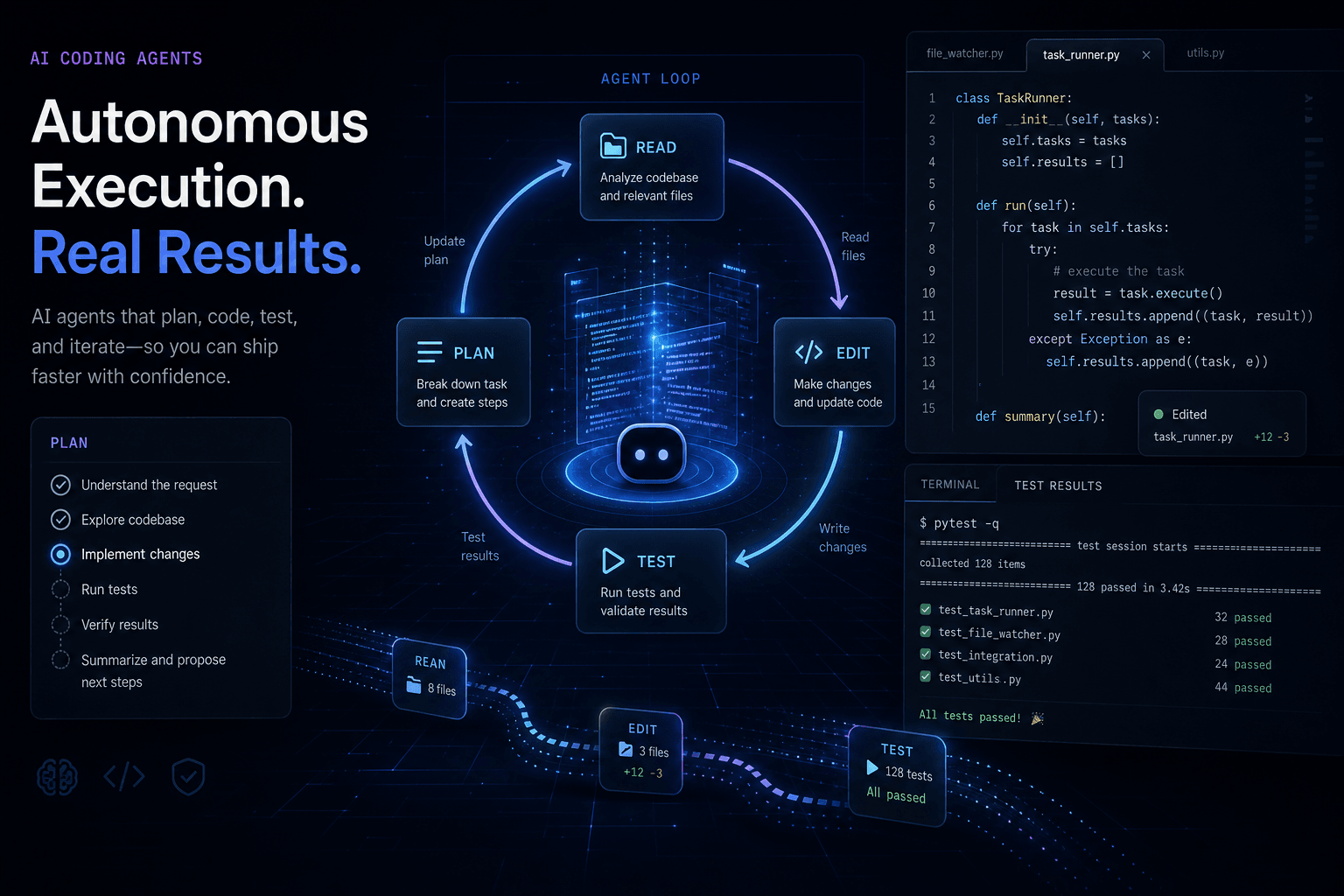
Every coding agent operates on a variation of the same loop: plan → read → edit → run → verify → iterate. Understanding this loop is the foundation of effective agent prompting because you are not just asking for output — you are directing the execution of this cycle.
The loop looks like this in practice:
User Prompt (Objective + Constraints)
    │
    ▼
Planning Phase — Agent breaks objective into steps
    │
    ▼
Reading Phase — Agent gathers relevant context from files
    │
    ▼
Editing Phase — Agent makes code changes
    │
    ▼
Running Phase — Agent executes tests, builds, or scripts
    │
    ├─► Failure → Return to Editing Phase
    │
    └─► Success → Completion
Cursor's agent mode and Claude Code both implement this loop, though their interfaces differ. Cursor shows the plan in a composer panel, lets you approve or modify it, then executes with visible progress. Claude Code operates more like a terminal-native agent — you type a command-like request, it streams its thinking, and you watch it work.
The critical insight for prompting: the plan phase is where you have the most leverage. A vague objective produces a vague plan, which produces scattered reading, unfocused edits, and failed verification. A specific objective with explicit constraints produces a precise plan, targeted context gathering, surgical edits, and passing verification.
When I prompt Cursor to "refactor the auth system," I get a generic plan that touches too many files. When I prompt it to "extract the password validation logic from src/auth/login.ts into a reusable validatePassword function in src/auth/validation.ts, update login.ts to import and use it, and run the auth tests to confirm nothing broke," I get surgical execution.
The planning phase is also where task decomposition happens. Agents can plan single-step tasks or multi-step workflows. The difference in output quality is dramatic. Single-step planning works for isolated changes. Multi-step planning with explicit intermediate verification produces reliable results on complex refactoring.
Context Scoping: Why Dumping the Whole Repo Hurts #
Giving an agent access to your entire codebase is like giving a contractor the keys to a warehouse when they need to fix a single outlet — the scope dilutes focus and multiplies error surface area. Modern agents have large context windows. Cursor's Composer can ingest hundreds of files. Claude Code with Claude Opus 4.1 has a 1M-token context window. But raw capacity doesn't equal effective context.
The "lost in the middle" effect that plagues language models in long contexts also affects agent behavior. When an agent sees every file in your repository, it must decide which ones matter for the current task. That decision-making introduces variance. Sometimes it reads the right files. Sometimes it reads irrelevant ones and gets confused. Sometimes it misses critical dependencies because they were buried in a sea of context.
Effective agent prompting scopes context deliberately:
| Strategy | When to Use | How to Implement |
|---|---|---|
| File reference | Known target file | "Edit src/components/Button.tsx" |
| Pattern reference | Follow existing conventions | "Match the pattern in src/components/Input.tsx" |
| Directory scope | Multiple related files | "Work in src/auth/ only" |
| Dependency tracing | Changes span imports | "Start with src/api/client.ts, follow imports to related files" |
| Test boundary | Verification-driven | "Modify src/utils/formatter.ts and its test in src/utils/formatter.test.ts" |
The most reliable agent prompts I write include explicit file paths and references. Instead of "fix the API client," I write "fix the retry logic in src/api/client.ts. The error handling should match the pattern in src/api/utils/error-handler.ts. Run tests in src/api/client.test.ts to verify."
Cursor's tab model helps here — you can pin relevant files to context. Claude Code's @-mentions serve the same purpose: "@src/components/Button.tsx refactor this to use the new design system tokens."
Over-scoping also increases token cost and latency. Every file in context burns tokens on every agent loop iteration. A tightly scoped 10-file context produces faster, cheaper, more focused results than a 200-file dump.
Project Memory: .cursorrules vs CLAUDE.md #
Both Cursor and Claude Code support project-level memory files that persist instructions, conventions, and context across sessions — .cursorrules for Cursor, CLAUDE.md for Claude Code. These files are where you encode the persistent knowledge an agent needs to work effectively in your codebase.
The concept is similar: a markdown file in your project root that the agent reads automatically at the start of every session. But the implementation and optimal content differ.
.cursorrules (Cursor) #
Cursor reads .cursorrules from the project root on every Composer session. The file should contain:
- Project structure — how the codebase is organized
- Naming conventions — file naming, function naming, component naming
- Technology stack — frameworks, libraries, preferred patterns
- Code style rules — formatting preferences, architectural constraints
- Common patterns — how to handle specific recurring tasks
Example .cursorrules content:
# Project Conventions

## Structure
- Components live in src/components/
- Each component has its own directory with .tsx, .test.tsx, and .module.css
- Utils live in src/utils/ — pure functions only, no side effects
- API calls live in src/api/ — use the client.ts base for all HTTP

## Naming
- Components: PascalCase (Button.tsx)
- Utilities: camelCase (formatDate.ts)
- CSS modules: componentName.module.css
- Test files: componentName.test.tsx

## Patterns
- Use TypeScript strict mode — no `any` types
- Prefer function components with hooks over class components
- Use the design system tokens from src/theme/tokens.ts
- Error handling: always throw custom AppError, never raw Error
CLAUDE.md (Claude Code) #
Claude Code reads CLAUDE.md from the project root. The format is similar but Claude Code's terminal-native nature means the file often includes more shell-oriented instructions:
# Project Guide

## Build & Test Commands
- Build: `npm run build`
- Test: `npm run test`
- Type check: `npm run typecheck`
- Lint: `npm run lint`

## Project Structure
- Python backend in /backend — use FastAPI patterns
- React frontend in /frontend — Vite-based, shadcn/ui components
- Database migrations in /backend/migrations — use Alembic

## Code Conventions
- Python: PEP 8, type hints required, Pydantic for data models
- React: functional components, React Query for data fetching
- Database: SQLAlchemy models, explicit relationships

## Common Tasks
- Add new API endpoint: create route in /backend/app/routes/, add test in /backend/tests/
- Add component: use `npm run shadcn:add [component]` then customize in /frontend/src/components/
- Database change: create migration with `alembic revision --autogenerate -m "description"`

## Verification Steps
- Always run typecheck after TypeScript changes
- Always run affected tests after backend changes
- Check migration generates cleanly after model changes
The key difference: .cursorrules focuses on code patterns and file organization. CLAUDE.md often includes more workflow commands and verification steps because Claude Code has deeper shell integration.
Both files reduce repetitive prompting. Instead of saying "use TypeScript strict mode" in every prompt, you write it once in the project memory file. The agent reads it automatically and applies the constraints to every task.
Task Decomposition for Agent Workflows #
Complex tasks fail when thrown at an agent as monolithic objectives. They succeed when decomposed into discrete steps with intermediate verification. Task decomposition is the skill of breaking a large objective into a sequence of smaller objectives, each of which the agent can execute and verify independently.
The pattern mirrors prompt chaining for chat-based workflows, but adapted for autonomous agent execution. In a chat chain, you paste intermediate outputs between steps manually. In an agent workflow, the agent handles the handoff internally.
A complex task like "migrate the authentication system from JWT to session-based" decomposes into:
- Research step — Read current auth implementation, identify all JWT usage
- Design step — Plan session schema, storage mechanism, and migration path
- Schema step — Create session database table/model
- Implementation step — Build session store module
- Integration step — Replace JWT middleware with session middleware
- Verification step — Run auth tests, fix failures
- Cleanup step — Remove JWT dependencies, update docs
Each step has a clear deliverable and verification criteria. The agent can execute each step, verify it works, and proceed to the next. If step 5 fails tests, the agent debugs within that scope rather than questioning the whole migration.
Prompting for decomposed tasks means specifying the sequence:
"I need to refactor the auth system in three phases. Phase 1: Read the current JWT implementation in src/auth/ and list every file that imports jwt-related functions. Phase 2: Create a new session-based auth module in src/auth/session.ts with the same interface as the JWT module. Phase 3: Replace all JWT imports with session imports, run the auth tests, and fix any failures. Start with Phase 1."
Cursor's Composer can present this as a multi-step plan you approve before execution. Claude Code executes it as a sequence of operations it streams to the terminal. Both benefit from explicit decomposition.
Verification Steps: Building Self-Correcting Agents #
The most powerful addition you can make to an agent prompt is explicit verification — tell the agent how to check its work, and what to do when checks fail. Without verification, agents declare success when the file is written, regardless of whether the code works. With verification, agents iterate until the objective is actually achieved.
Verification comes in three flavors:
| Type | Command | When to Use |
|---|---|---|
| Static analysis | npm run typecheck, tsc --noEmit, mypy, flake8 |
Type checking, linting, basic syntax |
| Test execution | npm test, pytest, cargo test, go test |
Unit tests, integration tests, coverage |
| Build verification | npm run build, docker build, cargo build |
Compilation, bundling, artifact generation |
| Runtime check | curl, manual test steps, script execution |
API endpoints, background jobs, complex flows |
The pattern for prompting verification:
- Specify the verification command — exact command to run
- Define success criteria — what output means success (exit code 0, specific string, no errors)
- Define failure handling — what to do when verification fails
Example prompt with verification:
"Add a new endpoint
/api/users/exportthat returns a CSV of all users. Create the route in src/routes/users.ts following the pattern of the existing/api/usersendpoint. The endpoint should require admin role authentication. After implementing, runnpm run typecheckto verify no TypeScript errors. Then runnpm test -- users.test.tsto verify the endpoint tests pass. If typecheck fails, fix all type errors before running tests. If tests fail, debug and fix until they pass."
This prompt encodes the self-correcting loop explicitly. The agent knows:
- What to build (admin-only user export endpoint)
- Where to put it (src/routes/users.ts)
- What pattern to follow (existing users endpoint)
- How to verify (typecheck, then tests)
- How to handle failure (fix types first, then debug tests)
Cursor's agent mode can run these commands automatically. Claude Code's terminal integration makes it natural — it suggests commands and runs them inline. The verification pattern works in both.
Cursor Composer and Agent Mode Patterns #
Cursor's Composer (formerly agent mode) is the most sophisticated in-editor agent interface available in August 2025, combining tab-based context management with multi-file editing and plan approval workflows. Understanding its specific patterns makes the difference between frustrating and fluid agent collaboration.
Tab-Based Context Management #
Cursor's tabs are your primary context scoping tool. Every file you open in a tab is included in the agent's context window. This is more powerful than manual file references because it is visual and persistent across prompts.
Pattern: Pin Reference Tabs
When asking Cursor to add a feature, I pin tabs for:
- The file I want to edit (target)
- A file showing the pattern to follow (reference)
- The test file for verification (validation)
With these three tabs pinned, my prompt can be concise: "Add a delete button to the UserCard component, following the pattern from Button.tsx. Update UserCard.test.tsx to test the delete flow."
Plan Approval Workflow #
Composer shows a plan before executing multi-file changes. This is the highest-leverage intervention point. A weak plan produces weak results. A strong plan produces surgical edits.
When reviewing the plan, check:
- Are the right files listed for modification?
- Does the order make sense (dependencies first)?
- Are verification steps included?
- Does the scope match your intent?
If the plan is wrong, edit it directly in the Composer panel or reject it and re-prompt with more specificity. Approving a bad plan wastes more time than refining the prompt.
Agent Mode Prompt Template #
Here is my standard Cursor agent prompt structure:
Objective: [Specific, measurable outcome]
Context: [Relevant tabs open, conventions to follow]
Requirements: [Specific constraints, edge cases]
Verification: [Commands to run, success criteria]
On Failure: [What to do if verification fails]
Example:
Objective: Implement pagination for the
/api/postsendpoint to return 20 posts per page with a?page=query parameter.Context: The endpoint is in src/routes/posts.ts following the pattern in src/routes/users.ts (tab open). Database queries use the pattern in src/db/posts.ts (tab open).
Requirements: Default to page 1 if not specified. Return 404 if page is 0 or negative. Include total count in response headers. Maintain existing filtering behavior (category, author).
Verification: Run
npm run typecheckthennpm test -- posts.test.ts. Both must pass.On Failure: If typecheck fails, fix all type errors. If tests fail, debug the specific failing test and fix before completing.
Composer Patterns That Work #
| Pattern | Use Case | Prompt Addition |
|---|---|---|
| Single-file focus | Isolated changes | "Only edit src/components/Button.tsx" |
| Pattern following | Consistency | "Match the pattern in src/components/Input.tsx" |
| Test-driven | Verification | "Update src/utils/parse.test.ts first with new test cases, then make them pass" |
| Refactoring | Code moves | "Move the validation logic from src/auth/login.ts to src/auth/validate.ts without changing behavior" |
| Stub-first | Complex features | "Create the API stub and types first, verify it compiles, then implement the logic" |
Claude Code Skills, Hooks, and Subagents #
Claude Code extends beyond interactive terminal use into programmable agent infrastructure through its skills system, hooks for automated triggers, and subagents for parallel task execution. These features make Claude Code suitable for autonomous workflows, not just assisted coding.
Skills System #
Skills are reusable instruction sets that Claude Code can invoke by name. You define a skill once, then trigger it with a command.
Example skill definition in CLAUDE.md:
## Skill: Component Generator

When I say "generate component [Name]", follow this process:

1. Create directory src/components/[Name]/
2. Create src/components/[Name]/[Name].tsx with:
   - Functional component using TypeScript
   - Props interface with JSDoc comments
   - Default export
   - Error boundary wrapper if component fetches data
3. Create src/components/[Name]/[Name].test.tsx with:
   - Basic render test
   - Props change test
   - Error state test if data fetching
4. Create src/components/[Name]/index.ts exporting the component
5. Run typecheck and tests
6. Report success or failures
Then invoke with: "generate component UserAvatar"
Hooks (Early Access, August 2025) #
Claude Code Hooks, announced in early access this month, enable event-driven automation. Hooks trigger Claude Code actions on git events, filesystem changes, or editor state.
Example hook configuration:
{
  "hooks": [
    {
      "id": "pre-commit-typecheck",
      "trigger": {
        "type": "git",
        "event": "pre-commit"
      },
      "action": {
        "type": "execute",
        "command": "npm run typecheck",
        "blockOnFailure": true
      }
    }
  ]
}
Subagents #
Subagents let Claude Code spawn parallel agents for independent tasks. This is Claude Code's answer to multi-threading.
Prompting for subagents:
"I need to update three API endpoints. Spawn subagents to handle each endpoint in parallel:
- Subagent 1: Update /api/users to support pagination
- Subagent 2: Add filtering to /api/posts
- Subagent 3: Add caching headers to /api/assets
Each subagent should read the relevant route file, implement the change, and run the specific tests for that endpoint. Report back when all three complete."
Claude Code with Claude Opus 4.1 can coordinate multiple subagents, merging their results into a coherent completion.
Claude Code Prompting Best Practices #
| Technique | Implementation |
|---|---|
| Command-style prompts | "Find all usages of the deprecated API and list the files" |
| File @-mentions | "@src/components/Button.tsx refactor this to use variants" |
| Skill invocation | "Use the component generator skill to create UserCard" |
| Verification chain | "Implement, then test, then typecheck — stop if any fail" |
| Subagent coordination | "Spawn three subagents for parallel processing of X, Y, Z" |
MCP Tools as Agent Capabilities #
Model Context Protocol (MCP) servers extend agent capabilities by exposing external tools as callable functions — databases, browsers, APIs, and custom services become part of the agent's available actions. Understanding how to prompt with MCP tools is essential for building agents that interact with real systems.
MCP transforms agents from code-editing assistants into full-stack operators. An agent with MCP access to a database can not only write the query code but execute the query to verify results. An agent with browser MCP can scrape a page, extract data, and use that data in the code it writes.
The prompting pattern for MCP tools:
- Reference the tool by name — agents need to know which MCP server to call
- Specify the tool action — which tool function to invoke
- Provide parameters — what data to pass to the tool
- Define result handling — what to do with the tool output
Example with database MCP:
"Add a new column
last_login_atto the users table. Use the database MCP to execute this migration: read the current schema from theuserstable, generate the ALTER TABLE statement, execute it via the MCP sql_execute tool, then verify the column exists by querying the table structure. If the migration succeeds, update src/models/user.ts to include the new field in the TypeScript interface."
The agent:
- Calls MCP
sql_describeto read the users table schema - Generates the ALTER TABLE statement
- Calls MCP
sql_executeto run the migration - Calls MCP
sql_describeagain to verify the column exists - Edits src/models/user.ts to add the field
MCP tools are particularly powerful when combined with verification. Instead of writing test code and hoping it works, the agent can run the actual database query and confirm the results.
Common MCP Tool Categories #
| Category | Example Tools | Use Case |
|---|---|---|
| Database | query, execute, describe | Schema changes, data verification |
| Browser | navigate, extract, screenshot | Scraping, visual testing |
| File system | read, write, list, search | Advanced file operations |
| Git | status, diff, commit, push | Automated version control |
| Shell | execute, background | Build, test, deployment |
| API clients | request, webhook | External service integration |
Cursor vs Claude Code: When to Use Which #
Cursor and Claude Code are both coding agents, but they optimize for different workflows — Cursor excels at in-editor multi-file refactoring with visual context management, while Claude Code dominates long-horizon terminal-native workflows with hooks and subagents. Knowing which to use for which task saves hours of friction.
| Dimension | Cursor | Claude Code |
|---|---|---|
| Interface | VS Code extension | Terminal-native |
| Context model | Tab-based visual | File @-mentions, shell context |
| Plan visibility | Composer panel with approval | Streaming terminal output |
| Best for | In-editor refactoring, UI work | Automation, scripting, long tasks |
| Multi-file edits | Excellent (Composer) | Good (sequential) |
| Shell integration | Good (integrated terminal) | Native (terminal is the interface) |
| Automation | Limited | Advanced (hooks, subagents) |
| MCP support | Yes | Yes |
| Pricing model | Subscription ($20/mo Pro) | Usage-based (tokens consumed) |
When to Use Cursor #
- UI component work — visual feedback, tab-based context management
- Multi-file refactoring — Composer's plan-approval workflow shines
- Codebase exploration — IDE navigation plus agent assistance
- Team environments — works in shared VS Code setups
- Learning new codebases — visual context helps understanding
When to Use Claude Code #
- Automation workflows — hooks enable event-driven automation
- DevOps and infrastructure — shell-native for CLI-heavy work
- Long-running tasks — subagents for parallel processing
- Scripts and tooling — building custom developer tools
- Headless environments — CI/CD, servers, remote machines
Hybrid Workflow #
Many teams use both. Cursor for daily development and UI work. Claude Code for automation, pre-commit hooks, and background tasks. They share MCP servers, so tool configurations transfer between them.
My personal workflow:
- Use Cursor for feature development in the editor
- Use Claude Code for pre-commit verification hooks
- Use Claude Code subagents for batch refactoring across many files
- Use Cursor Composer for complex multi-file UI changes
Common Failure Modes and Fixes #
Even with good prompts, agents fail. The difference between productive and frustrating agent use is recognizing failure modes early and knowing the specific fix for each. Here are the patterns I see most often and how to address them.
Failure Mode 1: Over-Broad Context #
Symptom: Agent reads irrelevant files, makes changes in the wrong places, suggests unrelated modifications.
Fix: Scope context explicitly. Close unrelated tabs in Cursor. Use file @-mentions in Claude Code. Include explicit file paths in your prompt: "Only modify src/components/Button.tsx and src/components/Button.test.tsx."
Failure Mode 2: Vague Acceptance Criteria #
Symptom: Agent declares success after writing code that doesn't actually work or meet requirements.
Fix: Add explicit verification. Specify the test command. Define success as passing tests, not just file creation. Include "Run tests and fix failures before completing" in every prompt.
Failure Mode 3: Pattern Drift #
Symptom: Agent implements a new feature using a different pattern than existing code, creating inconsistency.
Fix: Reference a pattern file explicitly. Open the reference file in a tab (Cursor) or @-mention it (Claude Code). Prompt: "Follow the exact pattern used in src/components/Input.tsx for props, state, and error handling."
Failure Mode 4: Premature Completion #
Symptom: Agent stops after the first edit, missing related files that need updates (types, tests, exports).
Fix: Decompose into explicit phases. "Phase 1: Update the implementation. Phase 2: Update the TypeScript interfaces. Phase 3: Update tests. Phase 4: Verify with typecheck and tests. Complete all phases."
Failure Mode 5: Infinite Iteration #
Symptom: Agent gets stuck in a loop — makes a change, test fails, reverts, tries again, repeat.
Fix: Add iteration limits. "Fix the test failure. If you cannot resolve it within 3 attempts, stop and report the specific error for human review."
Failure Mode 6: Hallucinated Dependencies #
Symptom: Agent imports libraries that don't exist in the project or uses APIs that aren't available.
Fix: Reference the package.json or requirements.txt. "Only use dependencies already listed in package.json. Check before adding any new import."
Failure Mode Reference Table #
| Failure | Early Signal | Immediate Fix | Prevention |
|---|---|---|---|
| Over-broad context | Agent asks about unrelated files | Close tabs, re-prompt with file list | Scope tightly in initial prompt |
| Vague criteria | "I've implemented..." without verification | Add verification command | Always include verification in prompt |
| Pattern drift | Code looks different from rest of codebase | Reference pattern file | Pin pattern file in context |
| Premature completion | Some files updated, others not | Explicit phase decomposition | List all affected files upfront |
| Infinite iteration | Same error repeated | Add iteration limit | Set max retry count |
| Hallucinated dependencies | Unknown import added | Check package.json first | Reference allowed dependencies |
Reusable Agent Task-Prompt Template #
Here is my reusable template for agent tasks — copy this, fill in the sections, and you have a prompt that produces reliable results in both Cursor and Claude Code.
## OBJECTIVE
[Single sentence describing what the agent should accomplish]

## CONTEXT
- Relevant files: [list specific files with paths]
- Pattern reference: [file to follow for conventions]
- Related tests: [test files to update/verify]

## REQUIREMENTS
- [Specific requirement 1]
- [Specific requirement 2]
- [Edge case to handle]
- [Constraint to respect]

## IMPLEMENTATION PHASES
1. [Phase 1: what to do first]
2. [Phase 2: what to do next]
3. [Phase 3: final steps]

## VERIFICATION
- Command to run: [exact command]
- Success criteria: [what output indicates success]
- On failure: [what to do if verification fails]

## ITERATION LIMITS
- Maximum attempts to fix verification failures: [number]
- If limit reached: [action — stop, report, or escalate]
Example Filled Template #
## OBJECTIVE
Add CSV export functionality to the user management page.

## CONTEXT
- Relevant files: src/pages/Users.tsx, src/api/users.ts
- Pattern reference: src/pages/Reports.tsx (has similar export functionality)
- Related tests: src/pages/Users.test.tsx

## REQUIREMENTS
- Add "Export CSV" button to the Users page header
- Export should include all visible columns plus email and created_at
- Handle large datasets (10k+ users) with streaming
- Maintain existing filtering — export only filtered results

## IMPLEMENTATION PHASES
1. Add the Export CSV button to Users.tsx following Reports.tsx pattern
2. Add exportUsers CSV function to src/api/users.ts
3. Add tests for the export functionality in Users.test.tsx
4. Run verification

## VERIFICATION
- Command to run: npm run typecheck && npm test -- Users.test.tsx
- Success criteria: No TypeScript errors, all tests pass
- On failure: Fix type errors first, then debug and fix test failures

## ITERATION LIMITS
- Maximum attempts to fix verification failures: 3
- If limit reached: Stop and report the specific error blocking completion
This template encodes everything discussed in this guide: scoped context, pattern following, phased decomposition, explicit verification, and failure handling. Use it consistently and agent reliability improves dramatically.
Frequently Asked Questions #
How is prompting a coding agent different from prompting ChatGPT? #
Coding agents like Cursor and Claude Code operate in an autonomous loop — they plan, read files, make edits, run commands, and iterate until completion. ChatGPT produces a single response. Agent prompts must include verification steps, failure handling, and explicit scoping because the agent executes autonomously rather than just responding. See the agent loop section for the full breakdown.
What is the difference between .cursorrules and CLAUDE.md? #
.cursorrules is for Cursor and focuses on code patterns, file organization, and naming conventions. CLAUDE.md is for Claude Code and often includes more workflow commands and shell instructions due to its terminal-native interface. Both are project memory files read automatically at session start. Cursor's file is typically more style-focused; Claude Code's often includes more build/test commands.
Should I use Cursor or Claude Code for my workflow? #
Use Cursor for in-editor work, UI development, multi-file refactoring with visual context, and team environments. Use Claude Code for terminal-native workflows, automation hooks, DevOps tasks, long-running processes, and headless environments. Many developers use both — Cursor for daily development, Claude Code for automation and hooks.
How do I stop an agent from editing the wrong files? #
Scope context explicitly: close unrelated tabs in Cursor, use file @-mentions in Claude Code, and include explicit file paths in your prompt. Example: "Only modify src/components/Button.tsx and its test file. Do not change other components." See the context scoping section for detailed strategies.
What makes an agent prompt produce reliable results? #
Four elements: explicit context scope, pattern references, phased task decomposition, and verification steps with failure handling. The reusable template encodes all four. Agents produce reliable results when they know exactly what to do, where to do it, how to verify success, and what to do when verification fails.
Can I use MCP tools with both Cursor and Claude Code? #
Yes, both support MCP servers. Cursor exposes MCP tools in the Composer interface. Claude Code calls MCP tools through its terminal-native workflow. The same MCP server configuration works in both. See the MCP section for prompting patterns with tools.
How do I write a good .cursorrules file? #
Include project structure, naming conventions, technology stack, code style rules, and common patterns. The file should answer "how do we write code in this project?" without being so long that it consumes excessive context. See the .cursorrules example in the project memory section.
What are Claude Code subagents and when should I use them? #
Subagents are parallel agent instances Claude Code can spawn for independent tasks. Use them when you have multiple unrelated changes to make that don't depend on each other. Example: updating three separate API endpoints simultaneously. Claude Code with Claude Opus 4.1 can coordinate up to 5 subagents in parallel.
How do I prevent agents from getting stuck in infinite loops? #
Add iteration limits to your prompt. Specify a maximum number of attempts to fix failures and an action to take when the limit is reached. Example: "If you cannot resolve the test failure within 3 attempts, stop and report the error for human review."
What is the best way to verify agent work automatically? #
Include explicit verification commands in every prompt: typecheck for TypeScript, test execution, build commands, or runtime checks. Tell the agent what success looks like (exit code 0, specific output) and what to do on failure (debug, fix, retry). See the verification section for the full pattern.
Can I automate Claude Code with hooks? #
Yes, Claude Code Hooks (in early access as of August 2025) enable event-driven automation on git events, filesystem changes, and editor state. Configure hooks in your project to trigger actions like pre-commit type checking, post-merge dependency updates, or file-change documentation generation.
How does task decomposition improve agent results? #
Complex tasks fail when attempted monolithically because agents lose focus and verification becomes fuzzy. Decomposition breaks them into discrete steps with clear deliverables and verification at each stage. The agent completes step 1, verifies it, then proceeds to step 2. If step 3 fails, debugging is isolated to that step. See the task decomposition section for examples.
What should I do when an agent keeps making the same mistake? #
Stop the agent, analyze the failure mode using the reference table, and re-prompt with a specific fix. Common fixes: tighter context scoping, explicit pattern reference, clearer acceptance criteria, or smaller task decomposition. If the agent hits the iteration limit you set, escalate to manual review.
Coding agents like Cursor and Claude Code represent a shift from AI-assisted coding to AI-directed development. The skill is not writing code anymore — it is directing agents to write code correctly. Prompt engineering for agents is how you exercise that direction.
The patterns in this guide — scoping context, encoding project memory, decomposing tasks, verifying work, handling failures — are the building blocks of reliable agent collaboration. Master them, and agents become consistent, autonomous contributors to your codebase.
If you are building AI-powered development workflows — whether it is custom agent configurations, automated verification pipelines, or team-wide .cursorrules standardization — book an AI automation strategy call. I help teams architect agent systems that scale from individual productivity to organization-wide automation.
Continue building your prompting expertise:
- How to Talk to AI: The Complete Prompt Engineering Guide — The foundational pillar covering all core techniques
- Prompt Chaining and Task Decomposition — Deep dive on breaking complex work into agent-sized pieces
- Prompting Claude: Anthropic's XML-Tag Playbook — Model-specific patterns for Claude Code optimization
- Context Engineering: The Skill That Beats Prompt Engineering — Advanced context management for frontier models
Related Posts

What an Agentic OS Means for Running Your Business Day to Day
An agentic OS is the standing layer that runs your inbox, calendar, CRM, and approvals every day — not a chatbot, not a search agent, and not a bake-off.
No-Code AI Agents: Drag, Click, Add the Variables, Run Until It Works
You build a no-code AI agent by dragging nodes, mapping variables, and hitting run until the output matches the job — n8n, Make, Zapier, Flowise-class.
The AI Already Inside Your Tools (And Why Most Owners Never Turn It On)
Most owners already pay for AI inside Notion, Airtable, HubSpot, Slack, Shopify, and Workspace — and still buy a new agent instead of turning it on first.