Framer Motion vs. GSAP in 2026: How I Prompted Seamless SaaS UI Motion Mechanics

Table of Contents
Framer Motion vs. GSAP in 2026: How I Prompted Seamless SaaS UI Motion Mechanics #
Framer Motion (now rebranded as Motion) wins for React-native UI animations, layout transitions, and component-level orchestration. GSAP wins for scroll-driven storytelling, complex timelines, and performance under heavy load. The decision depends on what you're building, not which library is "better."
If you're building a premium React or Next.js site in 2026, you've hit the same crossroads every motion-forward developer faces: Framer Motion (now Motion) or GSAP? Both libraries have evolved significantly over the past year. Both can deliver 60fps animations as required for smooth user experiences per Google's rendering performance guidelines. Both have passionate communities and impressive showcase sites. But they optimize for different animation archetypes and different performance budgets.
I'm William Spurlock, an AI automation engineer and custom web designer who ships immersive digital experiences for premium brands. I don't hand-write animation timelines anymore—I prompt them. In Cursor Composer, I describe the motion I want, point the model at the right library docs, and iterate until the SaaS UI feels pixel-perfect. This article is how I decide which library to prompt against, and the exact prompt templates I use for each pattern.
What's New in 2026: Motion Rebrand and GSAP's Free Plugin Era #
Motion (formerly Framer Motion) shipped its v12 release in early 2026 with a complete rebrand, a new motion package on npm, and deep investments in the Web Animations API (WAAPI). The old framer-motion package still works, but all current docs, new features, and performance optimizations are in the motion package. The recommended import for React projects is now:
Cursor Prompt Template for Motion v12 Setup:
"Set up a Next.js project with Motion v12 (the rebranded Framer Motion). I need the proper import pattern from
motion/reactinstead of the legacyframer-motionpackage. Include the core animation primitives—motion components, AnimatePresence for exit animations, and useScroll for scroll-linked transforms. Target the new v12 features: oklch/oklab color space interpolation, hardware-accelerated scroll animations via WAAPI, and the layoutAnchor prop for predictable layout transition origins."
Key v12 additions include native oklch, oklab, and color-mix() animation support (see CSS Color Module Level 4 for color space specifications), hardware-accelerated scroll animations via useScroll and CSS ScrollTimeline concepts, and the layoutAnchor prop for more predictable layout transition origins. Motion now interpolates between color spaces automatically—something that required manual conversion libraries in 2025.
GSAP 3.13+ fundamentally changed its value proposition in early 2026 by making every formerly paid "Club GSAP" plugin free for all users, including commercial projects. This includes:
- ScrollTrigger — the industry-standard scroll animation plugin
- SplitText — character, word, and line text animation
- MorphSVG — smooth shape morphing between SVG paths
- Flip — layout state transitions (GSAP's answer to Motion's layout animations)
- Inertia — momentum-based physics animations
- Draggable — touch/drag interactions with momentum
Webflow's acquisition of GSAP made this possible. For production work, this removes the licensing friction that previously pushed some teams toward Motion. You can now build complex scroll storytelling sites with GSAP without a subscription or attribution requirement. See GSAP's licensing page for current terms.
The Philosophy Split: Declarative vs. Imperative #
Motion is declarative and React-native—animations are props on components, state-driven, and tightly coupled to React's render cycle. GSAP is imperative and framework-agnostic—you command the DOM directly through a JavaScript animation engine that predates React and operates outside it.
This philosophical difference determines everything else:
| Aspect | Motion (Declarative) | GSAP (Imperative) |
|---|---|---|
| Mental model | "When state changes, animate to match" | "Tell the DOM exactly what to do, when" |
| React integration | Native—props on JSX elements | Via refs and useEffect—manual lifecycle management |
| Animation trigger | State/prop changes, gestures | Method calls, timelines, scroll position |
| Cleanup | Automatic on unmount | Manual—must kill tweens, remove listeners |
| Learning curve | Gentle if you know React | Steeper—separate animation mental model |
Motion feels like writing React with extra props. If you understand useState and conditional rendering, you understand Motion's basic animation model. The library abstracts away the animation engine—you declare the destination state, and Motion handles interpolation, timing, and cleanup.
GSAP feels like directing a film. You create timelines, position tweens absolutely or relatively, scrub through sequences, and control playback like a media player. The learning curve is steeper, but the control ceiling is higher—especially for scroll-linked narrative sequences that span multiple sections and dozens of elements.
Choose Motion when your animations are primarily state-driven UI feedback—modals opening, cards expanding, layout shifts, gesture responses. Choose GSAP when your animations are timeline-driven experiences—scroll storytelling, choreographed hero sequences, complex multi-element orchestration.
What's New in 2026: Motion Rebrand and GSAP's Free Plugin Era #
Motion (formerly Framer Motion) shipped its v12 release in early 2026 with a complete rebrand, a new motion package, and deep investments in the Web Animations API. GSAP 3.13+ made every formerly paid plugin free, including ScrollTrigger, SplitText, MorphSVG, and Flip—fundamentally shifting the value equation for complex animation work.
The Philosophy Split: Declarative vs. Imperative #
Framer Motion is declarative and React-native—animations are props on components, state-driven, and tightly coupled to React's render cycle. GSAP is imperative and framework-agnostic—you command the DOM directly through a JavaScript animation engine that predates React and operates outside it.
Bundle Size Reality Check: What You're Actually Shipping #
Motion's animate() mini build hits ~2.6 KB gzipped, making it the smallest serious animation library available for imperative animations outside React. The full React API (motion/react) lands at ~30–35 KB gzipped in properly tree-shaken production builds. A non-optimized build can balloon to ~46–59 KB if you import the full package without tree-shaking discipline.
GSAP core is ~23–27 KB gzipped, which is smaller than Motion's full React bundle but larger than Motion's animate() mini. However, real-world GSAP usage almost always includes plugins. Here's the realistic breakdown for a typical premium marketing site:
| Library Configuration | Gzipped Size | Use Case |
|---|---|---|
Motion animate() mini |
~2.6 KB | Vanilla JS, lightweight imperative animations |
| GSAP core only | ~23–27 KB | Framework-agnostic, no scroll/text needs |
| Motion React (tree-shaken) | ~30–35 KB | Full React UI animations, layout transitions |
| GSAP + ScrollTrigger | ~30–35 KB | Scroll-driven marketing sites |
| GSAP + ScrollTrigger + SplitText | ~35–40 KB | Text-heavy storytelling sites |
| Motion React (full, unoptimized) | ~46–59 KB | Import anti-patterns, no tree-shaking |
JavaScript parse overhead matters on mobile. Every additional 1 KB of gzipped JavaScript adds roughly 2 ms of parse time on mid-range Android devices, per V8 engine performance research and Chrome DevTools performance profiling guidelines. A 35 KB animation library costs ~70 ms of main-thread parsing before any animation runs. For sites targeting emerging markets or low-end devices, this budget directly impacts Time-to-Interactive (TTI) as defined by Google's Core Web Vitals.
The practical recommendation: If you're already in React and need a single animation library, Motion's ~30–35 KB is reasonable. If you need scroll storytelling specifically, GSAP + ScrollTrigger at a similar size delivers significantly more capability. Motion's animate() mini is the clear winner for non-React projects or isolated lightweight animations.
Tree-shaking discipline saves real bytes. Both libraries support tree-shaking via ES modules and Rollup/Webpack's sideEffects configuration. Motion's React API is more susceptible to bloat from convenience imports. Always import from motion/react specifically, not the root motion package, and avoid importing unused gesture handlers or scroll utilities. See Motion's tree-shaking guide for optimization strategies.
Performance Benchmarks: The Numbers That Matter #
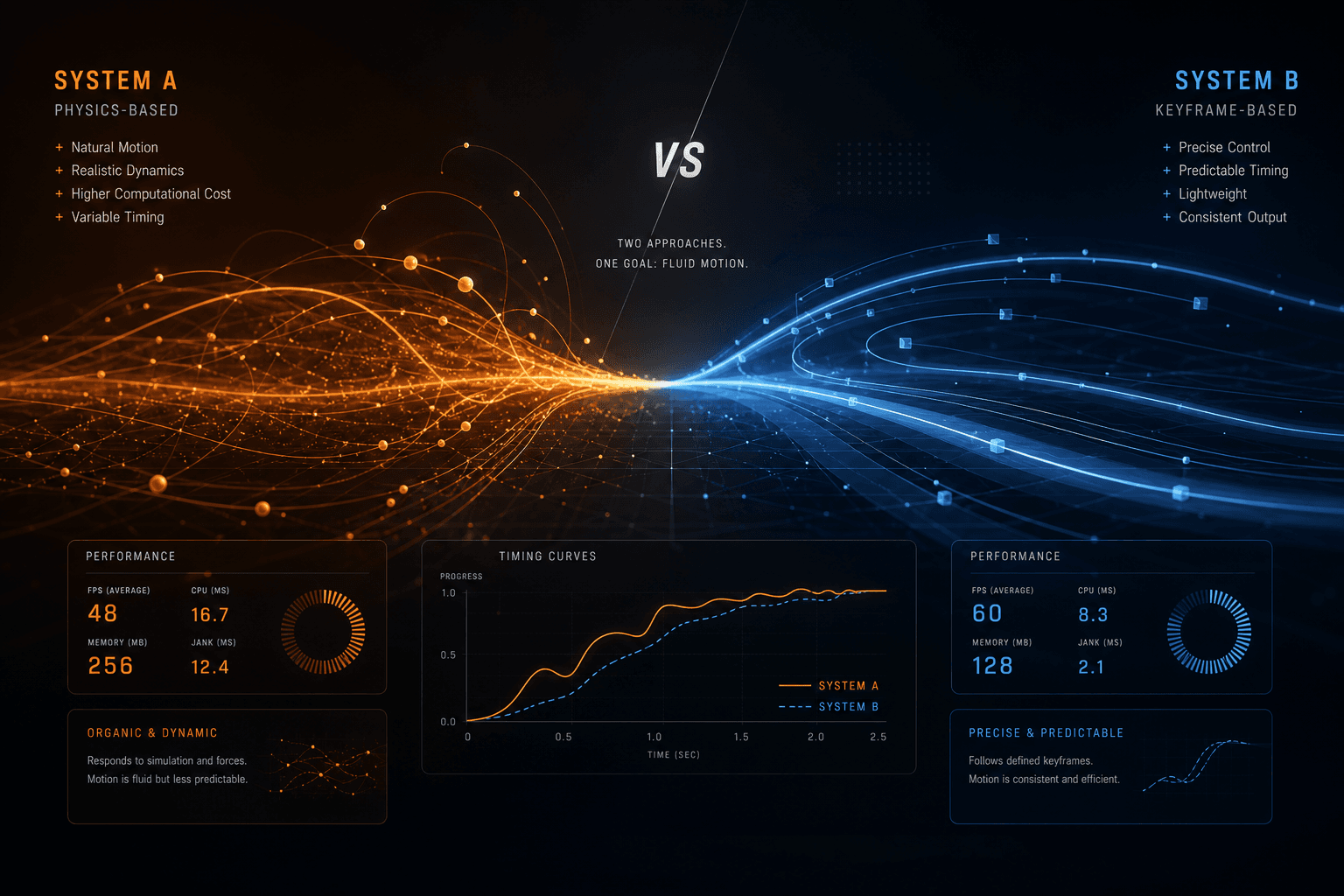
Motion claims 2.5× faster startup for unknown-value animations and 6× faster interpolation between value types, leveraging the Web Animations API (WAAPI) and GPU compositing. These numbers come from controlled benchmarks where Motion reads fewer computed styles and offloads more work to the browser's native animation engine. See Motion performance documentation for benchmark methodology.
GSAP maintains performance dominance under complex scroll-driven load, especially for long timelines with 50+ elements, pinned sections, and scrubbed animations where React reconciliation overhead becomes measurable. In production profiling, GSAP-driven scroll sections maintain 60 fps on devices where Motion drops to 30–45 fps under equivalent element counts.
Here's what the benchmarks actually mean in production:
Motion's WAAPI advantage:
- Startup latency: When animating from computed values (e.g., animating to a value from "whatever the current CSS says"), Motion's native Web Animations API (WAAPI) integration requires fewer style recalculations than GSAP's JavaScript-based value reading. See WAAPI performance characteristics per web.dev documentation.
- CPU efficiency: For simple property animations (transforms, opacity), Motion's browser-native engine uses less CPU than GSAP's JavaScript interpolation, freeing main-thread cycles for React reconciliation or other logic. Per Chrome's rendering performance guide, offloading to compositor threads reduces main-thread contention.
- Battery impact: Native animations can be more power-efficient on mobile devices, though the difference is modest for typical UI interactions. Reference W3C Web Animations specification for technical details on hardware acceleration.
GSAP's load resilience:
- React immunity: GSAP operates outside React's render cycle. During a scroll sequence with 40+ animated elements, GSAP isn't fighting React for main-thread time—it's commanding the DOM directly while React handles its normal reconciliation separately.
- Timeline complexity: GSAP's animation engine is purpose-built for long, complex sequences. A 10-second timeline with 20 staggered elements, multiple overlapping tweens, and scroll scrubbing performs consistently where Motion's variant orchestration becomes harder to optimize.
- Pinning performance: GSAP ScrollTrigger's pinning implementation uses highly optimized transforms and positioning. Motion has no equivalent pinning capability—attempting to replicate it with
useScrollanduseTransformcreates scroll-linked jank on lower-end devices.
The practical frame rate reality:
- Simple UI animations (1–5 elements): Both libraries maintain 60 fps reliably. The performance difference is imperceptible.
- Medium complexity (10–20 elements, simple scroll): Both libraries maintain 60 fps on desktop. Motion may show occasional frame drops on mid-range mobile; GSAP stays smooth.
- High complexity (40+ elements, pinned sections, scrubbed timeline): GSAP maintains 60 fps on most devices. Motion struggles to stay above 45 fps without aggressive optimization and React.memo usage everywhere.
Bundle size impacts Time-to-Interactive (TTI). A 35 KB animation library adds parse and compile overhead before any frame renders. On a 4G connection with a mid-range phone, this can push TTI by 100–200 ms, based on Chrome UX Report data on JavaScript processing times. For sites where "first animation plays" is part of the brand experience, this matters. Motion's animate() mini is the clear choice when TTI is critical and React integration isn't required. Reference web.dev's optimizing resource loading for bundle size impact on LCP and TTI metrics.
Performance Benchmarks: The Numbers That Matter #
Motion claims 2.5× faster startup for unknown-value animations and 6× faster interpolation between value types, leveraging the Web Animations API and GPU compositing. GSAP maintains performance dominance under complex scroll-driven load, especially for long timelines with 50+ elements, pinned sections, and scrubbed animations where React reconciliation overhead becomes measurable.
Developer Experience: Writing the Same Animation in Both Libraries #
Motion requires fewer lines for component-level interactions but becomes verbose for complex cross-component sequences. GSAP requires more boilerplate for simple UI feedback but scales gracefully to sequences that would be unmaintainable in Motion.
Let's look at the same interaction—a card that scales on hover, then expands into a full-size modal on click—implemented in both libraries. This is the type of "shared layout" animation that premium sites use constantly.
Motion Implementation: Cursor Prompt Template #
Prompt I use in Cursor Composer for expandable card-to-modal transitions:
"Build a React component with Motion that renders a card (300x200, indigo background, rounded-2xl) that expands into a full-screen modal on click. Use the
layoutprop for automatic FLIP animation andlayoutId="card"on both the card and modal to create a shared element transition. AddwhileHover={{ scale: 1.05 }}with a spring transition (stiffness: 300, damping: 30). Wrap the modal in AnimatePresence for exit animations. Uselayout="position"on the title to prevent text stretching during the morph."
What Cursor generates and why it works:
layoutprop — Enables automatic FLIP (First, Last, Invert, Play) animations when the component's position or size changes between renders. Per Motion's layout documentation, this handles the complex position calculation without manual measurement.layoutId="card"— Creates a shared element transition. Motion tracks both elements as the same entity and interpolates between their bounding boxes. See shared layout animations for implementation details.AnimatePresence— Handles exit animations when the modal unmounts. Critical for smooth modal dismissals; without it, the modal would disappear instantly. Reference AnimatePresence docs.whileHovergesture — Declarative hover state that triggers scale animation. Combines with the spring physics defined in thetransitionprop.layout="position"— Constrains the layout animation to position only; size changes happen instantly. Prevents text elements from stretching awkwardly during the morph.
Lines of code Cursor produces: ~35 lines of React JSX with Motion props.
GSAP Implementation: Cursor Prompt Template #
Prompt I use in Cursor Composer for the same card-to-modal with GSAP:
"Build a React component using GSAP with the Flip plugin that creates a card-to-modal expansion animation. The card is 300x200 with indigo background and rounded corners. On click, use GSAP Flip to capture the card's initial state, then animate a modal from the card's position to full-screen. Register the Flip plugin with gsap.registerPlugin(Flip). Handle hover with a paused tween (scale 1.05) and manual mouseenter/mouseleave listeners—no native hover prop in GSAP. Use a timeline for the modal entrance: fade in opacity, then animate position/size from card rect to viewport. Include explicit cleanup: kill tweens, remove listeners, and kill the timeline in useEffect return functions."
What Cursor generates and the manual complexity involved:
Flip.getState()— Captures the initial layout state before React re-renders. Per GSAP Flip documentation, this records position, size, and other properties for later interpolation.Manual hover management — Unlike Motion's
whileHover, GSAP requires:- Creating a paused tween
- Adding manual event listeners via
addEventListener - Calling
play()on mouseenter,reverse()on mouseleave - Cleaning up listeners and killing the tween on unmount
Timeline orchestration — The modal entrance requires a
gsap.timeline()with sequenced tweens. Position parameters (0,0.3) control overlap timing. See GSAP timeline position parameter for sequencing syntax.Manual position calculations — GSAP requires explicit measurement of
offsetWidth,offsetHeight, andgetBoundingClientRect()to determine animation start/end states. Motion'slayoutIdhandles this automatically.Explicit cleanup — Every tween, timeline, and listener must be manually killed/removed in useEffect cleanup functions. Reference GSAP React best practices for cleanup patterns.
Lines of code Cursor produces: ~95 lines of imperative animation code and cleanup logic.
Key insight: The GSAP implementation requires nearly 3× the code because GSAP predates React and knows nothing about its lifecycle. The library operates outside React's render cycle, requiring manual state synchronization.
The DX Verdict for This Pattern #
Motion wins this specific use case by a wide margin. The layoutId shared element transition handles automatically what requires 60+ lines of manual state capture, position calculation, and timeline orchestration in GSAP. For card-to-modal, list-to-detail, and tab-underline transitions, Motion's automatic FLIP implementation is unmatched.
But notice what happens if we extend this to a scroll-driven hero section with five pinned panels, staggered text reveals, parallax images, and scroll-linked progress indicators. Motion would require a tangle of useScroll hooks, useTransform motion values, and conditional state. GSAP would use a clean timeline with ScrollTrigger configuration—roughly the same lines of code as this simple card example.
The DX conclusion: Motion for UI, GSAP for scroll storytelling.
Scroll Animations: Where GSAP Still Dominates #
GSAP ScrollTrigger remains the industry standard for scroll-driven storytelling in 2026. Motion's useScroll and useTransform hooks handle simple viewport-linked transforms elegantly—fades, parallax, scale-on-scroll—but they don't match ScrollTrigger's capabilities for pinned sections, complex scrubbed timelines, and scroll-snapping orchestration.
What Motion's Scroll API Can Do #
Motion provides two primary scroll tools in 2026. Here's the Cursor Prompt Template I use for scroll-linked animations:
Cursor Prompt Template for Motion Scroll Animation:
"Create a scroll-linked animation using Motion's useScroll and useTransform hooks. Track a target element with useScroll, using offset ['start end', 'end start'] to control when tracking begins and ends. Map scrollYProgress to transform values: map [0, 1] progress to [100, -100] for Y translation and [0, 0.5, 1] to [0, 1, 0] for opacity fade-in/out. Apply these motion values to a motion.div via the style prop. Ensure the ref is passed to the target element for viewport tracking."
What Cursor generates and Motion's scroll architecture:
useScrollhook — Tracks element position in viewport. Theoffsetarray defines when tracking starts/ends using element/viewport intersection points. See Motion useScroll documentation.useTransformmapping — Maps scroll progress (0–1) to any animatable value. Supports multi-point arrays for complex curves like the opacity fade-in/out above.Motion value application — Values attach directly to the motion component via
style={{ y, opacity }}without triggering React re-renders during animation.
Motion's scroll strengths:
- Simple viewport progress tracking: Animate elements based on how much of a section is visible
- Transform mapping: Map scroll progress to any animatable value (x, y, scale, rotate, opacity)
- React-native: Works natively with component state and conditional rendering
- Gesture combination: Combine scroll progress with drag, hover, or tap gestures
Motion's scroll limitations:
- No pinning: Cannot pin an element while scrolling continues (the core mechanic of most award sites)
- No scroll-snapping: Cannot snap to specific scroll positions automatically
- Limited timeline control: Chaining multiple elements with precise offsets is verbose
- Single-element focus: Each
useScrolltracks one element; coordinating 20+ elements requires 20+ hooks
What GSAP ScrollTrigger Can Do #
Here's the Cursor Prompt Template I use for complex scroll storytelling with GSAP:
Cursor Prompt Template for GSAP ScrollTrigger:
"Build a GSAP ScrollTrigger timeline for a scroll storytelling section. Create a timeline with scrollTrigger configuration: trigger the section, start at 'top top', end at '+=2000' for 2000px of scroll duration, pin: true to lock the section, scrub: 1 for smooth 1-second delay scrubbing, and snap configuration to snap to each of 5 progress points with 0.3s duration and power2.inOut easing. Chain animations: fade in hero-title from y:100 with 0.5s duration, fade in hero-image with scale from 0.8 overlapping previous by 0.2s, slide panel-1 and panel-2 horizontally with xPercent:-100, and stagger reveal-text elements with 0.1s stagger. Include cleanup: kill the timeline and all ScrollTrigger instances in useEffect return."
What Cursor generates and GSAP's scroll architecture:
scrollTriggerconfiguration object — Attached to the timeline, not separate. Defines:trigger— The element that controls the animationstart/end— Scroll positions using element/viewport syntax (see ScrollTrigger start/end docs)pin: true— Locks the section in place while scroll continues; Motion has no equivalentscrub— Scroll position drives animation progress with configurable smoothingsnap— Automatic scroll-snap behavior for narrative sites
Timeline chaining with position parameters — The
"<0.2"syntax means "start 0.2s before the previous tween ends." The"<"means "start at the same time as the previous tween." See GSAP position parameter for syntax reference.Nested selectors — GSAP can target any element within the pinned section via CSS selectors, regardless of React component boundaries.
Explicit cleanup — Must kill both the timeline and all ScrollTrigger instances on unmount to prevent memory leaks.
GSAP's scroll strengths:
- Pinning: Lock elements in place while scroll continues—the foundation of scroll storytelling
- Scrubbed timelines: Scroll position drives precise animation progress with configurable smoothness
- Nested timelines: Complex sequences with child timelines, labels, and absolute positioning
- Scroll snapping: Automatic snap-to-section behavior for narrative sites
- Performance at scale: 50+ pinned elements with scrubbed animations maintain 60 fps
When to Use Which for Scroll #
| Scroll Pattern | Recommendation | Library |
|---|---|---|
| Simple parallax | Motion | useScroll + useTransform |
| Viewport fade-ins | Motion | whileInView prop |
| Sticky header progress | Motion | useScroll on document |
| Single pinned hero | GSAP | ScrollTrigger pin: true |
| Multi-section scroll story | GSAP | Timeline + pinned sections |
| Scroll-snap landing page | GSAP | ScrollTrigger snap config |
| Complex parallax with 10+ layers | GSAP | Nested timeline with stagger |
For a deep dive on GSAP ScrollTrigger architecture, see my dedicated guide: GSAP ScrollTrigger Architecture: Pixel-Perfect Scroll Storytelling.
Layout Animations: Motion's Unfair Advantage #
Motion's layout prop and layoutId shared element transitions are unmatched by any other library. GSAP's Flip plugin can approximate some effects, but Motion's automatic FLIP (First, Last, Invert, Play) implementation—triggered by React re-renders—is significantly more ergonomic for UI state changes.
Understanding FLIP Animations #
FLIP is the technique for smooth layout transitions:
- First: Record the initial position/size
- Last: Let React/DOM update to the new state
- Invert: Calculate the difference and apply a transform to "invert" the visual change
- Play: Animate the transform to zero (the element appears to move/resize smoothly)
Reference: Paul Lewis's FLIP technique — the canonical implementation pattern.
Motion does all four steps automatically when you add layout. Here's the Cursor Prompt Template I use for list reordering animations:
Cursor Prompt Template for Motion Layout Reordering:
"Create a sortable list component with Motion that animates item positions when the list reorders. Use motion.li elements with the
layoutprop for automatic FLIP animation. AddlayoutId={item-${item.id}}for stable identity across renders. Configure spring physics with stiffness: 500 and damping: 30 for snappy but smooth transitions. Handle the onClick to expand items. The layout prop should handle both position and size changes automatically."
What Cursor generates:
layoutprop — Enables automatic FLIP when list order changes. Motion measures initial state, lets React update, then animates to the new positions.layoutId— Provides stable identity for elements across renders. Essential for list items that maintain continuity even when their index changes.Spring configuration —
stiffness: 500, damping: 30produces a snappy-but-smooth feel. Adjust per Motion spring physics documentation.
The layout prop variants:
layout={true}: Animate both position and size changeslayout="position": Only animate position (size changes instantly)layout="size": Only animate size (position changes instantly)layoutAnchor="top left": Control which point acts as the morph reference
Shared Layout Transitions with layoutId
#
This is Motion's signature feature—elements with the same layoutId morph into each other even if they're different components in different parts of the tree.
Cursor Prompt Template for Tab Indicator Animation:
"Build a tab component with a sliding underline indicator using Motion's layoutId. Create three tabs: home, about, contact. The active tab shows a 2px indigo underline positioned absolutely at the bottom. Use motion.div with layoutId='activeIndicator' for the underline—this creates a shared element that smoothly glides between tabs even though React unmounts it from one button and mounts it in another. Style the container with flex display and 16px gap."
What Cursor generates:
The underline smoothly glides between tabs—even though React unmounts it from one button and mounts it in another. Motion's layout projection system tracks the shared element and interpolates between bounding boxes. See Motion shared layout documentation for the underlying mechanics.
GSAP Flip: The Alternative #
GSAP's Flip plugin (now free) provides similar capabilities with more manual work. Here's the Cursor Prompt Template:
Cursor Prompt Template for GSAP Flip:
"Implement GSAP Flip for layout transitions in a React component. In useEffect, capture the initial state with Flip.getState('.card') before React re-renders. After the layout update (in a subsequent effect or setTimeout), use Flip.from(state, { targets: '.card', duration: 0.5, ease: 'power3.out', scale: true }) to animate to the new positions. Ensure proper timing: either schedule the Flip.from in the next frame using requestAnimationFrame or use a separate useEffect with the dependency that triggers the layout change. Handle cleanup if the component unmounts mid-animation."
What Cursor generates and the GSAP Flip workflow:
Manual state capture —
Flip.getState('.card')must run before React updates. Unlike Motion's automatic measurement, this requires explicit timing control.DOM settlement timing — You must ensure the DOM has settled before running
Flip.from(). This often requiresrequestAnimationFrameorsetTimeoutto wait for React's render cycle. See GSAP Flip documentation for timing considerations.Manual cleanup — If the component unmounts between state capture and animation execution, you must handle the cleanup to prevent errors.
The verdict: For complex shared layout transitions (card-to-modal, grid-to-list, image zoom), Motion's automatic handling is significantly less error-prone. For simple reorder animations where you already have GSAP in the project, Flip works well without adding Motion as a second dependency.
Layout Animations: Motion's Unfair Advantage #
Motion's layout prop and layoutId shared element transitions are unmatched by any other library. GSAP's Flip plugin can approximate some effects, but Motion's automatic FLIP (First, Last, Invert, Play) implementation—triggered by React re-renders—is significantly more ergonomic for UI state changes.
React Integration: The Context Problem #
Motion is designed for React's component model, with automatic cleanup, context-aware propagation, and hooks that feel native. GSAP requires manual lifecycle management in React—useEffect cleanup, gsap.context() for scoping, and careful avoidance of React-DOM conflicts during animations.
Motion's React-Native Integration #
Motion feels like part of React because it is. The library uses React's context system for shared animation configs, automatic cleanup via useEffect internally, and motion values that avoid re-renders during animation.
Cursor Prompt Template for Motion Fade-In Component:
"Create a reusable Motion fade-in wrapper component that takes children and animates them in. Use motion.div with initial state { opacity: 0, y: 20 }, animate to { opacity: 1, y: 0 }, exit animation to { opacity: 0, y: -20 }, and a 0.5s duration transition. This should wrap any content and handle enter/exit animations automatically without manual effect management."
What Cursor generates and Motion's React integration:
Automatic cleanup — Motion handles cleanup internally when components unmount. No manual
useEffectreturn functions needed. See Motion component documentation.Motion values via refs — Animation values update via refs, not React state. This means zero re-renders during animation frames, critical for performance. Per Motion values docs, these are optimized for GPU acceleration.
Context propagation —
AnimatePresenceuses React context to coordinate exit animations across the entire component tree, even for unmounted elements.Strict Mode safe — Motion correctly handles React 18 Strict Mode double-mounting without duplicate animations or state issues.
GSAP's React Overhead #
GSAP predates React and knows nothing about its lifecycle. Using GSAP in React requires explicit management.
Cursor Prompt Template for GSAP Fade-In Component:
"Build a GSAP fade-in React component that requires manual lifecycle management. Use useRef to get a DOM reference to the animated element. In useEffect, check that the ref exists, then create a gsap.fromTo tween animating from { opacity: 0, y: 20 } to { opacity: 1, y: 0, duration: 0.5 }. CRITICAL: Include cleanup in the useEffect return function—kill the tween to prevent memory leaks and React warnings. The GSAP code must live entirely inside useEffect, not in the render path."
What Cursor generates and GSAP's React requirements:
Ref forwarding mandatory — All animated elements need refs for GSAP to target. No props-based animation declaration like Motion.
Effect encapsulation — All GSAP code must live in
useEffect, never in the render path. Violating this causes animation restart on every render.Manual cleanup — Every tween, timeline, and listener must be explicitly killed in the useEffect cleanup function. Per GSAP React best practices, failing to cleanup causes memory leaks.
Context scoping — For multi-element components, use
gsap.context()for scoped animation management and batch cleanup.
The gsap.context() Pattern
#
For components with multiple animations, GSAP recommends context scoping. Here's my Cursor Prompt Template:
Cursor Prompt Template for GSAP Context Pattern:
"Implement the GSAP context pattern for a React component with multiple animations. Create a sectionRef using useRef. In useEffect, initialize gsap.context with a callback function containing all animations—gsap.from('.title', { y: 50, opacity: 0 }) and gsap.from('.card', { y: 30, opacity: 0, stagger: 0.1 }). Pass sectionRef as the second argument to scope all selectors to that container. In the useEffect return function, call ctx.revert() to clean up all animations in this context at once. This pattern prevents document.querySelector conflicts and enables batch cleanup."
What Cursor generates and context benefits:
Automatic batch cleanup —
ctx.revert()kills all animations, ScrollTriggers, and listeners created in the context with one call.Scoped selectors — Selectors like
.titleand.cardonly match elements within the sectionRef container, preventing accidental targeting of elements in other components.Reversible animations — Calling
revert()also restores elements to their original state, useful for component unmounting.
Reference: GSAP context documentation for scoping and cleanup patterns.
The Verdict on React Integration #
Motion requires less boilerplate and fewer cognitive footguns in React. You write animations as props, not effects. Cleanup is automatic. The library handles React's quirks (Strict Mode, concurrent features) internally.
GSAP requires more discipline but offers more control. If you need that control—precise playback, scrubbing, external timeline control—the extra boilerplate is worth it. If you're building primarily state-driven UI animations, Motion's lower friction is compelling.
Orchestration Complexity: Timelines vs. Variants #
GSAP timelines are the most powerful animation sequencing system available, with precise control over overlaps, absolute positioning, labels, and nested timelines. Motion's variants and stagger provide elegant orchestration for component-level animations but become unwieldy for cross-component sequences longer than a few seconds.
Motion's Variants System #
Motion uses declarative variants for orchestration. Here's my Cursor Prompt Template for staggered list animations:
Cursor Prompt Template for Motion Variants:
"Create a staggered list animation using Motion variants. Define containerVariants with hidden state { opacity: 0 } and visible state { opacity: 1, transition: { staggerChildren: 0.1, delayChildren: 0.3 } }. Define itemVariants with hidden { opacity: 0, y: 20 } and visible { opacity: 1, y: 0 }. Apply containerVariants to a motion.ul with initial='hidden' and animate='visible'. Map list items to motion.li elements, each with variants={itemVariants}. This creates coordinated entrance: container fades in first, then each child staggers by 0.1s with an initial 0.3s delay."
What Cursor generates and Motion variants architecture:
Declarative orchestration — Animation logic lives in JavaScript objects (variants), not inline props. This separates animation configuration from component structure. See Motion variants documentation.
Automatic propagation — Parent variants pass through React context to children. When the parent hits "visible", children automatically receive their variant states.
Gesture integration — Variants work seamlessly with
whileHover,whileTapfor interactive states.AnimatePresence coordination — Exit variants control how elements leave when unmounted from the tree.
Motion variants limitations:
- No precise timing control (e.g., "start this at 0.2s before that ends")
- Difficult to coordinate across disconnected component trees
- Stagger is limited to child elements
- No scrubbing or external playback control
GSAP's Timeline System #
GSAP uses imperative timelines with absolute control. Here's my Cursor Prompt Template for complex sequencing:
Cursor Prompt Template for GSAP Timeline:
"Build a GSAP timeline with multiple positioning strategies. Create masterTl with gsap.timeline(). Add tweens in sequence: from '.intro' with 1s duration fading opacity, from '.title' with 0.8s duration translating y:50 using position '-=0.3' (starts 0.3s before previous ends), from '.image' at absolute time 2s with scale from 0.8, add a label 'section2', then from '.next-section' at 'section2+=0.5' (0.5s after the label). Create a nested childTl animating '.a' and '.b' to x:100, add it to masterTl at 'section2'. Include playback control methods: pause(), seek(1.5), and timeScale(2) for 2x speed."
What Cursor generates and GSAP timeline architecture:
Absolute positioning — Passing
2as the third argument places the tween at exactly 2 seconds on the timeline, regardless of other animations. See GSAP timeline position parameter.Relative positioning — The
"-=0.3"syntax overlaps with the previous tween by 0.3 seconds."+=0.5"would add a 0.5s gap. This level of timing control is unmatched in declarative libraries.Label-based positioning —
addLabel("section2")creates a semantic marker. Subsequent tweens reference it ("section2+=0.5") for readable, maintainable sequences.Nested timelines — Child timelines can be added to parents as if they were single tweens. This enables componentization of complex sequences.
Playback control —
pause(),seek(),reverse(), andtimeScale()give runtime control impossible with declarative variants. Integrates with ScrollTrigger scrubbing for scroll-driven playback.
GSAP timeline strengths:
- Absolute time positioning ("at 1.2 seconds, do this")
- Relative positioning with arbitrary overlaps
- Labels for semantic positioning ("start this at 'heroComplete'")
- Nested timelines for complex sequences
- Full playback control (pause, seek, reverse, scrub)
- ScrollTrigger integration (scrub through timeline with scroll)
When to Use Which Orchestration #
| Orchestration Need | Recommendation | Reason |
|---|---|---|
| Component children stagger | Motion | variants + staggerChildren is elegant |
| Exit animations | Motion | AnimatePresence handles mounting/unmounting |
| Gesture-chained sequences | Motion | whileHover → animate integration |
| Precise multi-element timing | GSAP | Absolute/relative positioning is unmatched |
| Scroll-scrubbed sequence | GSAP | ScrollTrigger + timeline integration |
| Reversible/seekable animation | GSAP | pause(), seek(), reverse() |
| Cross-component coordination | GSAP | Timelines can target any selector globally |
The rule of thumb: If your animation sequence fits within a single component and its direct children, Motion's variants are sufficient and more maintainable. If your sequence spans multiple sections, requires precise timing relationships, or needs scroll scrubbing, GSAP timelines are the professional choice.
Orchestration Complexity: Timelines vs. Variants #
GSAP timelines are the most powerful animation sequencing system available, with precise control over overlaps, absolute positioning, labels, and nested timelines. Motion's variants and stagger provide elegant orchestration for component-level animations but become unwieldy for cross-component sequences longer than a few seconds.
The Decision Matrix: Which Library for Which Project #
The decision depends on your animation archetype, not abstract library quality. Here's the practical matrix I use for production work:
| Project Type | Recommended Library | Rationale |
|---|---|---|
| SaaS dashboard UI | Motion | State-driven micro-interactions, layout animations, gesture feedback |
| Marketing landing page (simple) | Motion | Scroll fade-ins, viewport triggers, hover states |
| Marketing landing page (complex) | GSAP | ScrollTrigger storytelling, pinned sections, hero sequences |
| E-commerce product pages | Motion | Shared layout transitions, cart animations, image zoom |
| Portfolio/Awwwards-style site | GSAP | Pinned scroll sections, morphing, advanced staggers, text reveals |
| Mobile-first PWA | Motion | Smaller bundle potential, React-native gestures, battery efficiency |
| WebGL + animation hybrid | GSAP | R3F/Three.js + GSAP integration for 3D storytelling |
| Admin panel/tool UI | Motion | Form transitions, modal animations, toast notifications |
| One-page narrative site | GSAP | Full scroll control, timeline orchestration, snap points |
The Hybrid Architecture #
Most premium sites I build in 2026 use both libraries:
- Motion for UI layer: Buttons, modals, form transitions, layout shifts, hover states
- GSAP for scroll layer: Pinned sections, scrubbed timelines, parallax, text reveals
This hybrid approach gives you Motion's ergonomic React integration where it matters most (UI interactions happen constantly) and GSAP's scroll storytelling power where it differentiates (scroll sections are the brand experience).
Migration Path: Switching Libraries Mid-Project #
Both libraries can coexist in the same codebase without conflict. Motion operates through React props; GSAP manipulates refs directly. Many production sites use Motion for UI interactions and GSAP for scroll sections—hybrid architectures that leverage each library's strength.
Coexistence Without Conflict #
Motion and GSAP don't interfere with each other because they target different layers. Here's my Cursor Prompt Template for hybrid architecture:
Cursor Prompt Template for Hybrid Motion + GSAP:
"Build a hybrid React component using both Motion and GSAP together. Use a sectionRef for GSAP scoping. In useEffect, create a gsap.context with a timeline that has ScrollTrigger: trigger sectionRef, start at 'top center', end at 'bottom center', scrub: 1. Animate .parallax-bg from y:100 and .pinned-content opacity from 0 with 0.5s absolute position. Include ctx.revert cleanup. In the JSX, render .parallax-bg for GSAP control, a Motion button with whileHover scale:1.05 and whileTap scale:0.95 for gesture feedback, and .pinned-content for GSAP pinning. Both libraries coexist because Motion uses props/refs while GSAP uses selectors/refs, and neither patches the other's transforms."
What Cursor generates and why coexistence works:
Separate targeting layers — Motion reads from props and writes to DOM styles via refs (no CSS class targeting). GSAP reads from selectors or refs and writes directly to DOM styles. They never conflict over the same control surface.
Transform merging — Both libraries respect existing transforms and merge their changes rather than replacing them. If Motion sets
scalewhile GSAP setsy, the element receives both via combined transform.React lifecycle isolation — Motion operates through React's render cycle via props. GSAP operates outside React via useEffect. They don't fight for main-thread control during reconciliation.
Cleanup independence — Motion's automatic cleanup via unmount doesn't affect GSAP's manual cleanup, and vice versa.
Reference: GSAP React integration guide for combining with other animation libraries.
Migrating from Motion to GSAP #
If you start with Motion and hit scroll animation limits:
- Identify the scroll section causing issues (usually where you need pinning or complex scrubbing)
- Wrap that section in a ref for GSAP targeting
- Add GSAP ScrollTrigger for that section only
- Keep Motion for everything else—UI, modals, layout transitions
- No rewrite required—both libraries work in the same component tree
Reference: GSAP React best practices for migration strategies.
Migrating from GSAP to Motion #
If you want to reduce GSAP overhead for simpler sites:
- Replace simple tweens with Motion's
whileHover,whileTap,animateprops - Keep GSAP for scroll sections that use pinning or scrubbing
- Gradually migrate timeline sequences to Motion variants as appropriate
- Remove GSAP entirely only if you eliminate all scroll-driven storytelling
The migration cost is low because both libraries target DOM elements, not virtual abstractions. You're swapping animation engines, not architecture.
FAQ: Framer Motion vs. GSAP in 2026 #
Q: Is Framer Motion now called Motion? #
A: Yes, Framer Motion rebranded to Motion in early 2026 with the v12 release. The new package is motion on npm, with the React-specific import at motion/react. The old framer-motion package still works for backward compatibility, but all new features, performance optimizations, and documentation are in the motion package. For new projects in 2026, use npm install motion and import from motion/react, not framer-motion.
Q: Which library has better React integration? #
A: Motion has superior React integration because it was built specifically for React. It uses React's context system for shared configs, handles cleanup automatically on unmount, and provides hooks that feel native to React developers. GSAP requires manual lifecycle management in React—you must create tweens in useEffect, manage refs for targeting, and explicitly kill animations on unmount to avoid memory leaks. Motion's DX advantage is significant for teams primarily building React applications. See GSAP React best practices for integration patterns.
Q: How do bundle sizes compare in real-world usage? #
A: In typical React production builds, both libraries land in the 30–35 KB gzipped range. Motion's full React API is ~30–35 KB tree-shaken. GSAP core plus ScrollTrigger and one or two plugins is also ~30–35 KB. Motion's animate() mini build is the smallest option at ~2.6 KB gzipped, ideal for vanilla JS or isolated animations. GSAP can grow to 70–80 KB if you import many plugins without tree-shaking discipline. For React projects, the difference is negligible; choose based on features, not bundle size.
Q: Can I use both libraries in the same project? #
A: Yes, Motion and GSAP coexist cleanly in the same codebase. Motion operates through React props and refs, while GSAP manipulates the DOM directly via selectors or refs. They don't interfere with each other. Many production sites use both: Motion for UI interactions (buttons, modals, layout transitions) and GSAP for scroll storytelling (pinned sections, scrubbed timelines). This hybrid approach leverages each library's strength without the cost of rewriting existing animations.
Q: Which library is better for scroll-driven animations? #
A: GSAP with ScrollTrigger is the clear winner for scroll-driven animations, particularly pinned sections, scrubbed timelines, and scroll-snapping. Motion's useScroll and useTransform hooks handle simple parallax and viewport fade-ins elegantly, but they lack pinning capabilities and struggle with complex multi-element scroll sequences. For award-winning scroll storytelling sites, GSAP ScrollTrigger is the industry standard and remains unmatched in 2026. See Motion useScroll documentation for comparison of scroll capabilities.
Q: Does GSAP's free plugin policy include commercial use? #
A: Yes, GSAP's free plugin policy includes unrestricted commercial use. As of GSAP 3.13 (early 2026), all formerly paid "Club GSAP" plugins—including ScrollTrigger, SplitText, MorphSVG, Flip, and Inertia—are free for all users, including commercial projects. No attribution is required, no license key is needed, and there are no usage limits. This change, made possible by Webflow's acquisition of GSAP, removes the licensing friction that previously pushed some teams toward Motion. See GSAP licensing page for full terms.
Q: Which performs better on mobile devices? #
A: Motion has lower parse overhead on initial load, which benefits low-end mobile devices. Motion's animate() mini at 2.6 KB adds minimal JavaScript parse time. However, GSAP maintains better performance under complex animation load—scroll sequences with 40+ elements, pinned sections, and scrubbed timelines stay at 60 fps on GSAP where Motion may drop to 30–45 fps on mid-range mobile devices. For simple UI animations, Motion is more efficient; for complex scroll experiences, GSAP performs better. Reference Chrome DevTools mobile profiling for frame rate analysis techniques.
Q: Is Motion's Web Animations API integration an advantage? #
A: Motion's Web Animations API integration provides measurable advantages for specific use cases. Motion reports 2.5× faster startup when animating from unknown computed values and 6× faster interpolation between different value types (e.g., numeric to transform, or mixing color formats). WAAPI offloads animation work to the browser's native engine, reducing CPU usage and potentially improving battery life on mobile. However, WAAPI offers less control than GSAP's JavaScript interpolation, which is why GSAP maintains advantages for complex timeline control and scroll scrubbing where precise frame-by-frame manipulation matters. See W3C Web Animations specification for technical capabilities and limitations.
Q: When should I choose Motion over GSAP? #
A: Choose Motion when your animations are state-driven UI interactions—modals opening, cards expanding, layout shifts, hover effects, gesture responses, and shared element transitions. Motion's declarative API, automatic layout animations, and React-native integration make it the ergonomic choice for component-level motion. Specifically choose Motion for: dashboard UIs, e-commerce interactions, form transitions, list reordering, tab underlines, and any animation primarily triggered by React state changes. See Motion use cases for library design philosophy.
Q: When should I choose GSAP over Motion? #
A: Choose GSAP when your animations are timeline-driven experiences—scroll storytelling, choreographed hero sequences, pinned sections, and complex multi-element orchestration. GSAP's imperative control, ScrollTrigger integration, and timeline sequencing are unmatched for narrative animation work. Specifically choose GSAP for: marketing landing pages with scroll storytelling, portfolio sites with pinned sections, award-worthy immersive experiences, text reveals with SplitText, SVG morphing, and any project where scroll position drives precise animation timing. See GSAP showcase for award-winning implementation examples.
Start Building Premium Motion Experiences #
Animation is not decoration—it's the language of premium digital experiences. The sites that win awards, convert visitors, and build brand equity all share one trait: they move with intention.
Whether you need Motion's ergonomic React integration for a SaaS dashboard or GSAP's scroll storytelling power for a cinematic brand experience, the technical choice matters less than the motion strategy behind it. Great animation requires understanding pacing, narrative timing, performance budgets, and how motion serves conversion psychology.
I build immersive digital experiences for premium brands—sites where animation is the core value proposition, not an afterthought. From scroll-driven storytelling that wins Awwwards recognition to React UI systems that feel alive with micro-interactions, I help teams ship motion that differentiates.
Start a custom website project — Let's build a flagship digital experience that moves your audience.
Book a 15-min discovery call — Tell me about your project and I'll share how we'd approach the animation architecture.
Related Reading #
- GSAP ScrollTrigger Architecture: Pixel-Perfect Scroll Storytelling — Deep dive on building scroll-driven narrative sites with pinned sections, scrubbed timelines, and scroll snapping
- Build an Award-Worthy Hero Section with React Three Fiber and GSAP — Complete tutorial on combining WebGL and GSAP for immersive hero experiences
Looking for the foundational principles behind cinematic web design? The immersive web pillar post covers the full stack—from animation philosophy to performance budgets to scroll storytelling patterns. Follow the cluster for more on Three.js, kinetic typography, and premium web architecture.
Related Posts

Bold Design vs Machine-Readable Structure: How Neo-Brutalism and Semantic Architecture Coexist
You don't choose between a bold Neo-Brutalist site and one AI can read. Here's how I ship both: expressive design on top of strict semantic architecture.

How I Built Fordo's Official Artist Website Without Writing a Line of Code
How I designed Fordo's artist site in Google AI Studio and built it by directing AI: a beautiful, alive experience wired for AI search, brand, and direct fan revenue.
From a Figma Export and a Brand Video to a Live Site Using Only Prompts
How I turn Figma exports and brand videos into live, conversion-focused websites using only prompts and context handoffs. No manual coding, just directed AI execution.